
QVIO Output Interpretation
-
QVIO Orientation
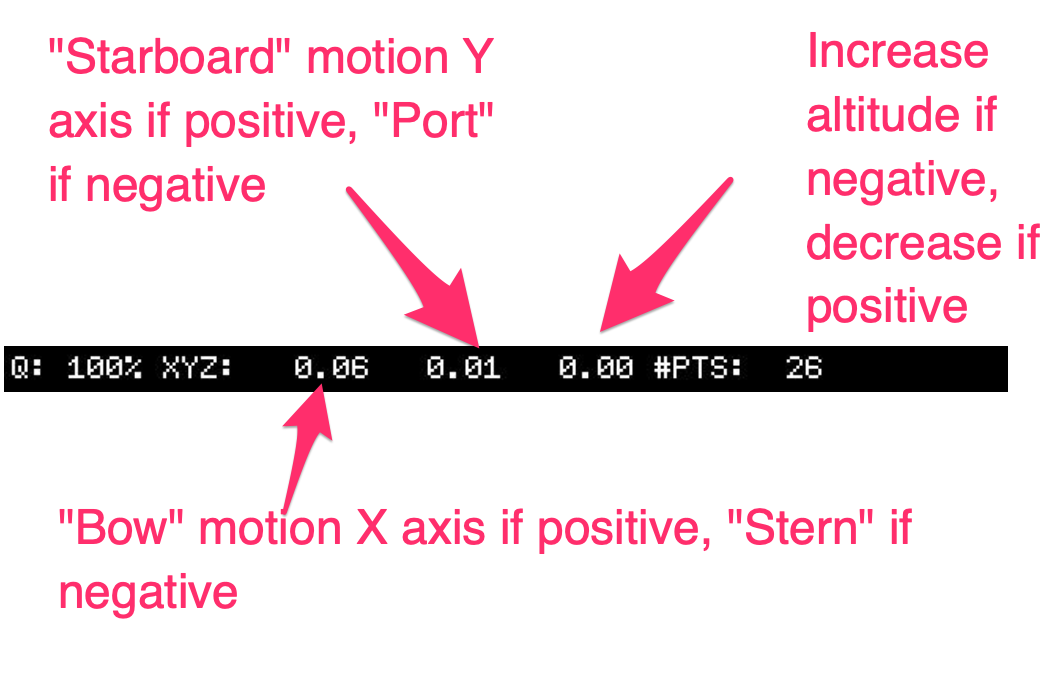
We've recently upgraded to the most recent QVIO server (8.2) and it seems like QVIO is blowing up more frequently. We do have custom extrinsic configuration given the location of tracking/IMU in our platform, but have not changed that.
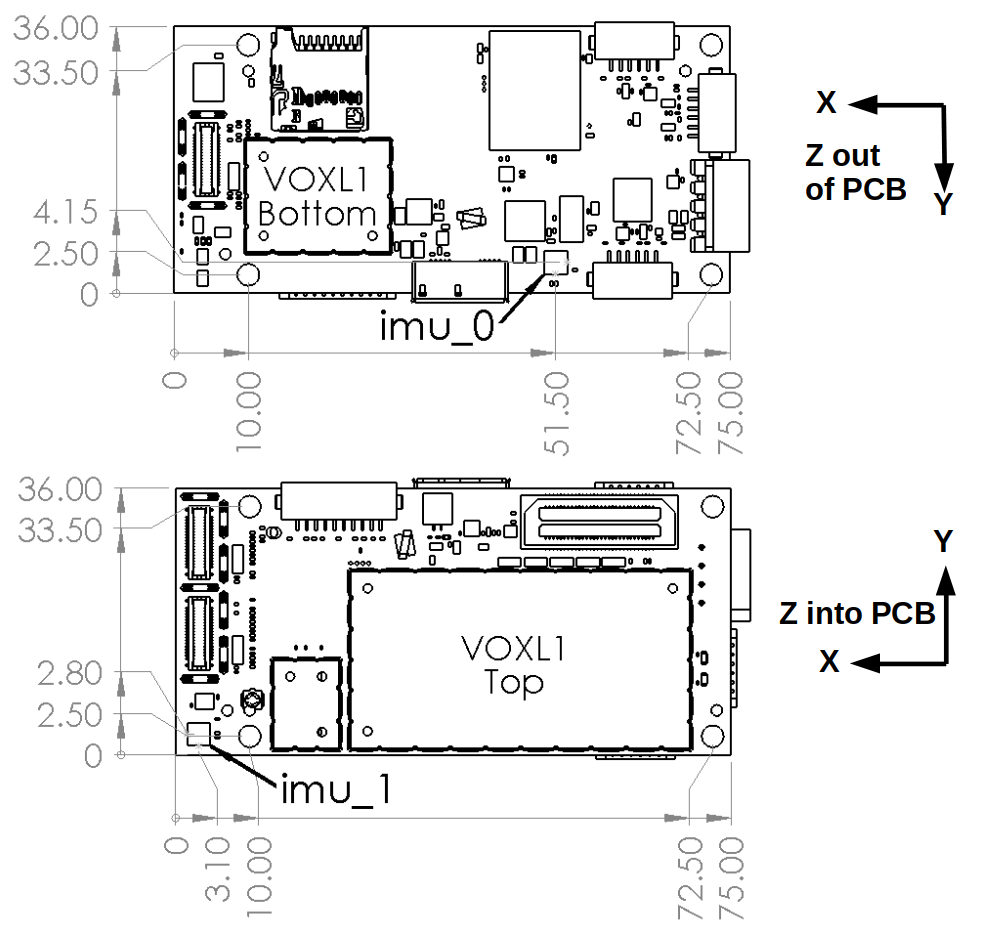
Is this the correct interpretation of QVIO outputs before rotation into PX4?
-
Followup to this one.
First -- kudos on the video posted to:
Second, we have one platform we can't seem to get stable under VIO.
https://review.px4.io/plot_app?log=64c3cf51-e998-43e7-8301-070c01d22107
Seems like we have good features in QVIO:
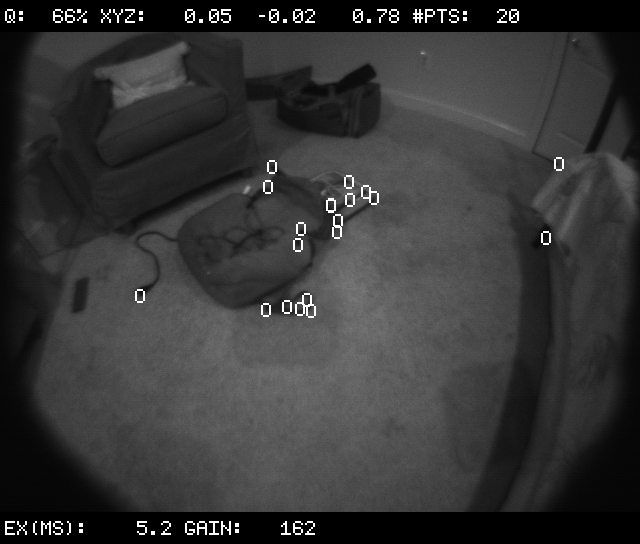
It looks like we have significant yaw authority and rate issues which cause it to become unstable. But we don't have this issue on our smaller platforms.
I can also upload voxl-logger output if that helps.
-
We've defaulted back to the "standard" translation measurements in extrinsics file to see if that was the source of issues for us. Rotation as follows...
VOXL is rolled 180 degrees to be "upside down" in our frame.
Tracking to IMU relation is then rolled 180 "back", pitched 45, and "yawed" 90 to get the camera aligned as: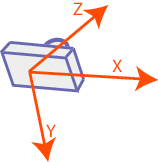 just as the m500 or other non-seeker ModalAI platforms.
voxl:~$ voxl-inspect-extrinsics #0: parent: imu1 child: imu0 T_child_wrt_parent: -0.048 0.037 0.002 RPY_parent_to_child: 0.0 0.0 0.0 R_child_to_parent: 1.000 -0.000 0.000 0.000 1.000 -0.000 0.000 0.000 1.000 #1: parent: imu0 child: tracking T_child_wrt_parent: 0.060 -0.014 0.011 RPY_parent_to_child: 180.0 45.0 90.0 R_child_to_parent: 0.000 -0.707 0.707 -1.000 -0.000 -0.000 0.000 -0.707 -0.707 #2: parent: imu1 child: tracking T_child_wrt_parent: 0.012 0.015 0.013 RPY_parent_to_child: 180.0 45.0 90.0 R_child_to_parent: 0.000 -0.707 0.707 -1.000 -0.000 -0.000 0.000 -0.707 -0.707 #3: parent: body child: imu0 T_child_wrt_parent: 0.000 0.014 -0.008 RPY_parent_to_child: 180.0 0.0 0.0 R_child_to_parent: 1.000 -0.000 0.000 0.000 -1.000 -0.000 0.000 0.000 -1.000 #4: parent: body child: imu1 T_child_wrt_parent: 0.049 -0.015 -0.011 RPY_parent_to_child: 180.0 0.0 0.0 R_child_to_parent: 1.000 -0.000 0.000 0.000 -1.000 -0.000 0.000 0.000 -1.000 #5: parent: body child: stereo_l T_child_wrt_parent: 0.065 -0.040 0.000 RPY_parent_to_child: 0.0 90.0 90.0 R_child_to_parent: 0.000 -0.000 1.000 1.000 0.000 -0.000 -0.000 1.000 0.000 #6: parent: body child: tof T_child_wrt_parent: 0.065 -0.013 0.010 RPY_parent_to_child: 0.0 90.0 90.0 R_child_to_parent: 0.000 -0.000 1.000 1.000 0.000 -0.000 -0.000 1.000 0.000 #7: parent: body child: ground T_child_wrt_parent: 0.000 0.000 0.029 RPY_parent_to_child: 0.0 0.0 0.0 R_child_to_parent: 1.000 -0.000 0.000 0.000 1.000 -0.000 0.000 0.000 1.000Here's a log file from an attempt at offboard figure 8. https://review.px4.io/plot_app?log=101ea9c4-9b0c-40a3-9859-a92019adf168
Accumulated a lot of errors and eventually had to take control. Good features available in the environment.
-
In case anyone else comes on this thread --
https://gitlab.com/voxl-public/voxl-sdk/core-libs/libmodal-pipe/-/blob/master/library/include/modal_pipe_interfaces.h#L848 defines the VIO messages within MPA.
float T_imu_wrt_vio[3];contains the translation in x, y, z and is what is printed in the overlay within VOXL Portal.- Positive X = Forward
- Positive Y = Left
- Positive Z = Increase in Altitude
If you then look in the Odometry messages used by PX4 or run
voxl-inspect-posethese coordinates will be in FRD/NED frame of reference which is:
Positive X = Forward
Positive Y = Right
Positive Z = Decrease Altitude
(I think I've got this right -- hopefully someone from Modal can confirm)https://gitlab.com/voxl-public/voxl-sdk/services/voxl-vision-px4/-/blob/master/src/vio_manager.c#L350-393 walks through the publication of the odometry MAVLINK message to PX4 and rotation into appropriate frame for processing.
========
TLDR; Most of my issues for this platform were solved by disabling the QVIO server, keepingvoxl-vision-px4running, and dialing in PID for PX4 without any external inputs from vision or GPS. Once tuned, you can focus on calibrating cameras andetc/modalai/extrinsics.confto ensure consistency in VIO inputs.Shoutout to @wilkinsaf for tips and tricks on tuning.
-
In case anyone else comes on this thread --
https://gitlab.com/voxl-public/voxl-sdk/core-libs/libmodal-pipe/-/blob/master/library/include/modal_pipe_interfaces.h#L848 defines the VIO messages within MPA.
float T_imu_wrt_vio[3];contains the translation in x, y, z and is what is printed in the overlay within VOXL Portal.- Positive X = Forward
- Positive Y = Left
- Positive Z = Increase in Altitude
If you then look in the Odometry messages used by PX4 or run
voxl-inspect-posethese coordinates will be in FRD/NED frame of reference which is:
Positive X = Forward
Positive Y = Right
Positive Z = Decrease Altitude
(I think I've got this right -- hopefully someone from Modal can confirm)https://gitlab.com/voxl-public/voxl-sdk/services/voxl-vision-px4/-/blob/master/src/vio_manager.c#L350-393 walks through the publication of the odometry MAVLINK message to PX4 and rotation into appropriate frame for processing.
========
TLDR; Most of my issues for this platform were solved by disabling the QVIO server, keepingvoxl-vision-px4running, and dialing in PID for PX4 without any external inputs from vision or GPS. Once tuned, you can focus on calibrating cameras andetc/modalai/extrinsics.confto ensure consistency in VIO inputs.Shoutout to @wilkinsaf for tips and tricks on tuning.
@Steve-Turner Glad to hear you were able to make substantial progress!


Reading along? Create a free ModalAI Forum account to join in.
With an account you can reply, ask your own question, get an email when a ModalAI engineer answers, and mark the reply that solved it. Your place in each thread is saved between visits.
Questions about VOXL, Flight Core, ESCs and ModalAI drones are answered here by the engineers who build them.
Register Login