
About camera configuration for M500 frame.
-
Hello, i want to ask about camera configuration. After reset m500 by voxl-configure-modalai-vl and setup again follow the guide. I also re-config voxl-vision-px4 to the factory set-up because it's look like when reset modalai-vl the NED position also lost. When i tried with position mode it seem the UAV flies is not good as well as the first time flight.
- for voxl-configure-cameras i choose the option 3.
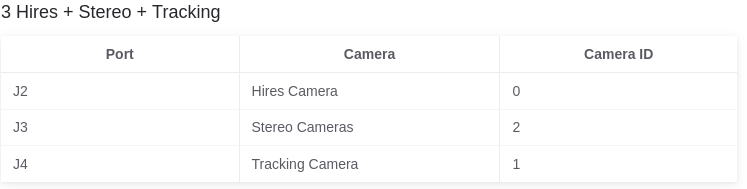
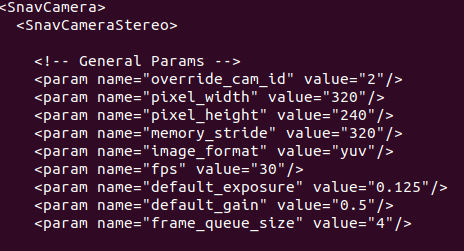
- Here is some information. i think the config is not same as the manual document.
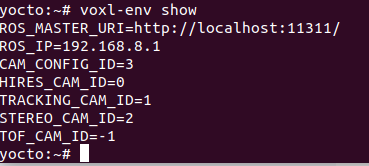
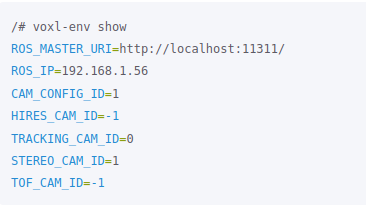
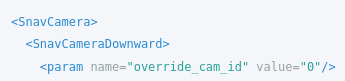
- cat /etc/snav/camera.downward.xml
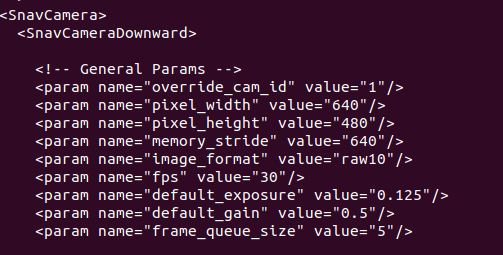
- cat /etc/snav/camera.stereo.xml
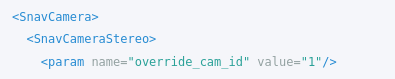
-> Did i was wrong? M500 driff so much when tried to flies in position mode.
- for voxl-configure-cameras i choose the option 3.
-
Hi @Kaiba-Kun ,
Hmm, we normally use
voxl-configure-vision-px4when setting up the vehicle.For the m500, we have a
-foption which will set it to factory state with respect to voxl-vision-px4, sovoxl-configure-vision-px4 -fThe camera configs in the ENV variables should be fine after this.
I'd try that option above, if you've configured your GCS IP address in the config file needs to be updated, eg.
vi /etc/modalai/voxl-vision-px4.confand setup your GCS IP after running with the-fflag.After that, I'd then reboot the system, and then do a 'hand flight' validation, where you can pick the vehicle up and move around, validating local position NED in QGC.
Here's a video where I do this: https://youtu.be/gTuSaHLCz8w?t=571


Reading along? Create a free ModalAI Forum account to join in.
With an account you can reply, ask your own question, get an email when a ModalAI engineer answers, and mark the reply that solved it. Your place in each thread is saved between visits.
Questions about VOXL, Flight Core, ESCs and ModalAI drones are answered here by the engineers who build them.
Register Login