
Seeker won't connect via ADB out of box
-
I'm pretty new to VOXL/ADB. Just got a Seeker drone a couple weeks ago, and straight out of the box have been unable to connect via ADB. I know ADB is installed and functioning correctly because I can connect my android tablet to the PC with no issues. When I try to connect Seeker, it does not register as a device. lsusb shows that the device is recognized by my PC. Running ubuntu 20.04. Seeker is on battery power, fully charged. Have tried killing/restarting ADB already. Have also tried different ports/USB cables. Any suggestions?
Sorry for the terrible image.
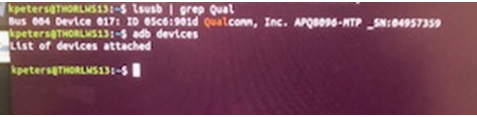
-
@sjp131416 It's possible you need to update your machine's udev rules, see here: https://docs.modalai.com/voxl2-setup-adb/#host-computer-setup
-
@sjp131416 Interesting, it does seem as though it is booting as expected as it is enumerating in the correct mode. Do you get a different result with
sudo adb devices? Oradb kill-server && adb start-server -
@sjp131416 How about a reboot of your PC? (I know these suggestions are a bit annoying but sometimes it's hard to tell exactly what linux is unhappy about)

Reading along? Create a free ModalAI Forum account to join in.
With an account you can reply, ask your own question, get an email when a ModalAI engineer answers, and mark the reply that solved it. Your place in each thread is saved between visits.
Questions about VOXL, Flight Core, ESCs and ModalAI drones are answered here by the engineers who build them.
Register Login