Skip to content
  • Categories
  • Recent
  • Tags
  • Popular
  • Users
  • Groups
Collapse
Brand Logo

ModalAI Forum

  1. ModalAI Support Forum
  2. VOXL Compute & Autopilot
  3. VOXL 2
  4. VOXL2 bricked and not entering forced Fastboot

VOXL2 bricked and not entering forced Fastboot

Scheduled Pinned Locked Moved VOXL 2
17 Posts 2 Posters 3.1k Views 1 Watching
  • Oldest to Newest
  • Newest to Oldest
  • Most Votes
Reply
  • Reply as topic
Log in to reply
This topic has been deleted. Only users with topic management privileges can see it.
  • T TPSetati

    Re: VOXL2 bricked

    Good day

    I am facing the bricked VOXL2 issue and forcing fastboot is not working.
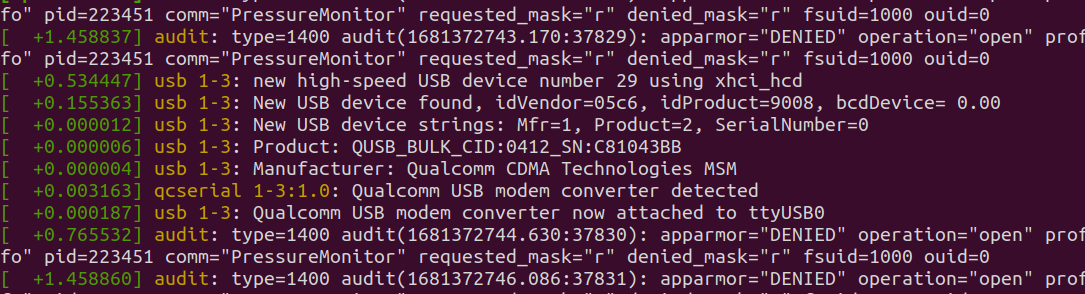
    After following the instruction to force a fastboot, I connect the USB cable to the host PC. Running dmesg -wH shows:Screenshot from 2023-04-13 10-02-23.png

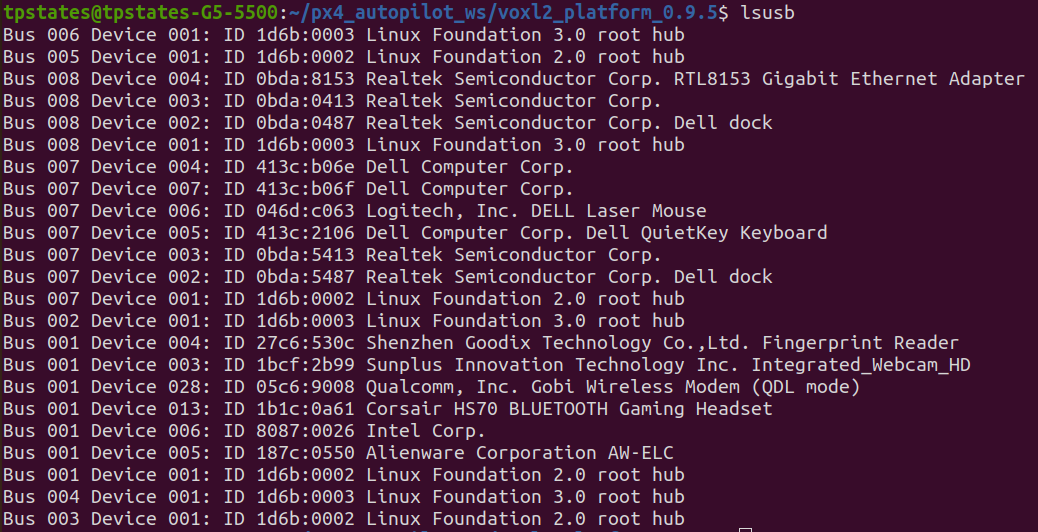
    lsusb also confirms the Qualcomm device is connected
    Screenshot from 2023-04-13 10-14-21.png

    Unfortunately fastboot devices still gives no output
    Screenshot from 2023-04-13 10-16-09.png

    T Offline
    T Offline
    TPSetati
    Contributor
    wrote on last edited by TPSetati
    #2

    Screenshot from 2023-04-13 16-04-25.png
    Apologies, I realized the error on my part. Here is the correct output

    1 Reply Last reply
    0
    • tomT Online
      tomT Online
      tom
      admin
      wrote on last edited by
      #3

      @TPSetati fastboot devices is the correct command.

      Your VOXL2 seems to be enumerated in QDL mode (factory flash mode).

      There are two ways this happens:

      1. One of the QDL switched is flipped to the ON position (either on VOXL2 itself or on an add-on board). If this is the case, you'll want to flip the switches to the OFF position.

      2. The VOXL2 is bricked, in which case you can follow the instructions here in order to recover it https://docs.modalai.com/voxl2-qdl/

      1 Reply Last reply
      0
      • T Offline
        T Offline
        TPSetati
        Contributor
        wrote on last edited by
        #4

        Good day

        Thank you for your response and for showing me another solution to try. I am trying the QDL route, but have hit a speed bump.

        SW2 has been switched to on and the host PC recognizes that the VOXL2 is in QDL mode
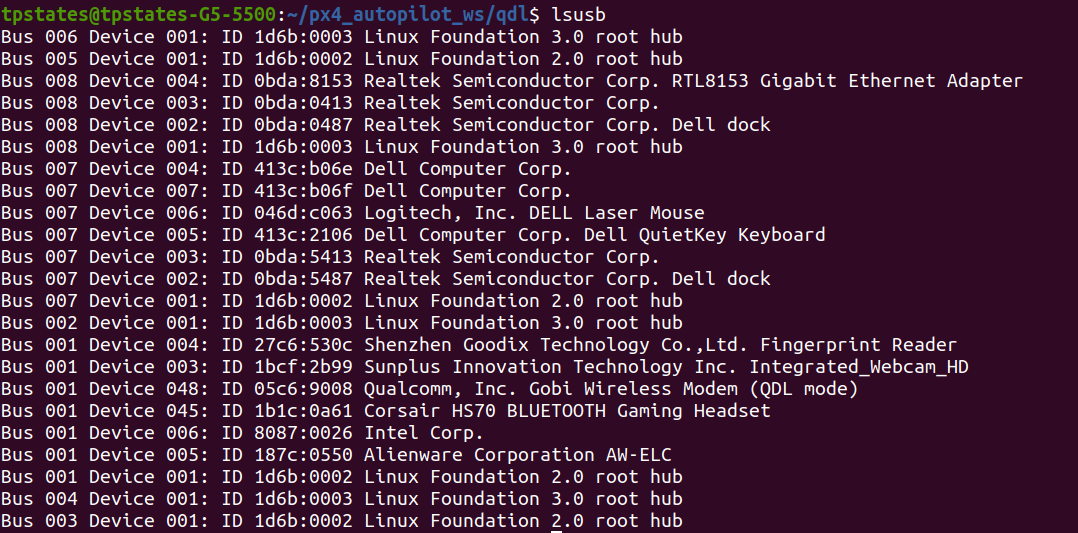
        Screenshot from 2023-04-17 10-37-56.png

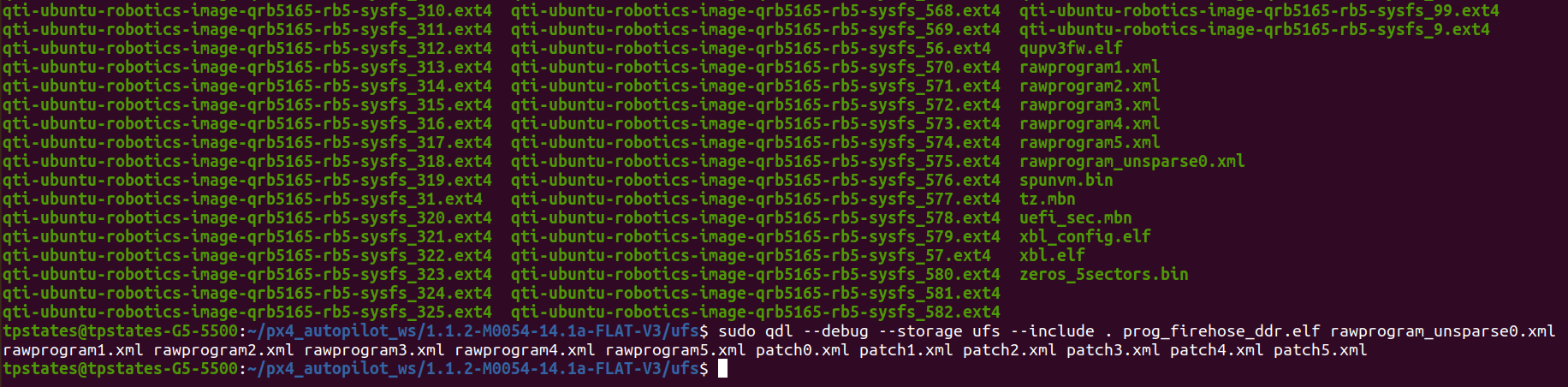
        I downloaded the system image on the QDL page and unzipped it. When running the sudo qdl command, nothing happens.
        Screenshot from 2023-04-17 10-35-25.png

        What could the issue be here?

        T 1 Reply Last reply
        0
        • T Offline
          T Offline
          TPSetati
          Contributor
          wrote on last edited by
          #5

          When the board is disconnected, the qdl command can detect that nothing is connected Screenshot from 2023-04-17 15-03-44.png

          1 Reply Last reply
          0
          • tomT Online
            tomT Online
            tom
            admin
            wrote on last edited by
            #6

            @TPSetati Maybe modemmanager is interfering?

            sudo systemctl stop ModemManager

            1 Reply Last reply
            0
            • T Offline
              T Offline
              TPSetati
              Contributor
              wrote on last edited by
              #7

              I ran thesudo apt remove --purge modemmanager command to uninstall it, but there was nothing to uninstall according to the output

              1 Reply Last reply
              0
              • T TPSetati

                Good day

                Thank you for your response and for showing me another solution to try. I am trying the QDL route, but have hit a speed bump.

                SW2 has been switched to on and the host PC recognizes that the VOXL2 is in QDL mode
                Screenshot from 2023-04-17 10-37-56.png

                I downloaded the system image on the QDL page and unzipped it. When running the sudo qdl command, nothing happens.
                Screenshot from 2023-04-17 10-35-25.png

                What could the issue be here?

                T Offline
                T Offline
                TPSetati
                Contributor
                wrote on last edited by
                #8

                @TPSetati I am just realizing that the VOXL2 board was already in QDL mode before I switched SW2 to the ON position. Even if I switch it back to off, it remains in QDL mode. Is there another switch that could be causing this?

                1 Reply Last reply
                0
                • tomT Online
                  tomT Online
                  tom
                  admin
                  wrote on last edited by
                  #9

                  @TPSetati What does your hardware setup look like? Do you have anything else connected to your VOXL2?

                  1 Reply Last reply
                  0
                  • T Offline
                    T Offline
                    TPSetati
                    Contributor
                    wrote on last edited by
                    #10

                    Our setup is similar to that on https://docs.modalai.com/voxl2-d0006/. All of this is on a Sentinel drone.

                    1 Reply Last reply
                    0
                    • tomT Online
                      tomT Online
                      tom
                      admin
                      wrote on last edited by
                      #11

                      @TPSetati Depending on the sentinel kit it may have an add-on board attached to VOXL2 that has a SW2 switch as well.

                      1 Reply Last reply
                      0
                      • T Offline
                        T Offline
                        TPSetati
                        Contributor
                        wrote on last edited by
                        #12

                        The add-on board we have connected is the WiFi board with its Fastboot button. The only SW2 I have spotted is the one depicted on https://docs.modalai.com/voxl2-qdl/.

                        Before the system image got corrupted, everything worked fine and no buttons or switches were engaged. I am finding it weird that it seems that the board went into EDL mode upon corruption with no changes made to the hardware.

                        1 Reply Last reply
                        0
                        • tomT Online
                          tomT Online
                          tom
                          admin
                          wrote on last edited by
                          #13

                          @TPSetati Interesting, do you know what happened that caused it to brick?

                          1 Reply Last reply
                          0
                          • T Offline
                            T Offline
                            TPSetati
                            Contributor
                            wrote on last edited by
                            #14

                            We flew the drone and had a semi-hard landing (I say semi-hard because we've had harder landings but the drone got back to flying easily). When we went in to check the drone, nothing was physically damaged. We just noticed that the WiFi was off.

                            We thought cycling the power would work, as it usually did, but this was not the case now. When trying to connect via ADB and noticed it didn't work, that's when we knew something was wrong.

                            We tried fastbooting the board, and that also was not working. So we realized that this problem is deeper than just a bricked board.

                            1 Reply Last reply
                            0
                            • tomT Online
                              tomT Online
                              tom
                              admin
                              wrote on last edited by
                              #15

                              @TPSetati Yeah it definitely seems like there is some sort of hardware issue. It's possible something has become disconnected or unseated, I would double check all cable connections, camera connections, board to board connections, etc. A semi-connected or incorrectly connected cable / camera / board can cause inconsistent boot or power issues which may be what you're seeing.

                              1 Reply Last reply
                              0
                              • T Offline
                                T Offline
                                TPSetati
                                Contributor
                                wrote on last edited by
                                #16

                                We'll have to take a look on our side then. Could we receive the schematics of the board and perhaps the source code for the qualcomm so we can test?

                                1 Reply Last reply
                                0
                                • tomT Online
                                  tomT Online
                                  tom
                                  admin
                                  wrote on last edited by
                                  #17

                                  @TPSetati I'd recommend sending it in to us for an RMA so that we can do an inspection: https://www.modalai.com/pages/rma

                                  1 Reply Last reply
                                  0

                                  Hello! It looks like you're interested in this conversation, but you don't have an account yet.

                                  Getting fed up of having to scroll through the same posts each visit? When you register for an account, you'll always come back to exactly where you were before, and choose to be notified of new replies (either via email, or push notification). You'll also be able to save bookmarks and upvote posts to show your appreciation to other community members.

                                  With your input, this post could be even better 💗

                                  Register Login
                                  Reply
                                  • Reply as topic
                                  Log in to reply
                                  • Oldest to Newest
                                  • Newest to Oldest
                                  • Most Votes


                                  ModalAI
                                  Categories Recent Tags ModalAI.com Docs
                                  © 2026 ModalAI® · Accelerating autonomy for smaller, smarter, safer drones · Powered by NodeBB
                                  • Login

                                  • Don't have an account? Register

                                  • Login or register to search.
                                  • First post
                                    Last post
                                  0
                                  • Categories
                                  • Recent
                                  • Tags
                                  • Popular
                                  • Users
                                  • Groups