
voxl2 unbrick
-
@Nishkala please write a more meaningful question so that people on this forum can help you. What are the symptoms? Why do you think it is bricked? What all did you try?
-
- I was installing MAVSDK on voxl2 by following the instructions on 'https://gitlab.com/voxl-public/voxl-docker-images/voxl-docker-mavsdk-python/-/tree/master/' under the heading 'Pull Image from Registry'.
- On voxl2, when I ran the command 'voxl-configure-docker-support enable' for the first time, I got a message saying install docker using 'voxl-configure-docker-support install'. Docker installation was successful after running 'voxl-configure-docker-support install'.
- After running 'voxl-configure-docker-support enable' and following instructions on under 'Pull Image from Registry', I was able to install MAVSDK onto the board. I was able to run example scripts (python3 takeoff_and_land2.py udp://:14551) present in the repo. I was able to run it successfully
- When I ran 'voxl-inspect-services' after running 'voxl-configure-docker-support enable', 'docker-autorun' and 'docker-daemon' was running and enabled.
- I powered off the voxl2 after testing the example script (python3 takeoff_and_land2.py udp://:14551) in 'https://gitlab.com/voxl-public/voxl-docker-images/voxl-docker-mavsdk-python/-/tree/master/'.
Post this, when I powered on voxl2 and ran 'adb shell', I got an output 'no devices/emulators found'.
I followed the issue, seen in this thread
How to solve this issue? If the voxl2 has bricked, how to unbrick it?
-
On VOXL2, Docker should work natively without the need for
voxl-configure-docker-support. We will need to see if this script is causing an issue, but please just use Docker natively without these helper scripts.If not booting, first we can try to boot into fastboot, there's a video showing how to force VOXL2 into fastboot: https://docs.modalai.com/voxl2-system-image/#force-voxl-2-into-fastboot
Once in fast boot, you can flash the system image. On VOXL2, we use a "Platform Release" which flashes the system image and then loads the VOXL SDK. The latest is
Voxl2 Platform 1.3.1-0.8and this can be downloaded from: https://downloads.modalai.com/If that fails, there's a lower level flashing process we call QDL that can be used, and is captured here: https://docs.modalai.com/voxl2-qdl/
-
@Nishkala did you manage to get MAVSDK working?
-
On VOXL2, Docker should work natively without the need for
voxl-configure-docker-support. We will need to see if this script is causing an issue, but please just use Docker natively without these helper scripts.If not booting, first we can try to boot into fastboot, there's a video showing how to force VOXL2 into fastboot: https://docs.modalai.com/voxl2-system-image/#force-voxl-2-into-fastboot
Once in fast boot, you can flash the system image. On VOXL2, we use a "Platform Release" which flashes the system image and then loads the VOXL SDK. The latest is
Voxl2 Platform 1.3.1-0.8and this can be downloaded from: https://downloads.modalai.com/If that fails, there's a lower level flashing process we call QDL that can be used, and is captured here: https://docs.modalai.com/voxl2-qdl/
Hello, @modaltb
with the "native Docker support" do you mean the voxl-docker command?. I've been trying to pull the registry as shown in the guide by using it but it does not seem to support the pull argument.
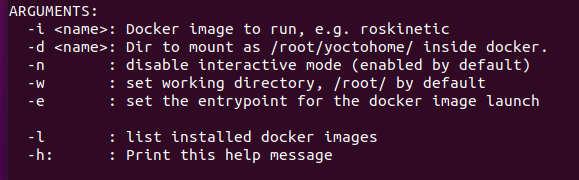
I am somewhat new with using Docker so I wanted to ask if I was missin something obvious perhaps?
-
Hi @Jose-Alfredo-Rosas-Cordova ,
Sorry for the confusion, "native" meaning nothin special "extra" should be needed when compared to desktop Ubuntu, e.g. --> you should be able to follow this: https://docs.docker.com/engine/install/ubuntu/
For VOXL1, we needed to do some special sauce for Docker, but VOXL2 it should work like you're used to on desktop (from my experience).



Reading along? Create a free ModalAI Forum account to join in.
With an account you can reply, ask your own question, get an email when a ModalAI engineer answers, and mark the reply that solved it. Your place in each thread is saved between visits.
Questions about VOXL, Flight Core, ESCs and ModalAI drones are answered here by the engineers who build them.
Register Login