
Does the Microhard Modem Add-on with USB Hub expose a viable UART to connect an External Flight Controller to VOXL 2?
-
Reading the documentation, the connection to an external flight controller requires the VOXL 2 USB3.0 / UART Expansion Adapter; however, the connection between the VOXL 2 USB3.0 / UART Expansion Adapter and the VOXL 2 utilizes the same connector that would be used for Microhard Modem Add-on with USB Hub.
Does the Microhard Modem Add-on with USB Hub expose a viable UART to connect an External Flight Controller to VOXL 2? Or is there another UART?
The external flight controller is Pixhawk 2.1/Cube Orange+.
Thanks! -
Reading the documentation, the connection to an external flight controller requires the VOXL 2 USB3.0 / UART Expansion Adapter; however, the connection between the VOXL 2 USB3.0 / UART Expansion Adapter and the VOXL 2 utilizes the same connector that would be used for Microhard Modem Add-on with USB Hub.
Does the Microhard Modem Add-on with USB Hub expose a viable UART to connect an External Flight Controller to VOXL 2? Or is there another UART?
The external flight controller is Pixhawk 2.1/Cube Orange+.
Thanks!Hi @Roy-Wood,
That would be a good use case had we designed the MH carrier after Voxl2. It was designed for Voxl1 originally and the UART exposed on the Expansion adapter is not even a UART on Voxl1, only Voxl2.You have two options:
-
SW Option: On the MH carriers, we do expose the Linux debug console UART (noted as "Serial Console" in the image on our docs pages). It's the smaller 1mm pitch JST-SR series connector J2 that exposes the signals at 3.3V.
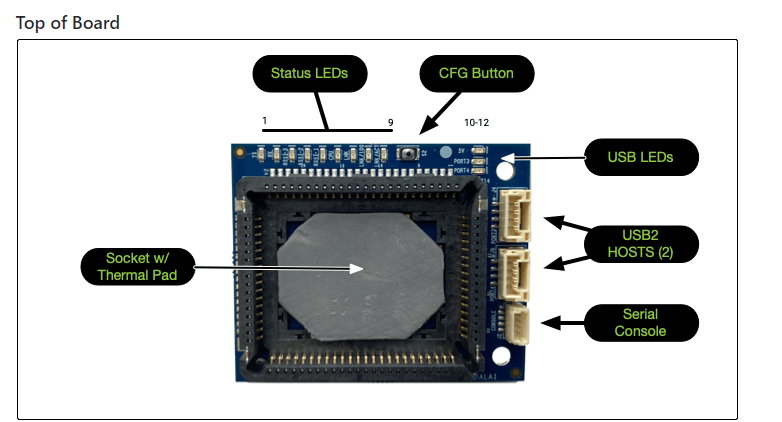 .
.
So, if someone is savvy with the the Kernel builds to turn that QUP_12 into a normal UART, it could be re-purposed just as UART/QUP_7 is now used on the expansion board. -
HW Option, (but will void your warranty)
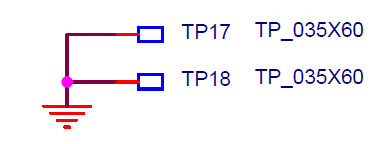
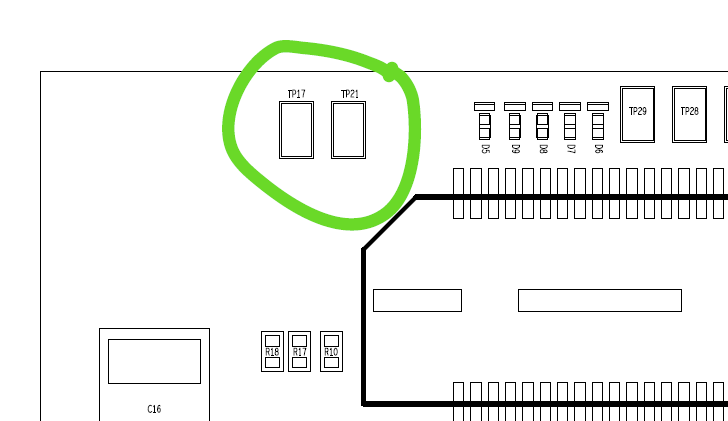
The UART signals the expansion board picks up are on Test Pads on the MH carrier (bottom side). They are at 1.8V nominally, not 3.3V,so you would need to blue-wire them to a level translator (using solder will void your warranty) and then connect to your external FC.
But, if you were really curious and handy with a soldering iron, TP28 (right side TP circled in green) is the UART_RX, and TP29 (left pad) is the UART-TX.
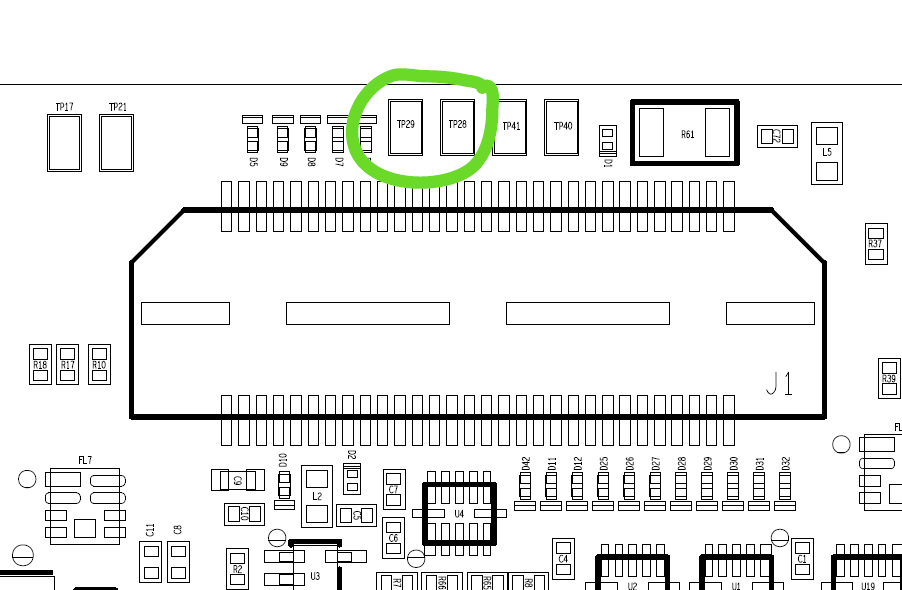
Hope that helps... Keep us posted since that is a good idea. If we spin this carrier, we will certainly add that as a feature to match the expansion board.
-
-
@Vinny,
Thank you for your response. I am interested in the HW option and soldering to the TP29/TP28 pads. Just to verify, those pads do exist on the most recent iteration of the VOXL Microhard Modem Add-on with USB Hub. On the item page, the image does not show TP29/TP28 pads (nor TP41/TP40, for that matter); however, on the Microhard Modem Add-on datasheet they are included. See attached.Item Page:
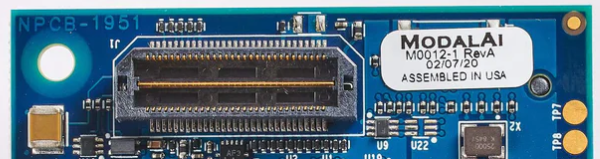
Datasheet:

-
@Vinny,
Thank you for your response. I am interested in the HW option and soldering to the TP29/TP28 pads. Just to verify, those pads do exist on the most recent iteration of the VOXL Microhard Modem Add-on with USB Hub. On the item page, the image does not show TP29/TP28 pads (nor TP41/TP40, for that matter); however, on the Microhard Modem Add-on datasheet they are included. See attached.Item Page:
Datasheet:
Hi @Roy-Wood
Oh wow, you have an older M0012... We added the TPs on the M0048 version which replaced the M0012 a couple years ago. So, the website is correct, since we do not sell the older version anymore.
Sorry, but I hope that explains the difference you see. -
@Vinny, I am just planning at the moment. Where can I find an exposed 1.8V pin on the VOXL Microhard Modem Add-on with USB Hub?
-
@Vinny Is this still the case?
I am using the MH pMDDL2350 radio with a VOXl2 and the V1.0.0 SDK. I would like to use the external ModalAI Flight Controller because of issues related to running a 6S configuration with the internal FC and ESC's. Without the MH radio in the architecture this works fine. However, once I try to connect the FC to the MH radio carrier USB port, I cannot get the communication to work. It seems the 2 USB ports on the MH Carrier board are not exposed to the VOXL2 as UARTS?
In general, without voiding our warranty, we'd like to use the MH Radio AND the external flight controller. Is there another UART we can use on the VOXL2 for this?
-
@Vinny Is this still the case?
I am using the MH pMDDL2350 radio with a VOXl2 and the V1.0.0 SDK. I would like to use the external ModalAI Flight Controller because of issues related to running a 6S configuration with the internal FC and ESC's. Without the MH radio in the architecture this works fine. However, once I try to connect the FC to the MH radio carrier USB port, I cannot get the communication to work. It seems the 2 USB ports on the MH Carrier board are not exposed to the VOXL2 as UARTS?
In general, without voiding our warranty, we'd like to use the MH Radio AND the external flight controller. Is there another UART we can use on the VOXL2 for this?
@Mastermind In our next release (SDK 1.0.1) we will have the ability to use a UART on the DSP (assuming px4 isn't running on VOXL2) from the applications processor specifically for the use case of running an external flight controller through it.
-
M Moderator referenced this topic on
-
J Jetson Nano referenced this topic on



Reading along? Create a free ModalAI Forum account to join in.
With an account you can reply, ask your own question, get an email when a ModalAI engineer answers, and mark the reply that solved it. Your place in each thread is saved between visits.
Questions about VOXL, Flight Core, ESCs and ModalAI drones are answered here by the engineers who build them.
Register Login