Skip to content
  • Categories
  • Recent
  • Tags
  • Popular
  • Users
  • Groups
Collapse
Brand Logo

ModalAI Forum

  1. ModalAI Support Forum
  2. VOXL Dev Kits
  3. VOXL Flight Deck
  4. cloud points

cloud points

Scheduled Pinned Locked Moved VOXL Flight Deck
19 Posts 5 Posters 2.9k Views 1 Watching
  • Oldest to Newest
  • Newest to Oldest
  • Most Votes
Reply
  • Reply as topic
Log in to reply
This topic has been deleted. Only users with topic management privileges can see it.
  • Zeev MindaliZ Offline
    Zeev MindaliZ Offline
    Zeev Mindali
    Contributor
    wrote on last edited by
    #1

    Dear all,

    how can I get the web portal and cloud point as in your video?

    straggling with that for few days

    1 Reply Last reply
    0
    • Steve TurnerS Offline
      Steve TurnerS Offline
      Steve Turner
      wrote on last edited by
      #2

      You need to determine the IP address of your VOXL and then simply type that into a web browser on the same network.

      https://docs.modalai.com/wifi-setup/ for more details.

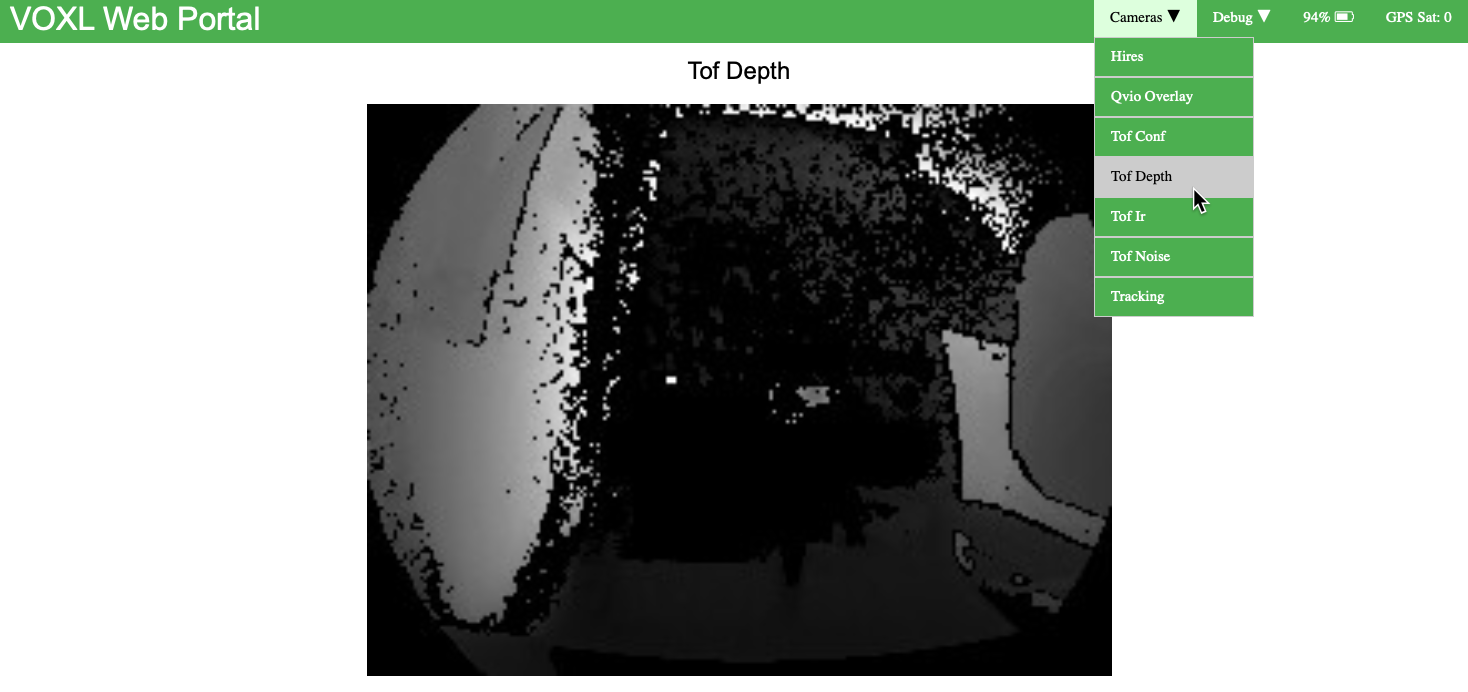
      In the portal, navigate to Cameras -> TOF Depth:
      f4a6dfd4-c17e-4760-9b17-3681c6203028-image.png

      1 Reply Last reply
      0
      • ? Offline
        ? Offline
        A Former User
        wrote on last edited by
        #3

        For the native point cloud viewer in voxl-portal, you must install from the opkg dev repository. You can point opkg to the correct repository and pull the package list by running:

        voxl-configure-opkg dev
        opkg update
        

        Then, as we have recently renamed some of our packages, you will face some dependency issues if you try to install the latest version. If you are not using custom versions of any of these libraries, you can simply remove them before installing the latest version of voxl-portal and opkg will install the correctly named dependencies without issue:

         opkg remove libmodal_json libmodal_pipe libvoxl_cutils libjpeg_turbo --force-depends
        opkg install voxl-portal
        
        1 Reply Last reply
        0
        • Zeev MindaliZ Offline
          Zeev MindaliZ Offline
          Zeev Mindali
          Contributor
          wrote on last edited by
          #4

          Dear Matt,

          i done the process, i bought the voxl flight deck,
          i am afraid that i missing a key issue, does i have a tof camera ??

          and if not, how i can buy one and how it's difficult to attach it to the flight deck?

          zeev

          1 Reply Last reply
          0
          • Zeev MindaliZ Offline
            Zeev MindaliZ Offline
            Zeev Mindali
            Contributor
            wrote on last edited by
            #5

            any answer??

            1 Reply Last reply
            0
            • ? Offline
              ? Offline
              A Former User
              wrote on last edited by
              #6

              Hi Zeev,

              You can purchase tof cameras on our website. The flight deck does not come designed to hold a TOF cam, but if you're just trying to test stuff out you can easily tape it to the front with double sided tape (we do this in our office). If you're looking for a more durable solution, the voxl cam is the platform that we have built designed around the TOF sensor.

              1 Reply Last reply
              0
              • Zeev MindaliZ Offline
                Zeev MindaliZ Offline
                Zeev Mindali
                Contributor
                wrote on last edited by
                #7

                if I only know about voxl 2, or voxl cam.
                you need to strength the pre sale 🙂

                to duck a tape is not an option, is there any 3d model that I can print?

                and where I will connect it on my voxl flight deck, which camera I will take out?

                Steve TurnerS 1 Reply Last reply
                0
                • Zeev MindaliZ Zeev Mindali

                  if I only know about voxl 2, or voxl cam.
                  you need to strength the pre sale 🙂

                  to duck a tape is not an option, is there any 3d model that I can print?

                  and where I will connect it on my voxl flight deck, which camera I will take out?

                  Steve TurnerS Offline
                  Steve TurnerS Offline
                  Steve Turner
                  wrote on last edited by
                  #8

                  @Zeev-Mindali https://docs.modalai.com/camera-connections/ lists the various supported camera connections and which ports to attach them.

                  1 Reply Last reply
                  0
                  • ? Offline
                    ? Offline
                    A Former User
                    wrote on last edited by
                    #9

                    We have 2d and 3d models of the sensor here, if you're trying to create a finished product and not use a voxl-cam we'd recommend designing a bezel around the sensor models that we provide to best fit your specific needs.

                    1 Reply Last reply
                    0
                    • Zeev MindaliZ Offline
                      Zeev MindaliZ Offline
                      Zeev Mindali
                      Contributor
                      wrote on last edited by
                      #10

                      saw the 3d, it's not what i looking for 😞

                      i make it short.
                      i bought voxl flight deck v1 with hires,stereo,tracking
                      and for the cloud points i now understand i need tof,stereo,tracking.

                      i think if i asked for the setup with the tof, i could get all connected in specific plastic.
                      i willing to buy the tof camera, but i would like the plastic in front of the flight deck that will support the tof camera, rather then hires camera.

                      is there any step file to print the front side with tof?

                      1 Reply Last reply
                      0
                      • ? Offline
                        ? Offline
                        A Former User
                        wrote on last edited by
                        #11

                        Unfortunately we don't have any such design, the flight deck was not designed to hold the TOF sensor since it's mainly for outdoor platforms. The step file for the flight deck can be found here, it shouldn't be too hard to modify the front plate yourself and print a new one if you'd like to add a TOF cam.

                        Zeev MindaliZ 1 Reply Last reply
                        0
                        • Zeev MindaliZ Offline
                          Zeev MindaliZ Offline
                          Zeev Mindali
                          Contributor
                          wrote on last edited by
                          #12

                          ok,

                          understood, I ordered the tof camera, hoping for the best 🙂

                          1 Reply Last reply
                          0
                          • ? A Former User

                            Unfortunately we don't have any such design, the flight deck was not designed to hold the TOF sensor since it's mainly for outdoor platforms. The step file for the flight deck can be found here, it shouldn't be too hard to modify the front plate yourself and print a new one if you'd like to add a TOF cam.

                            Zeev MindaliZ Offline
                            Zeev MindaliZ Offline
                            Zeev Mindali
                            Contributor
                            wrote on last edited by
                            #13

                            @Alex-Gardner one sec before I buy the tof camera
                            I see there is an extension cable is it come along with the camera, or I need to purchase it separately ?

                            second thing, can you print the 3d model of the tof camera, and what will be the cost of that?

                            zeev

                            1 Reply Last reply
                            0
                            • Chad SweetC Offline
                              Chad SweetC Offline
                              Chad Sweet
                              ModalAI Team
                              wrote on last edited by
                              #14

                              The MSU-M0040-1-01 kit connects directly to VOXL, it contains the TOF module and an adapter flex for VOXL.

                              1 Reply Last reply
                              0
                              • Zeev MindaliZ Offline
                                Zeev MindaliZ Offline
                                Zeev Mindali
                                Contributor
                                wrote on last edited by
                                #15

                                so all I need is to buy the tof camera, and I will get the extension as in the picture?

                                1 Reply Last reply
                                0
                                • Chad SweetC Offline
                                  Chad SweetC Offline
                                  Chad Sweet
                                  ModalAI Team
                                  wrote on last edited by
                                  #16

                                  It is not an extension, it is an adapter that connects the TOF module to the VOXL. It is included in MSU-M0040-1-01. We do not sell the TOF module without an adapter.

                                  Zeev MindaliZ 1 Reply Last reply
                                  0
                                  • Chad SweetC Chad Sweet

                                    It is not an extension, it is an adapter that connects the TOF module to the VOXL. It is included in MSU-M0040-1-01. We do not sell the TOF module without an adapter.

                                    Zeev MindaliZ Offline
                                    Zeev MindaliZ Offline
                                    Zeev Mindali
                                    Contributor
                                    wrote on last edited by
                                    #17

                                    @Chad-Sweet
                                    sweet, placing an order.
                                    it will give me the cloud point, right? want to be sure

                                    1 Reply Last reply
                                    0
                                    • Chad SweetC Offline
                                      Chad SweetC Offline
                                      Chad Sweet
                                      ModalAI Team
                                      wrote on last edited by
                                      #18

                                      Anything that produces a depth map can be used to create a point cloud. Both the stereo sensors, using depth from stereo, and TOF generate depth maps. The stereo sensors are best for outdoor use, the TOF sensor is best for indoor use.

                                      1 Reply Last reply
                                      0
                                      • Zeev MindaliZ Offline
                                        Zeev MindaliZ Offline
                                        Zeev Mindali
                                        Contributor
                                        wrote on last edited by
                                        #19

                                        last question :
                                        I could not see the point cloud with stereo , but since I need it to indoor solution, I will use tof anyway.

                                        I using the drone without any GPS module (don't need it)
                                        but I could not to change from manual to mission nor off board.

                                        when I change the gps to rc transmitter (first option) I was able to get move to mission
                                        but only left stick worked (up down rotate) the second stick won't work (forward and rotation)

                                        is there a way to move to mission without gps module?

                                        1 Reply Last reply
                                        0

                                        Hello! It looks like you're interested in this conversation, but you don't have an account yet.

                                        Getting fed up of having to scroll through the same posts each visit? When you register for an account, you'll always come back to exactly where you were before, and choose to be notified of new replies (either via email, or push notification). You'll also be able to save bookmarks and upvote posts to show your appreciation to other community members.

                                        With your input, this post could be even better 💗

                                        Register Login
                                        Reply
                                        • Reply as topic
                                        Log in to reply
                                        • Oldest to Newest
                                        • Newest to Oldest
                                        • Most Votes


                                        ModalAI
                                        Categories Recent Tags ModalAI.com Docs
                                        © 2026 ModalAI® · Accelerating autonomy for smaller, smarter, safer drones · Powered by NodeBB
                                        • Login

                                        • Don't have an account? Register

                                        • Login or register to search.
                                        • First post
                                          Last post
                                        0
                                        • Categories
                                        • Recent
                                        • Tags
                                        • Popular
                                        • Users
                                        • Groups