
Change Pwm channel
-
Hello my flight deck pwm connections is broke.Now I cant use channel 3 it does not recieve any signal from this channel..I want to use channel 6 instead of channel 3.How can i do this can you help me.
-
Hi @John-Mccarty ,
I haven't done this myself, but I think it should be possible with some hacking with PX4 mixers:
https://docs.px4.io/v1.12/en/concept/mixing.html
I've stuck to the default quad for everything I've ever done (same as default on your Fligh Deck), but you might be able to override using the SD card?
-
Thanks for your fast response I have not much experience in px4 code.I need more details. How do i change it and how do i integrate my changed codes into voxl ? I need help. Thanks again.
-
Hi @John-Mccarty ,
I haven't done this myself, but I think it should be possible with some hacking with PX4 mixers:
https://docs.px4.io/v1.12/en/concept/mixing.html
I've stuck to the default quad for everything I've ever done (same as default on your Fligh Deck), but you might be able to override using the SD card?
@modaltb I tried what you wrote in your post,it
s work on pixhawk when you change mixers file and override with sdcard but on voxl it doesnt work what is the differences between voxl px4 and pixhawk px4 ? -
Hi @John-Mccarty ,
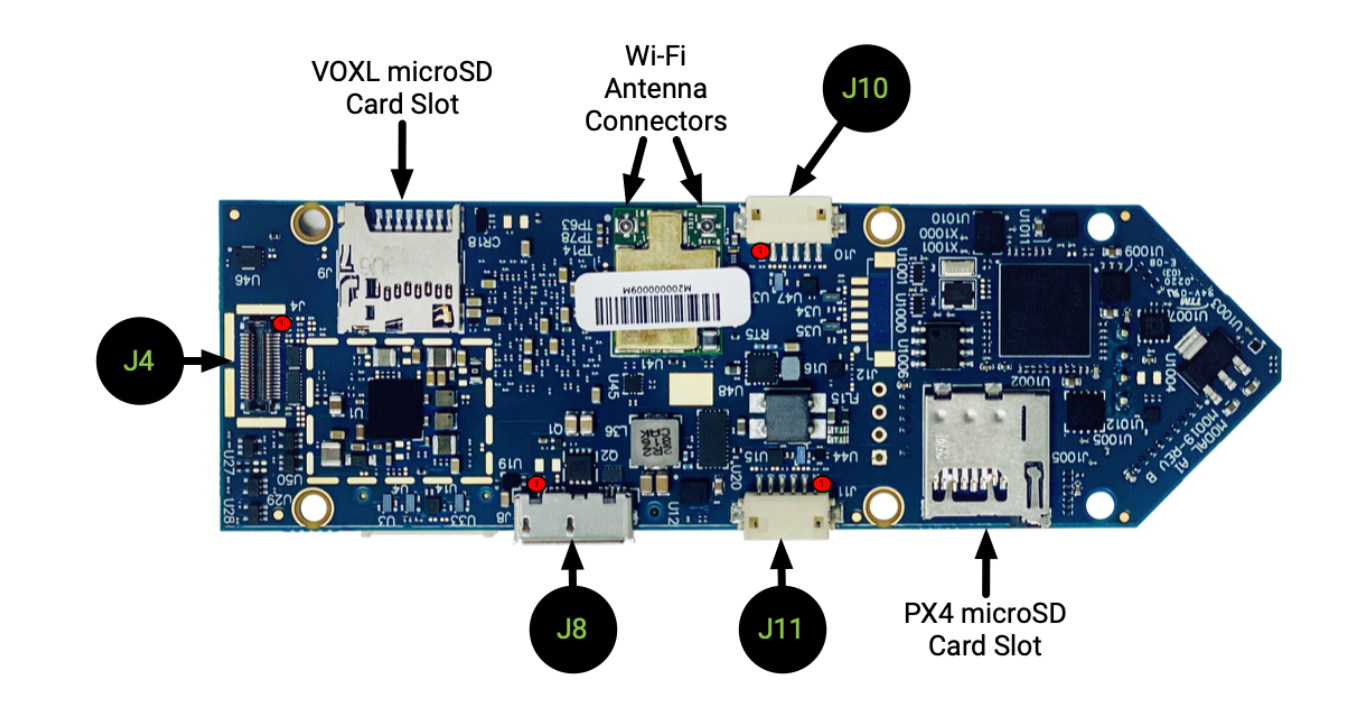
They 'should' operate the same. One quick thing to check, there are two SD cards on VOXL-Flight, one accessible by the Yocto Linux side, the other by PX4 FW. You want to use the bottom right one in this picture for this use case.
https://docs.modalai.com/voxl-flight-datasheet-connectors/
-
thanks for your fast response I inserted the sd card in the right place as in the picture but it still use default mixers file. I placed the changed mixer file in to /etc/mixers/ directory inside sd card.
-
It has solved. The problem was the hardware connection .Now I could change pwm channel with hacking mixers file and overriding with sd card.Thanks for your helping.
-
Alright! Thanks for the update, I'll likely use this post to get some updates to our docs, appreciate it!


Reading along? Create a free ModalAI Forum account to join in.
With an account you can reply, ask your own question, get an email when a ModalAI engineer answers, and mark the reply that solved it. Your place in each thread is saved between visits.
Questions about VOXL, Flight Core, ESCs and ModalAI drones are answered here by the engineers who build them.
Register Login