Skip to content
  • Categories
  • Recent
  • Tags
  • Popular
  • Users
  • Groups
Collapse
Brand Logo

ModalAI Forum

  1. ModalAI Support Forum
  2. General Questions
  3. OpenVpn don't launch on boot

OpenVpn don't launch on boot

Scheduled Pinned Locked Moved Unsolved General Questions
5 Posts 2 Posters 893 Views 2 Watching
  • Oldest to Newest
  • Newest to Oldest
  • Most Votes
Reply
  • Reply as topic
Log in to reply
This topic has been deleted. Only users with topic management privileges can see it.
  • Sébastien de Pret Roose de CalesbergS Offline
    Sébastien de Pret Roose de CalesbergS Offline
    Sébastien de Pret Roose de Calesberg
    wrote on last edited by
    #1

    Hi,
    I have OpenVpn that work when I launch the command:

    openvpn --daemon --script-security 2 --config /etc/openvpn/modal-connector_amsterdam.ovpn
    

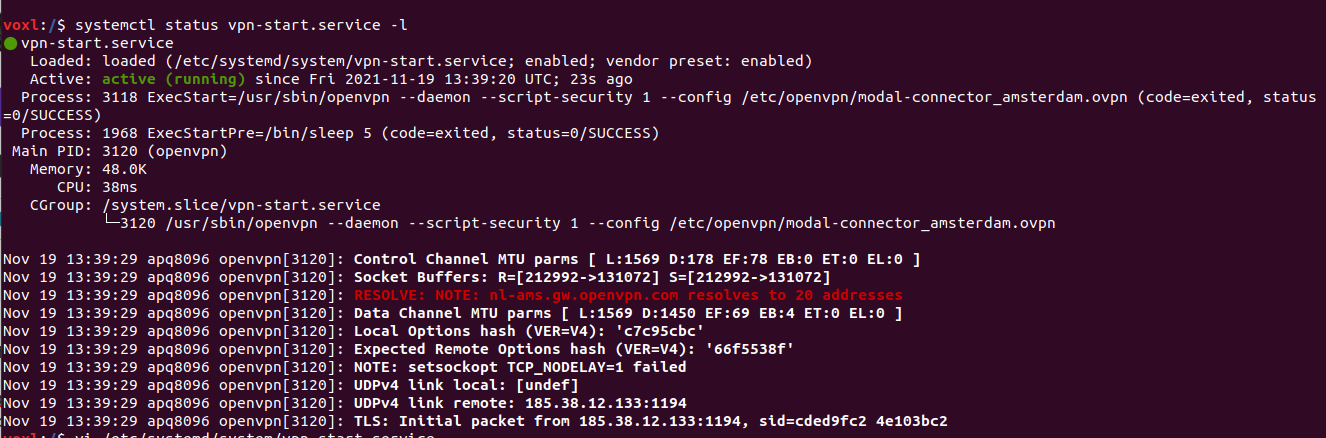
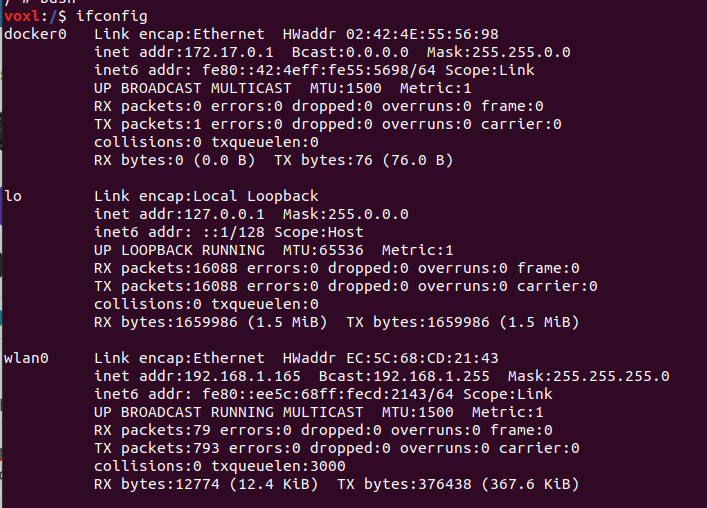
    But when I try to have it launch on boot I have the service that launch but I don't have the tun0 showing in ifconfig.Screenshot from 2021-11-19 14-51-17.png
    Screenshot from 2021-11-19 14-57-11.png

    And i did

    systemctl enable vpn-start.service
    

    Any idea where the problem could be? Thanks.
    (And I ask on the side but is it possible to install zerotier?)

    1 Reply Last reply
    0
    • tomT Offline
      tomT Offline
      tom
      admin
      wrote on last edited by
      #2

      I see that the VPN service is starting so that is a positive. It relies on the voxl-time-sync service to confirm that the date / time is correct before proceeding. One thing to try is to add a sudo to the front of your openvpn call in the service file. Root access may be required depending on your VPN configuration.

      I am not familiar with zerotier so can't give you an answer on that one.

      1 Reply Last reply
      0
      • Sébastien de Pret Roose de CalesbergS Offline
        Sébastien de Pret Roose de CalesbergS Offline
        Sébastien de Pret Roose de Calesberg
        wrote on last edited by
        #3

        It gives me 2021 when I launch the time-sync command, so it should be ok.
        Going to try the sudo command.

        sudo /usr/sbin/openvpn --daemon --script-security 2 --config /etc/openvpn/modal-connector_amsterdam.ovpn
        

        So something like that in the vpn-start file, right?

        1 Reply Last reply
        0
        • tomT Offline
          tomT Offline
          tom
          admin
          wrote on last edited by
          #4

          @Sébastien-de-Pret-Roose-de-Calesberg Yes, exactly. You may have to specify the whole path of sudo i.e. /usr/bin/sudo

          1 Reply Last reply
          0
          • tomT Offline
            tomT Offline
            tom
            admin
            wrote on last edited by
            #5

            Also, ensure you aren't connecting to your VPN with the same key on a different machine.

            1 Reply Last reply
            0

            Reading along? Create a free ModalAI Forum account to join in.

            With an account you can reply, ask your own question, get an email when a ModalAI engineer answers, and mark the reply that solved it. Your place in each thread is saved between visits.

            Questions about VOXL, Flight Core, ESCs and ModalAI drones are answered here by the engineers who build them.

            Register Login
            Reply
            • Reply as topic
            Log in to reply
            • Oldest to Newest
            • Newest to Oldest
            • Most Votes


            ModalAI
            Categories Recent Tags ModalAI.com Docs
            © 2026 ModalAI® · Accelerating autonomy for smaller, smarter, safer drones · Powered by NodeBB
            • Login

            • Don't have an account? Register

            • Login or register to search.
            • First post
              Last post
            0
            • Categories
            • Recent
            • Tags
            • Popular
            • Users
            • Groups