
Issue with USB Camera Disconnecting on VOXL2
-
Hello,
I would like to use a USB camera connected to the VOXL2. My test environment is as follows:
Hardware setup:
VOXL2
VOXL 2 Ethernet and USB Hub Add-on (MDK-M0062-3-00)
USB CameraThe camera is connected via the J11 USB port on the MDK-M0062-3-00.
VOXL2 <--> VOXL 2 Ethernet and USB Hub Add-on(J11) <--> USB Camera
J11 Pin Description:
- VBUS_PORT3 — 5V VBUS, 1A limit
- USB1_HS_CON_D_N — Host Port USB_D-
- USB1_HS_CON_D_P — Host Port USB_D+
- DGND — System GND
However, when I first power on the system, the video device is recognized correctly. After about one minute, the video device disappears.
Is there any additional configuration or setup I need to perform?
-
Hello,
I would like to use a USB camera connected to the VOXL2. My test environment is as follows:
Hardware setup:
VOXL2
VOXL 2 Ethernet and USB Hub Add-on (MDK-M0062-3-00)
USB CameraThe camera is connected via the J11 USB port on the MDK-M0062-3-00.
VOXL2 <--> VOXL 2 Ethernet and USB Hub Add-on(J11) <--> USB Camera
J11 Pin Description:
- VBUS_PORT3 — 5V VBUS, 1A limit
- USB1_HS_CON_D_N — Host Port USB_D-
- USB1_HS_CON_D_P — Host Port USB_D+
- DGND — System GND
However, when I first power on the system, the video device is recognized correctly. After about one minute, the video device disappears.
Is there any additional configuration or setup I need to perform?
Hi @Daehan-Won
To help us, what camera and how is it connected (cable details, with photo will help)
We want to first understand how much power it needs.However, if it appears upon boot up, that is usually the worst power draw (in-rush), so I'm not inclined to think this is the case. It may be loose wiring, which is why a photo of your cable setup will also help. Even the slighest intermittent glitch on USB will create USB reconect events.
You can monitor that in a VOXL console (over ADB) with this command :dmesg -w | grep -Ei 'usb|xhci'Thanks!
-
Hi @Daehan-Won
To help us, what camera and how is it connected (cable details, with photo will help)
We want to first understand how much power it needs.However, if it appears upon boot up, that is usually the worst power draw (in-rush), so I'm not inclined to think this is the case. It may be loose wiring, which is why a photo of your cable setup will also help. Even the slighest intermittent glitch on USB will create USB reconect events.
You can monitor that in a VOXL console (over ADB) with this command :dmesg -w | grep -Ei 'usb|xhci'Thanks!
@Vinny Thank you for reply!
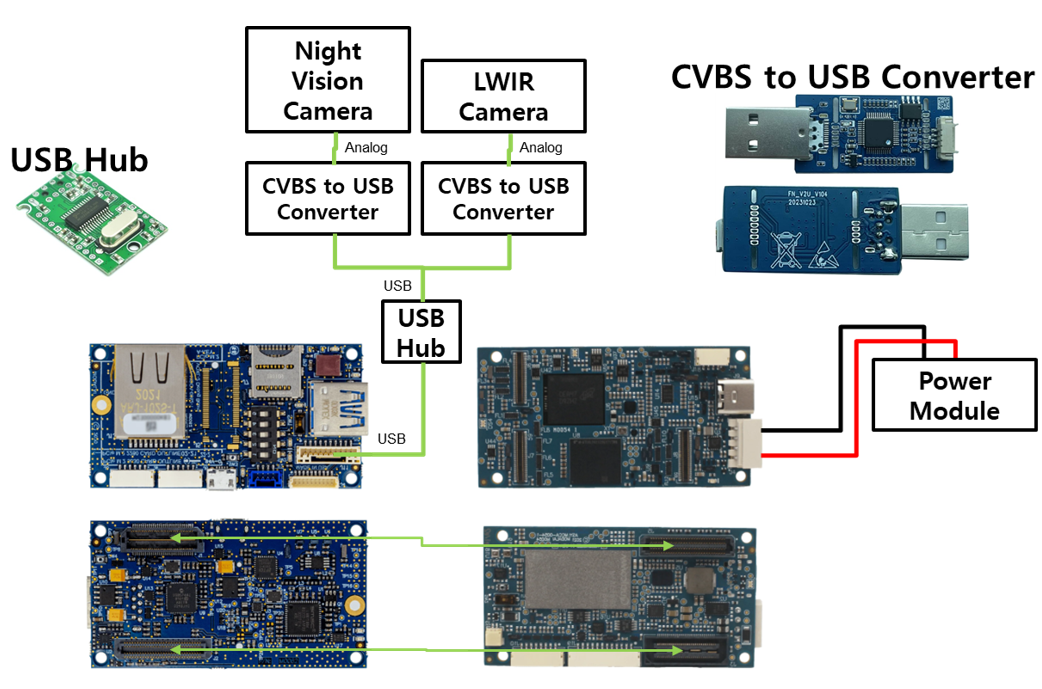
Night Vision Camera
https://ko.aliexpress.com/item/1005007185180818.html?spm=a2g0o.order_list.order_list_main.27.5cf0140f9dDqCE&gatewayAdapt=glo2korI connected it as shown in the attached file.
The camera was purchased from AliExpress. The Night Vision Camera has a current consumption of 0.2 A, and the LWIR camera’s current consumption is unknown (but it is expected to be low).
Even when testing with only the Night Vision Camera connected, the same issue occurred. -
@Vinny Thank you for reply!
Night Vision Camera
https://ko.aliexpress.com/item/1005007185180818.html?spm=a2g0o.order_list.order_list_main.27.5cf0140f9dDqCE&gatewayAdapt=glo2korI connected it as shown in the attached file.
The camera was purchased from AliExpress. The Night Vision Camera has a current consumption of 0.2 A, and the LWIR camera’s current consumption is unknown (but it is expected to be low).
Even when testing with only the Night Vision Camera connected, the same issue occurred.Hi @Daehan-Won
So, on the M0062 debug board, you do not need to connect an extra hub. You already have 3 USB ports...
Look at J10, J11, and J12..
https://docs.modalai.com/m0062-datasheet/#connector-callouts
Yes they are different connectors, but is a much easier system for you. We sell both 4 and 10-pin USB cables, and you can easily get Type-A breakouts from Adafruit or Digikey.
Can you try to remove the extra hub and see if you can get your system to work that way?We cannot validate or debug third party hardware/modules ... we would only be guessing and do not want to lead you down the wrong path. However, I suspect in this case, that Hub is indeed your issue. It is most likely only supporting 500mA modes, and if neither of those two devices are enumerating perfectly, it may only allow 100mA per port before tripping a reset. Depends on how it is configured and designed.
You can use USB TreeView to read all the descriptors of that hub board, and look for the self vs bus powered reporting, and the downstream current allocations. I suspect this is not set for your system.
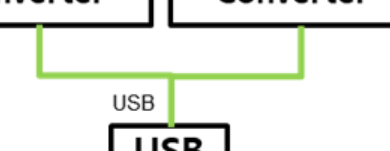
If you use our connectors, despite in various formats, you should be much better off.Lastly, just to clarify, are your USB connections unique? Your drawing looks like they are the same USBD+/D- wires connecting to one port of the Hub.
-
Hi @Daehan-Won
So, on the M0062 debug board, you do not need to connect an extra hub. You already have 3 USB ports...
Look at J10, J11, and J12..
https://docs.modalai.com/m0062-datasheet/#connector-callouts
Yes they are different connectors, but is a much easier system for you. We sell both 4 and 10-pin USB cables, and you can easily get Type-A breakouts from Adafruit or Digikey.
Can you try to remove the extra hub and see if you can get your system to work that way?We cannot validate or debug third party hardware/modules ... we would only be guessing and do not want to lead you down the wrong path. However, I suspect in this case, that Hub is indeed your issue. It is most likely only supporting 500mA modes, and if neither of those two devices are enumerating perfectly, it may only allow 100mA per port before tripping a reset. Depends on how it is configured and designed.
You can use USB TreeView to read all the descriptors of that hub board, and look for the self vs bus powered reporting, and the downstream current allocations. I suspect this is not set for your system.
If you use our connectors, despite in various formats, you should be much better off.Lastly, just to clarify, are your USB connections unique? Your drawing looks like they are the same USBD+/D- wires connecting to one port of the Hub.
@Vinny Thank you for reply!
Unfortunately, I need to connect two cameras to the J11 port. I’m planning to connect other sensors to the J10 and J12 ports.
I will first test by connecting one camera to the J11 port, and then try using a USB hub with a 1A capacity.Although it appears as a single line in the hardware architecture diagram, the connections to the USB hub were made individually!
-
@Vinny Thank you for reply!
Unfortunately, I need to connect two cameras to the J11 port. I’m planning to connect other sensors to the J10 and J12 ports.
I will first test by connecting one camera to the J11 port, and then try using a USB hub with a 1A capacity.Although it appears as a single line in the hardware architecture diagram, the connections to the USB hub were made individually!
OK @Daehan-Won
Yeah, I'd try to run one first on it's own before the hub to rule that out.
Keep us posted.
Thanks!


Reading along? Create a free ModalAI Forum account to join in.
With an account you can reply, ask your own question, get an email when a ModalAI engineer answers, and mark the reply that solved it. Your place in each thread is saved between visits.
Questions about VOXL, Flight Core, ESCs and ModalAI drones are answered here by the engineers who build them.
Register Login