
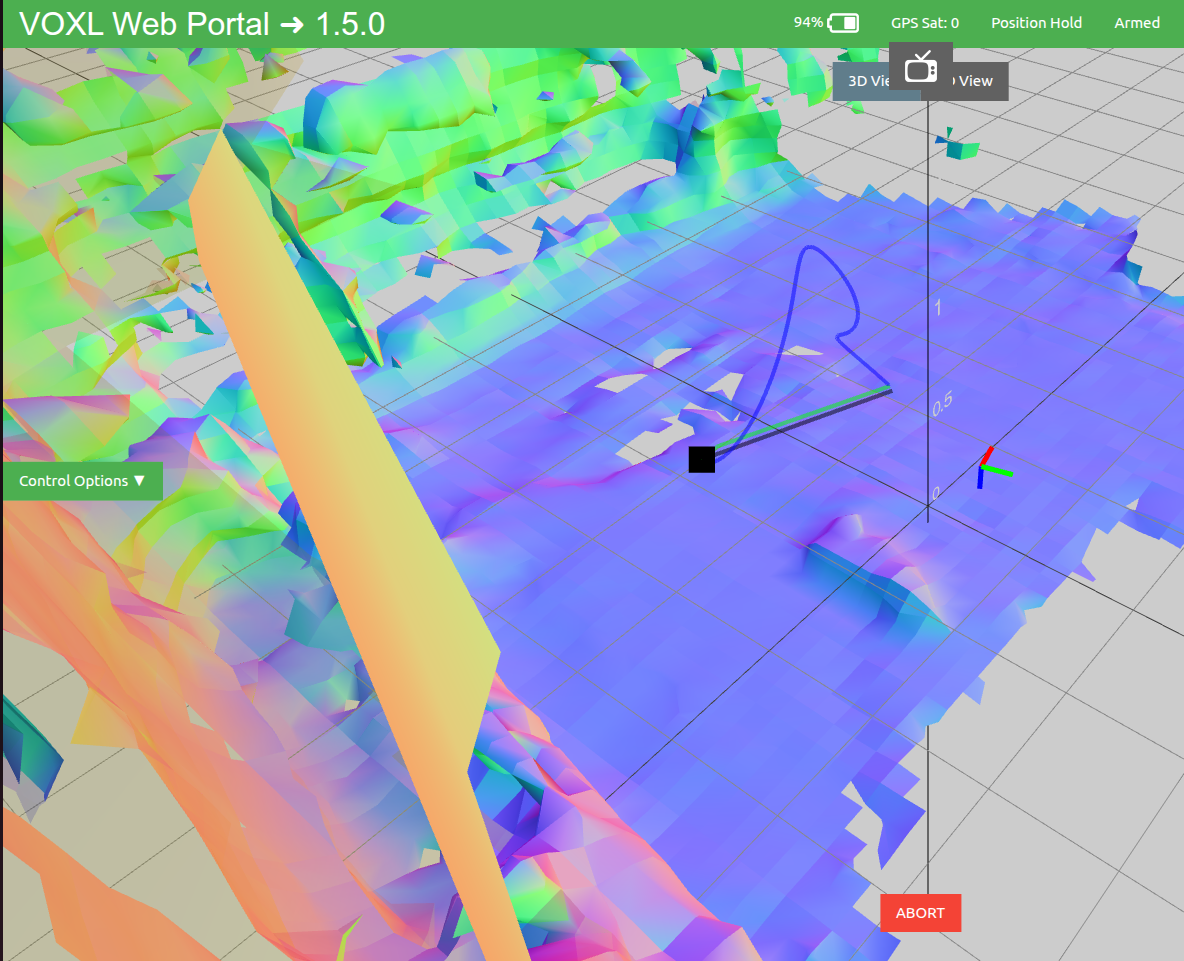
tarling - Path planning (blue line) is erratic and drone moves to wrong locations
-
Hi,
I am having significant issues with the voxl-mapper on a Starling drone. When using the "Plan to a Point" feature in the VOXL Web Portal, the system fails to calculate or execute a reliable path.
Even in a clear environment, after clicking "Plan to a Point", the calculated trajectory (blue line) becomes erratic. Instead of following the direct path, the drone often moves to incorrect locations, diverges from the intended target, or the planning simply fails to produce a viable route.
Hardware Details (Starling):
-
Flight Controller/Compute: VOXL 2 (MDK-M0054-1)
-
ToF Sensor: MDK-M0040 (PMD)
-
Tracking Sensor: ov7251
-
VIO: voxl-qvio-server (Stable)
Why is the path planner generating such erratic trajectories instead of a direct path to the waypoint? Are there specific tuning parameters for the Starling's ToF setup to make the planner more reliable?
Thanks
-
-
Hi,
I am having significant issues with the voxl-mapper on a Starling drone. When using the "Plan to a Point" feature in the VOXL Web Portal, the system fails to calculate or execute a reliable path.
Even in a clear environment, after clicking "Plan to a Point", the calculated trajectory (blue line) becomes erratic. Instead of following the direct path, the drone often moves to incorrect locations, diverges from the intended target, or the planning simply fails to produce a viable route.
Hardware Details (Starling):
-
Flight Controller/Compute: VOXL 2 (MDK-M0054-1)
-
ToF Sensor: MDK-M0040 (PMD)
-
Tracking Sensor: ov7251
-
VIO: voxl-qvio-server (Stable)
Why is the path planner generating such erratic trajectories instead of a direct path to the waypoint? Are there specific tuning parameters for the Starling's ToF setup to make the planner more reliable?
Thanks
@DronAlan Hi there,
Can you power up, login and at the ModalAI splash screen is a label: SKU: [some text value] Please post that sku text here to help us diagnosis.
This looks an extrinsics error posting improper orientations of the drone. Please try the following, I expect one of these actions will fail:
a. power cycle and perform a bench test to ensure the extrinsics are proper (forward is X, etc..). If that passes...
b. edit file on drone/etc/modalai/voxl-vision-hub.confand change back to figure_eight mode. Flight test in figure 8 mode (it should fly a controlled figure 8). If these tests pass, your extrinsics are good and you can switch back to trajectory mode.If those 2 actions pass, then this leans towards a classic VIO reset error. Rerun your mapping test case, login and run
voxl-inspect-qvio -nand it will provide the status if vio reset in flight. Typically the lighting conditions of one's environment are poor for qvio to work robustly and you can get multiple rests in flight. -
-
@DronAlan Hi there,
Can you power up, login and at the ModalAI splash screen is a label: SKU: [some text value] Please post that sku text here to help us diagnosis.
This looks an extrinsics error posting improper orientations of the drone. Please try the following, I expect one of these actions will fail:
a. power cycle and perform a bench test to ensure the extrinsics are proper (forward is X, etc..). If that passes...
b. edit file on drone/etc/modalai/voxl-vision-hub.confand change back to figure_eight mode. Flight test in figure 8 mode (it should fly a controlled figure 8). If these tests pass, your extrinsics are good and you can switch back to trajectory mode.If those 2 actions pass, then this leans towards a classic VIO reset error. Rerun your mapping test case, login and run
voxl-inspect-qvio -nand it will provide the status if vio reset in flight. Typically the lighting conditions of one's environment are poor for qvio to work robustly and you can get multiple rests in flight.Hi @Cliff-Wong ,
Thank you so much for your detailed response and help! Actually, I have some great news: it is working now! Before I saw your message, I had already performed most of those resets and reconfigurations because I noticed something critical: the CPU was completely saturated. When running voxl-inspect-services, several services (especially the portal and mapper) were maxing out the CPU with percentages in red.
Once I managed to clean up the configurations, restart the pipes, and get the CPU usage back to normal, stable levels (no red percentages in the inspector), the drone started behaving correctly. I tested the trajectory planning and it executed it decently. There is still a tiny bit of error/drift, but it is much more reliable now and no longer going crazy.
I really appreciate your troubleshooting steps regarding the extrinsics and the VIO resets, it's great to know how to diagnose those for future tests. Thanks again for the support!
-
@DronAlan Hi there,
Can you power up, login and at the ModalAI splash screen is a label: SKU: [some text value] Please post that sku text here to help us diagnosis.
This looks an extrinsics error posting improper orientations of the drone. Please try the following, I expect one of these actions will fail:
a. power cycle and perform a bench test to ensure the extrinsics are proper (forward is X, etc..). If that passes...
b. edit file on drone/etc/modalai/voxl-vision-hub.confand change back to figure_eight mode. Flight test in figure 8 mode (it should fly a controlled figure 8). If these tests pass, your extrinsics are good and you can switch back to trajectory mode.If those 2 actions pass, then this leans towards a classic VIO reset error. Rerun your mapping test case, login and run
voxl-inspect-qvio -nand it will provide the status if vio reset in flight. Typically the lighting conditions of one's environment are poor for qvio to work robustly and you can get multiple rests in flight.@Cliff-Wong said in tarling - Path planning (blue line) is erratic and drone moves to wrong locations:
voxl-inspect-qvio -n
As requested, here is the system information and SKU from the splash screen:
- system-image: 1.8.04-M0054-14.1a-perf
- kernel: #1 SMP PREEMPT Mon Mar 24 21:47:11 UTC 2025 4.19.125
- hw platform: M0054
- mach.var: 1.0.0
- SKU: MRB-D0005-4-V2-C6-T7-M0-X0
- voxl-suite: 1.5.0
While optimizing the CPU usage helped stabilize the services, I am now experiencing a new flight behavior that perfectly aligns with your suspicion about an extrinsics error. When I command the drone (via offboard mode) to go to position (1, 1), it physically flies in the exact opposite direction to (-1, -1). It seems its internal orientation is completely inverted or mirrored.
Given my specific SKU, what is the correct procedure to fix this extrinsics orientation? Are there specific rotation matrices or parameters I need to change in
/etc/modalai/extrinsic_config.txt,voxl-camera-server, orvoxl-vision-hubso that "forward" matches the physical front of the drone?Thanks again for your continuous support!
-
@Cliff-Wong said in tarling - Path planning (blue line) is erratic and drone moves to wrong locations:
voxl-inspect-qvio -n
As requested, here is the system information and SKU from the splash screen:
- system-image: 1.8.04-M0054-14.1a-perf
- kernel: #1 SMP PREEMPT Mon Mar 24 21:47:11 UTC 2025 4.19.125
- hw platform: M0054
- mach.var: 1.0.0
- SKU: MRB-D0005-4-V2-C6-T7-M0-X0
- voxl-suite: 1.5.0
While optimizing the CPU usage helped stabilize the services, I am now experiencing a new flight behavior that perfectly aligns with your suspicion about an extrinsics error. When I command the drone (via offboard mode) to go to position (1, 1), it physically flies in the exact opposite direction to (-1, -1). It seems its internal orientation is completely inverted or mirrored.
Given my specific SKU, what is the correct procedure to fix this extrinsics orientation? Are there specific rotation matrices or parameters I need to change in
/etc/modalai/extrinsic_config.txt,voxl-camera-server, orvoxl-vision-hubso that "forward" matches the physical front of the drone?Thanks again for your continuous support!
Just one more quick detail to add: this behavior is not constant. Sometimes the drone executes the trajectory perfectly fine, and other times it does the opposite thing and goes to (-1,-1).
-
Just one more quick detail to add: this behavior is not constant. Sometimes the drone executes the trajectory perfectly fine, and other times it does the opposite thing and goes to (-1,-1).
-
@Cliff-Wong said in tarling - Path planning (blue line) is erratic and drone moves to wrong locations:
voxl-inspect-qvio -n
As requested, here is the system information and SKU from the splash screen:
- system-image: 1.8.04-M0054-14.1a-perf
- kernel: #1 SMP PREEMPT Mon Mar 24 21:47:11 UTC 2025 4.19.125
- hw platform: M0054
- mach.var: 1.0.0
- SKU: MRB-D0005-4-V2-C6-T7-M0-X0
- voxl-suite: 1.5.0
While optimizing the CPU usage helped stabilize the services, I am now experiencing a new flight behavior that perfectly aligns with your suspicion about an extrinsics error. When I command the drone (via offboard mode) to go to position (1, 1), it physically flies in the exact opposite direction to (-1, -1). It seems its internal orientation is completely inverted or mirrored.
Given my specific SKU, what is the correct procedure to fix this extrinsics orientation? Are there specific rotation matrices or parameters I need to change in
/etc/modalai/extrinsic_config.txt,voxl-camera-server, orvoxl-vision-hubso that "forward" matches the physical front of the drone?Thanks again for your continuous support!
-
@DronAlan Hi there,
Seeing the opposite direction that looks like a 100% 180 rotation is typically a sign of a reset while powering up: incorrectly detects the gravity vector. This is a common anomaly with qvio. I suggest at power up, immediately put the drone on the ground and try not to move the drone until takeoff. Try this and see if you get consistency. QVIO is sensitive to resets prior takeoff. You can edit the following in
/etc/modalai/voxl-vision-hub.conf:"en_reset_vio_if_initialized_inverted": false,if your use case doesn't allow this type of procedure, you can ssh onto the drone and force reset before every takeoff by running:
systemctl restart voxl-qvio-server.If you have not edited the extrinsic settings from factory then I would safely assume they are correct, but in case, extrinsics are stored in /etc/modalai/extrinsics.conf where you'd look for the
body to imuparameter section (which should be 0,0,0 in starling's case).Note: these types of anomalies have been corrected in SDK 1.6.x, as the latest SDK now defaults to the new & improved openvins VIO subsystem if you're inclined to upgrade (recommended, though any custom-external apps make need to be recompiled as the MPA API has changed).
-
@DronAlan Hi there,
Seeing the opposite direction that looks like a 100% 180 rotation is typically a sign of a reset while powering up: incorrectly detects the gravity vector. This is a common anomaly with qvio. I suggest at power up, immediately put the drone on the ground and try not to move the drone until takeoff. Try this and see if you get consistency. QVIO is sensitive to resets prior takeoff. You can edit the following in
/etc/modalai/voxl-vision-hub.conf:"en_reset_vio_if_initialized_inverted": false,if your use case doesn't allow this type of procedure, you can ssh onto the drone and force reset before every takeoff by running:
systemctl restart voxl-qvio-server.If you have not edited the extrinsic settings from factory then I would safely assume they are correct, but in case, extrinsics are stored in /etc/modalai/extrinsics.conf where you'd look for the
body to imuparameter section (which should be 0,0,0 in starling's case).Note: these types of anomalies have been corrected in SDK 1.6.x, as the latest SDK now defaults to the new & improved openvins VIO subsystem if you're inclined to upgrade (recommended, though any custom-external apps make need to be recompiled as the MPA API has changed).
Hi,
Thank you for the detailed response and suggestions. I have carefully followed all the steps you mentioned, but unfortunately, the issue persists.
Here is what I did:
1. I edited
/etc/modalai/voxl-vision-hub.confto set the reset parameter to false. Here is my current file:{
"config_file_version": 1,
"en_localhost_mavlink_udp": false,
"localhost_udp_port_number": 14551,
"en_vio": true,
"vio_pipe": "qvio",
"secondary_vio_pipe": "ov",
"vfc_vio_pipe": "ov",
"en_reset_vio_if_initialized_inverted": false,
"vio_warmup_s": 3,
"send_odom_while_failed": true,
"horizon_cal_tolerance": 0.5,
"en_hitl": false,
"offboard_mode": "trajectory",
"follow_tag_id": 0,
"figure_eight_move_home": true,
"robot_radius": 0.300000011920929,
"collision_sampling_dt": 0.1,
"max_lookahead_distance": 1,
"backtrack_seconds": 60,
"backtrack_rc_chan": 8,
"backtrack_rc_thresh": 1500,
"wps_move_home": true,
"wps_stride": 0,
"wps_timeout": 0,
"wps_damp": 1,
"wps_vfc_mission": true,
"wps_vfc_mission_loop": false,
"wps_vfc_mission_to_ramp": 25,
"wps_vfc_mission_to_kp": 0.10000000149011612,
"wps_vfc_mission_cruise_speed": 1,
"en_tag_fixed_frame": false,
"fixed_frame_filter_len": 5,
"en_transform_mavlink_pos_setpoints_from_fixed_frame": false,
"vfc_rate": 100,
"vfc_rc_chan_min": 980,
"vfc_rc_chan_max": 2020,
"vfc_thrust_ch": 3,
"vfc_roll_ch": 1,
"vfc_pitch_ch": 2,
"vfc_yaw_ch": 4,
"vfc_submode_ch": 6,
"vfc_alt_mode_rc_min": 0,
"vfc_alt_mode_rc_max": 0,
"vfc_flow_mode_rc_min": 0,
"vfc_flow_mode_rc_max": 0,
"vfc_hybrid_flow_mode_rc_min": 0,
"vfc_hybrid_flow_mode_rc_max": 0,
"vfc_position_mode_rc_min": 0,
"vfc_position_mode_rc_max": 2100,
"vfc_traj_mode_rc_min": 0,
"vfc_traj_mode_rc_max": 0,
"vfc_yaw_deadband": 30,
"vfc_vxy_deadband": 50,
"vfc_vz_deadband": 150,
"vfc_min_thrust": 0,
"vfc_max_thrust": 0.800000011920929,
"vfc_tilt_max": 0.43599998950958252,
"vfc_yaw_rate_max": 3,
"vfc_thrust_hover": 0.5,
"vfc_vz_max": 1,
"vfc_kp_z": 5.2899999618530273,
"vfc_kd_z": 5.9800000190734863,
"vfc_vxy_max": 3,
"vfc_kp_xy": 0.63999998569488525,
"vfc_kd_xy": 2.559999942779541,
"vfc_kp_z_vio": 5.2899999618530273,
"vfc_kd_z_vio": 5.9800000190734863,
"vfc_kp_xy_vio": 3.2400000095367432,
"vfc_kd_xy_vio": 3.9600000381469727,
"vfc_w_filt_xy_vio": 10,
"vfc_w_filt_xy_flow": 3,
"vfc_vel_ff_factor_vio": 0.899999976158142,
"vfc_xy_acc_limit_vio": 2.5,
"vfc_max_z_delta": 3,
"vfc_att_transition_time": 0.5,
"vfc_stick_move_threshold": 30,
"vfc_flow_transition_time": 1,
"vfc_q_min": 10,
"vfc_points_min": 7,
"vfc_en_submode_announcement": 1,
"vfc_disable_fallback": false,
"vfc_traj_csv": "/data/voxl-vision-hub/traj.csv",
"en_voa": true,
"voa_upper_bound_m": -0.15000000596046448,
"voa_lower_bound_m": 0.15000000596046448,
"voa_voa_memory_s": 1,
"voa_max_pc_per_fusion": 100,
"voa_pie_max_dist_m": 20,
"voa_pie_min_dist_m": 0.25,
"voa_pie_under_trim_m": 1,
"voa_pie_threshold": 3,
"voa_send_rate_hz": 20,
"voa_pie_slices": 36,
"voa_pie_bin_depth_m": 0.15000000596046448,
"voa_inputs": [{
"enabled": false,
"type": "point_cloud",
"input_pipe": "dfs_point_cloud",
"frame": "stereo_l",
"max_depth": 8,
"min_depth": 0.300000011920929,
"cell_size": 0.079999998211860657,
"threshold": 4,
"x_fov_deg": 68,
"y_fov_deg": 56,
"conf_cutoff": 0
}, {
"enabled": false,
"type": "point_cloud",
"input_pipe": "stereo_front_pc",
"frame": "stereo_front_l",
"max_depth": 8,
"min_depth": 0.300000011920929,
"cell_size": 0.079999998211860657,
"threshold": 4,
"x_fov_deg": 68,
"y_fov_deg": 56,
"conf_cutoff": 0
}, {
"enabled": false,
"type": "point_cloud",
"input_pipe": "stereo_rear_pc",
"frame": "stereo_rear_l",
"max_depth": 8,
"min_depth": 0.300000011920929,
"cell_size": 0.079999998211860657,
"threshold": 4,
"x_fov_deg": 68,
"y_fov_deg": 56,
"conf_cutoff": 0
}, {
"enabled": true,
"type": "tof",
"input_pipe": "tof",
"frame": "tof",
"max_depth": 6,
"min_depth": 0.15000000596046448,
"cell_size": 0.079999998211860657,
"threshold": 3,
"x_fov_deg": 106.5,
"y_fov_deg": 85.0999984741211,
"conf_cutoff": 125
}, {
"enabled": false,
"type": "rangefinder",
"input_pipe": "rangefinders",
"frame": "body",
"max_depth": 8,
"min_depth": 0.300000011920929,
"cell_size": 0.079999998211860657,
"threshold": 4,
"x_fov_deg": 68,
"y_fov_deg": 56,
"conf_cutoff": 0
}]
}2. I forced the VIO reset right before takeoff.
I ransystemctl restart voxl-qvio-servervia SSH just as you suggested, keeping the drone perfectly still on the ground.3. I verified the extrinsics settings.
I checked/etc/modalai/extrinsics.confand confirmed that thebody to imuparameter is indeed[0, 0, 0].
Here is my current extrinsics file:
{
"name": "starling_v2_voxl2",
"extrinsics": [{
"parent": "imu_apps",
"child": "tracking",
"T_child_wrt_parent": [0.0229, 0.006, 0.023],
"RPY_parent_to_child": [0, 45, 90]
}, {
"parent": "body",
"child": "imu_apps",
"T_child_wrt_parent": [0.0407, -0.006, -0.0188],
"RPY_parent_to_child": [0, 0, 0]
}, {
"parent": "body",
"child": "tof",
"T_child_wrt_parent": [0.068, -0.0116, -0.0168],
"RPY_parent_to_child": [0, 90, 180]
}, {
"parent": "body",
"child": "lepton0_raw",
"T_child_wrt_parent": [-0.06, 0, 0.01],
"RPY_parent_to_child": [0, 0, 90]
}, {
"parent": "body",
"child": "ground",
"T_child_wrt_parent": [0, 0, 0.0309],
"RPY_parent_to_child": [0, 0, 0]
}]
}Despite doing all of this, the 180-degree rotation (mirror effect) is still happening.
Given that these steps didn't resolve the issue and you mentioned that these anomalies have been corrected in newer versions, would you recommend that my best course of action right now is to flash the drone and upgrade to SDK 1.6.x (or newer) to use the new OpenVINS subsystem?
I would also appreciate it if you could take a look at the files I sent you in this message to make sure everything is correct.
One more thing:
Looking at my SKU (MRB-D0005-4-V2...), is it possible that the tracking camera or the IMU was physically mounted 180° rotated at the factory?
If this is a known hardware discrepancy for this specific batch, should I manually compensate for it in the extrinsics or will the SDK 1.6.x upgrade fix it automatically?
Thanks again for your help!
-
@DronAlan Hi there,
Seeing the opposite direction that looks like a 100% 180 rotation is typically a sign of a reset while powering up: incorrectly detects the gravity vector. This is a common anomaly with qvio. I suggest at power up, immediately put the drone on the ground and try not to move the drone until takeoff. Try this and see if you get consistency. QVIO is sensitive to resets prior takeoff. You can edit the following in
/etc/modalai/voxl-vision-hub.conf:"en_reset_vio_if_initialized_inverted": false,if your use case doesn't allow this type of procedure, you can ssh onto the drone and force reset before every takeoff by running:
systemctl restart voxl-qvio-server.If you have not edited the extrinsic settings from factory then I would safely assume they are correct, but in case, extrinsics are stored in /etc/modalai/extrinsics.conf where you'd look for the
body to imuparameter section (which should be 0,0,0 in starling's case).Note: these types of anomalies have been corrected in SDK 1.6.x, as the latest SDK now defaults to the new & improved openvins VIO subsystem if you're inclined to upgrade (recommended, though any custom-external apps make need to be recompiled as the MPA API has changed).
-
@Cliff-Wong please response
@DronAlan Hi there, when the camera was rotated 180, you'll have stable take off behavior, but any XY movement would cause the drone to 'fly away' quickly.
Taking a step back with your concerns on physical mounts:
-
checking camera orientation:
a. bring up the front camera in portal: it should be upright orientation, e.g. top of the camera image should be from the top of the drone itself ("tops are aligned"). -
Since you are using qvio, only 1 camera is supported. Ensure in
/etc/modalai/vio_cams.confhastracking_downdisabled, It's a safeguard if qvio is accidentally using that camera (would would lead to a orientation problem).
As for IMU, the voxl2 unit should have the USB-C port facing the bottom/ground side (and WiFi dongle on the top side). Let's force reset the imu calibration. If you run on the drone
voxl-calibrate-imuand follow the directions, will reset the imu.Let's check these items. If they all pass and still presents the orientation problem, then it's worth moving to the SDK1.6.3 to take advantage of the advanced config installer.
-
-
@DronAlan Hi there, when the camera was rotated 180, you'll have stable take off behavior, but any XY movement would cause the drone to 'fly away' quickly.
Taking a step back with your concerns on physical mounts:
-
checking camera orientation:
a. bring up the front camera in portal: it should be upright orientation, e.g. top of the camera image should be from the top of the drone itself ("tops are aligned"). -
Since you are using qvio, only 1 camera is supported. Ensure in
/etc/modalai/vio_cams.confhastracking_downdisabled, It's a safeguard if qvio is accidentally using that camera (would would lead to a orientation problem).
As for IMU, the voxl2 unit should have the USB-C port facing the bottom/ground side (and WiFi dongle on the top side). Let's force reset the imu calibration. If you run on the drone
voxl-calibrate-imuand follow the directions, will reset the imu.Let's check these items. If they all pass and still presents the orientation problem, then it's worth moving to the SDK1.6.3 to take advantage of the advanced config installer.
@Cliff-Wong said in tarling - Path planning (blue line) is erratic and drone moves to wrong locations:
/etc/modalai/vio_cams.conf
Hi there, thanks for the detailed suggestions!
I have gone through all your steps to discard physical and configuration issues, but it seems I'll need to upgrade. Here is the checklist of what I tested:
-
Camera orientation: I checked the front camera in voxl-portal and it is completely upright (tops are aligned, ceiling is up, floor is down).
-
Physical mounts: The VOXL 2 unit is mounted correctly from the factory (USB-C port facing the ground, WiFi dongle on the top side).
-
IMU Calibration: I ran a full 6DOF voxl-calibrate-imu on a flat surface. It completed successfully, and voxl-inspect-imu shows perfect readings now (X and Y at ~0.00, and Z gravity at exactly -9.80).
-
VIO config: I checked /etc/modalai/vio_cams.conf. tracking_down is disabled/not present, and it is only using the front camera as expected. Here is my exact configuration:
{
"cams": [{
"enable": true,
"name": "tracking",
"pipe_for_preview": "tracking",
"pipe_for_tracking": "tracking",
"is_occluded_on_ground": false,
"imu": "imu_apps",
"cal_file": "opencv_tracking_intrinsics.yml"
}]
}Since all physical and configuration checks passed perfectly, I am going to follow your advice and proceed to flash SDK 1.6.3 to take advantage of the advanced config installer and move to OpenVINS.
Thanks again for the help, I'll keep you posted on how the 1.6.3 update goes!
-
-
@DronAlan Hi there, when the camera was rotated 180, you'll have stable take off behavior, but any XY movement would cause the drone to 'fly away' quickly.
Taking a step back with your concerns on physical mounts:
-
checking camera orientation:
a. bring up the front camera in portal: it should be upright orientation, e.g. top of the camera image should be from the top of the drone itself ("tops are aligned"). -
Since you are using qvio, only 1 camera is supported. Ensure in
/etc/modalai/vio_cams.confhastracking_downdisabled, It's a safeguard if qvio is accidentally using that camera (would would lead to a orientation problem).
As for IMU, the voxl2 unit should have the USB-C port facing the bottom/ground side (and WiFi dongle on the top side). Let's force reset the imu calibration. If you run on the drone
voxl-calibrate-imuand follow the directions, will reset the imu.Let's check these items. If they all pass and still presents the orientation problem, then it's worth moving to the SDK1.6.3 to take advantage of the advanced config installer.
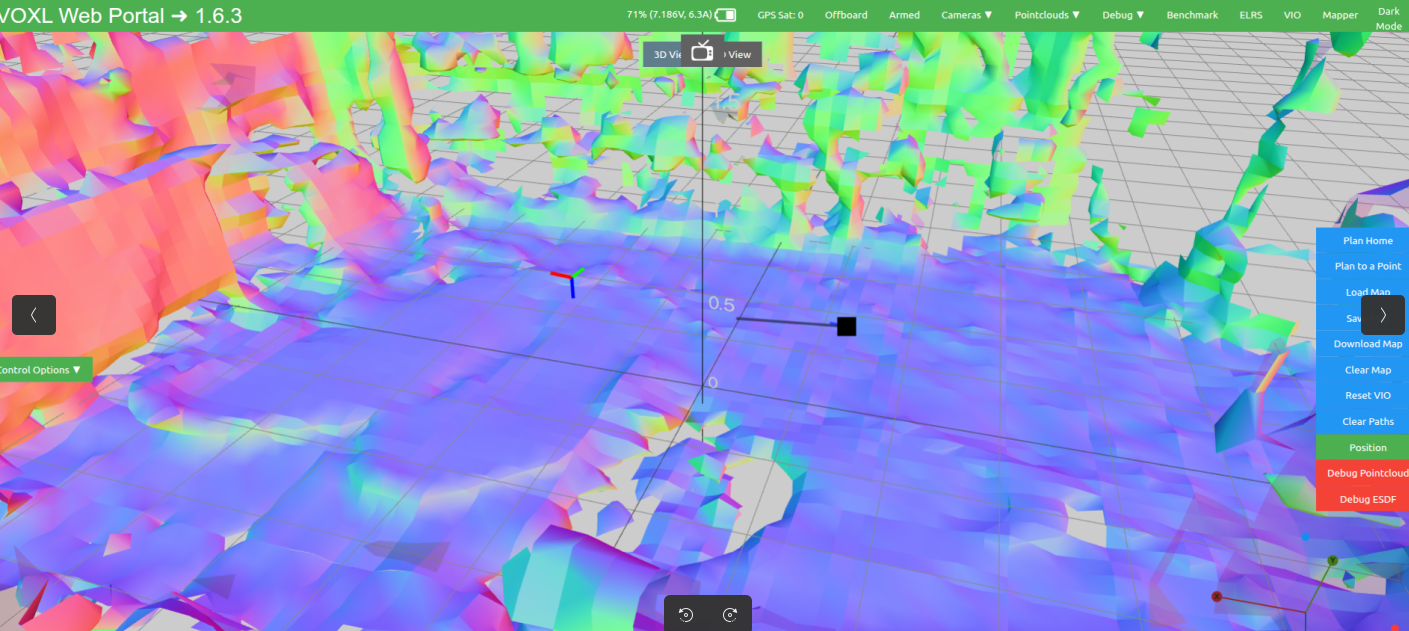
I have just updated to SDK 1.6.3 doing a complete wipe and applying the factory configuration, but the drone is still executing the trajectory in reverse/backwards. I really don't know what else to try at this point. Any ideas on what could be causing this inverted behavior despite the clean install?
-
-
@DronAlan Hi there, when the camera was rotated 180, you'll have stable take off behavior, but any XY movement would cause the drone to 'fly away' quickly.
Taking a step back with your concerns on physical mounts:
-
checking camera orientation:
a. bring up the front camera in portal: it should be upright orientation, e.g. top of the camera image should be from the top of the drone itself ("tops are aligned"). -
Since you are using qvio, only 1 camera is supported. Ensure in
/etc/modalai/vio_cams.confhastracking_downdisabled, It's a safeguard if qvio is accidentally using that camera (would would lead to a orientation problem).
As for IMU, the voxl2 unit should have the USB-C port facing the bottom/ground side (and WiFi dongle on the top side). Let's force reset the imu calibration. If you run on the drone
voxl-calibrate-imuand follow the directions, will reset the imu.Let's check these items. If they all pass and still presents the orientation problem, then it's worth moving to the SDK1.6.3 to take advantage of the advanced config installer.
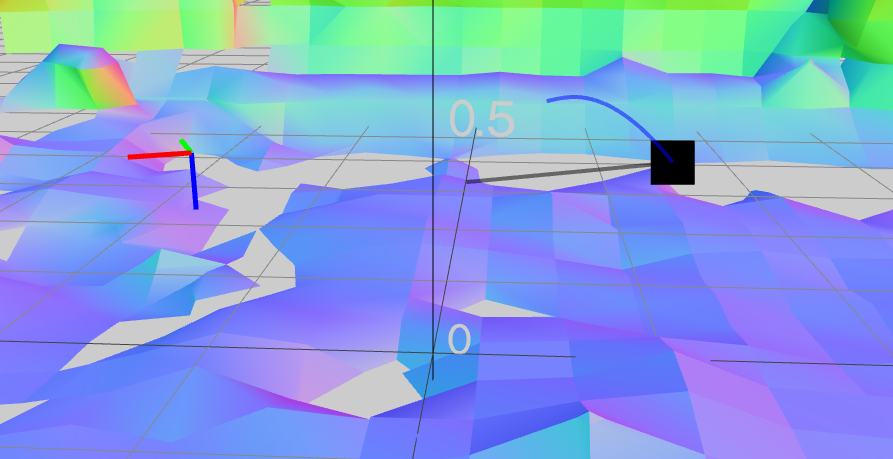
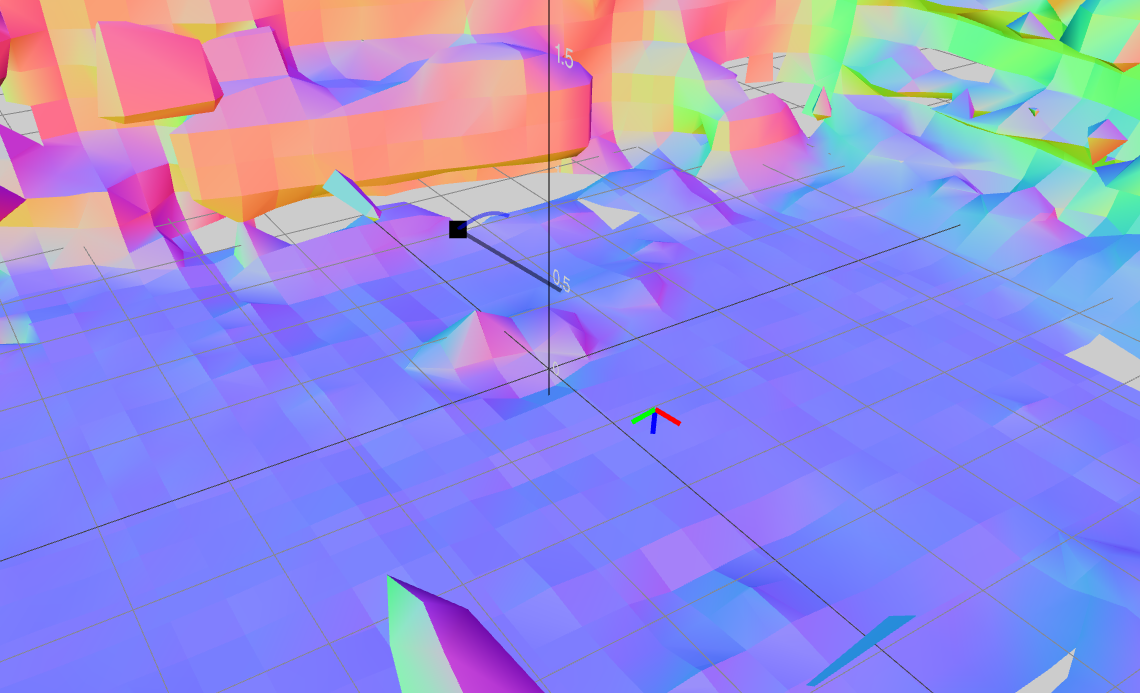
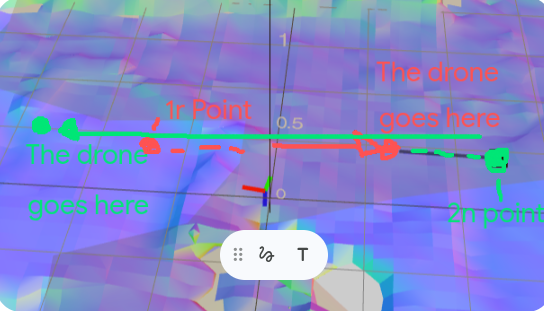
I am experiencing a severe issue with trajectory execution in the SLAM/Mapper mode where the drone exhibits an inverted and cumulative 'mirror' behavior regarding position setpoints.
As shown in the attached image:
- If I set a first waypoint directly in front of the drone (1st Point), the drone flies backward instead, covering the intended distance but in the exact opposite direction.
- From that new incorrect position, if I command the drone to return backward by the same distance (2nd point, aiming to return to the original starting location), the drone does not return. Instead, it flies forward, doubling the distance in the opposite direction from the newly commanded point.
It appears as though the drone is accumulating a starting error or interpreting the coordinate frame in a completely mirrored way (FRD vs NED mismatch), where both the direction and the origin reference point are inverted. The dashed lines in the image represent the intended path, while the solid arrows represent the actual path flown. I am on SDK 1.6.3 with factory settings.
-
-
I have just updated to SDK 1.6.3 doing a complete wipe and applying the factory configuration, but the drone is still executing the trajectory in reverse/backwards. I really don't know what else to try at this point. Any ideas on what could be causing this inverted behavior despite the clean install?
@DronAlan With 1.6.3 SDK upgrade, did you test against the figure 8/offboard mode? Also flying in position mode after drawing the trajectory, if you manually fly the path you created, does the drone follow correctly? If position mode manual flying is working fine and figure 8/offboard mode is working fine (a clockwise figure
 then we have a trajectory calculation problem on the voxl-mapper side (I'll check our code, but our QA currently show that was working properly).
Since you're using OpenVINS vio module now, there's an unlikely chance of a reset causing a 180 orientation change by design. Also make sure qvio is disabled. You can check if it's running via
voxl-inspect-servicesand runsystemctl disable voxl-qvio-server(+reboot). -
@DronAlan With 1.6.3 SDK upgrade, did you test against the figure 8/offboard mode? Also flying in position mode after drawing the trajectory, if you manually fly the path you created, does the drone follow correctly? If position mode manual flying is working fine and figure 8/offboard mode is working fine (a clockwise figure
then we have a trajectory calculation problem on the voxl-mapper side (I'll check our code, but our QA currently show that was working properly).Since you're using OpenVINS vio module now, there's an unlikely chance of a reset causing a 180 orientation change by design. Also make sure qvio is disabled. You can check if it's running via
voxl-inspect-servicesand runsystemctl disable voxl-qvio-server(+reboot).{
"config_file_version": 1,
"en_localhost_mavlink_udp": false,
"localhost_udp_port_number": 14551,
"en_vio": true,
"vio_pipe": "qvio",
"secondary_vio_pipe": "ov",
"vfc_vio_pipe": "ov",
"en_reset_vio_if_initialized_inverted": true,
"vio_warmup_s": 3,
"send_odom_while_failed": true,
"horizon_cal_tolerance": 0.5,
"en_hitl": false,
"offboard_mode": "figure_eight",
"follow_tag_id": 0,
"figure_eight_move_home": true,
"robot_radius": 0.300000011920929,
"collision_sampling_dt": 0.1,
"max_lookahead_distance": 1,
"wps_move_home": true,
"wps_stride": 0,
"wps_timeout": 0,
"wps_damp": 1,
"wps_vfc_mission": true,
"wps_vfc_mission_loop": false,
"wps_vfc_mission_to_ramp": 25,
"wps_vfc_mission_to_kp": 0.10000000149011612,
"wps_vfc_mission_cruise_speed": 1,
"tracking_trigger_ch": 12,
"tracking_trigger_ch_thresh_temp": 1200,
"tracking_trigger_ch_thresh_new": 1800,
"en_tag_fixed_frame": false,
"fixed_frame_filter_len": 5,
"en_transform_mavlink_pos_setpoints_from_fixed_frame": false,
"en_voa": true,
"voa_upper_bound_m": -0.15000000596046448,
"voa_lower_bound_m": 0.15000000596046448,
"voa_voa_memory_s": 1,
"voa_max_pc_per_fusion": 100,
"voa_pie_max_dist_m": 20,
"voa_pie_min_dist_m": 0.25,
"voa_pie_under_trim_m": 1,
"voa_pie_threshold": 3,
"voa_send_rate_hz": 20,
"voa_pie_slices": 36,
"voa_pie_bin_depth_m": 0.15000000596046448,
"voa_inputs": [{
"enabled": true,
"type": "point_cloud",
"input_pipe": "dfs_point_cloud",
"frame": "stereo_l",
"max_depth": 8,
"min_depth": 0.300000011920929,
"cell_size": 0.079999998211860657,
"threshold": 4,
"x_fov_deg": 68,
"y_fov_deg": 56,
"conf_cutoff": 0
}, {
"enabled": true,
"type": "point_cloud",
"input_pipe": "stereo_front_pc",
"frame": "stereo_front_l",
"max_depth": 8,
"min_depth": 0.300000011920929,
"cell_size": 0.079999998211860657,
"threshold": 4,
"x_fov_deg": 68,
"y_fov_deg": 56,
"conf_cutoff": 0
}, {
"enabled": true,
"type": "point_cloud",
"input_pipe": "stereo_rear_pc",
"frame": "stereo_rear_l",
"max_depth": 8,
"min_depth": 0.300000011920929,
"cell_size": 0.079999998211860657,
"threshold": 4,
"x_fov_deg": 68,
"y_fov_deg": 56,
"conf_cutoff": 0
}, {
"enabled": true,
"type": "tof",
"input_pipe": "tof",
"frame": "tof",
"max_depth": 6,
"min_depth": 0.15000000596046448,
"cell_size": 0.079999998211860657,
"threshold": 3,
"x_fov_deg": 106.5,
"y_fov_deg": 85.0999984741211,
"conf_cutoff": 125
}, {
"enabled": true,
"type": "rangefinder",
"input_pipe": "rangefinders",
"frame": "body",
"max_depth": 8,
"min_depth": 0.300000011920929,
"cell_size": 0.079999998211860657,
"threshold": 4,
"x_fov_deg": 68,
"y_fov_deg": 56,
"conf_cutoff": 0
}]
}this is my /etc/modalai/voxl-vision-hub.conf, what should i change????
-
Hi there, just to confirm: does flying manually in position mode work and follows the XYZ position in voxl-portal's VIO page. as well as follows figure 8 mode too? This will confirm the vio pose estimate is correct and more of a issue on mapper.
-
Hi there, just to confirm: does flying manually in position mode work and follows the XYZ position in voxl-portal's VIO page. as well as follows figure 8 mode too? This will confirm the vio pose estimate is correct and more of a issue on mapper.
@Cliff-Wong Yes, I can confirm that flying manually in Position mode works correctly and accurately follows the XYZ coordinates shown in the voxl-portal VIO page. Additionally, the drone successfully performs the figure 8 trajectories in offboard mode as expected.
-
@Cliff-Wong Yes, I can confirm that flying manually in Position mode works correctly and accurately follows the XYZ coordinates shown in the voxl-portal VIO page. Additionally, the drone successfully performs the figure 8 trajectories in offboard mode as expected.
@DronAlan
Hi there, the configuration & extrinsics files look fine (just switch offboard mode fromfigure_eightback totrajectorymode. Since you confirmed figure 8 and position mode are working fine and reflect true ground truth in voxl portal, next is to dive a bit deep into the processes:Just to confirm: are you using a loaded saved map? Orientation can be different in a loaded maps based on how it was saved. Going forward in debugging this I would create the map while flying, then test plan-to-point to ensure it is working properly.
- Before take off, if you ssh onto the drone and run
voxl-vision-hub --debug_offboardand rerun the mapping test (point 1m in front of the drone hovering), and you don't need to map the entire room, just get the general area. - In the ssh session, monitor the output from
voxl-vision-hub. - Take off and fly forward and backward in position mode, with some slight yaw motions to generate a decent map in voxl portal (recall we're generating a map in flight then plan to fly to a point, not using a old-saved map).
- Then switch into trajectory mode. In the ssh session, you should get a
Received trajectory has durationmessage printed. - Goto voxl-portal and plan-a-point. Then execute go-to-point. In the ssh session you should get a
Received insert command.printed out on the terminal. And it will show the drone's forward commands, i..e set points, to your planned point. I expect thecommanding: XYZvalues to increase in the positive X direction. Please post the output of the ssh session here.
If the drone moves in the backwards direction as you've been seeing but the commanding XYZs are moving forward, we have found our problem (PX4 issue such that I'll need your params file). If the drone moves forward with commanding XYZs are moving forward then it's how your older maps are being saved and we can go from there.
- Before take off, if you ssh onto the drone and run

Reading along? Create a free ModalAI Forum account to join in.
With an account you can reply, ask your own question, get an email when a ModalAI engineer answers, and mark the reply that solved it. Your place in each thread is saved between visits.
Questions about VOXL, Flight Core, ESCs and ModalAI drones are answered here by the engineers who build them.
Register Login