
Consistent camera not found (M00014 and M0076 or M0135)
-
Hi,
The error is probably very obvious but I'm just not able to see it at the moment.
We're trying to setup a new voxl2 mini with a tracking camera, but we simply cannot get the camera recognized by the voxl-camera-server. I have tried with both M0076 and M0135 interposers.
For example, if we try to replicate the setup from https://docs.modalai.com/voxl2-mini-image-sensors/
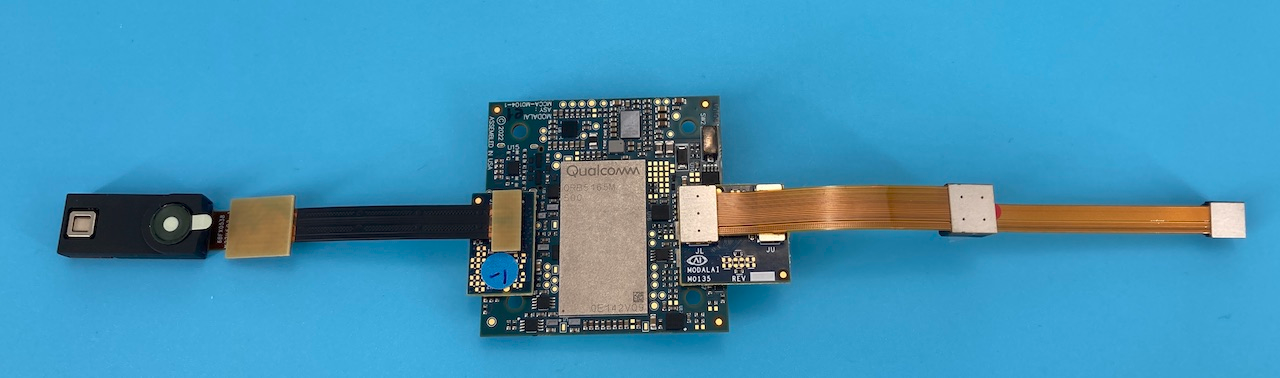
for just the tracking camera, that means connecting M0014 to M0135/JU to J7 on the voxl2 mini. None of the other camera are connected, for now we're just interested in the tracking. We can try the same with the M0076, but I just want to follow this image explicitly.
Once I do this I configure the camera as follows:
$ camera-server-config-helper tracking:ov7251:3
successfully wrote this camera config to disk:
=================================================================
configuration for 1 cameras:

cam #0
    name:                tracking
    sensor type:         ov7251
    isEnabled:           1
    camId:               3
    camId2:              -1
    fps:                 30
    en_rotate:           0
    en_rotate2:          0

    en_preview:          1
    pre_width:           640
    pre_height:          480
    en_raw_preview:      1

    en_small_video:      0
    small_video_width:   -1
    small_video_height:  -1

    en_large_video:      0
    large_video_width:   -1
    large_video_height:  -1

    en_misp:             0
    misp_width:          -1
    misp_height:         -1

    en_snapshot:         0
    snap_width:          -1
    snap_height:         -1
    exif_focal_length:   0.000000
    exif_focal_len_35mm_format:0
    exif_fnumber:        0.000000

    ae_mode:             lme_msv
    msv_exposure_min_us: 20
    msv_exposure_max_us: 33000
    gain_min           : 54
    gain_max           : 8000
    standby_enabled:     0
    decimator:           1
    independent_exposure:0

fsync_en:            0
fsync_gpio:          109
=================================================================
camera_server_config_helper is done
After which I run
$ voxl-camera-server -d 0
=================================================================
configuration for 1 cameras:

cam #0
    name:                tracking
    sensor type:         ov7251
    isEnabled:           1
    camId:               3
    camId2:              -1
    fps:                 30
    en_rotate:           0
    en_rotate2:          0

    en_preview:          1
    pre_width:           640
    pre_height:          480
    en_raw_preview:      1

    en_small_video:      0
    small_video_width:   -1
    small_video_height:  -1

    en_large_video:      0
    large_video_width:   -1
    large_video_height:  -1

    en_misp:             0
    misp_width:          -1
    misp_height:         -1

    en_snapshot:         0
    snap_width:          -1
    snap_height:         -1
    exif_focal_length:   0.000000
    exif_focal_len_35mm_format:0
    exif_fnumber:        0.000000

    ae_mode:             lme_msv
    msv_exposure_min_us: 20
    msv_exposure_max_us: 33000
    gain_min           : 54
    gain_max           : 8000
    standby_enabled:     0
    decimator:           1
    independent_exposure:0

fsync_en:            0
fsync_gpio:          109
=================================================================
DEBUG:   Attempting to open the hal module
DEBUG:   SUCCESS: Camera module opened on attempt 0
DEBUG:   ----------- Number of cameras: 0

VERBOSE: cci-direct: using voxl_platform_mod config 1 and 2 layout
ERROR:   Found zero cameras connected, need at least one.
I've tried with different hardware IDs, but from what I can see from the documentation it should be three. No ID lets the camera server find a camera.
Version info:
system-image: 1.8.04-M0104-14.1a-perf
kernel:       #1 SMP PREEMPT Mon Mar 24 21:03:36 UTC 2025 4.19.125
────────────────────────────────────────────────────────────────────────────────
hw platform:  M0104
mach.var:     2.0.2
SKU:          MCCA-M0104-C0-T0-M0-X0
────────────────────────────────────────────────────────────────────────────────
voxl-suite:   1.5.1
Curious if anyone can see what I'm doing wrong?
-
Hi,
The error is probably very obvious but I'm just not able to see it at the moment.
We're trying to setup a new voxl2 mini with a tracking camera, but we simply cannot get the camera recognized by the voxl-camera-server. I have tried with both M0076 and M0135 interposers.
For example, if we try to replicate the setup from https://docs.modalai.com/voxl2-mini-image-sensors/
for just the tracking camera, that means connecting M0014 to M0135/JU to J7 on the voxl2 mini. None of the other camera are connected, for now we're just interested in the tracking. We can try the same with the M0076, but I just want to follow this image explicitly.
Once I do this I configure the camera as follows:
$ camera-server-config-helper tracking:ov7251:3
successfully wrote this camera config to disk:
=================================================================
configuration for 1 cameras:

cam #0
    name:                tracking
    sensor type:         ov7251
    isEnabled:           1
    camId:               3
    camId2:              -1
    fps:                 30
    en_rotate:           0
    en_rotate2:          0

    en_preview:          1
    pre_width:           640
    pre_height:          480
    en_raw_preview:      1

    en_small_video:      0
    small_video_width:   -1
    small_video_height:  -1

    en_large_video:      0
    large_video_width:   -1
    large_video_height:  -1

    en_misp:             0
    misp_width:          -1
    misp_height:         -1

    en_snapshot:         0
    snap_width:          -1
    snap_height:         -1
    exif_focal_length:   0.000000
    exif_focal_len_35mm_format:0
    exif_fnumber:        0.000000

    ae_mode:             lme_msv
    msv_exposure_min_us: 20
    msv_exposure_max_us: 33000
    gain_min           : 54
    gain_max           : 8000
    standby_enabled:     0
    decimator:           1
    independent_exposure:0

fsync_en:            0
fsync_gpio:          109
=================================================================
camera_server_config_helper is done
After which I run
$ voxl-camera-server -d 0
=================================================================
configuration for 1 cameras:

cam #0
    name:                tracking
    sensor type:         ov7251
    isEnabled:           1
    camId:               3
    camId2:              -1
    fps:                 30
    en_rotate:           0
    en_rotate2:          0

    en_preview:          1
    pre_width:           640
    pre_height:          480
    en_raw_preview:      1

    en_small_video:      0
    small_video_width:   -1
    small_video_height:  -1

    en_large_video:      0
    large_video_width:   -1
    large_video_height:  -1

    en_misp:             0
    misp_width:          -1
    misp_height:         -1

    en_snapshot:         0
    snap_width:          -1
    snap_height:         -1
    exif_focal_length:   0.000000
    exif_focal_len_35mm_format:0
    exif_fnumber:        0.000000

    ae_mode:             lme_msv
    msv_exposure_min_us: 20
    msv_exposure_max_us: 33000
    gain_min           : 54
    gain_max           : 8000
    standby_enabled:     0
    decimator:           1
    independent_exposure:0

fsync_en:            0
fsync_gpio:          109
=================================================================
DEBUG:   Attempting to open the hal module
DEBUG:   SUCCESS: Camera module opened on attempt 0
DEBUG:   ----------- Number of cameras: 0

VERBOSE: cci-direct: using voxl_platform_mod config 1 and 2 layout
ERROR:   Found zero cameras connected, need at least one.
I've tried with different hardware IDs, but from what I can see from the documentation it should be three. No ID lets the camera server find a camera.
Version info:
system-image: 1.8.04-M0104-14.1a-perf
kernel:       #1 SMP PREEMPT Mon Mar 24 21:03:36 UTC 2025 4.19.125
────────────────────────────────────────────────────────────────────────────────
hw platform:  M0104
mach.var:     2.0.2
SKU:          MCCA-M0104-C0-T0-M0-X0
────────────────────────────────────────────────────────────────────────────────
voxl-suite:   1.5.1
Curious if anyone can see what I'm doing wrong?
@Morten-Nissov you have the kernel variant 2.0.2, which works with M0188 and M0195 camera adapters, but not the adapters you are using. Please update your kernel to use 2.0.0, there are details in a recent question here : https://forum.modalai.com/topic/4975/hardware-configuration-for-2-m0014-tracking-1-m0169-pmd-tof-1-m0024-hires/7
Alex
-
@Morten-Nissov you have the kernel variant 2.0.2, which works with M0188 and M0195 camera adapters, but not the adapters you are using. Please update your kernel to use 2.0.0, there are details in a recent question here : https://forum.modalai.com/topic/4975/hardware-configuration-for-2-m0014-tracking-1-m0169-pmd-tof-1-m0024-hires/7
Alex
@Alex-Kushleyev We made a couple discoveries:
- First, thanks for referring me to this other topic, I'm not sure how I missed this. Switching, temporarily, to kernel 2.0.0 does result in connector J7 functioning, however J6 still does not for some reasons.
- Otherwise, a colleague discovered that some SKU configurations with kernel 2.0.2 actually still work, for example the voxl2-mini-test-fixture (TF-M0104) seems to work with the older interposers and cameras. I guess it is related to this having cam config 6.
As a result we have the following questions
- I would still be curious to figure out if I have hardware problems with J6, what logging information could help with this?
- Is there any downside to using the voxl2-mini-test-fixture configuration, the only desire being to use the newer SDK while having the older cameras functioning?
-
@Alex-Kushleyev We made a couple discoveries:
- First, thanks for referring me to this other topic, I'm not sure how I missed this. Switching, temporarily, to kernel 2.0.0 does result in connector J7 functioning, however J6 still does not for some reasons.
- Otherwise, a colleague discovered that some SKU configurations with kernel 2.0.2 actually still work, for example the voxl2-mini-test-fixture (TF-M0104) seems to work with the older interposers and cameras. I guess it is related to this having cam config 6.
As a result we have the following questions
- I would still be curious to figure out if I have hardware problems with J6, what logging information could help with this?
- Is there any downside to using the voxl2-mini-test-fixture configuration, the only desire being to use the newer SDK while having the older cameras functioning?
Is it just the specific camera (tracking) not working in a specific port? what if you connect TOF or IMX214 camera there?
For your configuration using the M0135 interposer, kernel variant 2.0.0 is the correct one to use. Using kernel 2.0.2 will result in some cameras not working due to different pins used for camera reset (which get properly routed in M0188 and M0195 camera adapter boards for the coax cameras).
So i would suggest using the correct kernel 2.0.0, then test one camera at a time and see if you can narrow it down to a camera or port not working.
Alex


Reading along? Create a free ModalAI Forum account to join in.
With an account you can reply, ask your own question, get an email when a ModalAI engineer answers, and mark the reply that solved it. Your place in each thread is saved between visits.
Questions about VOXL, Flight Core, ESCs and ModalAI drones are answered here by the engineers who build them.
Register Login