
voxl-mavlink-server GCS udp port
-
I just realized you could also probably resolve this issue by leaving the gcs ip addresses blank in the config file for voxl-mavlink-server. That would force QGC to make a server side connection because there wouldn't be any heartbeats on the local port (I think QGC link manager checks local udp port first, hence the auto connection issue).
-
@Eric-Katzfey I'm just trying to connect to and monitor multiple vehicles, yes QGC supports that
I tested a modified voxl-mavlink-server with the configurable gcs udp port and assigned separate ports for each vehicle and it resolved the issue.
I don't think it's a qgc issue unless their link manager is designed to differentiate multiple vehicles publishing to the same udp port on the ground station. I can raise the issue on their forum as well though
I'm assuming 14560 - 14580 is a safe range, but is there any way to verify there are no conflicts short of going through every voxl service to check which publish/receive over udp?
@jmltt Hi Man, so we are also trying to do something similar. We want to change the hard coded UDP port on the voxl crafts, it would be really helpful if you could share the modified voxl-mavlink-server with the configurable gcs udp port which worked for you. Thank you.
-
@jmltt Hi Man, so we are also trying to do something similar. We want to change the hard coded UDP port on the voxl crafts, it would be really helpful if you could share the modified voxl-mavlink-server with the configurable gcs udp port which worked for you. Thank you.
@ashwin I just added a parameter called qgc_udp_port to config_file.h/c in voxl-mavlink-server (you can use the same syntax as used for any of the other port number variables in the config file to add it) and then added some logic to the gcs_io.c file where it makes the connections and rebuilt voxl-mavlink-server locally. I don't have that version somewhere publically available, but the required changes are so minor you could easily update and rebuild voxl-mavlink-server yourself
In the gcs_io_init(void) function in gcs_io.c you could replace the line
si_me_gcs.sin_port = htons(GCS_UDP_PORT);
with something like
si_me_gcs.sin_port = htons((uint16_t)qgc_udp_port);
where qgc_udp_port is the variable you add to the config file. You'd also need to go the _add_connection(unsigned long ip) function and replace
connections[i].sockaddr.sin_port = htons(GCS_UDP_PORT);
with something like
connections[i].sockaddr.sin_port = htons((uint16_t)gcs_udp_publish_port);
I also added some logic to check that the user generated port number is within a valid range and only change it for each connection if it's not equal to the value defined by GCS_UDP_PORT (14550), but that's not strictly necessary.
This was all done for voxl-mavlink-server in SDK 1.3.5. I don't know how much the logic has changed in the more recent SDK versions, but I imagine these changes would carry over
-
@ashwin I just added a parameter called qgc_udp_port to config_file.h/c in voxl-mavlink-server (you can use the same syntax as used for any of the other port number variables in the config file to add it) and then added some logic to the gcs_io.c file where it makes the connections and rebuilt voxl-mavlink-server locally. I don't have that version somewhere publically available, but the required changes are so minor you could easily update and rebuild voxl-mavlink-server yourself
In the gcs_io_init(void) function in gcs_io.c you could replace the line
si_me_gcs.sin_port = htons(GCS_UDP_PORT);
with something like
si_me_gcs.sin_port = htons((uint16_t)qgc_udp_port);
where qgc_udp_port is the variable you add to the config file. You'd also need to go the _add_connection(unsigned long ip) function and replace
connections[i].sockaddr.sin_port = htons(GCS_UDP_PORT);
with something like
connections[i].sockaddr.sin_port = htons((uint16_t)gcs_udp_publish_port);
I also added some logic to check that the user generated port number is within a valid range and only change it for each connection if it's not equal to the value defined by GCS_UDP_PORT (14550), but that's not strictly necessary.
This was all done for voxl-mavlink-server in SDK 1.3.5. I don't know how much the logic has changed in the more recent SDK versions, but I imagine these changes would carry over
@jmltt There were some places in voxl-mavlink-server where the system id was hardcoded to 1. This may have been causing problems when trying to enable multi-uav support in QGC. That has now been fixed and so it should be possible to use multi-uav in QGC now where each vehicle is assigned a separate system id. http://voxl-packages.modalai.com/dists/qrb5165/dev/binary-arm64/voxl-mavlink-server_1.4.12-202509181025_arm64.deb
-
@ashwin I just added a parameter called qgc_udp_port to config_file.h/c in voxl-mavlink-server (you can use the same syntax as used for any of the other port number variables in the config file to add it) and then added some logic to the gcs_io.c file where it makes the connections and rebuilt voxl-mavlink-server locally. I don't have that version somewhere publically available, but the required changes are so minor you could easily update and rebuild voxl-mavlink-server yourself
In the gcs_io_init(void) function in gcs_io.c you could replace the line
si_me_gcs.sin_port = htons(GCS_UDP_PORT);
with something like
si_me_gcs.sin_port = htons((uint16_t)qgc_udp_port);
where qgc_udp_port is the variable you add to the config file. You'd also need to go the _add_connection(unsigned long ip) function and replace
connections[i].sockaddr.sin_port = htons(GCS_UDP_PORT);
with something like
connections[i].sockaddr.sin_port = htons((uint16_t)gcs_udp_publish_port);
I also added some logic to check that the user generated port number is within a valid range and only change it for each connection if it's not equal to the value defined by GCS_UDP_PORT (14550), but that's not strictly necessary.
This was all done for voxl-mavlink-server in SDK 1.3.5. I don't know how much the logic has changed in the more recent SDK versions, but I imagine these changes would carry over
@jmltt So reading the original issue that you were having back in November. The Deb file that Eric posted will solve the issue of mismatching communication links in QGC. I tested it and it works. The problem was that the voxl-mavlink-server was assigning every drone sys id 1 regardless of the MAV_SYS_ID parameter. This resulted in QGC assuming each of the drones were the same since the SYS ID on connection were the same.
Now as for why the drones were all connecting at once sounds like the autoconnect for UDP is enabled. The drones should not connect unless given the IP address + Port number in the comm link like you described. If QGC is setup to autoconnect to any UDP connections then that would explain why since all of the drone are set to communicate on 14550.
https://docs.qgroundcontrol.com/master/en/qgc-user-guide/settings_view/general.html#auto_connect
I understand why changing the port number would help prevent confusion but I don't think 4 drones using port 14550 is the issue as other have had multiple drones all on 14550 connected to a single QGC instance. There are issues if you are suing a simulation but not for physical drones.
-
@jmltt So reading the original issue that you were having back in November. The Deb file that Eric posted will solve the issue of mismatching communication links in QGC. I tested it and it works. The problem was that the voxl-mavlink-server was assigning every drone sys id 1 regardless of the MAV_SYS_ID parameter. This resulted in QGC assuming each of the drones were the same since the SYS ID on connection were the same.
Now as for why the drones were all connecting at once sounds like the autoconnect for UDP is enabled. The drones should not connect unless given the IP address + Port number in the comm link like you described. If QGC is setup to autoconnect to any UDP connections then that would explain why since all of the drone are set to communicate on 14550.
https://docs.qgroundcontrol.com/master/en/qgc-user-guide/settings_view/general.html#auto_connect
I understand why changing the port number would help prevent confusion but I don't think 4 drones using port 14550 is the issue as other have had multiple drones all on 14550 connected to a single QGC instance. There are issues if you are suing a simulation but not for physical drones.
@Aaron-Porter I'm sure the system id fix might have resolved the issue. I just find having separate ports for each vehicle to establish a connection over a cleaner option. This isn't an issue for me anymore, I was just responding to the question on the approach I used to resolve it
-
@Aaron-Porter I'm sure the system id fix might have resolved the issue. I just find having separate ports for each vehicle to establish a connection over a cleaner option. This isn't an issue for me anymore, I was just responding to the question on the approach I used to resolve it
@jmltt I understand it is personal preference, I just wanted to give more detail on the issue that you were originally seeing incase anyone else ran into the same problem. Shouldn't happen in the future with the recent changes, but some still use older SDK versions.
-
I am also having this issue. I think that the voxl-mavlink-server may have an incorrect implementation of the "server" side of the UDP connection. My evidence would be that using mavproxy.py from a remote computer in client mode (e.g. mavproxy.py --master=udpout:192.168.83.254:14550) does not receive packets from the server, but the server does detect the connection.
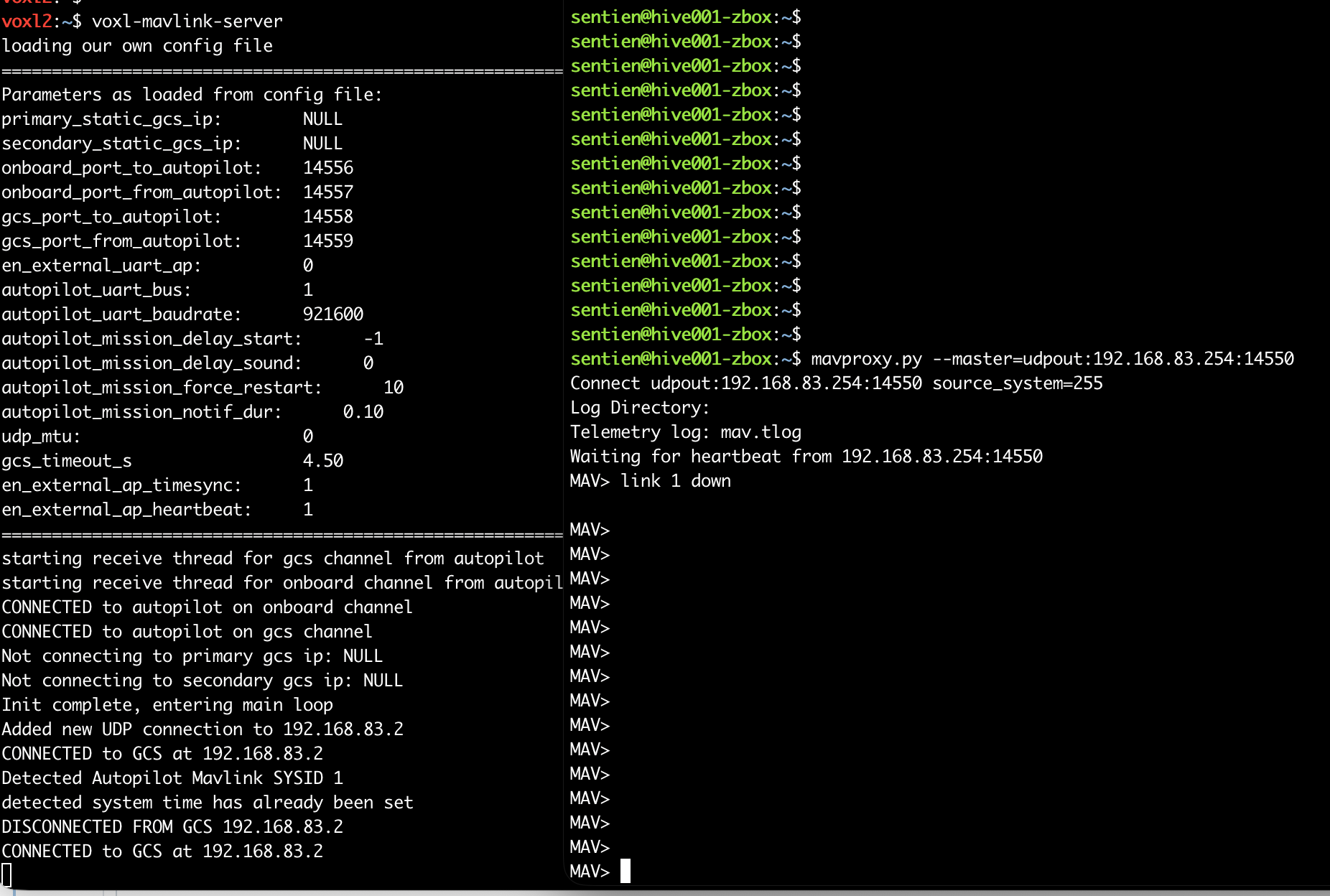
I took a look at wireshark and saw that the voxl-mavlink-server in "server" mode is not replying to the mavproxy.py client on the correct port. It is replying to 14550 at the client (incorrect). See the picture below, but ignore IPs as data capture was on a different network. You can see the mavproxy client sending from port 33935 to voxl at 14550, but the voxl incorrectly replies back to 14550 on the client computer when it should be replying back to 33935.
The side-effect of this is that you cannot have two independent clients (talking to different drones) running on the same computer because both drones will send their data to the same port. Computers only allow one process to be a server on a given port.

-
I am also having this issue. I think that the voxl-mavlink-server may have an incorrect implementation of the "server" side of the UDP connection. My evidence would be that using mavproxy.py from a remote computer in client mode (e.g. mavproxy.py --master=udpout:192.168.83.254:14550) does not receive packets from the server, but the server does detect the connection.
I took a look at wireshark and saw that the voxl-mavlink-server in "server" mode is not replying to the mavproxy.py client on the correct port. It is replying to 14550 at the client (incorrect). See the picture below, but ignore IPs as data capture was on a different network. You can see the mavproxy client sending from port 33935 to voxl at 14550, but the voxl incorrectly replies back to 14550 on the client computer when it should be replying back to 33935.
The side-effect of this is that you cannot have two independent clients (talking to different drones) running on the same computer because both drones will send their data to the same port. Computers only allow one process to be a server on a given port.
@brandon Agreed, the code has a fixed port but should use the source port. We will fix that and also add configurable ports for the gcs IP addresses in the configuration file.
-
I am also having this issue. I think that the voxl-mavlink-server may have an incorrect implementation of the "server" side of the UDP connection. My evidence would be that using mavproxy.py from a remote computer in client mode (e.g. mavproxy.py --master=udpout:192.168.83.254:14550) does not receive packets from the server, but the server does detect the connection.
I took a look at wireshark and saw that the voxl-mavlink-server in "server" mode is not replying to the mavproxy.py client on the correct port. It is replying to 14550 at the client (incorrect). See the picture below, but ignore IPs as data capture was on a different network. You can see the mavproxy client sending from port 33935 to voxl at 14550, but the voxl incorrectly replies back to 14550 on the client computer when it should be replying back to 33935.
The side-effect of this is that you cannot have two independent clients (talking to different drones) running on the same computer because both drones will send their data to the same port. Computers only allow one process to be a server on a given port.
@brandon The latest voxl-mavlink-server is available here: http://voxl-packages.modalai.com/dists/qrb5165/dev/binary-arm64/voxl-mavlink-server_1.4.12-202511040816_arm64.deb. This has added configuration for the GCS ports and also fixes the above issue so that it now responds to the correct port.


Reading along? Create a free ModalAI Forum account to join in.
With an account you can reply, ask your own question, get an email when a ModalAI engineer answers, and mark the reply that solved it. Your place in each thread is saved between visits.
Questions about VOXL, Flight Core, ESCs and ModalAI drones are answered here by the engineers who build them.
Register Login