
Drone Flipping on Take off
-
Hello, I have a voxl flight deck 2 with the 4 in 1 esc using the SunnySky V2806 v 650 motors. I've gone through the ESC calibration with props on defined on the git and motors seem to be able to spin up to correct rpm, however when I go to actually fly giving any throttle the drone pitches hard up and attempts to flip.
https://review.px4.io/plot_app?log=20ac3c83-485a-41ce-94a0-cca4886b4724
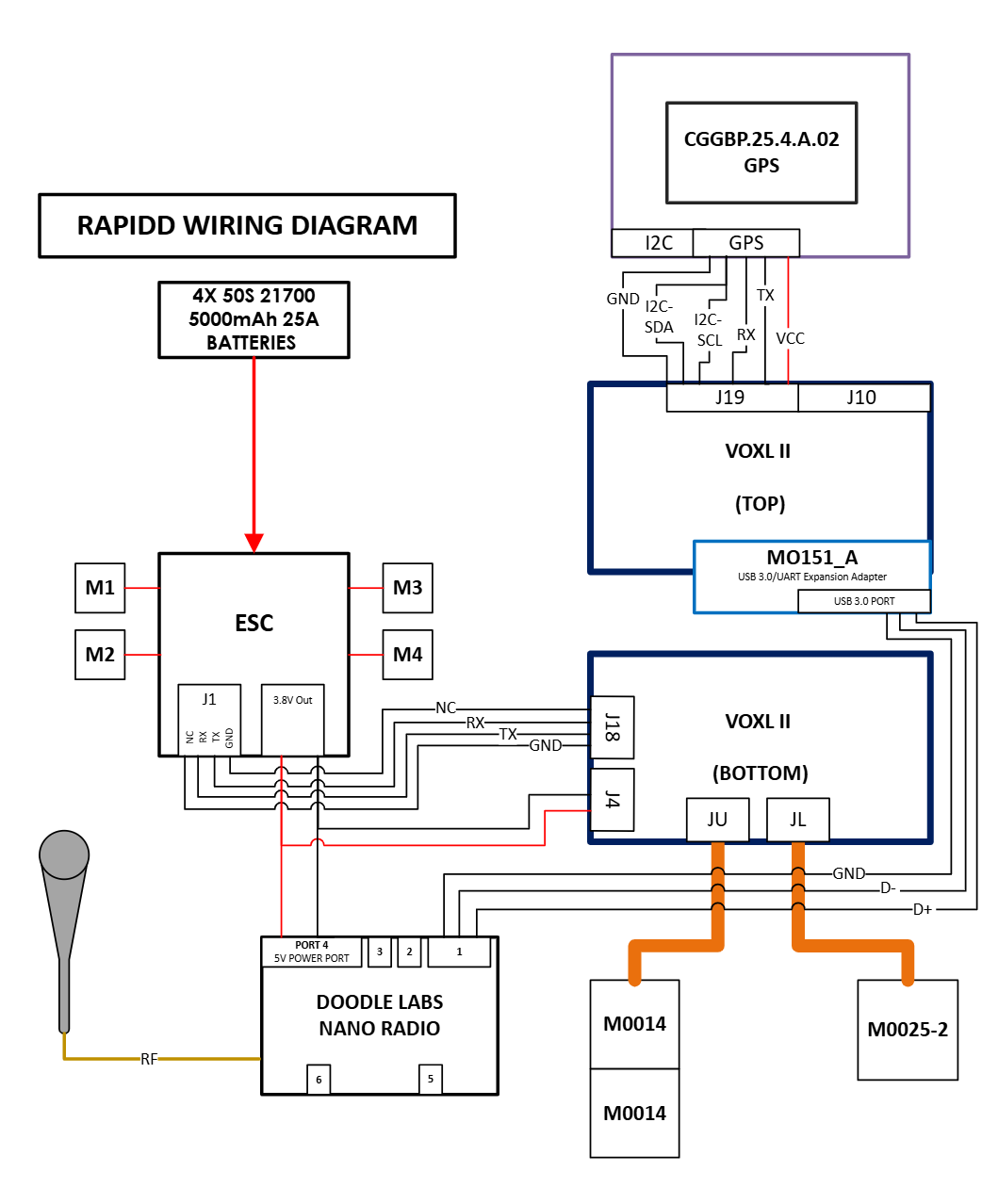
It seems like 2 of the motors are not reaching the same rpm as the others and I think this may be my issue, but when I run ./voxl-esc-spin.py --id 3 --rpm 4000 --ramp-time 2.0 all motors seem to ramp up and able to hold 4000 rpm fairly constantly so I don't think the esc calibration is the issue. I've also turned the px4 PID down pretty low just to try to get the drone in the air.
There seems to be something I am missing in this setup so I'm trying to get any answers, thanks.
-
Hello, I have a voxl flight deck 2 with the 4 in 1 esc using the SunnySky V2806 v 650 motors. I've gone through the ESC calibration with props on defined on the git and motors seem to be able to spin up to correct rpm, however when I go to actually fly giving any throttle the drone pitches hard up and attempts to flip.
https://review.px4.io/plot_app?log=20ac3c83-485a-41ce-94a0-cca4886b4724
It seems like 2 of the motors are not reaching the same rpm as the others and I think this may be my issue, but when I run ./voxl-esc-spin.py --id 3 --rpm 4000 --ramp-time 2.0 all motors seem to ramp up and able to hold 4000 rpm fairly constantly so I don't think the esc calibration is the issue. I've also turned the px4 PID down pretty low just to try to get the drone in the air.
There seems to be something I am missing in this setup so I'm trying to get any answers, thanks.
- Check your motor order
- Check motor rotation direction
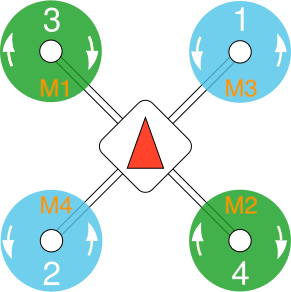
- What is your voxl orientation?
-
- Check your motor order
- Check motor rotation direction
- What is your voxl orientation?
- I'm pretty sure motor order is correct, what is the best way to check/change this my method so far has been running the spin test command you provide and then switching the wires for where they are plugged in, is there a way in software to change this?
- Rotation direction is correct
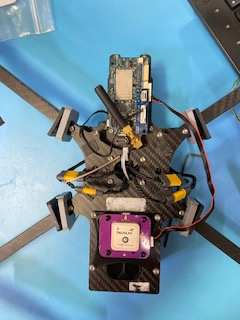
- The voxl orientation matches the voxl 2 flight deck, with the picture below the front is the voxl side going to the top of the image
I have another drone that matched this setup as well that at one point was able to fly and now has a similar issue so I'm trying to figure out why it no longer can fly.
-
- I'm pretty sure motor order is correct, what is the best way to check/change this my method so far has been running the spin test command you provide and then switching the wires for where they are plugged in, is there a way in software to change this?
- Rotation direction is correct
- The voxl orientation matches the voxl 2 flight deck, with the picture below the front is the voxl side going to the top of the image
I have another drone that matched this setup as well that at one point was able to fly and now has a similar issue so I'm trying to figure out why it no longer can fly.
@mkriesel I recommend connecting the drone to QGroundControl and using the spin tool through there to determine correct orientation.
voxl-esc spindoesn't take into account anything px4 is doing to determine motor direction so won't be entirely accurate in term of what direction the motor will spin via the flight controller. -
@mkriesel I recommend connecting the drone to QGroundControl and using the spin tool through there to determine correct orientation.
voxl-esc spindoesn't take into account anything px4 is doing to determine motor direction so won't be entirely accurate in term of what direction the motor will spin via the flight controller.

Reading along? Create a free ModalAI Forum account to join in.
With an account you can reply, ask your own question, get an email when a ModalAI engineer answers, and mark the reply that solved it. Your place in each thread is saved between visits.
Questions about VOXL, Flight Core, ESCs and ModalAI drones are answered here by the engineers who build them.
Register Login