
Voxl2 IO Board
-
Good Day,
We are working with a Voxl2 currently running SDK 1.3, we have just updated the IO board to the newest version of the firmware from the protected downloads page (v1.35, updated 12/04/2023).
We have been attempting to calibrate the tmotor ESC we have, however, it seems voxl2_io is not running on the aircraft. I ran the following command via the Mavlink Console in QGC and received the following output:
"qshell voxl2_io status
INFO [qshell] Send cmd: 'voxl2_io status'
INFO [muorb] SLPI: Marking DeviceNode(qshell_req) as advertised in process_remote_topic
INFO [muorb] SLPI: qshell gotten: voxl2_io status
INFO [muorb] SLPI: arg0 = 'voxl2_io'INFO [muorb] SLPI: arg1 = 'status'
INFO [muorb] SLPI: not running
ERROR [muorb] SLPI: Failed to execute command: voxl2_io status
INFO [qshell] cmd returned with: -1
INFO [qshell] qshell return value timestamp: 85609105, local time: 85611265
ERROR [qshell] Command failed
Command 'qshell' failed, returned -1.
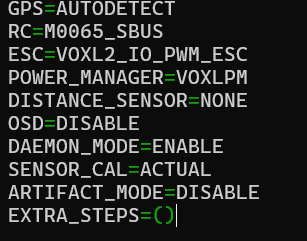
pxh> "I have performed the voxl-configure-px4-params -w and set the params and i have gone into voxl-px4 to make sure ESC=VOXL2_IO_PWM_ESC
What are other troubleshooting steps i can take? how can i confirm my driver is running?
-
Good Day,
We are working with a Voxl2 currently running SDK 1.3, we have just updated the IO board to the newest version of the firmware from the protected downloads page (v1.35, updated 12/04/2023).
We have been attempting to calibrate the tmotor ESC we have, however, it seems voxl2_io is not running on the aircraft. I ran the following command via the Mavlink Console in QGC and received the following output:
"qshell voxl2_io status
INFO [qshell] Send cmd: 'voxl2_io status'
INFO [muorb] SLPI: Marking DeviceNode(qshell_req) as advertised in process_remote_topic
INFO [muorb] SLPI: qshell gotten: voxl2_io status
INFO [muorb] SLPI: arg0 = 'voxl2_io'INFO [muorb] SLPI: arg1 = 'status'
INFO [muorb] SLPI: not running
ERROR [muorb] SLPI: Failed to execute command: voxl2_io status
INFO [qshell] cmd returned with: -1
INFO [qshell] qshell return value timestamp: 85609105, local time: 85611265
ERROR [qshell] Command failed
Command 'qshell' failed, returned -1.
pxh> "I have performed the voxl-configure-px4-params -w and set the params and i have gone into voxl-px4 to make sure ESC=VOXL2_IO_PWM_ESC
What are other troubleshooting steps i can take? how can i confirm my driver is running?
@Stefan-Amundarain can you please stop
voxl-px4and run it in the foreground and grep for VOXL2_IO:voxl-px4 -d | grep VOXL2_IOIf everything is working, you should see output like below. If the board cannot be detected, check to make sure the port you have VOXL2 IO board actually connected matches what the software driver uses (it is printed below (
INFO [muorb] SLPI: VOXL2_IO: Opening UART device 2, baud rate 921600) . You can change the port in /usr/bin/voxl-px4-start (look forqshell voxl2_io start -p 7, where7is the UART port number). If not specified, the port number is2. You can find more details on connector pinout here : https://docs.modalai.com/voxl2-connectors/#j18-uart-esc (look for QUPx corresponding to the UART ports, where x is the port number that should be used in software)INFO [muorb] SLPI: VOXL2_IO: Driver starting INFO [muorb] SLPI: VOXL2_IO: Params: VOXL2_IO_BAUD : 921600 INFO [muorb] SLPI: VOXL2_IO: Params: VOXL2_IO_FUNC1 : 101 INFO [muorb] SLPI: VOXL2_IO: Params: VOXL2_IO_FUNC2 : 102 INFO [muorb] SLPI: VOXL2_IO: Params: VOXL2_IO_FUNC3 : 103 INFO [muorb] SLPI: VOXL2_IO: Params: VOXL2_IO_FUNC4 : 104 INFO [muorb] SLPI: VOXL2_IO: Params: VOXL2_IO_FUNC5 : 0 INFO [muorb] SLPI: VOXL2_IO: Params: VOXL2_IO_FUNC6 : 0 INFO [muorb] SLPI: VOXL2_IO: Params: VOXL2_IO_FUNC7 : 0 INFO [muorb] SLPI: VOXL2_IO: Params: VOXL2_IO_FUNC8 : 0 INFO [muorb] SLPI: VOXL2_IO: Params: VOXL2_IO_DIS : 1000 INFO [muorb] SLPI: VOXL2_IO: Params: VOXL2_IO_MIN : 1100 INFO [muorb] SLPI: VOXL2_IO: Params: VOXL2_IO_MAX : 2000 INFO [muorb] SLPI: VOXL2_IO: Params: VOXL2_IO_CMIN : 1050 INFO [muorb] SLPI: VOXL2_IO: Params: VOXL2_IO_CMAX : 2000 INFO [muorb] SLPI: VOXL2_IO: INFO [muorb] SLPI: VOXL2_IO: Opening UART device 2, baud rate 921600 INFO [muorb] SLPI: VOXL2_IO: Successfully opened UART device INFO [muorb] SLPI: VOXL2_IO: Detecting M0065 board... INFO [muorb] SLPI: VOXL2_IO: VOXL2_IO ID: 0 INFO [muorb] SLPI: VOXL2_IO: Board Type : 35: ModalAi I/O Expander (M0065) INFO [muorb] SLPI: VOXL2_IO: Unique ID : 0x4304296039364B560671FF36 INFO [muorb] SLPI: VOXL2_IO: Firmware : version 2, hash f94baad1 INFO [muorb] SLPI: VOXL2_IO: Bootloader : version 0, hash 17147346* INFO [muorb] SLPI: VOXL2_IO: Reply time : 2584us INFO [muorb] SLPI: VOXL2_IO: Driver initialization succeeded -
@Stefan-Amundarain can you please stop
voxl-px4and run it in the foreground and grep for VOXL2_IO:voxl-px4 -d | grep VOXL2_IOIf everything is working, you should see output like below. If the board cannot be detected, check to make sure the port you have VOXL2 IO board actually connected matches what the software driver uses (it is printed below (
INFO [muorb] SLPI: VOXL2_IO: Opening UART device 2, baud rate 921600) . You can change the port in /usr/bin/voxl-px4-start (look forqshell voxl2_io start -p 7, where7is the UART port number). If not specified, the port number is2. You can find more details on connector pinout here : https://docs.modalai.com/voxl2-connectors/#j18-uart-esc (look for QUPx corresponding to the UART ports, where x is the port number that should be used in software)INFO [muorb] SLPI: VOXL2_IO: Driver starting INFO [muorb] SLPI: VOXL2_IO: Params: VOXL2_IO_BAUD : 921600 INFO [muorb] SLPI: VOXL2_IO: Params: VOXL2_IO_FUNC1 : 101 INFO [muorb] SLPI: VOXL2_IO: Params: VOXL2_IO_FUNC2 : 102 INFO [muorb] SLPI: VOXL2_IO: Params: VOXL2_IO_FUNC3 : 103 INFO [muorb] SLPI: VOXL2_IO: Params: VOXL2_IO_FUNC4 : 104 INFO [muorb] SLPI: VOXL2_IO: Params: VOXL2_IO_FUNC5 : 0 INFO [muorb] SLPI: VOXL2_IO: Params: VOXL2_IO_FUNC6 : 0 INFO [muorb] SLPI: VOXL2_IO: Params: VOXL2_IO_FUNC7 : 0 INFO [muorb] SLPI: VOXL2_IO: Params: VOXL2_IO_FUNC8 : 0 INFO [muorb] SLPI: VOXL2_IO: Params: VOXL2_IO_DIS : 1000 INFO [muorb] SLPI: VOXL2_IO: Params: VOXL2_IO_MIN : 1100 INFO [muorb] SLPI: VOXL2_IO: Params: VOXL2_IO_MAX : 2000 INFO [muorb] SLPI: VOXL2_IO: Params: VOXL2_IO_CMIN : 1050 INFO [muorb] SLPI: VOXL2_IO: Params: VOXL2_IO_CMAX : 2000 INFO [muorb] SLPI: VOXL2_IO: INFO [muorb] SLPI: VOXL2_IO: Opening UART device 2, baud rate 921600 INFO [muorb] SLPI: VOXL2_IO: Successfully opened UART device INFO [muorb] SLPI: VOXL2_IO: Detecting M0065 board... INFO [muorb] SLPI: VOXL2_IO: VOXL2_IO ID: 0 INFO [muorb] SLPI: VOXL2_IO: Board Type : 35: ModalAi I/O Expander (M0065) INFO [muorb] SLPI: VOXL2_IO: Unique ID : 0x4304296039364B560671FF36 INFO [muorb] SLPI: VOXL2_IO: Firmware : version 2, hash f94baad1 INFO [muorb] SLPI: VOXL2_IO: Bootloader : version 0, hash 17147346* INFO [muorb] SLPI: VOXL2_IO: Reply time : 2584us INFO [muorb] SLPI: VOXL2_IO: Driver initialization succeeded@Alex-Kushleyev thanks for the response.
I did as instructed and recieved the following print out
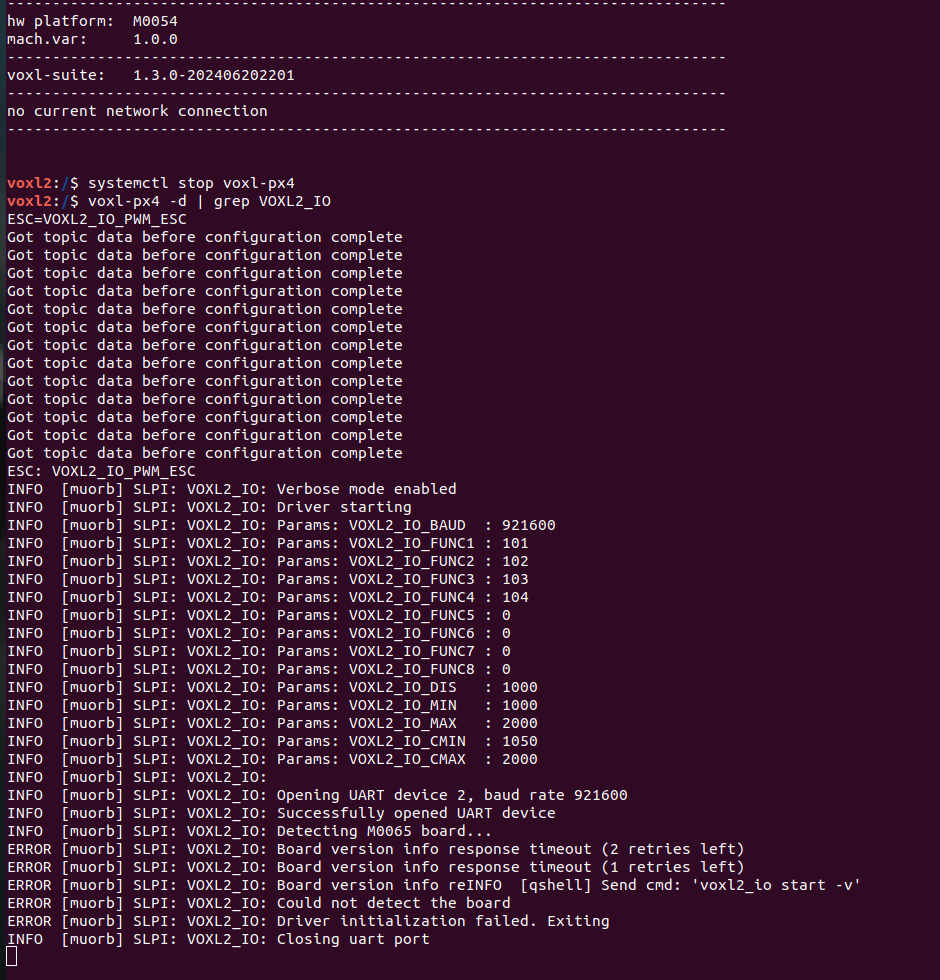
The Voxl IO board is plugged into the j18 esc port (QUP_2). lights seem to start up on the IO board in conjuncture with the newest start up blinks, however, i do not have an orange light when connected to a RC when using my R-XSR.
-
@Alex-Kushleyev thanks for the response.
I did as instructed and recieved the following print out
The Voxl IO board is plugged into the j18 esc port (QUP_2). lights seem to start up on the IO board in conjuncture with the newest start up blinks, however, i do not have an orange light when connected to a RC when using my R-XSR.
@Stefan-Amundarain , I suspect you have wrong version of the firmware. Please see documentation here :
If you have an old VOXL2 IO board (can be identified by the blinking pattern https://docs.modalai.com/voxl2-io-firmware/#legacy ), you can get a free replacement from us, please contact us : https://modalai.com/contact
-
@Stefan-Amundarain , I suspect you have wrong version of the firmware. Please see documentation here :
If you have an old VOXL2 IO board (can be identified by the blinking pattern https://docs.modalai.com/voxl2-io-firmware/#legacy ), you can get a free replacement from us, please contact us : https://modalai.com/contact
@Alex-Kushleyev Good Afternoon,
I have received my new IO board and after plugging it in and running the voxl-px4 -d | grep VOXL2_IO command as before, I get the following print out.
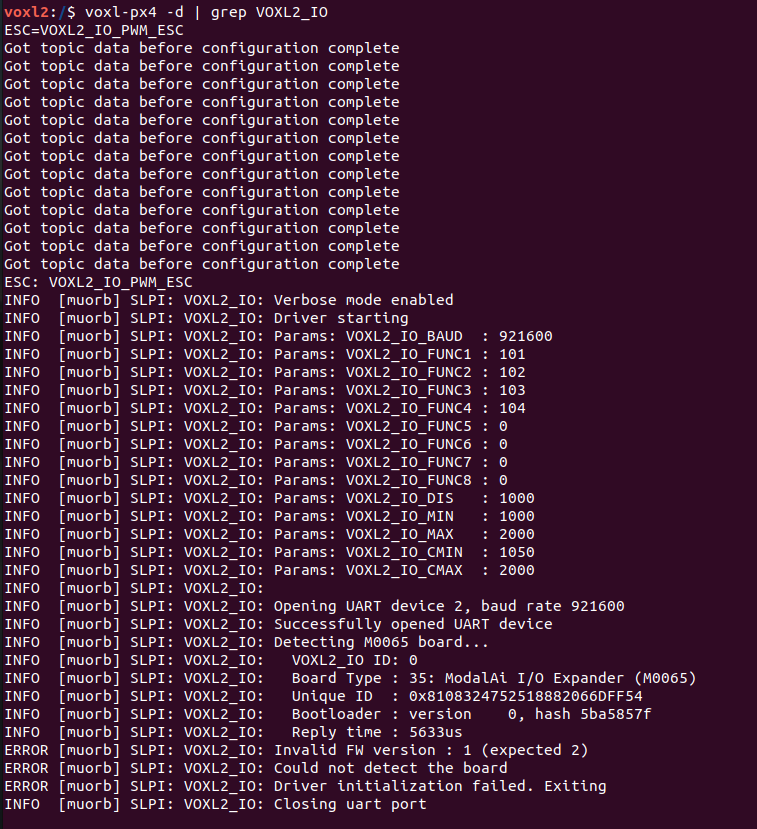
It says unexpected firmware version "ERROR [muorb] SLPI: VOXL2_IO: Invalid FW version : 1 (expected 2)". Will this cause issues?
-
@Alex-Kushleyev Good Afternoon,
I have received my new IO board and after plugging it in and running the voxl-px4 -d | grep VOXL2_IO command as before, I get the following print out.
It says unexpected firmware version "ERROR [muorb] SLPI: VOXL2_IO: Invalid FW version : 1 (expected 2)". Will this cause issues?
@Stefan-Amundarain , yes, you should update your firmware for VOXL2 IO board. Without updating firmware, the board will not work properly, that is why we have strict version checking of the VOXL2 IO firmware in PX4 code.
The latest firmware should already be on your VOXL2:
/usr/share/modalai/voxl2-io-tools/firmware/modalai_m0065_firmware_v0_2_RC1_f94baad1.binYou can also find the firmware here : https://gitlab.com/voxl-public/voxl-sdk/utilities/voxl2-io/-/tree/master/voxl2-io-tools/firmware
Update instructions:
https://docs.modalai.com/voxl2-io-firmware/#via-voxl-2-command-line-tools(just replace
$FIRMWARE_FILEwith the path to the firmware)Alex
-
@Stefan-Amundarain , yes, you should update your firmware for VOXL2 IO board. Without updating firmware, the board will not work properly, that is why we have strict version checking of the VOXL2 IO firmware in PX4 code.
The latest firmware should already be on your VOXL2:
/usr/share/modalai/voxl2-io-tools/firmware/modalai_m0065_firmware_v0_2_RC1_f94baad1.binYou can also find the firmware here : https://gitlab.com/voxl-public/voxl-sdk/utilities/voxl2-io/-/tree/master/voxl2-io-tools/firmware
Update instructions:
https://docs.modalai.com/voxl2-io-firmware/#via-voxl-2-command-line-tools(just replace
$FIRMWARE_FILEwith the path to the firmware)Alex
@Alex-Kushleyev Roger, I will get this firmware updated then.
Is a firmware update typically necessary for a brand-new IO board? Just trying to make some SOPs for my company and want to include those steps if this is going to be necessary or expected.
Thanks,
Stefan -
@Alex-Kushleyev Roger, I will get this firmware updated then.
Is a firmware update typically necessary for a brand-new IO board? Just trying to make some SOPs for my company and want to include those steps if this is going to be necessary or expected.
Thanks,
StefanIt is always good to double check the firmware version of our ESCs and IO board (whichever you are using) so that you have control over the version that you are using and do not upgrade unless that is your intention or use outdated firmware. Typically when we release the new SDK we recommend updating ESC and IO board firmware because some features will require the update.
However, if you just receive a new board, you probably want to upgrade it to the firmware version that you have already been using or version required by the sdk.
Our voxl-esc tools (used for firmware update, checking) are used for IO board and ESC and make it easy to check and update firmware in an automated way to ensure you are running the firmware that you intended.
If you need more help with this, please let me know.
Alex


Reading along? Create a free ModalAI Forum account to join in.
With an account you can reply, ask your own question, get an email when a ModalAI engineer answers, and mark the reply that solved it. Your place in each thread is saved between visits.
Questions about VOXL, Flight Core, ESCs and ModalAI drones are answered here by the engineers who build them.
Register Login