
IO board for PWM output using the 4in1 ESC M0138-1
-
@Alex-Kushleyev yes I am looking to output standard PWM signals. We have the VOXL2 I/O expander board (MDK-M0065). We originally got it for RC connection but we’re also hoping to use the PWM capability for camera triggering.
@restore , got it. Please check this doc: https://docs.modalai.com/voxl2-io-user-guide/
You should definitely install the latest firmware for the M0065 and you probably want to use the following use case (Modal AI ESC in combination with M0065 pwm expander): https://docs.modalai.com/voxl2-io-user-guide/#voxl-2-io-sbus-input-and-4-in-1-uart-esc-output (even though it mentions RC input, you don't have to plug in the RC in order to use PWM output)
Since you mentioned the RC.. if you use the M0065 board, you may not have room (UART ports) left to plug in the RC receiver, which means you will need to plug in the RC into M0065, which only supports SBUS (currently).
If you provide more information regarding how you want to connect your RC, we can figure out the rest.
Alex
-
@restore , got it. Please check this doc: https://docs.modalai.com/voxl2-io-user-guide/
You should definitely install the latest firmware for the M0065 and you probably want to use the following use case (Modal AI ESC in combination with M0065 pwm expander): https://docs.modalai.com/voxl2-io-user-guide/#voxl-2-io-sbus-input-and-4-in-1-uart-esc-output (even though it mentions RC input, you don't have to plug in the RC in order to use PWM output)
Since you mentioned the RC.. if you use the M0065 board, you may not have room (UART ports) left to plug in the RC receiver, which means you will need to plug in the RC into M0065, which only supports SBUS (currently).
If you provide more information regarding how you want to connect your RC, we can figure out the rest.
Alex
@Alex-Kushleyev we are all good on the RC front. We have the PWM expansion board and are trying to understand how to configure QGC. In the actuators tab, the I/O board is recognized but in the VOXL2 IO output tab it only shows 4 pwm channels that are all set to motors (which we don’t need). How can we use one of the other channels or configure one of the first 4 to provide a standard PWM that we can use for our camera trigger interface?
-
@Alex-Kushleyev we are all good on the RC front. We have the PWM expansion board and are trying to understand how to configure QGC. In the actuators tab, the I/O board is recognized but in the VOXL2 IO output tab it only shows 4 pwm channels that are all set to motors (which we don’t need). How can we use one of the other channels or configure one of the first 4 to provide a standard PWM that we can use for our camera trigger interface?
@restore , if you only see 4 pwm outputs in the VOXL2 IO tab, then you are using older version of PX4.
We updated voxl2_io driver 2 months ago (commit to enable 8 channels. You need to use voxl-px4 version
1.14.0-2.0.70or later. You will see the 8 actuators show in the picture here : https://docs.modalai.com/voxl2-io-user-guide/#sdk-130-1You also need to update the M0065 board firmware based on the instructions in
voxl2-io-user-guideThen you will be able to use up to 8 channels and map them to any function just like a normal PWM output in PX4.
Since you will still use VOXL ESC for motors and not connecting RC to M0065, then you would connect ESC to J18 and M0065 to J19 (pins 10,11 rx,tx) and you may have to modify your
/usr/bin/voxl-px4-startscript to start both thevoxl_escdriver andvoxl2_iodriver, but latter with RC function disabled:# -e to disable RC input, -p 7 for DSP UART 7 (J19) qshell voxl2_io start -e -p 7Alex
-
@restore , if you only see 4 pwm outputs in the VOXL2 IO tab, then you are using older version of PX4.
We updated voxl2_io driver 2 months ago (commit to enable 8 channels. You need to use voxl-px4 version
1.14.0-2.0.70or later. You will see the 8 actuators show in the picture here : https://docs.modalai.com/voxl2-io-user-guide/#sdk-130-1You also need to update the M0065 board firmware based on the instructions in
voxl2-io-user-guideThen you will be able to use up to 8 channels and map them to any function just like a normal PWM output in PX4.
Since you will still use VOXL ESC for motors and not connecting RC to M0065, then you would connect ESC to J18 and M0065 to J19 (pins 10,11 rx,tx) and you may have to modify your
/usr/bin/voxl-px4-startscript to start both thevoxl_escdriver andvoxl2_iodriver, but latter with RC function disabled:# -e to disable RC input, -p 7 for DSP UART 7 (J19) qshell voxl2_io start -e -p 7Alex
@Alex-Kushleyev okay I upgraded px4 and updated the px4-start script - now see 8 pwm channels.
I need to configure the camera trigger as shown in the image below (it is shown in mission planner and I am not sure how to do it in QGC)
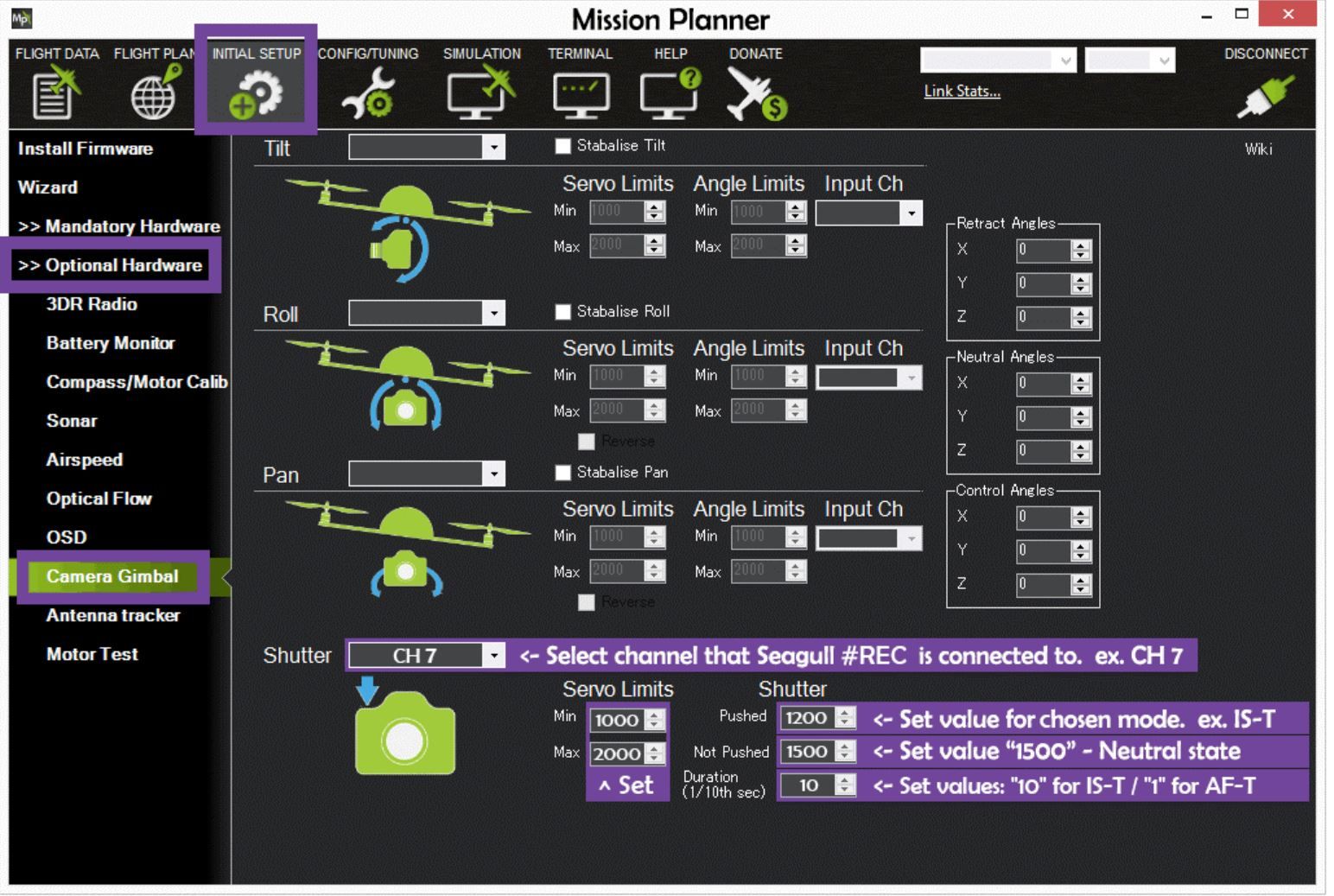
Can you please explain how I can configure the PWM output to trigger a shutter "pushed".
Thanks!
-
@Alex-Kushleyev okay I upgraded px4 and updated the px4-start script - now see 8 pwm channels.
I need to configure the camera trigger as shown in the image below (it is shown in mission planner and I am not sure how to do it in QGC)
Can you please explain how I can configure the PWM output to trigger a shutter "pushed".
Thanks!
@restore ,
I am not sure about this one. This is a question specific to details of PX4 (not VOXL) and I don't think we've ever set up the trigger this way. You might want to try asking / searching the PX4 forums.
As long as you are able to map your trigger to any channels that you can select in QGC to map to PWM outputs, it should work.
By the way, does your camera require just one pulse to trigger or continuous pulses? If you wanted to set up VOXL2_IO in one pulse mode, that could be tricky, since it will run continuously, outputting the latest pulse values set by PX4 mixer.
Alex
-
@restore ,
I am not sure about this one. This is a question specific to details of PX4 (not VOXL) and I don't think we've ever set up the trigger this way. You might want to try asking / searching the PX4 forums.
As long as you are able to map your trigger to any channels that you can select in QGC to map to PWM outputs, it should work.
By the way, does your camera require just one pulse to trigger or continuous pulses? If you wanted to set up VOXL2_IO in one pulse mode, that could be tricky, since it will run continuously, outputting the latest pulse values set by PX4 mixer.
Alex
@Alex-Kushleyev Okay I can do some searching for how to setup the trigger.
For the camera trigger.
Neutral state is 1500 microseconds
To trigger the camera, change the duty cycle to yield 1200 microseconds and hold that for one second before switching back to 1500 microsecondsIs that something that can be done?
-
@Alex-Kushleyev Okay I can do some searching for how to setup the trigger.
For the camera trigger.
Neutral state is 1500 microseconds
To trigger the camera, change the duty cycle to yield 1200 microseconds and hold that for one second before switching back to 1500 microsecondsIs that something that can be done?
@restore , yes sounds simple enough sequence. I am assuming px4 can generate that type of sequence, so voxl2_io driver will just execute. This is no different from sending out regular pwm signals, except the control signal is not coming from actuator mixer.
Alex
-
@restore , yes sounds simple enough sequence. I am assuming px4 can generate that type of sequence, so voxl2_io driver will just execute. This is no different from sending out regular pwm signals, except the control signal is not coming from actuator mixer.
Alex
@Alex-Kushleyev I am looking to enable the seagull trigger in camera interfaces as shown here , but I do not see that option. I see that the interface is in the modalai repo but how do I enable it to show up in QGC?
-
@Alex-Kushleyev I am looking to enable the seagull trigger in camera interfaces as shown here , but I do not see that option. I see that the interface is in the modalai repo but how do I enable it to show up in QGC?
@Alex-Kushleyev I found that the parameters were just not used and once I set them with
px4-param set PARAM_NAME param-valuethat they show up in QGCOne that I am still stuck on though. I am looking for a parameter
TRIG_PINSthat is not in the list of params inpx4-param show -aThe default is 56 and I need to know how to map the pins to the PWM expansion board. From px4 documentation:
TRIGGER_INTERFACE = 2
"Enables the Seagull MAP2 interface. This allows the use of the Seagull MAP2 to interface to a multitude of supported cameras. Pin 1 of the MAP2 should be connected to the lower AUX pin of TRIG_PINS (therefore, pin 1 to AUX 5 and pin 2 to AUX 6 by default). In this mode, PX4 also supports automatic power control and keep-alive functionalities of Sony Multiport cameras like the QX-1." -
@Alex-Kushleyev I found that the parameters were just not used and once I set them with
px4-param set PARAM_NAME param-valuethat they show up in QGCOne that I am still stuck on though. I am looking for a parameter
TRIG_PINSthat is not in the list of params inpx4-param show -aThe default is 56 and I need to know how to map the pins to the PWM expansion board. From px4 documentation:
TRIGGER_INTERFACE = 2
"Enables the Seagull MAP2 interface. This allows the use of the Seagull MAP2 to interface to a multitude of supported cameras. Pin 1 of the MAP2 should be connected to the lower AUX pin of TRIG_PINS (therefore, pin 1 to AUX 5 and pin 2 to AUX 6 by default). In this mode, PX4 also supports automatic power control and keep-alive functionalities of Sony Multiport cameras like the QX-1."@restore , i don't think this module will work with VOXL2_IO because it seems the Seagull MAP2 interface expects direct connection to the I/O pins, which is not the case when using VOXL2_IO module.
Alex

Reading along? Create a free ModalAI Forum account to join in.
With an account you can reply, ask your own question, get an email when a ModalAI engineer answers, and mark the reply that solved it. Your place in each thread is saved between visits.
Questions about VOXL, Flight Core, ESCs and ModalAI drones are answered here by the engineers who build them.
Register Login