
lis3mdl magnetometer
-
@Eric-Katzfey Hello
I've looked through px4 and I'm alittle lost on how exactly this all works maybe you can give alittle more detail. I understand the the ports are configured to the spli proc to be used on the dsp but where extacly does this interface, In I2C.cpp you showed above it sets all the functions to null and then they get decalred on init but I can't find where they actually interface with the i2c registers.After that would I need to compile my program with Hexagon SDK or is it possible at all to interface with this i2c port in the normal Ubuntu environment at all?My understanding is that the uart on the same J19 is configured in the same way but I can access those through the libqrb5165-io and voxl-io.h so is there something similar available for i2c or could I implement my own in a similar way and if I could how would I go about doing this?
@mkriesel The low level driver is Qualcomm proprietary so we cannot share it. But you don't need to look at that code to use an i2c port. You just need to use the interface functions provided by px4.
-
@Eric-Katzfey Hello
I've looked through px4 and I'm alittle lost on how exactly this all works maybe you can give alittle more detail. I understand the the ports are configured to the spli proc to be used on the dsp but where extacly does this interface, In I2C.cpp you showed above it sets all the functions to null and then they get decalred on init but I can't find where they actually interface with the i2c registers.After that would I need to compile my program with Hexagon SDK or is it possible at all to interface with this i2c port in the normal Ubuntu environment at all?My understanding is that the uart on the same J19 is configured in the same way but I can access those through the libqrb5165-io and voxl-io.h so is there something similar available for i2c or could I implement my own in a similar way and if I could how would I go about doing this?
@mkriesel Yes, you would need to compile the DSP code with the Hexagon SDK.
-
@Eric-Katzfey Hello
I've looked through px4 and I'm alittle lost on how exactly this all works maybe you can give alittle more detail. I understand the the ports are configured to the spli proc to be used on the dsp but where extacly does this interface, In I2C.cpp you showed above it sets all the functions to null and then they get decalred on init but I can't find where they actually interface with the i2c registers.After that would I need to compile my program with Hexagon SDK or is it possible at all to interface with this i2c port in the normal Ubuntu environment at all?My understanding is that the uart on the same J19 is configured in the same way but I can access those through the libqrb5165-io and voxl-io.h so is there something similar available for i2c or could I implement my own in a similar way and if I could how would I go about doing this?
@mkriesel You cannot access the DSP i2c ports from the applications processor.
-
@Eric-Katzfey Hello
I've looked through px4 and I'm alittle lost on how exactly this all works maybe you can give alittle more detail. I understand the the ports are configured to the spli proc to be used on the dsp but where extacly does this interface, In I2C.cpp you showed above it sets all the functions to null and then they get decalred on init but I can't find where they actually interface with the i2c registers.After that would I need to compile my program with Hexagon SDK or is it possible at all to interface with this i2c port in the normal Ubuntu environment at all?My understanding is that the uart on the same J19 is configured in the same way but I can access those through the libqrb5165-io and voxl-io.h so is there something similar available for i2c or could I implement my own in a similar way and if I could how would I go about doing this?
@mkriesel We don't have any immediate plans to add dsp i2c access to libqrb5165-io.
-
@mkriesel We don't have any immediate plans to add dsp i2c access to libqrb5165-io.
@Eric-Katzfey Hi again, sorry for all the questions but for an update, I was able to get the compass working for my application by using the mavlink pipe and for now this is sufficient, however if I wanted to reconfigure the port to have it on the application processor instead could I do that? Again, it doesn't matter if I lose functionality in px4 because I don't plan to use it if I don't have to but if those GPIO pins are available I would like to explore that option.
Thanks for all the help so far.
-
@Eric-Katzfey Hi again, sorry for all the questions but for an update, I was able to get the compass working for my application by using the mavlink pipe and for now this is sufficient, however if I wanted to reconfigure the port to have it on the application processor instead could I do that? Again, it doesn't matter if I lose functionality in px4 because I don't plan to use it if I don't have to but if those GPIO pins are available I would like to explore that option.
Thanks for all the help so far.
@mkriesel The VOXL 2 does not have any i2c brought out to connectors for the applications processor. However, there are some add-on boards that do include this. For example: https://docs.modalai.com/usb2-type-a-breakout-add-on/
-
@mkriesel The VOXL 2 does not have any i2c brought out to connectors for the applications processor. However, there are some add-on boards that do include this. For example: https://docs.modalai.com/usb2-type-a-breakout-add-on/
@Eric-Katzfey I undertand you do not have any Voxl 2 mini schematics open to the public but is it possible for you to share with me the gpio pins that J19 are on for the QRB5165 board?
-
@Eric-Katzfey I undertand you do not have any Voxl 2 mini schematics open to the public but is it possible for you to share with me the gpio pins that J19 are on for the QRB5165 board?
https://docs.modalai.com/voxl2-mini-connectors/#j19---external-sensors-2x-uart-2x-i2c
here is a link for voxl2 (not mini) : https://docs.modalai.com/voxl2-connectors/
does this help?
-
https://docs.modalai.com/voxl2-mini-connectors/#j19---external-sensors-2x-uart-2x-i2c
here is a link for voxl2 (not mini) : https://docs.modalai.com/voxl2-connectors/
does this help?
@Alex-Kushleyev @mkriesel , I just updated that table to include the raw GPIO numbers.
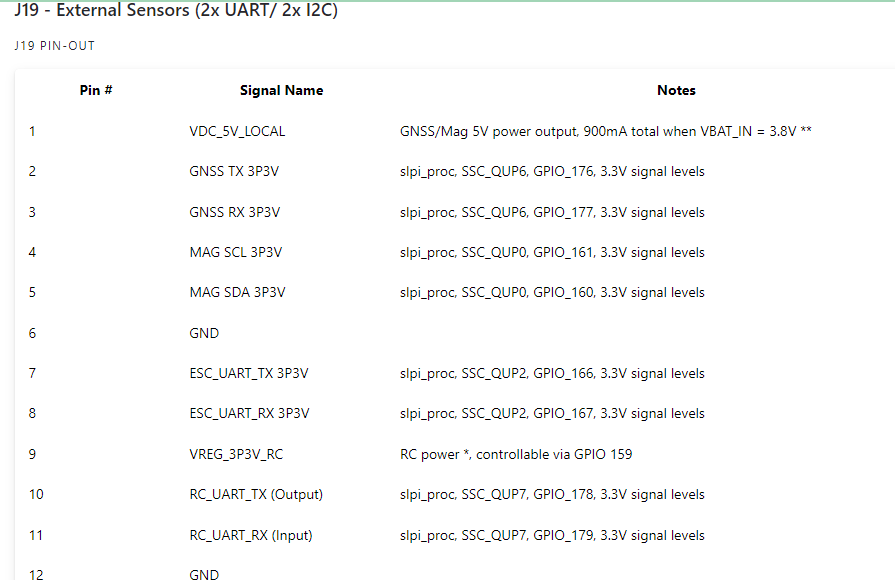
However, I'm certain that they are unusable as GPIOs due to Trust Zone settings we have applied using them as I2C/UART etc. -
@Eric-Katzfey I undertand you do not have any Voxl 2 mini schematics open to the public but is it possible for you to share with me the gpio pins that J19 are on for the QRB5165 board?
Hi @mkriesel
Have you seen this product we offer? This may be something that interests you:
https://docs.modalai.com/voxl2-dev-test-board/Our purchase link is buried in our beta section due to the risk of such product:
https://www.modalai.com/pages/beta-voxl-2-b2b-breakout-board
It includes a lot of extras not posted such as a tray to hold everything together, an SD Card, many cables, and several jumpers to get you going.
Hope this helps! -
Hi @mkriesel
Have you seen this product we offer? This may be something that interests you:
https://docs.modalai.com/voxl2-dev-test-board/Our purchase link is buried in our beta section due to the risk of such product:
https://www.modalai.com/pages/beta-voxl-2-b2b-breakout-board
It includes a lot of extras not posted such as a tray to hold everything together, an SD Card, many cables, and several jumpers to get you going.
Hope this helps!



Reading along? Create a free ModalAI Forum account to join in.
With an account you can reply, ask your own question, get an email when a ModalAI engineer answers, and mark the reply that solved it. Your place in each thread is saved between visits.
Questions about VOXL, Flight Core, ESCs and ModalAI drones are answered here by the engineers who build them.
Register Login