
MAVSDK not connecting to the RB5 drone
-
Hello,
Apologies for so many questions, I have a project deadline coming up. I have a MAVSDK script file that I need to run on my laptop to connect to the drone using udp connection. I have tried using the default 14540 port among others which include 14550 (gcs), 14560, 14556, 14557, 14558 etc. None of which establish a connection.
I am stuck here. When I run this on SITL it does connect with the simulation and runs well. But now I need to use it on my physical drone but I am unable to move forward.
As a background, I am doing a project where I need to use my lab computer (running Windows) to send MoCap from OptiTrack to the MAVSDK script which receives the data, unpacks it and uses it as telemetry for the drone. This script is being executed on my personal laptop running Ubuntu. Now, this script needs to connect to the drone in order to execute this program and that's where I am stuck. Can you please advise me on this. Thanks!
Kind regards,
Advait P
-
Hello,
Apologies for so many questions, I have a project deadline coming up. I have a MAVSDK script file that I need to run on my laptop to connect to the drone using udp connection. I have tried using the default 14540 port among others which include 14550 (gcs), 14560, 14556, 14557, 14558 etc. None of which establish a connection.
I am stuck here. When I run this on SITL it does connect with the simulation and runs well. But now I need to use it on my physical drone but I am unable to move forward.
As a background, I am doing a project where I need to use my lab computer (running Windows) to send MoCap from OptiTrack to the MAVSDK script which receives the data, unpacks it and uses it as telemetry for the drone. This script is being executed on my personal laptop running Ubuntu. Now, this script needs to connect to the drone in order to execute this program and that's where I am stuck. Can you please advise me on this. Thanks!
Kind regards,
Advait P
@Advait-Pandit What kind of a network are you using? Is this WiFi? Are you connecting via access point or are you configuring the drone to be the access point? Can you ping the drone from your laptop? Can you ping the laptop from your drone?
-
@Advait-Pandit What kind of a network are you using? Is this WiFi? Are you connecting via access point or are you configuring the drone to be the access point? Can you ping the drone from your laptop? Can you ping the laptop from your drone?
I am using my laptop for running the MAVSDK script, both (the drone and my laptop) are connected to the same wifi network. I am new to this therefore, I am not sure how I can ping the drone from my laptop or vice versa. Also, the wifi network is only set up to work with multi-device projects in the lab and does not have internet on it.
Is there a specific port I need to connect to for the drone when using udp? For simulation purposes using Jmavsim or Gazebo and the same MAVSDK script, it works with Port:14540 but this does not work for the physical drone.
Kind regards,
Advait P
-
I am using my laptop for running the MAVSDK script, both (the drone and my laptop) are connected to the same wifi network. I am new to this therefore, I am not sure how I can ping the drone from my laptop or vice versa. Also, the wifi network is only set up to work with multi-device projects in the lab and does not have internet on it.
Is there a specific port I need to connect to for the drone when using udp? For simulation purposes using Jmavsim or Gazebo and the same MAVSDK script, it works with Port:14540 but this does not work for the physical drone.
Kind regards,
Advait P
@Advait-Pandit You really need to verify basic network connectivity before anything else. That is why I suggested the ping test. Ping is a very fundamental command used to help troubleshoot and verify networks.
-
@Advait-Pandit You really need to verify basic network connectivity before anything else. That is why I suggested the ping test. Ping is a very fundamental command used to help troubleshoot and verify networks.
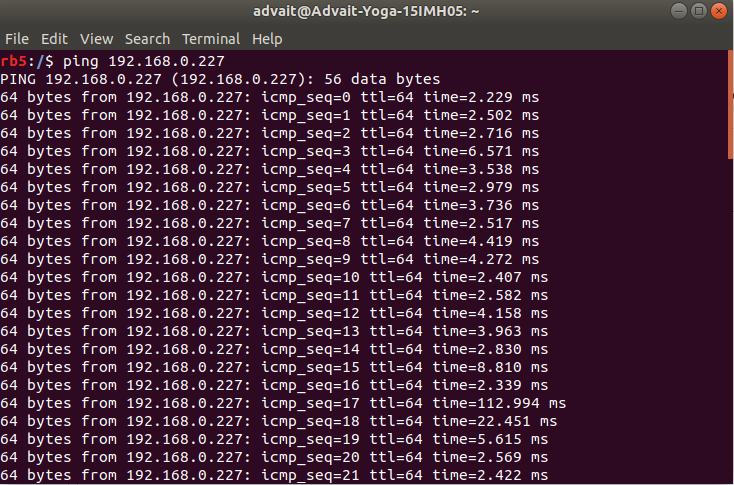
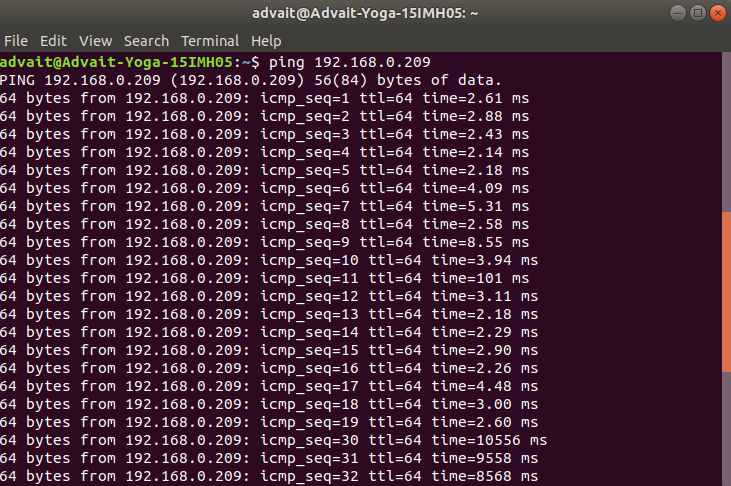
I was able to ping both my laptop from the RB5 and the RB5 from my laptop. I am attaching the screenshots below. It seems to be working fine so I am unsure why it does not connect as expected on the port.
Drone pinging the laptop:
Laptop pinging the drone:
Kind regards,
Advait P
-
I was able to ping both my laptop from the RB5 and the RB5 from my laptop. I am attaching the screenshots below. It seems to be working fine so I am unsure why it does not connect as expected on the port.
Drone pinging the laptop:
Laptop pinging the drone:
Kind regards,
Advait P
@Advait-Pandit Are you able to connect QGC?
-
@Advait-Pandit Are you able to connect QGC?
Yes it connects to GCS properly on station mode.
-
Yes it connects to GCS properly on station mode.
@Advait-Pandit You can trace the packets used for the QGC connection with
tcpdumpand compare against what is happening with mavsdk. That should help you to understand what is going wrong. -
@Advait-Pandit You can trace the packets used for the QGC connection with
tcpdumpand compare against what is happening with mavsdk. That should help you to understand what is going wrong.

Reading along? Create a free ModalAI Forum account to join in.
With an account you can reply, ask your own question, get an email when a ModalAI engineer answers, and mark the reply that solved it. Your place in each thread is saved between visits.
Questions about VOXL, Flight Core, ESCs and ModalAI drones are answered here by the engineers who build them.
Register Login