
VOXL 2 M0135 Dual Camera Connections with M0107 and M0149 Cameras
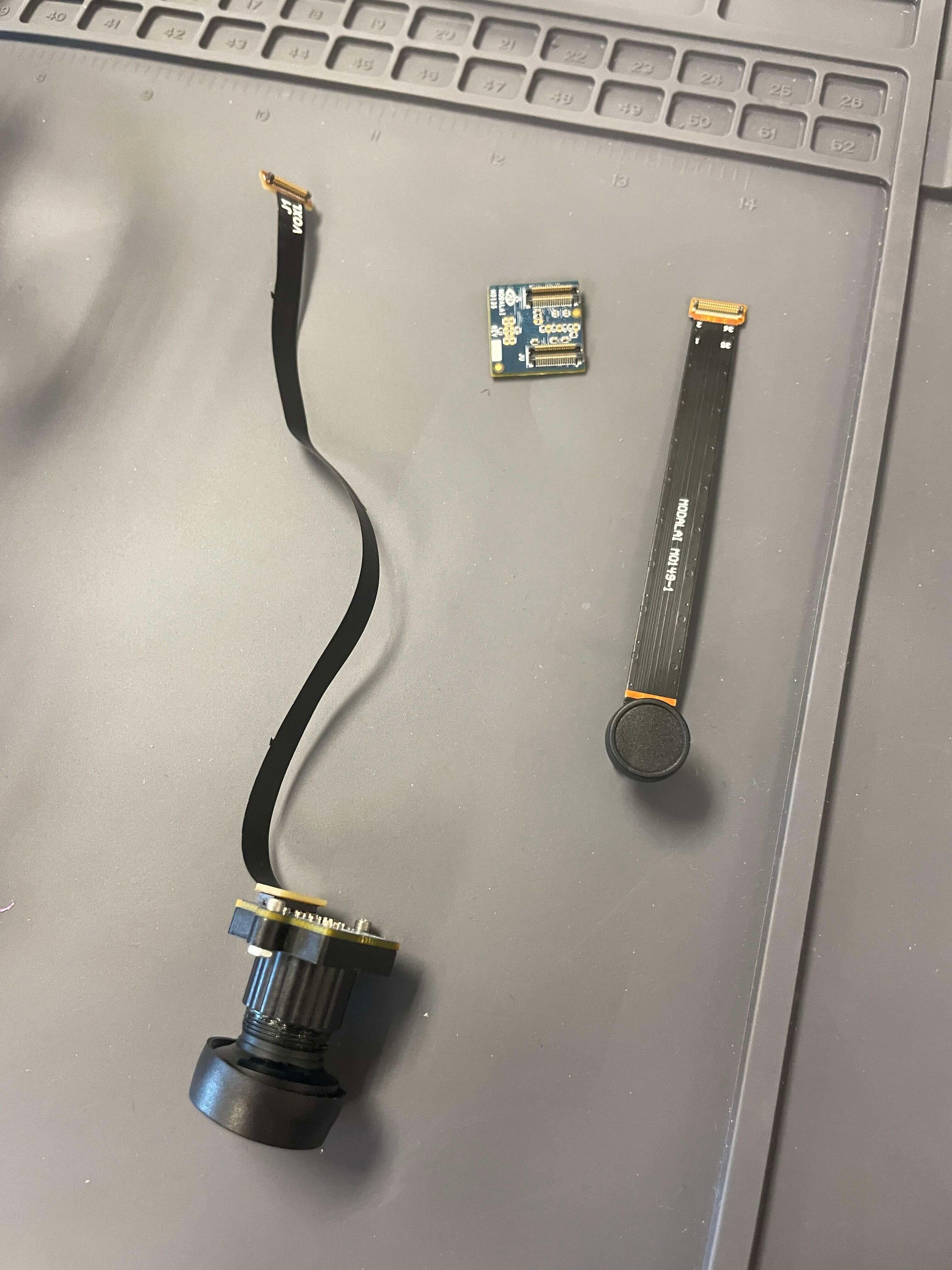
-
@Alex-Kushleyev
voxl-camera-server -loutputsvoxl2-mini:/$ voxl-camera-server -l DEBUG: Attempting to open the hal module DEBUG: SUCCESS: Camera module opened on attempt 0 DEBUG: ----------- Number of cameras: 0 DEBUG: Note: This list comes from the HAL module and may not be indicative DEBUG: of configurations that have full pipelines DEBUG: Number of cameras: 0I also tried
voxl-camera-server -swhich gave mevoxl2-mini:/$ voxl-camera-server -s GPS server Connected ERROR: Did not detect any cameras plugged in ERROR: Failed to get valid debug configurationI'm sure my connections are correct as detailed above (pin 1 on pin 1, correct JL/JU, and on the J7 port). Could it be a bad connector?
@WineVirus , can you please provide a picture of the connected cameras to VOXL2 and contents of
/usr/lib/cameraon your VOXL2? -
@WineVirus , can you please provide a picture of the connected cameras to VOXL2 and contents of
/usr/lib/cameraon your VOXL2?@Alex-Kushleyev Here's the output of
./adb shell ls -la /usr/lib/camera. I'll take a picture of the connections when I can. Also, I'm using the VOXL 2 MINI, don't know if that makes any difference.total 4664 drwxr-xr-x 3 root root 4096 Mar 2 13:10 . drwxr-xr-x 69 root root 20480 Mar 2 12:59 .. -rwxr-xr-x 1 root root 9912 Oct 26 2023 com.qti.eeprom.cmk_imx577.so -rwxr-xr-x 1 root root 9904 Oct 26 2023 com.qti.sensor.ar0144.so -rwxr-xr-x 1 root root 5816 Oct 26 2023 com.qti.sensor.cmk_imx577.so -rwxr-xr-x 1 root root 5816 Oct 26 2023 com.qti.sensor.cmk_imx577_flip.so -rwxr-xr-x 1 root root 9904 Oct 26 2023 com.qti.sensor.imx214.so -rwxr-xr-x 1 root root 9912 Oct 26 2023 com.qti.sensor.imx214_flip.so -rwxr-xr-x 1 root root 9904 Oct 26 2023 com.qti.sensor.imx335.so -rwxr-xr-x 1 root root 5808 Oct 26 2023 com.qti.sensor.imx377.so -rwxr-xr-x 1 root root 9904 Oct 26 2023 com.qti.sensor.imx678.so -rwxr-xr-x 1 root root 9912 Oct 26 2023 com.qti.sensor.imx678_flip.so -rwxr-xr-x 1 root root 9912 Oct 26 2023 com.qti.sensor.imx678_mod.so -rwxr-xr-x 1 root root 5808 Oct 26 2023 com.qti.sensor.irs1645.so -rwxr-xr-x 1 root root 9904 Oct 26 2023 com.qti.sensor.ov7251.so -rwxr-xr-x 1 root root 9912 Oct 26 2023 com.qti.sensor.ov7251_front_left.so -rwxr-xr-x 1 root root 9920 Oct 26 2023 com.qti.sensor.ov7251_front_left_flip.so -rwxr-xr-x 1 root root 9920 Oct 26 2023 com.qti.sensor.ov7251_front_right.so -rwxr-xr-x 1 root root 9920 Oct 26 2023 com.qti.sensor.ov7251_front_right_flip.so -rwxr-xr-x 1 root root 9912 Oct 26 2023 com.qti.sensor.ov7251_fsin.so -rwxr-xr-x 1 root root 9912 Oct 26 2023 com.qti.sensor.ov7251_fsout.so -rwxr-xr-x 1 root root 9912 Oct 26 2023 com.qti.sensor.ov7251_rear_left.so -rwxr-xr-x 1 root root 9920 Oct 26 2023 com.qti.sensor.ov7251_rear_left_flip.so -rwxr-xr-x 1 root root 9912 Oct 26 2023 com.qti.sensor.ov7251_rear_right.so -rwxr-xr-x 1 root root 9920 Oct 26 2023 com.qti.sensor.ov7251_rear_right_flip.so -rwxr-xr-x 1 root root 9904 Oct 26 2023 com.qti.sensor.ov9782.so -rwxr-xr-x 1 root root 9912 Oct 26 2023 com.qti.sensor.ov9782_front_left.so -rwxr-xr-x 1 root root 9920 Oct 26 2023 com.qti.sensor.ov9782_front_left_flip.so -rwxr-xr-x 1 root root 9920 Oct 26 2023 com.qti.sensor.ov9782_front_right.so -rwxr-xr-x 1 root root 9920 Oct 26 2023 com.qti.sensor.ov9782_front_right_flip.so -rwxr-xr-x 1 root root 9912 Oct 26 2023 com.qti.sensor.ov9782_rear_left.so -rwxr-xr-x 1 root root 9920 Oct 26 2023 com.qti.sensor.ov9782_rear_left_flip.so -rwxr-xr-x 1 root root 9912 Oct 26 2023 com.qti.sensor.ov9782_rear_right.so -rwxr-xr-x 1 root root 9920 Oct 26 2023 com.qti.sensor.ov9782_rear_right_flip.so -rw-rw-rw- 1 root root 31984 Mar 26 2024 com.qti.sensormodule.ar0144_2.bin -rw-r--r-- 1 root root 578576 Mar 2 13:12 com.qti.sensormodule.imx412_flip_3.bin -rw-r--r-- 1 root root 142472 Mar 2 13:12 com.qti.sensormodule.ov7251_2.bin -rw-r--r-- 1 root root 957344 Oct 26 2023 com.qti.tuned.cmk_imx577.bin -rw-r--r-- 1 root root 835464 Oct 26 2023 com.qti.tuned.cmk_ov9282.bin -rw-r--r-- 1 root root 931864 Oct 26 2023 com.qti.tuned.default.bin -rw-r--r-- 1 root root 882376 Oct 26 2023 com.qti.tuned.sony_imx335.bin drwxr-xr-x 2 root root 4096 Oct 26 2023 components -
@Alex-Kushleyev Here's the output of
./adb shell ls -la /usr/lib/camera. I'll take a picture of the connections when I can. Also, I'm using the VOXL 2 MINI, don't know if that makes any difference.total 4664 drwxr-xr-x 3 root root 4096 Mar 2 13:10 . drwxr-xr-x 69 root root 20480 Mar 2 12:59 .. -rwxr-xr-x 1 root root 9912 Oct 26 2023 com.qti.eeprom.cmk_imx577.so -rwxr-xr-x 1 root root 9904 Oct 26 2023 com.qti.sensor.ar0144.so -rwxr-xr-x 1 root root 5816 Oct 26 2023 com.qti.sensor.cmk_imx577.so -rwxr-xr-x 1 root root 5816 Oct 26 2023 com.qti.sensor.cmk_imx577_flip.so -rwxr-xr-x 1 root root 9904 Oct 26 2023 com.qti.sensor.imx214.so -rwxr-xr-x 1 root root 9912 Oct 26 2023 com.qti.sensor.imx214_flip.so -rwxr-xr-x 1 root root 9904 Oct 26 2023 com.qti.sensor.imx335.so -rwxr-xr-x 1 root root 5808 Oct 26 2023 com.qti.sensor.imx377.so -rwxr-xr-x 1 root root 9904 Oct 26 2023 com.qti.sensor.imx678.so -rwxr-xr-x 1 root root 9912 Oct 26 2023 com.qti.sensor.imx678_flip.so -rwxr-xr-x 1 root root 9912 Oct 26 2023 com.qti.sensor.imx678_mod.so -rwxr-xr-x 1 root root 5808 Oct 26 2023 com.qti.sensor.irs1645.so -rwxr-xr-x 1 root root 9904 Oct 26 2023 com.qti.sensor.ov7251.so -rwxr-xr-x 1 root root 9912 Oct 26 2023 com.qti.sensor.ov7251_front_left.so -rwxr-xr-x 1 root root 9920 Oct 26 2023 com.qti.sensor.ov7251_front_left_flip.so -rwxr-xr-x 1 root root 9920 Oct 26 2023 com.qti.sensor.ov7251_front_right.so -rwxr-xr-x 1 root root 9920 Oct 26 2023 com.qti.sensor.ov7251_front_right_flip.so -rwxr-xr-x 1 root root 9912 Oct 26 2023 com.qti.sensor.ov7251_fsin.so -rwxr-xr-x 1 root root 9912 Oct 26 2023 com.qti.sensor.ov7251_fsout.so -rwxr-xr-x 1 root root 9912 Oct 26 2023 com.qti.sensor.ov7251_rear_left.so -rwxr-xr-x 1 root root 9920 Oct 26 2023 com.qti.sensor.ov7251_rear_left_flip.so -rwxr-xr-x 1 root root 9912 Oct 26 2023 com.qti.sensor.ov7251_rear_right.so -rwxr-xr-x 1 root root 9920 Oct 26 2023 com.qti.sensor.ov7251_rear_right_flip.so -rwxr-xr-x 1 root root 9904 Oct 26 2023 com.qti.sensor.ov9782.so -rwxr-xr-x 1 root root 9912 Oct 26 2023 com.qti.sensor.ov9782_front_left.so -rwxr-xr-x 1 root root 9920 Oct 26 2023 com.qti.sensor.ov9782_front_left_flip.so -rwxr-xr-x 1 root root 9920 Oct 26 2023 com.qti.sensor.ov9782_front_right.so -rwxr-xr-x 1 root root 9920 Oct 26 2023 com.qti.sensor.ov9782_front_right_flip.so -rwxr-xr-x 1 root root 9912 Oct 26 2023 com.qti.sensor.ov9782_rear_left.so -rwxr-xr-x 1 root root 9920 Oct 26 2023 com.qti.sensor.ov9782_rear_left_flip.so -rwxr-xr-x 1 root root 9912 Oct 26 2023 com.qti.sensor.ov9782_rear_right.so -rwxr-xr-x 1 root root 9920 Oct 26 2023 com.qti.sensor.ov9782_rear_right_flip.so -rw-rw-rw- 1 root root 31984 Mar 26 2024 com.qti.sensormodule.ar0144_2.bin -rw-r--r-- 1 root root 578576 Mar 2 13:12 com.qti.sensormodule.imx412_flip_3.bin -rw-r--r-- 1 root root 142472 Mar 2 13:12 com.qti.sensormodule.ov7251_2.bin -rw-r--r-- 1 root root 957344 Oct 26 2023 com.qti.tuned.cmk_imx577.bin -rw-r--r-- 1 root root 835464 Oct 26 2023 com.qti.tuned.cmk_ov9282.bin -rw-r--r-- 1 root root 931864 Oct 26 2023 com.qti.tuned.default.bin -rw-r--r-- 1 root root 882376 Oct 26 2023 com.qti.tuned.sony_imx335.bin drwxr-xr-x 2 root root 4096 Oct 26 2023 componentsI will test your camera configuration on voxl2 mini running sdk 1.1.1 and will follow up soon.
If you have a picture that will be helpful to confirm correct connections.
-
I will test your camera configuration on voxl2 mini running sdk 1.1.1 and will follow up soon.
If you have a picture that will be helpful to confirm correct connections.
Hi, I just connected the two cameras to voxl-2 mini running SDK 1.1.1.
For ar0144, please use the latest
sensormodulefile from this location . The one that comes with SDK 1.1.1 has stability issues.#from your PC adb push ~/Downloads/com.qti.sensormodule.ar0144_2.bin /usr/lib/camera/ #now on VOXL2 mini voxl2-mini:/$ cp /usr/share/modalai/chi-cdk/imx412/com.qti.sensormodule.imx412_3.bin /usr/lib/camera/ voxl2-mini:/$ voxl-camera-server -l DEBUG: Attempting to open the hal module DEBUG: SUCCESS: Camera module opened on attempt 0 DEBUG: ----------- Number of cameras: 2 DEBUG: Cam idx: 0, Cam slot: 2, Slave Address: 0x0030, Sensor Id: 0x0356 DEBUG: Cam idx: 1, Cam slot: 3, Slave Address: 0x0034, Sensor Id: 0x0577 DEBUG: Note: This list comes from the HAL module and may not be indicative DEBUG: of configurations that have full pipelines DEBUG: Number of cameras: 2 ...The
/etc/modalai/voxl-camera-server.confshould look like this (a good starting point):{ "version": 0.1, "cameras": [{ "type": "ar0144", "name": "tracking", "enabled": true, "camera_id": 0, "fps": 30, "en_rotate": false, "en_preview": true, "preview_width": 1280, "preview_height": 800, "en_raw_preview": true, "ae_mode": "lme_msv", "ae_desired_msv": 60, "exposure_min_us": 20, "exposure_max_us": 33000, "gain_min": 54, "gain_max": 8000, "exposure_soft_min_us": 5000, "ae_filter_alpha": 0.600000023841858, "ae_ignore_fraction": 0.20000000298023224, "ae_slope": 0.05000000074505806, "ae_exposure_period": 1, "ae_gain_period": 1 }, { "type": "imx412", "name": "hires", "enabled": true, "camera_id": 1, "fps": 30, "en_preview": false, "preview_width": 640, "preview_height": 480, "en_raw_preview": false, "en_small_video": true, "small_video_width": 1280, "small_video_height": 800, "small_venc_mode": "h265", "small_venc_br_ctrl": "cqp", "small_venc_Qfixed": 30, "small_venc_Qmin": 15, "small_venc_Qmax": 40, "small_venc_nPframes": 9, "small_venc_mbps": 2, "en_large_video": true, "large_video_width": 3840, "large_video_height": 2160, "large_venc_mode": "h265", "large_venc_br_ctrl": "cqp", "large_venc_Qfixed": 38, "large_venc_Qmin": 15, "large_venc_Qmax": 50, "large_venc_nPframes": 29, "large_venc_mbps": 30, "en_snapshot": false, "en_snapshot_width": 4056, "en_snapshot_height": 3040, "ae_mode": "isp" }] }then you can start
voxl-camera-serverin regular mode (without-l), it should run.use
voxl-inspect-cam -ato check video streams:| Pipe Name | bytes | wide | hgt |exp(ms)| gain | frame id |latency(ms)| fps | mbps | format | hires_large_color |12441600 | 3840 | 2160 | 33.23 | 1125 | 566 | 78.3 | 29.9 | 2974.3 | NV12 | hires_large_encoded | 4893 | 3840 | 2160 | 33.23 | 1125 | 566 | 89.2 | 29.9 | 1.3 | H265 (P) | hires_large_grey | 8294400 | 3840 | 2160 | 33.23 | 1125 | 567 | 70.6 | 29.9 | 1982.9 | RAW8 | hires_small_color | 1536000 | 1280 | 800 | 33.23 | 1125 | 568 | 57.3 | 29.9 | 367.2 | NV12 | hires_small_encoded | 2710 | 1280 | 800 | 33.23 | 1125 | 568 | 60.9 | 29.9 | 1.8 | H265 (P) | hires_small_grey | 1024000 | 1280 | 800 | 33.23 | 1125 | 568 | 55.5 | 29.9 | 244.8 | RAW8 | tracking | 1024000 | 1280 | 800 | 7.04 | 665 | 8043 | 20.7 | 30.0 | 245.6 | RAW8Then you can use voxl-portal to view images (assuming you have a wired or wifi adapter plugged into your voxl2-mini:
(if voxl portal is not enabled, you can enable it):systemctl enable voxl-portal systemctl start voxl-portalThen go to web browser and enter your voxl2-mini's ip to view
voxl-portal -
Hi, I just connected the two cameras to voxl-2 mini running SDK 1.1.1.
For ar0144, please use the latest
sensormodulefile from this location . The one that comes with SDK 1.1.1 has stability issues.#from your PC adb push ~/Downloads/com.qti.sensormodule.ar0144_2.bin /usr/lib/camera/ #now on VOXL2 mini voxl2-mini:/$ cp /usr/share/modalai/chi-cdk/imx412/com.qti.sensormodule.imx412_3.bin /usr/lib/camera/ voxl2-mini:/$ voxl-camera-server -l DEBUG: Attempting to open the hal module DEBUG: SUCCESS: Camera module opened on attempt 0 DEBUG: ----------- Number of cameras: 2 DEBUG: Cam idx: 0, Cam slot: 2, Slave Address: 0x0030, Sensor Id: 0x0356 DEBUG: Cam idx: 1, Cam slot: 3, Slave Address: 0x0034, Sensor Id: 0x0577 DEBUG: Note: This list comes from the HAL module and may not be indicative DEBUG: of configurations that have full pipelines DEBUG: Number of cameras: 2 ...The
/etc/modalai/voxl-camera-server.confshould look like this (a good starting point):{ "version": 0.1, "cameras": [{ "type": "ar0144", "name": "tracking", "enabled": true, "camera_id": 0, "fps": 30, "en_rotate": false, "en_preview": true, "preview_width": 1280, "preview_height": 800, "en_raw_preview": true, "ae_mode": "lme_msv", "ae_desired_msv": 60, "exposure_min_us": 20, "exposure_max_us": 33000, "gain_min": 54, "gain_max": 8000, "exposure_soft_min_us": 5000, "ae_filter_alpha": 0.600000023841858, "ae_ignore_fraction": 0.20000000298023224, "ae_slope": 0.05000000074505806, "ae_exposure_period": 1, "ae_gain_period": 1 }, { "type": "imx412", "name": "hires", "enabled": true, "camera_id": 1, "fps": 30, "en_preview": false, "preview_width": 640, "preview_height": 480, "en_raw_preview": false, "en_small_video": true, "small_video_width": 1280, "small_video_height": 800, "small_venc_mode": "h265", "small_venc_br_ctrl": "cqp", "small_venc_Qfixed": 30, "small_venc_Qmin": 15, "small_venc_Qmax": 40, "small_venc_nPframes": 9, "small_venc_mbps": 2, "en_large_video": true, "large_video_width": 3840, "large_video_height": 2160, "large_venc_mode": "h265", "large_venc_br_ctrl": "cqp", "large_venc_Qfixed": 38, "large_venc_Qmin": 15, "large_venc_Qmax": 50, "large_venc_nPframes": 29, "large_venc_mbps": 30, "en_snapshot": false, "en_snapshot_width": 4056, "en_snapshot_height": 3040, "ae_mode": "isp" }] }then you can start
voxl-camera-serverin regular mode (without-l), it should run.use
voxl-inspect-cam -ato check video streams:| Pipe Name | bytes | wide | hgt |exp(ms)| gain | frame id |latency(ms)| fps | mbps | format | hires_large_color |12441600 | 3840 | 2160 | 33.23 | 1125 | 566 | 78.3 | 29.9 | 2974.3 | NV12 | hires_large_encoded | 4893 | 3840 | 2160 | 33.23 | 1125 | 566 | 89.2 | 29.9 | 1.3 | H265 (P) | hires_large_grey | 8294400 | 3840 | 2160 | 33.23 | 1125 | 567 | 70.6 | 29.9 | 1982.9 | RAW8 | hires_small_color | 1536000 | 1280 | 800 | 33.23 | 1125 | 568 | 57.3 | 29.9 | 367.2 | NV12 | hires_small_encoded | 2710 | 1280 | 800 | 33.23 | 1125 | 568 | 60.9 | 29.9 | 1.8 | H265 (P) | hires_small_grey | 1024000 | 1280 | 800 | 33.23 | 1125 | 568 | 55.5 | 29.9 | 244.8 | RAW8 | tracking | 1024000 | 1280 | 800 | 7.04 | 665 | 8043 | 20.7 | 30.0 | 245.6 | RAW8Then you can use voxl-portal to view images (assuming you have a wired or wifi adapter plugged into your voxl2-mini:
(if voxl portal is not enabled, you can enable it):systemctl enable voxl-portal systemctl start voxl-portalThen go to web browser and enter your voxl2-mini's ip to view
voxl-portalimages of my setup attached
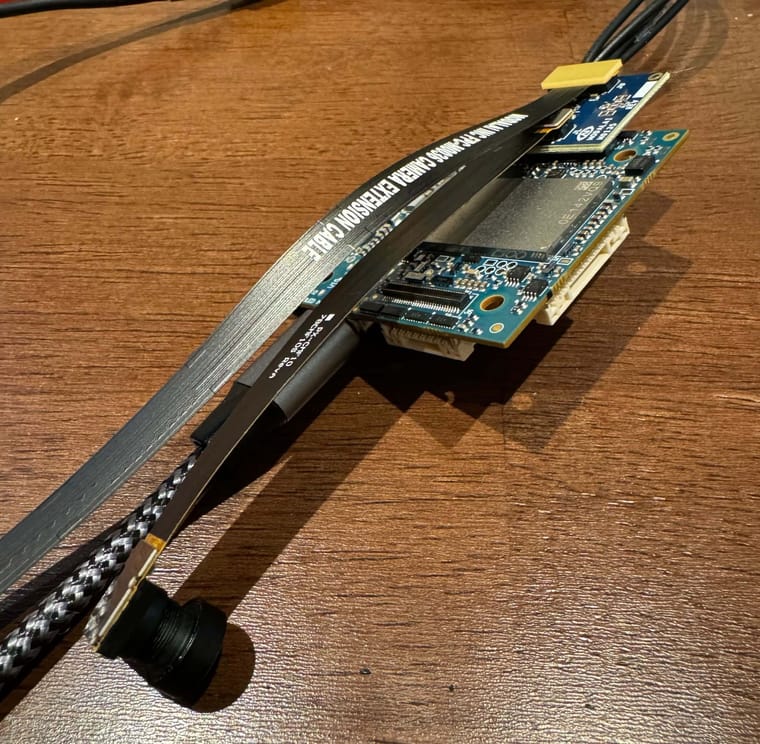
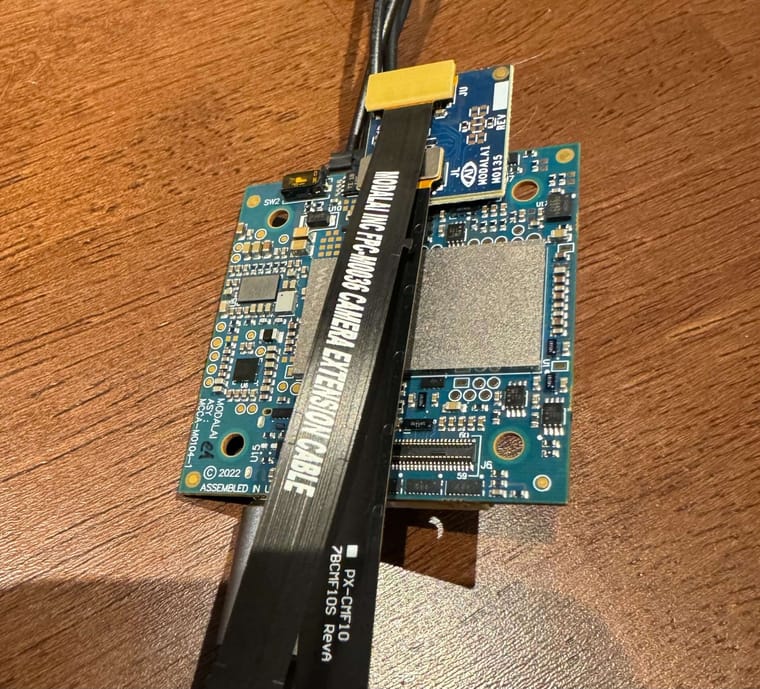
-
Hi, I just connected the two cameras to voxl-2 mini running SDK 1.1.1.
For ar0144, please use the latest
sensormodulefile from this location . The one that comes with SDK 1.1.1 has stability issues.#from your PC adb push ~/Downloads/com.qti.sensormodule.ar0144_2.bin /usr/lib/camera/ #now on VOXL2 mini voxl2-mini:/$ cp /usr/share/modalai/chi-cdk/imx412/com.qti.sensormodule.imx412_3.bin /usr/lib/camera/ voxl2-mini:/$ voxl-camera-server -l DEBUG: Attempting to open the hal module DEBUG: SUCCESS: Camera module opened on attempt 0 DEBUG: ----------- Number of cameras: 2 DEBUG: Cam idx: 0, Cam slot: 2, Slave Address: 0x0030, Sensor Id: 0x0356 DEBUG: Cam idx: 1, Cam slot: 3, Slave Address: 0x0034, Sensor Id: 0x0577 DEBUG: Note: This list comes from the HAL module and may not be indicative DEBUG: of configurations that have full pipelines DEBUG: Number of cameras: 2 ...The
/etc/modalai/voxl-camera-server.confshould look like this (a good starting point):{ "version": 0.1, "cameras": [{ "type": "ar0144", "name": "tracking", "enabled": true, "camera_id": 0, "fps": 30, "en_rotate": false, "en_preview": true, "preview_width": 1280, "preview_height": 800, "en_raw_preview": true, "ae_mode": "lme_msv", "ae_desired_msv": 60, "exposure_min_us": 20, "exposure_max_us": 33000, "gain_min": 54, "gain_max": 8000, "exposure_soft_min_us": 5000, "ae_filter_alpha": 0.600000023841858, "ae_ignore_fraction": 0.20000000298023224, "ae_slope": 0.05000000074505806, "ae_exposure_period": 1, "ae_gain_period": 1 }, { "type": "imx412", "name": "hires", "enabled": true, "camera_id": 1, "fps": 30, "en_preview": false, "preview_width": 640, "preview_height": 480, "en_raw_preview": false, "en_small_video": true, "small_video_width": 1280, "small_video_height": 800, "small_venc_mode": "h265", "small_venc_br_ctrl": "cqp", "small_venc_Qfixed": 30, "small_venc_Qmin": 15, "small_venc_Qmax": 40, "small_venc_nPframes": 9, "small_venc_mbps": 2, "en_large_video": true, "large_video_width": 3840, "large_video_height": 2160, "large_venc_mode": "h265", "large_venc_br_ctrl": "cqp", "large_venc_Qfixed": 38, "large_venc_Qmin": 15, "large_venc_Qmax": 50, "large_venc_nPframes": 29, "large_venc_mbps": 30, "en_snapshot": false, "en_snapshot_width": 4056, "en_snapshot_height": 3040, "ae_mode": "isp" }] }then you can start
voxl-camera-serverin regular mode (without-l), it should run.use
voxl-inspect-cam -ato check video streams:| Pipe Name | bytes | wide | hgt |exp(ms)| gain | frame id |latency(ms)| fps | mbps | format | hires_large_color |12441600 | 3840 | 2160 | 33.23 | 1125 | 566 | 78.3 | 29.9 | 2974.3 | NV12 | hires_large_encoded | 4893 | 3840 | 2160 | 33.23 | 1125 | 566 | 89.2 | 29.9 | 1.3 | H265 (P) | hires_large_grey | 8294400 | 3840 | 2160 | 33.23 | 1125 | 567 | 70.6 | 29.9 | 1982.9 | RAW8 | hires_small_color | 1536000 | 1280 | 800 | 33.23 | 1125 | 568 | 57.3 | 29.9 | 367.2 | NV12 | hires_small_encoded | 2710 | 1280 | 800 | 33.23 | 1125 | 568 | 60.9 | 29.9 | 1.8 | H265 (P) | hires_small_grey | 1024000 | 1280 | 800 | 33.23 | 1125 | 568 | 55.5 | 29.9 | 244.8 | RAW8 | tracking | 1024000 | 1280 | 800 | 7.04 | 665 | 8043 | 20.7 | 30.0 | 245.6 | RAW8Then you can use voxl-portal to view images (assuming you have a wired or wifi adapter plugged into your voxl2-mini:
(if voxl portal is not enabled, you can enable it):systemctl enable voxl-portal systemctl start voxl-portalThen go to web browser and enter your voxl2-mini's ip to view
voxl-portal@Alex-Kushleyev Here's what I'm seeing:
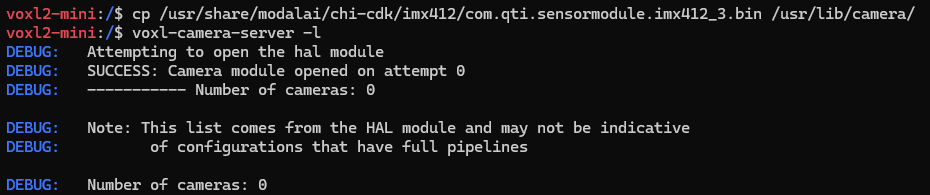
Here's the wiring; It looks the same as yours.
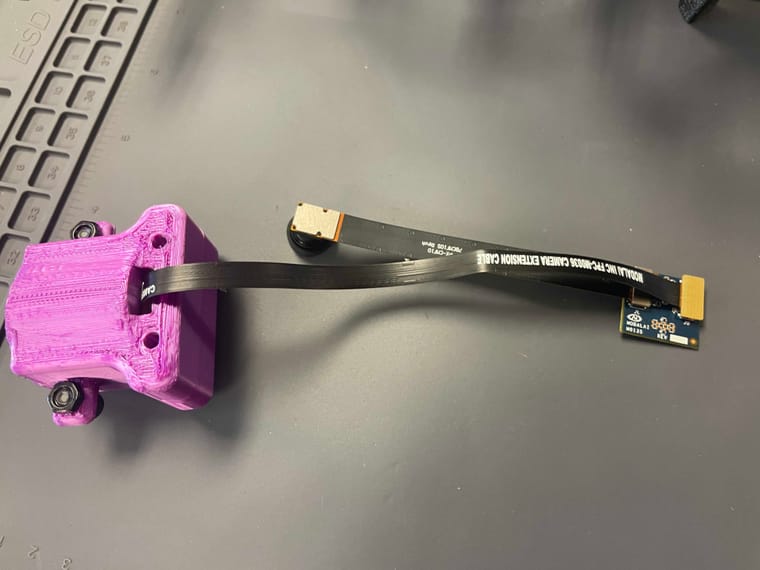
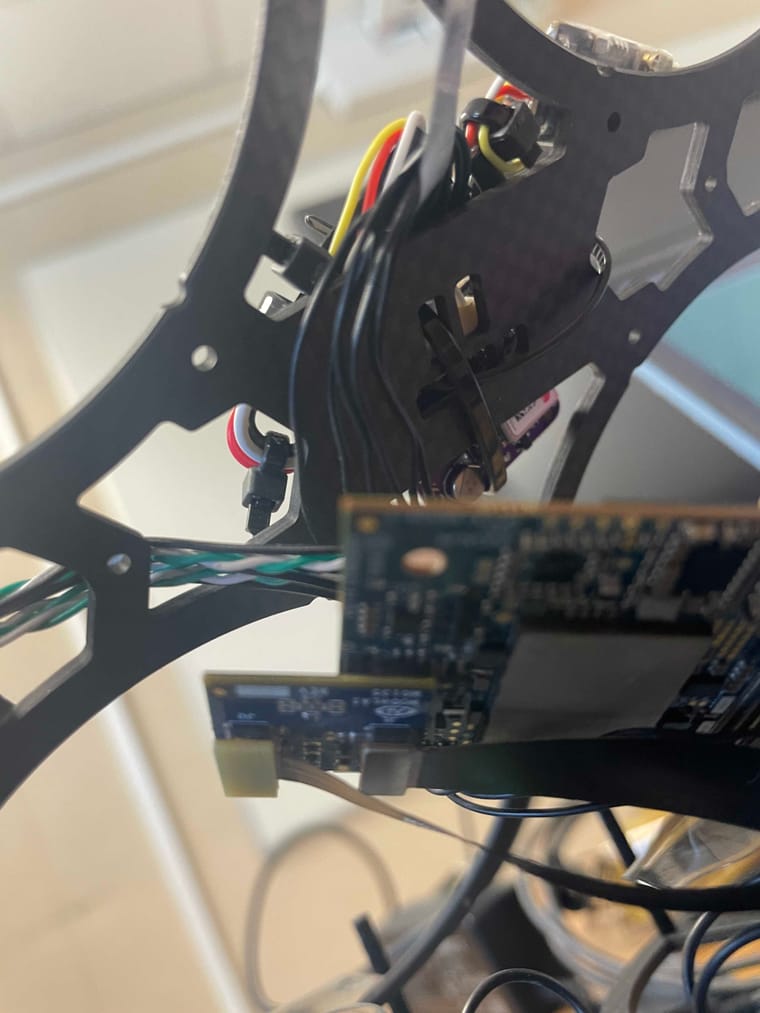
-
@Alex-Kushleyev Here's what I'm seeing:
Here's the wiring; It looks the same as yours.
@WineVirus i believe you have M0135 plugged into J6 instead of J7 like I do. Take a look at my photo again.
-
@WineVirus i believe you have M0135 plugged into J6 instead of J7 like I do. Take a look at my photo again.
@Alex-Kushleyev Ahh, yeah. My board is upside down, so I got turned around.
I'm now detecting one camera, but both are plugged in. I'm not sure which one this is?
voxl2-mini:/$ voxl-camera-server -l
DEBUG:   Attempting to open the hal module
DEBUG:   SUCCESS: Camera module opened on attempt 0
DEBUG:   ----------- Number of cameras: 1

DEBUG:   Cam idx: 0, Cam slot: 2, Slave Address: 0x0030, Sensor Id: 0x0356
DEBUG:   Note: This list comes from the HAL module and may not be indicative
DEBUG:          of configurations that have full pipelines

DEBUG:   Number of cameras: 1
Also, in terms of updating the config - is it a push command, like the ar0144 driver? Not sure what command to use in ADB.
-
@Alex-Kushleyev Ahh, yeah. My board is upside down, so I got turned around.
I'm now detecting one camera, but both are plugged in. I'm not sure which one this is?
voxl2-mini:/$ voxl-camera-server -l
DEBUG:   Attempting to open the hal module
DEBUG:   SUCCESS: Camera module opened on attempt 0
DEBUG:   ----------- Number of cameras: 1

DEBUG:   Cam idx: 0, Cam slot: 2, Slave Address: 0x0030, Sensor Id: 0x0356
DEBUG:   Note: This list comes from the HAL module and may not be indicative
DEBUG:          of configurations that have full pipelines

DEBUG:   Number of cameras: 1
Also, in terms of updating the config - is it a push command, like the ar0144 driver? Not sure what command to use in ADB.
@WineVirus please double check that you have
com.qti.sensormodule.imx412_3.binin/usr/lib/camera/and also double check the orientation of the flex cable coming out of IMX412 camera inside your 3D printed enclosure. It should come straight away from the camera not towards to center of the camera PCB.for the configuration file, you could edit it right on VOXL (using a command line text editor, like
vi), or you can make a new filevoxl-camera-server.confon your PC with the exact contents that i posted and push it to/etc/modalai/Alex
-
@WineVirus please double check that you have
com.qti.sensormodule.imx412_3.binin/usr/lib/camera/and also double check the orientation of the flex cable coming out of IMX412 camera inside your 3D printed enclosure. It should come straight away from the camera not towards to center of the camera PCB.for the configuration file, you could edit it right on VOXL (using a command line text editor, like
vi), or you can make a new filevoxl-camera-server.confon your PC with the exact contents that i posted and push it to/etc/modalai/Alex
@Alex-Kushleyev Is there somewhere I can download the imx412_3.bin file? It's not in the output of
./adb shell ls -la /usr/lib/cameraThe flex connector comes straight away from the camera.
I've pushed the server config file.
-
@Alex-Kushleyev Is there somewhere I can download the imx412_3.bin file? It's not in the output of
./adb shell ls -la /usr/lib/cameraThe flex connector comes straight away from the camera.
I've pushed the server config file.
copy the IMX412 driver
cp /usr/share/modalai/chi-cdk/imx412/com.qti.sensormodule.imx412_3.bin /usr/lib/camera/
-
copy the IMX412 driver
cp /usr/share/modalai/chi-cdk/imx412/com.qti.sensormodule.imx412_3.bin /usr/lib/camera/
@Alex-Kushleyev ok, the imx412_3 bin file is in /usr/lib/camera/, but I'm still only sensing 1 camera.
Also, I'll be on spring break, so I apologize for a potential lack of response.
-
@Alex-Kushleyev ok, the imx412_3 bin file is in /usr/lib/camera/, but I'm still only sensing 1 camera.
Also, I'll be on spring break, so I apologize for a potential lack of response.
@WineVirus Hmm. please double check to make sure all the connectors are seated properly. They should "snap in" as you insert them.
If that does not work, it could be a bad cable for IMX412 camera, or something else. we can try putting IMX412 on JL, so it would e imx412_2, which you could also copy and try. Then AR0144 could be on JU, so you could download it from here : https://gitlab.com/voxl-public/voxl-sdk/services/voxl-camera-server/-/blob/master/misc_files/usr/share/modalai/voxl-camera-server/drivers/ar0144/com.qti.sensormodule.ar0144_3.bin
Swapping the cameras can help figure out where the issue is. You can leave the existing sensormodules in there (no need to delete them), just add ar0144_3 and imx412_2
-
@WineVirus Hmm. please double check to make sure all the connectors are seated properly. They should "snap in" as you insert them.
If that does not work, it could be a bad cable for IMX412 camera, or something else. we can try putting IMX412 on JL, so it would e imx412_2, which you could also copy and try. Then AR0144 could be on JU, so you could download it from here : https://gitlab.com/voxl-public/voxl-sdk/services/voxl-camera-server/-/blob/master/misc_files/usr/share/modalai/voxl-camera-server/drivers/ar0144/com.qti.sensormodule.ar0144_3.bin
Swapping the cameras can help figure out where the issue is. You can leave the existing sensormodules in there (no need to delete them), just add ar0144_3 and imx412_2
If you switch the two cameras around, make sure double check pin 1 on the connector. JL and JU are rotated 180 degrees with respect to each other. You can also just test IMX412 and not connect AR0144 at all, if that is simpler, so that you could test IMX412 only.
-
If you switch the two cameras around, make sure double check pin 1 on the connector. JL and JU are rotated 180 degrees with respect to each other. You can also just test IMX412 and not connect AR0144 at all, if that is simpler, so that you could test IMX412 only.
@Alex-Kushleyev Ran through the troubleshooting steps (swapping both connections), still only getting one camera (same ID, just on the other slot). I think I'll just replace the cable.
Can I work on the setup on only one sensor, with a simple way to add another one? Or will I have to redo the whole setup when I have both?
voxl2-mini:/$ voxl-camera-server -l existing instance of voxl-camera-server found, attempting to stop it DEBUG: Attempting to open the hal module DEBUG: SUCCESS: Camera module opened on attempt 0 DEBUG: ----------- Number of cameras: 1 DEBUG: Cam idx: 0, Cam slot: 3, Slave Address: 0x0030, Sensor Id: 0x0356 DEBUG: Note: This list comes from the HAL module and may not be indicative DEBUG: of configurations that have full pipelines DEBUG: Number of cameras: 1 -
@Alex-Kushleyev Ran through the troubleshooting steps (swapping both connections), still only getting one camera (same ID, just on the other slot). I think I'll just replace the cable.
Can I work on the setup on only one sensor, with a simple way to add another one? Or will I have to redo the whole setup when I have both?
voxl2-mini:/$ voxl-camera-server -l existing instance of voxl-camera-server found, attempting to stop it DEBUG: Attempting to open the hal module DEBUG: SUCCESS: Camera module opened on attempt 0 DEBUG: ----------- Number of cameras: 1 DEBUG: Cam idx: 0, Cam slot: 3, Slave Address: 0x0030, Sensor Id: 0x0356 DEBUG: Note: This list comes from the HAL module and may not be indicative DEBUG: of configurations that have full pipelines DEBUG: Number of cameras: 1Hi @WineVirus
I think you are also using M0135 wrong.
You can only use 1 of them on each J6 or J7, they cannot be cascaded.
The way I see this here is not the correct usage:
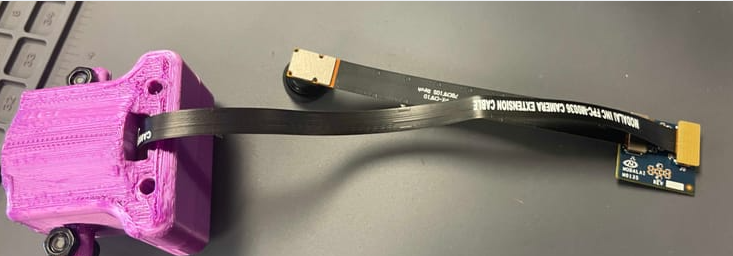
So the hires camera will never work like this.
The one camera you do see is the tracking cam... this one:
You must connect the module into M0135 directly only when plugged into the Voxl 2 Mini.
It is not designed to use the extension flex to mate to another image sensor via M0135.
In summary, remove this second M0135 and the M0036 extension flex:
 And plug the M0149 directly into M0135 here to mimic what Alex has demonstrated:
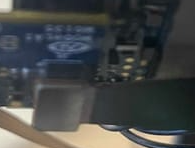
Hope this helps.If I am mistaken, please let us know but this is what I gather from your photos.
-
Hi @WineVirus
I think you are also using M0135 wrong.
You can only use 1 of them on each J6 or J7, they cannot be cascaded.
The way I see this here is not the correct usage:
So the hires camera will never work like this.
The one camera you do see is the tracking cam... this one:
You must connect the module into M0135 directly only when plugged into the Voxl 2 Mini.
It is not designed to use the extension flex to mate to another image sensor via M0135.
In summary, remove this second M0135 and the M0036 extension flex:
And plug the M0149 directly into M0135 here to mimic what Alex has demonstrated:
Hope this helps.If I am mistaken, please let us know but this is what I gather from your photos.
@Vinny , i was able to use both cameras in this configuration (see above in this thread).
It seems the imx412 camera is not detected, potentially bad extension flex cable or (less likely) bad camera. Has this hires camera worked before at some point?
-
@Vinny , i was able to use both cameras in this configuration (see above in this thread).
It seems the imx412 camera is not detected, potentially bad extension flex cable or (less likely) bad camera. Has this hires camera worked before at some point?
@Alex-Kushleyev OK, I am just making sure the M0135 is not used in a cascaded mode (a M0135 plugged into another M0135). That is what the first pictures look like to me since the M0135 is just sitting open on a bench.
As far as the image sensor, all modules are tested at ModalAI HQ before shipping in a known good working configuration of hardware (i.e.: a golden setup). So, yes, all image sensors are working when shipped. Same for the extension flexes. Every one is tested before shipping.
I do see a bend in the flex right here, so hopefully that is not a firm crease since creases will damage flexes:
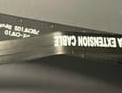
Hope this helps! -
@Alex-Kushleyev OK, I am just making sure the M0135 is not used in a cascaded mode (a M0135 plugged into another M0135). That is what the first pictures look like to me since the M0135 is just sitting open on a bench.
As far as the image sensor, all modules are tested at ModalAI HQ before shipping in a known good working configuration of hardware (i.e.: a golden setup). So, yes, all image sensors are working when shipped. Same for the extension flexes. Every one is tested before shipping.
I do see a bend in the flex right here, so hopefully that is not a firm crease since creases will damage flexes:
Hope this helps!@Vinny I think you may be mistaken... One end of the M0036 is connected to the M0135, and the other end is connected to the M0107 Camera (that's inside the purple case). We're only using one M0135.
I'm receiving a new M0036 cable tomorrow. I'll test that.
-
@Vinny I think you may be mistaken... One end of the M0036 is connected to the M0135, and the other end is connected to the M0107 Camera (that's inside the purple case). We're only using one M0135.
I'm receiving a new M0036 cable tomorrow. I'll test that.
@WineVirus Thanks for confirming!
Just trying to help and that picture struck me as odd.Glad you have it covered with Alex, he'll guide you correctly!!!


Reading along? Create a free ModalAI Forum account to join in.
With an account you can reply, ask your own question, get an email when a ModalAI engineer answers, and mark the reply that solved it. Your place in each thread is saved between visits.
Questions about VOXL, Flight Core, ESCs and ModalAI drones are answered here by the engineers who build them.
Register Login