
VOXL2 Camera Configuration 2XHires + Tracking
-
@jacob-yaacubov , which hires cameras are you trying to connect and do you have a preference where to plug them in? I can test and provide a configuration for you.
@Alex-Kushleyev thanks , i use the imx214, don't have a specific preference
-
@Alex-Kushleyev thanks , i use the imx214, don't have a specific preference
Here is a quick tutorial.
- Connect two M0024 IMX214 cameras to VOXL2 J7 via MSU-M0084 dual camera flex adapter. Disconnect any other cameras for now to avoid confusion.
- power on voxl
- copy imx214 sensormodules for camera slots 2 and 3 because that is the assignment for J7
cp /usr/share/modalai/chi-cdk/imx214/com.qti.sensormodule.imx214_2.bin /usr/lib/camera/ cp /usr/share/modalai/chi-cdk/imx214/com.qti.sensormodule.imx214_3.bin /usr/lib/camera/- copy the tuning file for imx214 (this tuning file is specific for M0024 / M0124), and it has some lens correction params specific to that lens. If you are using another variant IMX214, let me know, i can make a suggestion how to get good image quality.
cp /usr/share/modalai/chi-cdk/tuned/com.qti.tuned.imx214_m0024.bin /usr/lib/camera/com.qti.tuned.imx214.binquick test using camera server
voxl-camera-server -l DEBUG: Attempting to open the hal module DEBUG: SUCCESS: Camera module opened on attempt 0 DEBUG: ----------- Number of cameras: 2 DEBUG: Cam idx: 0, Cam slot: 2, Slave Address: 0x0020, Sensor Id: 0x0214 DEBUG: Cam idx: 1, Cam slot: 3, Slave Address: 0x0020, Sensor Id: 0x0214 ...- update
/etc/modalai/voxl-camera-server.conf
{
	"version":	0.1,
	"fsync_en":	false,
	"fsync_gpio":	111,
	"cameras":	[{
			"type":	"imx214",
			"name":	"hires2",
			"enabled":	true,
			"camera_id":	0,
			"fps":	30,
			"en_preview":	true,
			"preview_width":	1920,
			"preview_height":	1080,
			"ae_mode":	"isp",
			"en_raw_preview":	false,
			"en_small_video":	false,
			"small_video_width":	1280,
			"small_video_height":	720,
			"small_venc_mode":	"h265",
			"small_venc_br_ctrl":	"cqp",
			"small_venc_Qfixed":	30,
			"small_venc_Qmin":	15,
			"small_venc_Qmax":	40,
			"small_venc_nPframes":	9,
			"small_venc_mbps":	2,
			"en_large_video":	false,
			"large_video_width":	1920,
			"large_video_height":	1080,
			"large_venc_mode":	"h265",
			"large_venc_br_ctrl":	"cqp",
			"large_venc_Qfixed":	38,
			"large_venc_Qmin":	15,
			"large_venc_Qmax":	50,
			"large_venc_nPframes":	29,
			"large_venc_mbps":	30,
			"en_snapshot":	        false,
			"en_snapshot_width":	4208,
			"en_snapshot_height":	3120
		}, {
			"type":	"imx214",
			"name":	"hires3",
			"enabled":	true,
			"camera_id":	1,
			"fps":	30,
			"en_preview":	true,
			"preview_width":	1920,
			"preview_height":	1080,
			"ae_mode":	"isp",
			"en_raw_preview":	false,
			"en_small_video":	false,
			"small_video_width":	1280,
			"small_video_height":	720,
			"small_venc_mode":	"h265",
			"small_venc_br_ctrl":	"cqp",
			"small_venc_Qfixed":	30,
			"small_venc_Qmin":	15,
			"small_venc_Qmax":	40,
			"small_venc_nPframes":	9,
			"small_venc_mbps":	2,
			"en_large_video":	false,
			"large_video_width":	1920,
			"large_video_height":	1080,
			"large_venc_mode":	"h265",
			"large_venc_br_ctrl":	"cqp",
			"large_venc_Qfixed":	38,
			"large_venc_Qmin":	15,
			"large_venc_Qmax":	50,
			"large_venc_nPframes":	29,
			"large_venc_mbps":	30,
			"en_snapshot":	        false,
			"en_snapshot_width":	4208,
			"en_snapshot_height":	3120
		}]
}
then start
voxl-camera-serverand you should be able to see the output of the two cameras invoxl-portal. I called themhires2andhires3corresponding to their hardware slot IDs. You can modify thevoxl-camera-server.conffurther to enable encoded streams.A few considerations
- if you find any interference (extra noise or any glitches) while two hires cameras are connected to the same VOXL2 camera connector (e.g. J7), it may be best to split them up: connect one camera to J6 and another to J7. I have seen that sometimes i get a noticeable horizontal line a few pixels wide in one or both images, i suspect this maybe a short power spike when one camera starts acquiring an image while another camera is already in process of acquiring. I don't see this every time, but it's not something i have seen before when running a single hires camera, so i just wanted to mention that.
- if you are changing sensor resolutions, you can always check which native camera resolution the camera pipeline has selected by running (before starting
voxl-camera-server) :
logcat | grep -i selectedin our case, you will see
Selected sensor Mode W=1920, H=1080since i requested 1920x1080 preview frame.- just FYI, if you use resolutions 1920x1080 or smaller, the camera will be in 2x2 binning mode with 4x sensitivity (good for low light conditions). While if you use large resolutions like 3840x2160, the camera will be in regular mode, not as sensitive in low light conditions.
- if you request multiple resolutions, the camera native mode will be chosen to satisfy the largest requested resolution, as the camera can only stream raw images of only one size, so largest will be selected and smaller images will be obtained by downscaling in the isp.
Once you get two hires cameras working, you can add the tracking camera as third camera, follow the same logic for figuring out slot ID and sensormodule that you need to copy. More details about hardware sensor IDs (i called them slot ids) here : https://docs.modalai.com/voxl2-camera-configs/#overview
Lots of details here, try this out and let me know if you have any questions..
Alex
-
Here is a quick tutorial.
- Connect two M0024 IMX214 cameras to VOXL2 J7 via MSU-M0084 dual camera flex adapter. Disconnect any other cameras for now to avoid confusion.
- power on voxl
- copy imx214 sensormodules for camera slots 2 and 3 because that is the assignment for J7
cp /usr/share/modalai/chi-cdk/imx214/com.qti.sensormodule.imx214_2.bin /usr/lib/camera/ cp /usr/share/modalai/chi-cdk/imx214/com.qti.sensormodule.imx214_3.bin /usr/lib/camera/- copy the tuning file for imx214 (this tuning file is specific for M0024 / M0124), and it has some lens correction params specific to that lens. If you are using another variant IMX214, let me know, i can make a suggestion how to get good image quality.
cp /usr/share/modalai/chi-cdk/tuned/com.qti.tuned.imx214_m0024.bin /usr/lib/camera/com.qti.tuned.imx214.binquick test using camera server
voxl-camera-server -l DEBUG: Attempting to open the hal module DEBUG: SUCCESS: Camera module opened on attempt 0 DEBUG: ----------- Number of cameras: 2 DEBUG: Cam idx: 0, Cam slot: 2, Slave Address: 0x0020, Sensor Id: 0x0214 DEBUG: Cam idx: 1, Cam slot: 3, Slave Address: 0x0020, Sensor Id: 0x0214 ...- update
/etc/modalai/voxl-camera-server.conf
{
	"version":	0.1,
	"fsync_en":	false,
	"fsync_gpio":	111,
	"cameras":	[{
			"type":	"imx214",
			"name":	"hires2",
			"enabled":	true,
			"camera_id":	0,
			"fps":	30,
			"en_preview":	true,
			"preview_width":	1920,
			"preview_height":	1080,
			"ae_mode":	"isp",
			"en_raw_preview":	false,
			"en_small_video":	false,
			"small_video_width":	1280,
			"small_video_height":	720,
			"small_venc_mode":	"h265",
			"small_venc_br_ctrl":	"cqp",
			"small_venc_Qfixed":	30,
			"small_venc_Qmin":	15,
			"small_venc_Qmax":	40,
			"small_venc_nPframes":	9,
			"small_venc_mbps":	2,
			"en_large_video":	false,
			"large_video_width":	1920,
			"large_video_height":	1080,
			"large_venc_mode":	"h265",
			"large_venc_br_ctrl":	"cqp",
			"large_venc_Qfixed":	38,
			"large_venc_Qmin":	15,
			"large_venc_Qmax":	50,
			"large_venc_nPframes":	29,
			"large_venc_mbps":	30,
			"en_snapshot":	        false,
			"en_snapshot_width":	4208,
			"en_snapshot_height":	3120
		}, {
			"type":	"imx214",
			"name":	"hires3",
			"enabled":	true,
			"camera_id":	1,
			"fps":	30,
			"en_preview":	true,
			"preview_width":	1920,
			"preview_height":	1080,
			"ae_mode":	"isp",
			"en_raw_preview":	false,
			"en_small_video":	false,
			"small_video_width":	1280,
			"small_video_height":	720,
			"small_venc_mode":	"h265",
			"small_venc_br_ctrl":	"cqp",
			"small_venc_Qfixed":	30,
			"small_venc_Qmin":	15,
			"small_venc_Qmax":	40,
			"small_venc_nPframes":	9,
			"small_venc_mbps":	2,
			"en_large_video":	false,
			"large_video_width":	1920,
			"large_video_height":	1080,
			"large_venc_mode":	"h265",
			"large_venc_br_ctrl":	"cqp",
			"large_venc_Qfixed":	38,
			"large_venc_Qmin":	15,
			"large_venc_Qmax":	50,
			"large_venc_nPframes":	29,
			"large_venc_mbps":	30,
			"en_snapshot":	        false,
			"en_snapshot_width":	4208,
			"en_snapshot_height":	3120
		}]
}
then start
voxl-camera-serverand you should be able to see the output of the two cameras invoxl-portal. I called themhires2andhires3corresponding to their hardware slot IDs. You can modify thevoxl-camera-server.conffurther to enable encoded streams.A few considerations
- if you find any interference (extra noise or any glitches) while two hires cameras are connected to the same VOXL2 camera connector (e.g. J7), it may be best to split them up: connect one camera to J6 and another to J7. I have seen that sometimes i get a noticeable horizontal line a few pixels wide in one or both images, i suspect this maybe a short power spike when one camera starts acquiring an image while another camera is already in process of acquiring. I don't see this every time, but it's not something i have seen before when running a single hires camera, so i just wanted to mention that.
- if you are changing sensor resolutions, you can always check which native camera resolution the camera pipeline has selected by running (before starting
voxl-camera-server) :
logcat | grep -i selectedin our case, you will see
Selected sensor Mode W=1920, H=1080since i requested 1920x1080 preview frame.- just FYI, if you use resolutions 1920x1080 or smaller, the camera will be in 2x2 binning mode with 4x sensitivity (good for low light conditions). While if you use large resolutions like 3840x2160, the camera will be in regular mode, not as sensitive in low light conditions.
- if you request multiple resolutions, the camera native mode will be chosen to satisfy the largest requested resolution, as the camera can only stream raw images of only one size, so largest will be selected and smaller images will be obtained by downscaling in the isp.
Once you get two hires cameras working, you can add the tracking camera as third camera, follow the same logic for figuring out slot ID and sensormodule that you need to copy. More details about hardware sensor IDs (i called them slot ids) here : https://docs.modalai.com/voxl2-camera-configs/#overview
Lots of details here, try this out and let me know if you have any questions..
Alex
Thank you for the detailed reply i am checking this right now,
regarding the slots assignment i might need to check other configurations so do have an idea
where can i find which connector mapped to which slot ? haven't found this in the Docsin theory what is the maximum mun of image sensors (Not TOF) the Voxl2 will support?
(i include the stereo as two separate sensors for the purpose of this question ) -
Thank you for the detailed reply i am checking this right now,
regarding the slots assignment i might need to check other configurations so do have an idea
where can i find which connector mapped to which slot ? haven't found this in the Docsin theory what is the maximum mun of image sensors (Not TOF) the Voxl2 will support?
(i include the stereo as two separate sensors for the purpose of this question )You can find the slot information in this diagram here : https://docs.modalai.com/voxl2-camera-configs/#overview (also pasting it below). We use
hw sensor idandslot idterms interchangeably. Upper / Lower is marked on the flex if you are using the dual-camera flex (JU / JL)
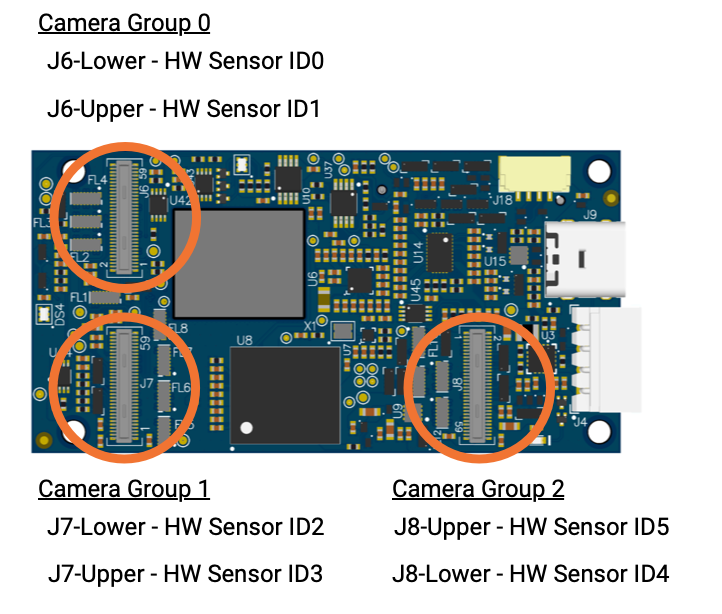
In terms of maximum number of cameras.. this configuration https://docs.modalai.com/voxl2-camera-configs/#c-11-front-stereo-rear-stereo-hires-and-tracking-d0006-sentinel shows 6 cameras (1 hires, 5 ov7251).
There is is a limit in terms of how many concurrent cameras can be using the video processing pipeline (outputting YUV or encoded streams). Let me check what that number is (at least 2). The number of RAW streams does not have this limit and will be limited by the physical hardware ports. If you have more specific camera configuration in mind, i can check that for you.
-
You can find the slot information in this diagram here : https://docs.modalai.com/voxl2-camera-configs/#overview (also pasting it below). We use
hw sensor idandslot idterms interchangeably. Upper / Lower is marked on the flex if you are using the dual-camera flex (JU / JL)
In terms of maximum number of cameras.. this configuration https://docs.modalai.com/voxl2-camera-configs/#c-11-front-stereo-rear-stereo-hires-and-tracking-d0006-sentinel shows 6 cameras (1 hires, 5 ov7251).
There is is a limit in terms of how many concurrent cameras can be using the video processing pipeline (outputting YUV or encoded streams). Let me check what that number is (at least 2). The number of RAW streams does not have this limit and will be limited by the physical hardware ports. If you have more specific camera configuration in mind, i can check that for you.
@Alex-Kushleyev
Great i understand thank you very much, i understand
the most extreme case i need to check is the following :
two hi-res IMX214 sensor working at 5hz
2 sets of stereo ov7251 VGA - ( front & rear) - 30hz
1 - tracking - 30hzthis is just one more HI-RES that the max you suggested
i plan to use the Dual Image Sensor Expander to
group 0 - 1 x Stereo , 1 x Tracking
group 1 - 1 x HI-RES, 1 x Stereo
group 2 - 1 x HI-RESif this is possible it will be great
Again Thanks for the quick response
-
@Alex-Kushleyev
Great i understand thank you very much, i understand
the most extreme case i need to check is the following :
two hi-res IMX214 sensor working at 5hz
2 sets of stereo ov7251 VGA - ( front & rear) - 30hz
1 - tracking - 30hzthis is just one more HI-RES that the max you suggested
i plan to use the Dual Image Sensor Expander to
group 0 - 1 x Stereo , 1 x Tracking
group 1 - 1 x HI-RES, 1 x Stereo
group 2 - 1 x HI-RESif this is possible it will be great
Again Thanks for the quick response
@jacob-yaacubov , it does not look like a stereo pair can share the dual camera expander. i tried it and only one of the two sensors in the pair was detected. I will check why.
However, i was able use the configuration 11 (https://docs.modalai.com/voxl2-camera-configs/#c11---front-stereo-rear-stereo-hires-and-tracking) and replace the tracking camera with a 2nd imx214 and it worked (2x imx214 and 2x stereo). A small change in camera config was required along with a copying of
com.qti.sensormodule.imx214_2.binfrom/usr/share/modalai/chi-cdk/imx214/to/usr/lib/camera(after running voxl-configure-cameras with C11)output of
voxl-inspect-cam -a(please note that is a very stressful test to usevoxl-inspect-cam -abecause the inspect tool will pull all this data fromvoxl-camera-server, you can see it is over 10Gbit/second due to un-encoded frames. Normally you would not be sending 30fps 4K frames via MPA, but i think you mentioned 5Hz each, but did not specify format - yuv or encoded video).i named hires2 the camera connected to slot 2 and hires3 connected to slot 3.
           Pipe Name |  bytes  | wide |  hgt |exp(ms)| gain | frame id |latency(ms)|  fps |  mbps  | format
|   hires2_large_color |12441600 | 3840 | 2160 | 33.23 |  800 |      146 |    224.3  | 30.0 | 2986.9 | NV12
| hires2_large_encoded |  158743 | 3840 | 2160 | 33.23 |  800 |      147 |    212.6  | 30.0 |   38.2 | H265 (P)
|    hires2_large_grey | 8294400 | 3840 | 2160 | 33.23 |  800 |      148 |    177.9  | 30.0 | 1991.2 | RAW8
|   hires3_large_color |12441600 | 3840 | 2160 | 11.11 |  575 |      140 |    307.2  | 30.0 | 2986.8 | NV12
| hires3_large_encoded |   96018 | 3840 | 2160 | 11.11 |  575 |      140 |    287.0  | 30.0 |   24.1 | H265 (P)
|    hires3_large_grey | 8294400 | 3840 | 2160 | 11.11 |  575 |      141 |    259.6  | 30.0 | 1991.3 | RAW8
|         stereo_front |  614400 |  640 |  480 |  6.50 |  538 |      166 |     15.3  | 30.0 |  147.5 | STEREO_RAW8
|          stereo_rear |  614400 |  640 |  480 | 12.49 | 1238 |      153 |     16.3  | 30.0 |  147.5 | STEREO_RAW8
If i change the fps of both hires (in `voxl-camera-server.conf) to 5, the load is much lower, you can also see the latency for hires stream is reduced:
|            Pipe Name |  bytes  | wide |  hgt |exp(ms)| gain | frame id |latency(ms)|  fps |  mbps  | format
|   hires2_large_color |12441600 | 3840 | 2160 | 66.67 |  800 |      108 |     79.8  |  5.0 |  497.9 | NV12
| hires2_large_encoded |  179368 | 3840 | 2160 | 66.67 |  800 |      108 |     89.8  |  5.0 |    7.2 | H265 (P)
|    hires2_large_grey | 8294400 | 3840 | 2160 | 66.67 |  800 |      108 |     73.7  |  5.0 |  331.9 | RAW8
|   hires3_large_color |12441600 | 3840 | 2160 | 11.11 |  512 |      107 |     83.2  |  5.0 |  497.8 | NV12
| hires3_large_encoded |   62102 | 3840 | 2160 | 11.11 |  512 |      107 |     85.3  |  5.0 |    2.7 | H265 (P)
|    hires3_large_grey | 8294400 | 3840 | 2160 | 11.11 |  512 |      107 |     72.8  |  5.0 |  331.9 | RAW8
|         stereo_front |  614400 |  640 |  480 |  6.47 |  531 |      669 |     12.1  | 30.0 |  147.4 | STEREO_RAW8
|          stereo_rear |  614400 |  640 |  480 | 11.78 | 1194 |      657 |     11.5  | 30.0 |  147.5 | STEREO_RAW8
output of
voxl-camera-server -l(you can see two IMX214 cameras in slots 2 and 3 and the rest ov7251 in slots 0,1,3,4). Sensor ID for IMX214 is 0x0214 and for ov7251 is 0x7750:DEBUG: ----------- Number of cameras: 6 DEBUG: Cam idx: 0, Cam slot: 0, Slave Address: 0x00E2, Sensor Id: 0x7750 DEBUG: Cam idx: 1, Cam slot: 1, Slave Address: 0x00E4, Sensor Id: 0x7750 DEBUG: Cam idx: 2, Cam slot: 2, Slave Address: 0x0020, Sensor Id: 0x0214 DEBUG: Cam idx: 3, Cam slot: 3, Slave Address: 0x0020, Sensor Id: 0x0214 DEBUG: Cam idx: 4, Cam slot: 4, Slave Address: 0x00E2, Sensor Id: 0x7750 DEBUG: Cam idx: 5, Cam slot: 5, Slave Address: 0x00E4, Sensor Id: 0x7750So there are some preliminary results.. I am not sure if 7-camera setup will work, but I will check.
-
@jacob-yaacubov , it does not look like a stereo pair can share the dual camera expander. i tried it and only one of the two sensors in the pair was detected. I will check why.
However, i was able use the configuration 11 (https://docs.modalai.com/voxl2-camera-configs/#c11---front-stereo-rear-stereo-hires-and-tracking) and replace the tracking camera with a 2nd imx214 and it worked (2x imx214 and 2x stereo). A small change in camera config was required along with a copying of
com.qti.sensormodule.imx214_2.binfrom/usr/share/modalai/chi-cdk/imx214/to/usr/lib/camera(after running voxl-configure-cameras with C11)output of
voxl-inspect-cam -a(please note that is a very stressful test to usevoxl-inspect-cam -abecause the inspect tool will pull all this data fromvoxl-camera-server, you can see it is over 10Gbit/second due to un-encoded frames. Normally you would not be sending 30fps 4K frames via MPA, but i think you mentioned 5Hz each, but did not specify format - yuv or encoded video).i named hires2 the camera connected to slot 2 and hires3 connected to slot 3.
           Pipe Name |  bytes  | wide |  hgt |exp(ms)| gain | frame id |latency(ms)|  fps |  mbps  | format
|   hires2_large_color |12441600 | 3840 | 2160 | 33.23 |  800 |      146 |    224.3  | 30.0 | 2986.9 | NV12
| hires2_large_encoded |  158743 | 3840 | 2160 | 33.23 |  800 |      147 |    212.6  | 30.0 |   38.2 | H265 (P)
|    hires2_large_grey | 8294400 | 3840 | 2160 | 33.23 |  800 |      148 |    177.9  | 30.0 | 1991.2 | RAW8
|   hires3_large_color |12441600 | 3840 | 2160 | 11.11 |  575 |      140 |    307.2  | 30.0 | 2986.8 | NV12
| hires3_large_encoded |   96018 | 3840 | 2160 | 11.11 |  575 |      140 |    287.0  | 30.0 |   24.1 | H265 (P)
|    hires3_large_grey | 8294400 | 3840 | 2160 | 11.11 |  575 |      141 |    259.6  | 30.0 | 1991.3 | RAW8
|         stereo_front |  614400 |  640 |  480 |  6.50 |  538 |      166 |     15.3  | 30.0 |  147.5 | STEREO_RAW8
|          stereo_rear |  614400 |  640 |  480 | 12.49 | 1238 |      153 |     16.3  | 30.0 |  147.5 | STEREO_RAW8
If i change the fps of both hires (in `voxl-camera-server.conf) to 5, the load is much lower, you can also see the latency for hires stream is reduced:
|            Pipe Name |  bytes  | wide |  hgt |exp(ms)| gain | frame id |latency(ms)|  fps |  mbps  | format
|   hires2_large_color |12441600 | 3840 | 2160 | 66.67 |  800 |      108 |     79.8  |  5.0 |  497.9 | NV12
| hires2_large_encoded |  179368 | 3840 | 2160 | 66.67 |  800 |      108 |     89.8  |  5.0 |    7.2 | H265 (P)
|    hires2_large_grey | 8294400 | 3840 | 2160 | 66.67 |  800 |      108 |     73.7  |  5.0 |  331.9 | RAW8
|   hires3_large_color |12441600 | 3840 | 2160 | 11.11 |  512 |      107 |     83.2  |  5.0 |  497.8 | NV12
| hires3_large_encoded |   62102 | 3840 | 2160 | 11.11 |  512 |      107 |     85.3  |  5.0 |    2.7 | H265 (P)
|    hires3_large_grey | 8294400 | 3840 | 2160 | 11.11 |  512 |      107 |     72.8  |  5.0 |  331.9 | RAW8
|         stereo_front |  614400 |  640 |  480 |  6.47 |  531 |      669 |     12.1  | 30.0 |  147.4 | STEREO_RAW8
|          stereo_rear |  614400 |  640 |  480 | 11.78 | 1194 |      657 |     11.5  | 30.0 |  147.5 | STEREO_RAW8
output of
voxl-camera-server -l(you can see two IMX214 cameras in slots 2 and 3 and the rest ov7251 in slots 0,1,3,4). Sensor ID for IMX214 is 0x0214 and for ov7251 is 0x7750:DEBUG: ----------- Number of cameras: 6 DEBUG: Cam idx: 0, Cam slot: 0, Slave Address: 0x00E2, Sensor Id: 0x7750 DEBUG: Cam idx: 1, Cam slot: 1, Slave Address: 0x00E4, Sensor Id: 0x7750 DEBUG: Cam idx: 2, Cam slot: 2, Slave Address: 0x0020, Sensor Id: 0x0214 DEBUG: Cam idx: 3, Cam slot: 3, Slave Address: 0x0020, Sensor Id: 0x0214 DEBUG: Cam idx: 4, Cam slot: 4, Slave Address: 0x00E2, Sensor Id: 0x7750 DEBUG: Cam idx: 5, Cam slot: 5, Slave Address: 0x00E4, Sensor Id: 0x7750So there are some preliminary results.. I am not sure if 7-camera setup will work, but I will check.
Quick update..
Currently on VOXL2 we support only 1 regular camera or 1 stereo pair on J6 and J8. J7 supports up to two regular cameras, so you can either have 4 single cameras (in slots 0, 2, 3, 4) or you can use stereo pair in slots 0 and 4 using M0076 adapters and single cameras in slots 2,3 . Support for more cameras is possible in hardware, but not yet implemented in software.
-
Quick update..
Currently on VOXL2 we support only 1 regular camera or 1 stereo pair on J6 and J8. J7 supports up to two regular cameras, so you can either have 4 single cameras (in slots 0, 2, 3, 4) or you can use stereo pair in slots 0 and 4 using M0076 adapters and single cameras in slots 2,3 . Support for more cameras is possible in hardware, but not yet implemented in software.
Thank You, i understand makes things clearer now
since you mention software still does not support this...
how complicated and even if its possible on my side to open J6 or J8 for One More single camera , or one more stereo??
since i see there is two different ID_SLOTS on them which make me wonderquestion 2:
regarding the previous setup you inspected 2 X HIRES (5hz) J7 and 2 X Stereo (30hz) J6, J8
on the hires, we process the raw8 (yuv) format at 5hz (plan maybe at 3hz)based on what you checked whats your verdict will the mpa support this or is this a stretch?
-
Thank You, i understand makes things clearer now
since you mention software still does not support this...
how complicated and even if its possible on my side to open J6 or J8 for One More single camera , or one more stereo??
since i see there is two different ID_SLOTS on them which make me wonderquestion 2:
regarding the previous setup you inspected 2 X HIRES (5hz) J7 and 2 X Stereo (30hz) J6, J8
on the hires, we process the raw8 (yuv) format at 5hz (plan maybe at 3hz)based on what you checked whats your verdict will the mpa support this or is this a stretch?
regarding question2: yes, yuv is fine, it is already supported. To provide more details.. Actually the raw frames that come in from hires camera are 10bit Bayer format. If you want to debayer yourself, this is already supported in camera server (you can use as example), but you can also get YUV which goes through a camera processing inside the ISP (debayering, denoise, gamma correction, color correction, etc etc). There is an option whether to do a raw preview (which would give you the 10bit bayer format) or otherwise you will get YUV preview frame. "preview" is just a name of the processing pipeline and we typically use it for the uncompressed images, while the small / large video streams will still get YUVs and push them directly into hardware encoder to get h264/5).
Currently there is a limit of 2 concurrent cameras which use the ISP for processing, such as hires camera. Stereo and tracking cameras are typically running in RAW only mode, so they don't really use the ISP. It seems that it should not be an issue for you, since you need only two hires cameras which would potentially use the ISP to generate YUV. I believe there is a way to get more processed streams but it is not yet possible using the camera server.
-
regarding question2: yes, yuv is fine, it is already supported. To provide more details.. Actually the raw frames that come in from hires camera are 10bit Bayer format. If you want to debayer yourself, this is already supported in camera server (you can use as example), but you can also get YUV which goes through a camera processing inside the ISP (debayering, denoise, gamma correction, color correction, etc etc). There is an option whether to do a raw preview (which would give you the 10bit bayer format) or otherwise you will get YUV preview frame. "preview" is just a name of the processing pipeline and we typically use it for the uncompressed images, while the small / large video streams will still get YUVs and push them directly into hardware encoder to get h264/5).
Currently there is a limit of 2 concurrent cameras which use the ISP for processing, such as hires camera. Stereo and tracking cameras are typically running in RAW only mode, so they don't really use the ISP. It seems that it should not be an issue for you, since you need only two hires cameras which would potentially use the ISP to generate YUV. I believe there is a way to get more processed streams but it is not yet possible using the camera server.
Regarding enabling additional cameras, it is is not trivial and it would require a special kernel (because it would break the existing stereo camera support). Additionally, it would require a special interposer / cable in order to use a stereo pair with another camera on a single connector (this hardware does not exist now). At this time, we do not have plans to enable this functionality. As an option, you could potentially hook up a USB camera (will require an usb expansion adapter) to supplement existing cameras (using UVC interface), but we don't provide as much support for that option since that is 3rd party hardware and software.


Reading along? Create a free ModalAI Forum account to join in.
With an account you can reply, ask your own question, get an email when a ModalAI engineer answers, and mark the reply that solved it. Your place in each thread is saved between visits.
Questions about VOXL, Flight Core, ESCs and ModalAI drones are answered here by the engineers who build them.
Register Login