
ADB no longer working, docker-daemon no longer on the VOXL-2 services page
-
Hello, new user, working with a VOXL2 Dev kit.
A coworker was working on our VOXL 2 and we had success in uploading our AI and getting it all working. We were able to connect through ADB and also through ssh. We updated the device and have been testing different aspects while preparing our drone frame.
We are now currently unable to view the device through the adb devices list.
I noticed in our voxl-inspect-services that we are missing the docker-daemon as a service.
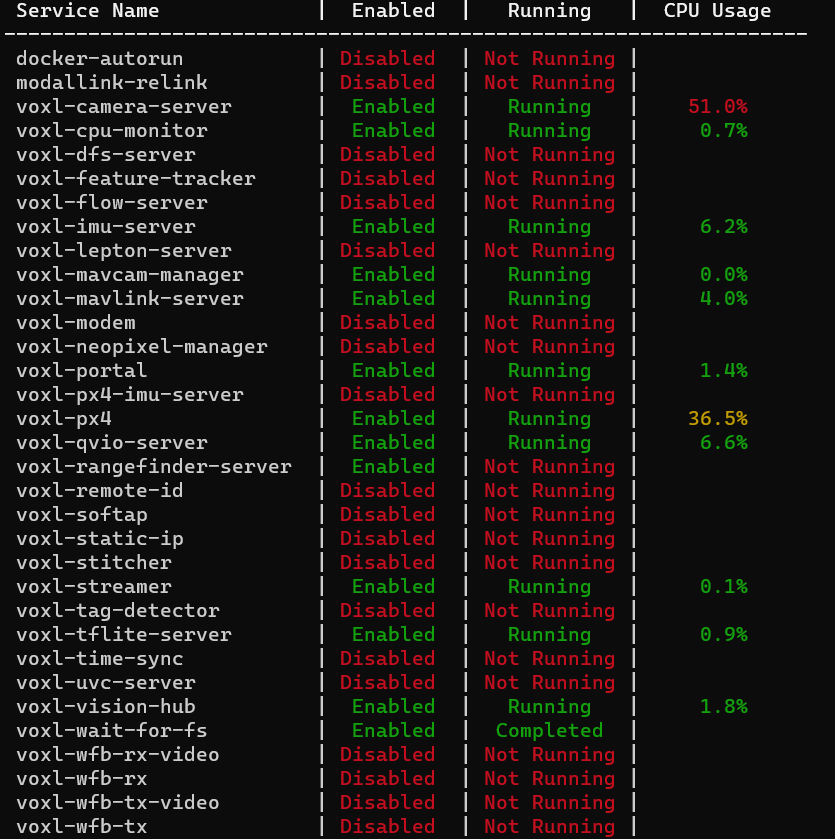
I am by no means an expert, like stated above, very new user, more of a drone expert than a software expert.
Is Docker-daemon something we can reinstall?
Our team has made many changes to the VOXL already and do not want to erase all our work so far.Any help would be greatly appreciated.
-
Hello, new user, working with a VOXL2 Dev kit.
A coworker was working on our VOXL 2 and we had success in uploading our AI and getting it all working. We were able to connect through ADB and also through ssh. We updated the device and have been testing different aspects while preparing our drone frame.
We are now currently unable to view the device through the adb devices list.
I noticed in our voxl-inspect-services that we are missing the docker-daemon as a service.
I am by no means an expert, like stated above, very new user, more of a drone expert than a software expert.
Is Docker-daemon something we can reinstall?
Our team has made many changes to the VOXL already and do not want to erase all our work so far.Any help would be greatly appreciated.
@Stefan-Amundarain said in ADB no longer working, docker-daemon no longer on the VOXL-2 services page:
unable to view the device through the adb devices list
Can you please clarify this statement? if you are not able to view the device in adb devices list, this means you are not able to connect to the device via adb, but you are showing the output of
voxl-inspect-services- how are you running that? Are you using an SSH connection to the board? -
@Stefan-Amundarain said in ADB no longer working, docker-daemon no longer on the VOXL-2 services page:
unable to view the device through the adb devices list
Can you please clarify this statement? if you are not able to view the device in adb devices list, this means you are not able to connect to the device via adb, but you are showing the output of
voxl-inspect-services- how are you running that? Are you using an SSH connection to the board?Thank you for your response @Alex-Kushleyev.
Yes, we were able to set up the WiFi and can ssh into the VOXL2.
I am quite new to the developmental side and per my understanding we have been able to access and change what we would like through the ssh, but I was curious if this lack of docker-daemon has any negative effects AND if this is the reason we can no longer view the VOXL when using the USB-C to USB-A cable.
We did have ADB working when we first received the platform as we were able to log in and modify the WiFi settings among others. We are not sure what changed but now we are no longer able to connect to the VOXL via the USB yet we had success with previously.
-
Thank you for your response @Alex-Kushleyev.
Yes, we were able to set up the WiFi and can ssh into the VOXL2.
I am quite new to the developmental side and per my understanding we have been able to access and change what we would like through the ssh, but I was curious if this lack of docker-daemon has any negative effects AND if this is the reason we can no longer view the VOXL when using the USB-C to USB-A cable.
We did have ADB working when we first received the platform as we were able to log in and modify the WiFi settings among others. We are not sure what changed but now we are no longer able to connect to the VOXL via the USB yet we had success with previously.
on some systems, you need to run adb in root / sudo mode in order to access VOXL2.
Can you please try the following on your Linux host machine:
adb kill-server
sudo adb shell
* daemon not running; starting now at tcp:5037
* daemon started successfully
hopefully this works. after first time (with
sudo), you don't needsudoin theadb shellcommand until you reboot your host machine. -
on some systems, you need to run adb in root / sudo mode in order to access VOXL2.
Can you please try the following on your Linux host machine:
adb kill-server
sudo adb shell
* daemon not running; starting now at tcp:5037
* daemon started successfully
hopefully this works. after first time (with
sudo), you don't needsudoin theadb shellcommand until you reboot your host machine.all is working now. Not sure what has changed but we are all set. Thank you for your help Alex!
Stefan


Reading along? Create a free ModalAI Forum account to join in.
With an account you can reply, ask your own question, get an email when a ModalAI engineer answers, and mark the reply that solved it. Your place in each thread is saved between visits.
Questions about VOXL, Flight Core, ESCs and ModalAI drones are answered here by the engineers who build them.
Register Login