
How to make UVC Server running on VOXL for testing USB Camera
-
How to make UVC Server running on VOXL for testing USB Camera? Can someone help me in running uvc server running?
I even tried running using systemctl to start uvc server.
configuration file:
/**- This file contains configuration that's specific to voxl-uvc-server.
- parameter descriptions:
- width: Desired image width. (e.g. 640)
- Default is 640.
- height: Desired image height. (e.g. 480)
- Default is 480.
- height: Desired frame rate in fps (e.g. 15).
- Default is 30.
- pipe-name: Desired MPA pipe name in /run/mpa (e.g. webcam).
- Default is uvc.
*/
{
"pipe_name": "uvc",
"width": 640,
"height": 512,
"fps": 30,
}I am sure my usb camera is connected and I can see the device
voxl:~$ show-video-device-info.sh
/dev/video2: Boson 09cb:4007 -
How to make UVC Server running on VOXL for testing USB Camera? Can someone help me in running uvc server running?
I even tried running using systemctl to start uvc server.
configuration file:
/**- This file contains configuration that's specific to voxl-uvc-server.
- parameter descriptions:
- width: Desired image width. (e.g. 640)
- Default is 640.
- height: Desired image height. (e.g. 480)
- Default is 480.
- height: Desired frame rate in fps (e.g. 15).
- Default is 30.
- pipe-name: Desired MPA pipe name in /run/mpa (e.g. webcam).
- Default is uvc.
*/
{
"pipe_name": "uvc",
"width": 640,
"height": 512,
"fps": 30,
}I am sure my usb camera is connected and I can see the device
voxl:~$ show-video-device-info.sh
/dev/video2: Boson 09cb:4007 -
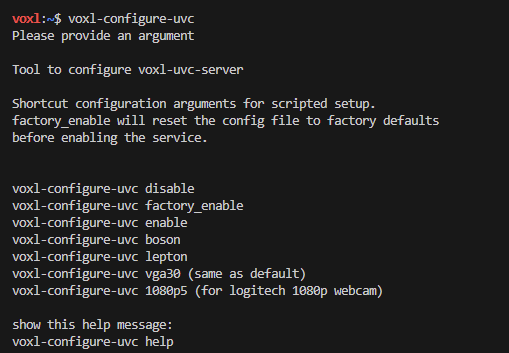
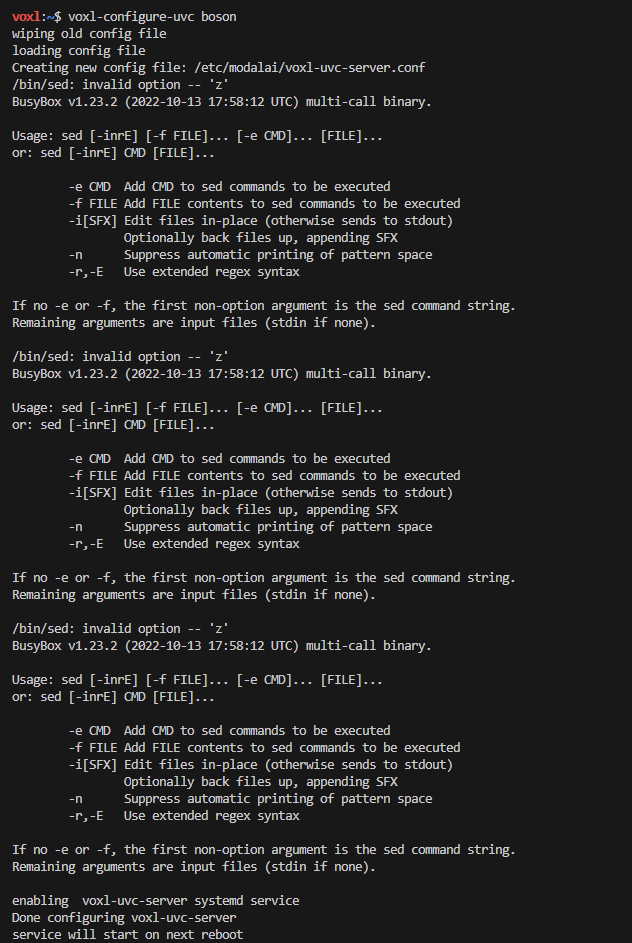
@tom I see following message when I run voxl-configure-uvc
Since, I am using Boson, I tried voxl-configure-uvc boson and rebooted VOXL.
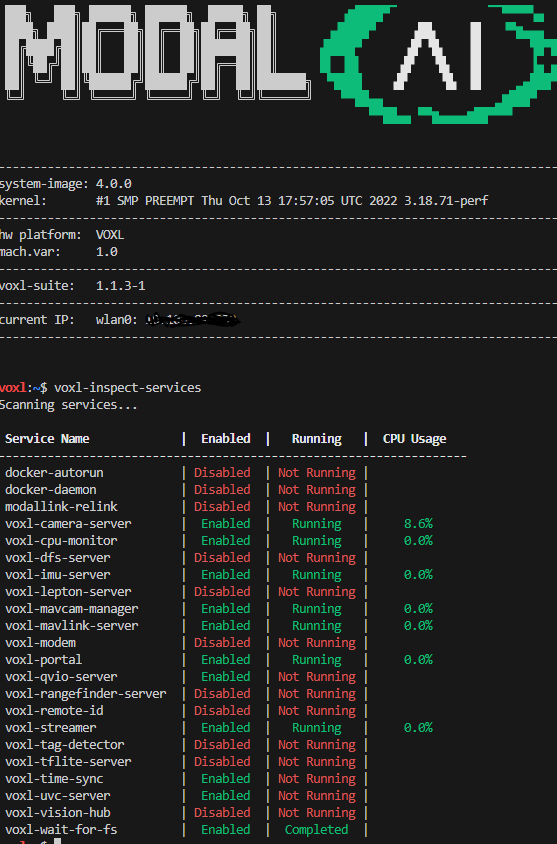
Upon running voxl-inspect-services, I am still not seeing voxl-uvc-server running.
-
@tom I see following message when I run voxl-configure-uvc
Since, I am using Boson, I tried voxl-configure-uvc boson and rebooted VOXL.
Upon running voxl-inspect-services, I am still not seeing voxl-uvc-server running.
-
@tom I see following message when I run voxl-configure-uvc
Since, I am using Boson, I tried voxl-configure-uvc boson and rebooted VOXL.
Upon running voxl-inspect-services, I am still not seeing voxl-uvc-server running.
@rsr4z There appears to be an extra comma after
30in"fps": 30,, that will need to be removed. It's possible this is a bug in the config script.You can run
systemctl status voxl-uvc-serverto see the status of the service if it is showing as "Not running" -
@rsr4z There appears to be an extra comma after
30in"fps": 30,, that will need to be removed. It's possible this is a bug in the config script.You can run
systemctl status voxl-uvc-serverto see the status of the service if it is showing as "Not running"@tom Yes. I removed "," from the config file and it worked. Thanks

Reading along? Create a free ModalAI Forum account to join in.
With an account you can reply, ask your own question, get an email when a ModalAI engineer answers, and mark the reply that solved it. Your place in each thread is saved between visits.
Questions about VOXL, Flight Core, ESCs and ModalAI drones are answered here by the engineers who build them.
Register Login