
Extracting images from a rosbag and image format of hires_small_color mpa topic
-
I am trying to extract images from a rosbag which i recorded for the following topic
/hires_small_color - sensors_msg/msg/Imagebut when the script runs it shows that the image has only two topics, here's the example script, is the image of a specific encoding which is causing this, I checked by playing the rosbag there the image is showing as color image#!/usr/bin/env python # -*- coding: utf-8 -*- # Copyright 2016 Massachusetts Institute of Technology """Extract images from a rosbag. """ import os import argparse import cv2 import rosbag from sensor_msgs.msg import Image from cv_bridge import CvBridge def main(): """Extract a folder of images from a rosbag. """ parser = argparse.ArgumentParser(description="Extract images from a ROS bag.") parser.add_argument("bag_file", help="Input ROS bag.", default="2023-09-30-00-07-26.bag") parser.add_argument("output_dir", help="Output directory.", default="output_images") parser.add_argument("image_topic", help="Image topic.", default="/voxl/hires_small_color") args = parser.parse_args() print ("Extract images from %s on topic %s into %s" % (args.bag_file, args.image_topic, args.output_dir)) bag = rosbag.Bag(args.bag_file, "r") bridge = CvBridge() count = 0 for topic, msg, t in bag.read_messages(topics=[args.image_topic]): cv_img = bridge.imgmsg_to_cv2(msg, desired_encoding="passthrough") cv2.imwrite(os.path.join(args.output_dir, "frame%06i.png" % count), cv_img) print ("Wrote image %i" % count) count += 1 bag.close() return if __name__ == '__main__': main() -
@Darshit-Desai said in Extracting images from a rosbag and image format of hires_small_color mpa topic:
import cv2
import rosbag
from sensor_msgs.msg import Image
from cv_bridge import CvBridgedef main():
"""Extract a folder of images from a rosbag.
"""
parser = argparse.ArgumentParser(description="Extract images from a ROS bag.")
parser.add_argument("bag_file", help="Input ROS bag.", default="2023-09-30-00-07-26.bag")
parser.add_argument("output_dir", help="Output directory.", default="output_images")
parser.add_argument("image_topic", help="Image topic.", default="/voxl/hires_small_color")args = parser.parse_args() print ("Extract images from %s on topic %s into %s" % (args.bag_file, args.image_topic, args.output_dir)) bag = rosbag.Bag(args.bag_file, "r") bridge = CvBridge() count = 0 for topic, msg, t in bag.read_messages(topics=[args.image_topic]): cv_img = bridge.imgmsg_to_cv2(msg, desired_encoding="passthrough") cv2.imwrite(os.path.join(args.output_dir, "frame%06i.png" % count), cv_img) print ("Wrote image %i" % count) count += 1 bag.close() returnif name == 'main':
main()@Darshit-Desai - I will look into this today and get an answer for you. The endpoint in which you are subscribing to is not an encoded frame but the raw image. Is this in a docker image by chance? I know that cv_bridge is not supported in c/c++ for ros1 on the voxl2 as it corrupts the version of opencv that we leverage on the board.
-
@Darshit-Desai said in Extracting images from a rosbag and image format of hires_small_color mpa topic:
import cv2
import rosbag
from sensor_msgs.msg import Image
from cv_bridge import CvBridgedef main():
"""Extract a folder of images from a rosbag.
"""
parser = argparse.ArgumentParser(description="Extract images from a ROS bag.")
parser.add_argument("bag_file", help="Input ROS bag.", default="2023-09-30-00-07-26.bag")
parser.add_argument("output_dir", help="Output directory.", default="output_images")
parser.add_argument("image_topic", help="Image topic.", default="/voxl/hires_small_color")args = parser.parse_args() print ("Extract images from %s on topic %s into %s" % (args.bag_file, args.image_topic, args.output_dir)) bag = rosbag.Bag(args.bag_file, "r") bridge = CvBridge() count = 0 for topic, msg, t in bag.read_messages(topics=[args.image_topic]): cv_img = bridge.imgmsg_to_cv2(msg, desired_encoding="passthrough") cv2.imwrite(os.path.join(args.output_dir, "frame%06i.png" % count), cv_img) print ("Wrote image %i" % count) count += 1 bag.close() returnif name == 'main':
main()@Darshit-Desai - I will look into this today and get an answer for you. The endpoint in which you are subscribing to is not an encoded frame but the raw image. Is this in a docker image by chance? I know that cv_bridge is not supported in c/c++ for ros1 on the voxl2 as it corrupts the version of opencv that we leverage on the board.
@Zachary-Lowell-0 Actually I ran this code locally on my desktop after recording the hires_small_color topic in a rosbag. Also when trying to rosbag the hires_small_encoded or any other encoded topic it throws an error, that is why I had to record this format of the image.
-
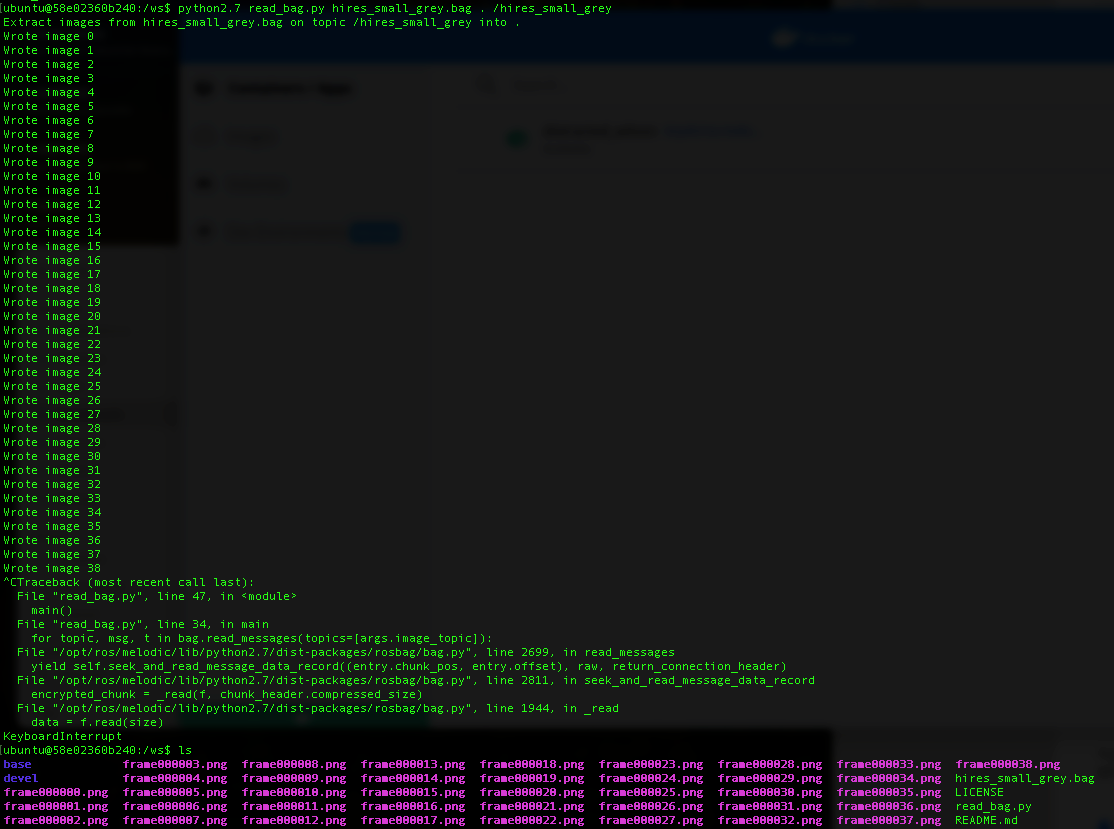
@Darshit-Desai I was able to save the images to a rosbag for the grey and color images and then use your script to view them via the code you attached. As for the encoded - there is a bug in the code that is publishing them as an image, when obviously an encoded h264 image is not an image. I will update the source code to reflect this rosmsg that is most likely a string or something.
-
@Darshit-Desai I was able to save the images to a rosbag for the grey and color images and then use your script to view them via the code you attached. As for the encoded - there is a bug in the code that is publishing them as an image, when obviously an encoded h264 image is not an image. I will update the source code to reflect this rosmsg that is most likely a string or something.
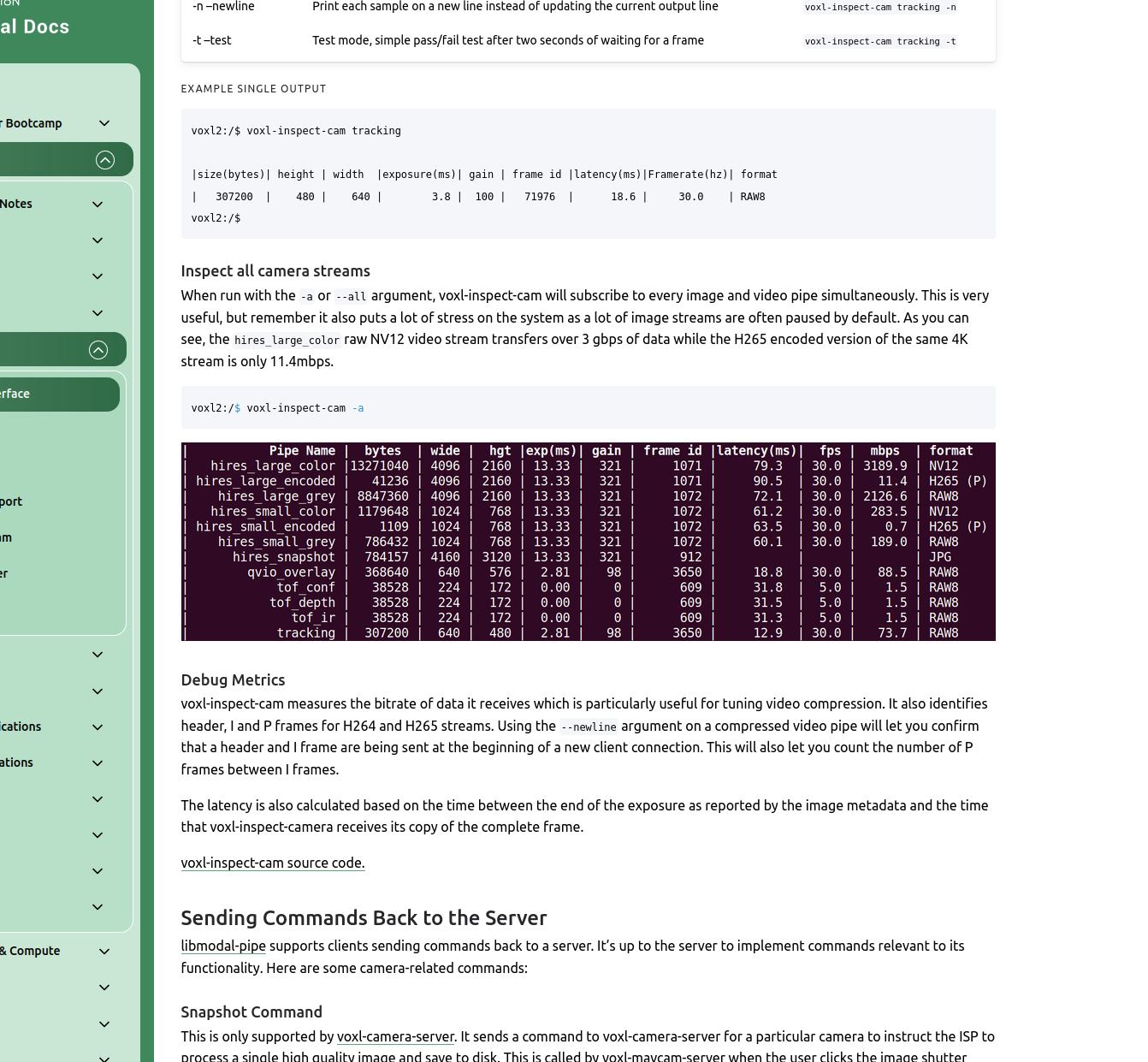
@Zachary-Lowell-0 Actually the hires_small_grey works for me too, It is because it is a 3 channel image. But when I try to extract hires_small_color it shows invalid format. I checked in the documentation its a NV12 Format image and searched for code references to unpack such an image but wasn't able to find any
-
The issue is with your reviewing code @Darshit-Desai - not the mpa-to-ros then. Since YUV is a 2 channel image, you need to use some opencv manipulation prior to saving the image:
        bgr_img = cv2.cvtColor(cv_img, cv2.COLOR_YUV2BGR_UYVY)  # Replace with the correct YUV422 format code
        cv2.imwrite(os.path.join(args.output_dir, "frame%06i.png" % count), bgr_img)
        print ("Wrote image %i" % count)
Add the following above to your code and you will be able to save the color images as well.
-
The issue is with your reviewing code @Darshit-Desai - not the mpa-to-ros then. Since YUV is a 2 channel image, you need to use some opencv manipulation prior to saving the image:
        bgr_img = cv2.cvtColor(cv_img, cv2.COLOR_YUV2BGR_UYVY)  # Replace with the correct YUV422 format code
        cv2.imwrite(os.path.join(args.output_dir, "frame%06i.png" % count), bgr_img)
        print ("Wrote image %i" % count)
Add the following above to your code and you will be able to save the color images as well.
@Zachary-Lowell-0 Yes that was my initial question, thanks it worked, although I didn't know NV12 means YUV format
@Darshit-Desai said in Extracting images from a rosbag and image format of hires_small_color mpa topic:
is the image of a specific encoding which is causing this,


Reading along? Create a free ModalAI Forum account to join in.
With an account you can reply, ask your own question, get an email when a ModalAI engineer answers, and mark the reply that solved it. Your place in each thread is saved between visits.
Questions about VOXL, Flight Core, ESCs and ModalAI drones are answered here by the engineers who build them.
Register Login