
QGroundControl parameters are missing from firmware
-
Re: QGroundControl parameters are missing from firmware
Hello,
I have been facing the same problem on my newly aqcuired StarlingV2 after I did a few nominal tests with QGroundControl. Steps:
-
I only slightly modified voxl-vision-hub, voxl-tag-detector, tag_location conf files for AprilTag fixed frame relocalization. After rebooting I got this error on QGroundcontrol. Only changed the parameters as this docu states https://docs.modalai.com/voxl-vision-hub-apriltag-relocalization/
-
In order to overcome it I then ran voxl-configure-mpa to reset to factory default and I am getting the following error:
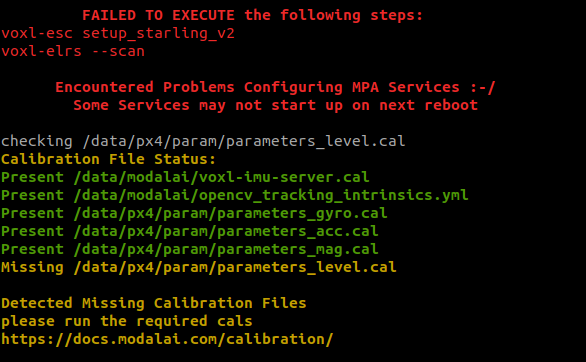
Not really sure how to proceed since resetting to factory defaults should bring back the original calibration files no? Feels like the problem is elsewhere and I would first like to be sure before wasting time in calibration.
Best,
Milton
-
-
Re: QGroundControl parameters are missing from firmware
Hello,
I have been facing the same problem on my newly aqcuired StarlingV2 after I did a few nominal tests with QGroundControl. Steps:
-
I only slightly modified voxl-vision-hub, voxl-tag-detector, tag_location conf files for AprilTag fixed frame relocalization. After rebooting I got this error on QGroundcontrol. Only changed the parameters as this docu states https://docs.modalai.com/voxl-vision-hub-apriltag-relocalization/
-
In order to overcome it I then ran voxl-configure-mpa to reset to factory default and I am getting the following error:
Not really sure how to proceed since resetting to factory defaults should bring back the original calibration files no? Feels like the problem is elsewhere and I would first like to be sure before wasting time in calibration.
Best,
Milton
After power cycling, I am now getting the following QGC error:

Further on, running voxl-esc setup_starling_v2 gives the following error:
Couldn't configure flight_controller sensor
Error calling voxl_uart_init
Received standard error event 2
Received standard error event 2
Couldn't configure flight_controller sensor
Error calling voxl_uart_init
[ERROR] Unknown board detected:
disabling bridge
bridge disabled
EXITING VOXL-ESC WITH ERRORIf you could please send me the calibration files as soon as possible and I will do a factory flash of the SDK as mentioned in Starling V2 voxl-configure-mpa fails to execute voxl-esc setup_starling_v2 and voxl-elrs --scan
Model Serial #: M23000001JJ
-
-
After power cycling, I am now getting the following QGC error:
Further on, running voxl-esc setup_starling_v2 gives the following error:
Couldn't configure flight_controller sensor
Error calling voxl_uart_init
Received standard error event 2
Received standard error event 2
Couldn't configure flight_controller sensor
Error calling voxl_uart_init
[ERROR] Unknown board detected:
disabling bridge
bridge disabled
EXITING VOXL-ESC WITH ERRORIf you could please send me the calibration files as soon as possible and I will do a factory flash of the SDK as mentioned in Starling V2 voxl-configure-mpa fails to execute voxl-esc setup_starling_v2 and voxl-elrs --scan
Model Serial #: M23000001JJ
@smilon You have to scroll up to see the actual errors. It looks like the two following commands are what generated errors:
voxl-esc setup_starling_v2
voxl-elrs --scanThe calibration status is fine, you can generate the missing
parameters_level.calby calibrating level via. QGroundControl, but that wouldn't cause the errors that are occurring above -
@smilon You have to scroll up to see the actual errors. It looks like the two following commands are what generated errors:
voxl-esc setup_starling_v2
voxl-elrs --scanThe calibration status is fine, you can generate the missing
parameters_level.calby calibrating level via. QGroundControl, but that wouldn't cause the errors that are occurring above -
@tom Thanks for the quick reply. I will calibrate the level tomorrow via QGC. Is there any idea why the original issue, prior to running voxl-configure-mpa occurred? Could it hint to some wrongly defined config files on my side?
@smilon In order for things to be setup properly, px4 params, etc. voxl-configure-mpa + a reboot are required. So if either of those weren't completed before booting up QGC then that could've been the cause. Sometimes a reboot of QGC can solve that issue as well as it does some weird caching sometimes
-
@smilon In order for things to be setup properly, px4 params, etc. voxl-configure-mpa + a reboot are required. So if either of those weren't completed before booting up QGC then that could've been the cause. Sometimes a reboot of QGC can solve that issue as well as it does some weird caching sometimes
@tom Sorry to bother you again. But I am facing issues where I'm missing several QGC params such as battery percent and some RC params. Also attempting to calibrate the level via QGC is unresponsive and generally QGC itself seems unresponsive to any command I give. Even though I'm getting a "Ready to Fly" state. I can't arm the drone since I can't calibrate the level. I also can't run voxl-configure-mpa sucessfully unless I can solve the "voxl-esc setup_startling_v2" error. Any ideas on how to move onwards?
-
@tom Sorry to bother you again. But I am facing issues where I'm missing several QGC params such as battery percent and some RC params. Also attempting to calibrate the level via QGC is unresponsive and generally QGC itself seems unresponsive to any command I give. Even though I'm getting a "Ready to Fly" state. I can't arm the drone since I can't calibrate the level. I also can't run voxl-configure-mpa sucessfully unless I can solve the "voxl-esc setup_startling_v2" error. Any ideas on how to move onwards?
It seems the error is in the ESC, no clue why unrelated px4 parameters are being deleted. However I can't discover the esc when i run:
voxl-esc scan
or
voxl-esc detect
The ESC wiring looks fine and I have not put more than 30minutes of flight time in the Starling, so I'm guessing its a firmware issue. Looks like it would be better if I can perform a factory reset and you can send me the calibration files for my model (M23000001JJ)?
-
It seems the error is in the ESC, no clue why unrelated px4 parameters are being deleted. However I can't discover the esc when i run:
voxl-esc scan
or
voxl-esc detect
The ESC wiring looks fine and I have not put more than 30minutes of flight time in the Starling, so I'm guessing its a firmware issue. Looks like it would be better if I can perform a factory reset and you can send me the calibration files for my model (M23000001JJ)?
-
S smilon referenced this topic on
-
S smilon referenced this topic on

Reading along? Create a free ModalAI Forum account to join in.
With an account you can reply, ask your own question, get an email when a ModalAI engineer answers, and mark the reply that solved it. Your place in each thread is saved between visits.
Questions about VOXL, Flight Core, ESCs and ModalAI drones are answered here by the engineers who build them.
Register Login