
Camera server bug for config 6?
-
Hi devs
I just upgraded to SDK 1.0
Is there a bug in voxl-camera-server when selecting config 6 (Hires(IMX214) + ToF + Tracking)?
voxl-camera-server does not start and throws this:
DEBUG:   ------ voxl-camera-server: Starting 3 cameras
Starting Camera: tof
DEBUG:   Attempting to open the hal module
DEBUG:   SUCCESS: Camera module opened on attempt 0
DEBUG:   ----------- Number of cameras: 1

DEBUG:   Cam idx: 0, Cam slot: 0, Slave Address: 0x007A, Sensor Id: 0x003D
VERBOSE: Successfully found configuration match for camera 0: 224x1557
VERBOSE: Adding preview stream for camera: 0
DEBUG:   ALIGNING HEIGHT FOR LARGE IMAGE
DEBUG:   Allocating img Buffer: width:  224 stride:  224 height: 1557 slice: 2048 size:  688128
DEBUG:   ALIGNING HEIGHT FOR LARGE IMAGE
DEBUG:   Allocating img Buffer: width:  224 stride:  224 height: 1557 slice: 2048 size:  688128
DEBUG:   ALIGNING HEIGHT FOR LARGE IMAGE
DEBUG:   Allocating img Buffer: width:  224 stride:  224 height: 1557 slice: 2048 size:  688128
DEBUG:   ALIGNING HEIGHT FOR LARGE IMAGE
DEBUG:   Allocating img Buffer: width:  224 stride:  224 height: 1557 slice: 2048 size:  688128
DEBUG:   ALIGNING HEIGHT FOR LARGE IMAGE
DEBUG:   Allocating img Buffer: width:  224 stride:  224 height: 1557 slice: 2048 size:  688128
DEBUG:   ALIGNING HEIGHT FOR LARGE IMAGE
DEBUG:   Allocating img Buffer: width:  224 stride:  224 height: 1557 slice: 2048 size:  688128
DEBUG:   ALIGNING HEIGHT FOR LARGE IMAGE
DEBUG:   Allocating img Buffer: width:  224 stride:  224 height: 1557 slice: 2048 size:  688128
DEBUG:   ALIGNING HEIGHT FOR LARGE IMAGE
DEBUG:   Allocating img Buffer: width:  224 stride:  224 height: 1557 slice: 2048 size:  688128
DEBUG:   ALIGNING HEIGHT FOR LARGE IMAGE
DEBUG:   Allocating img Buffer: width:  224 stride:  224 height: 1557 slice: 2048 size:  688128
DEBUG:   ALIGNING HEIGHT FOR LARGE IMAGE
DEBUG:   Allocating img Buffer: width:  224 stride:  224 height: 1557 slice: 2048 size:  688128
DEBUG:   ALIGNING HEIGHT FOR LARGE IMAGE
DEBUG:   Allocating img Buffer: width:  224 stride:  224 height: 1557 slice: 2048 size:  688128
DEBUG:   ALIGNING HEIGHT FOR LARGE IMAGE
DEBUG:   Allocating img Buffer: width:  224 stride:  224 height: 1557 slice: 2048 size:  688128
DEBUG:   ALIGNING HEIGHT FOR LARGE IMAGE
DEBUG:   Allocating img Buffer: width:  224 stride:  224 height: 1557 slice: 2048 size:  688128
DEBUG:   ALIGNING HEIGHT FOR LARGE IMAGE
DEBUG:   Allocating img Buffer: width:  224 stride:  224 height: 1557 slice: 2048 size:  688128
DEBUG:   ALIGNING HEIGHT FOR LARGE IMAGE
DEBUG:   Allocating img Buffer: width:  224 stride:  224 height: 1557 slice: 2048 size:  688128
DEBUG:   ALIGNING HEIGHT FOR LARGE IMAGE
DEBUG:   Allocating img Buffer: width:  224 stride:  224 height: 1557 slice: 2048 size:  688128
DEBUG:   Successfully set up pipeline for stream: PREVIEW
VERBOSE: Entered thread: cam0-request(tid: 2217)
DEBUG:   Started Camera: tof
Starting Camera: hires
VERBOSE: Entered thread: cam0-result(tid: 2218)

Segmentation fault:
Fault thread: voxl-camera-ser(tid: 2196)
Fault address: 0x567e5e26cc
Address not mapped.
VERBOSE: Found Royale module config: imagerType 2, illuminationConfig.dutyCycle: 4 temp_sensor_type: 5
VERBOSE: Found Royale module config: maxImgW 224 maxImgH 172 frameTxMode 1 camName X1.1_850nm_2W
VERBOSE: Found Royale module config: tempLimitSoft 60.000000 tempLimitHard 65.000000 autoExpoSupported yes
VERBOSE: Found Royale usecase: MODE_9_5FPS - phases: 9 fps: 5
VERBOSE: Found Royale usecase: MODE_9_5FPS - exposure group[0] = gray
VERBOSE: Found Royale usecase: MODE_9_5FPS - exposure group[1] = mod1
VERBOSE: Found Royale usecase: MODE_9_5FPS - exposure group[2] = mod2
Segmentation fault
When i flashed back to SDK 0.9.5, everything works.
Flashed back to SDK 1.0 and the above shows up again.Pls help.
Thanks
-
Hi devs
I just upgraded to SDK 1.0
Is there a bug in voxl-camera-server when selecting config 6 (Hires(IMX214) + ToF + Tracking)?
voxl-camera-server does not start and throws this:
DEBUG:   ------ voxl-camera-server: Starting 3 cameras
Starting Camera: tof
DEBUG:   Attempting to open the hal module
DEBUG:   SUCCESS: Camera module opened on attempt 0
DEBUG:   ----------- Number of cameras: 1

DEBUG:   Cam idx: 0, Cam slot: 0, Slave Address: 0x007A, Sensor Id: 0x003D
VERBOSE: Successfully found configuration match for camera 0: 224x1557
VERBOSE: Adding preview stream for camera: 0
DEBUG:   ALIGNING HEIGHT FOR LARGE IMAGE
DEBUG:   Allocating img Buffer: width:  224 stride:  224 height: 1557 slice: 2048 size:  688128
DEBUG:   ALIGNING HEIGHT FOR LARGE IMAGE
DEBUG:   Allocating img Buffer: width:  224 stride:  224 height: 1557 slice: 2048 size:  688128
DEBUG:   ALIGNING HEIGHT FOR LARGE IMAGE
DEBUG:   Allocating img Buffer: width:  224 stride:  224 height: 1557 slice: 2048 size:  688128
DEBUG:   ALIGNING HEIGHT FOR LARGE IMAGE
DEBUG:   Allocating img Buffer: width:  224 stride:  224 height: 1557 slice: 2048 size:  688128
DEBUG:   ALIGNING HEIGHT FOR LARGE IMAGE
DEBUG:   Allocating img Buffer: width:  224 stride:  224 height: 1557 slice: 2048 size:  688128
DEBUG:   ALIGNING HEIGHT FOR LARGE IMAGE
DEBUG:   Allocating img Buffer: width:  224 stride:  224 height: 1557 slice: 2048 size:  688128
DEBUG:   ALIGNING HEIGHT FOR LARGE IMAGE
DEBUG:   Allocating img Buffer: width:  224 stride:  224 height: 1557 slice: 2048 size:  688128
DEBUG:   ALIGNING HEIGHT FOR LARGE IMAGE
DEBUG:   Allocating img Buffer: width:  224 stride:  224 height: 1557 slice: 2048 size:  688128
DEBUG:   ALIGNING HEIGHT FOR LARGE IMAGE
DEBUG:   Allocating img Buffer: width:  224 stride:  224 height: 1557 slice: 2048 size:  688128
DEBUG:   ALIGNING HEIGHT FOR LARGE IMAGE
DEBUG:   Allocating img Buffer: width:  224 stride:  224 height: 1557 slice: 2048 size:  688128
DEBUG:   ALIGNING HEIGHT FOR LARGE IMAGE
DEBUG:   Allocating img Buffer: width:  224 stride:  224 height: 1557 slice: 2048 size:  688128
DEBUG:   ALIGNING HEIGHT FOR LARGE IMAGE
DEBUG:   Allocating img Buffer: width:  224 stride:  224 height: 1557 slice: 2048 size:  688128
DEBUG:   ALIGNING HEIGHT FOR LARGE IMAGE
DEBUG:   Allocating img Buffer: width:  224 stride:  224 height: 1557 slice: 2048 size:  688128
DEBUG:   ALIGNING HEIGHT FOR LARGE IMAGE
DEBUG:   Allocating img Buffer: width:  224 stride:  224 height: 1557 slice: 2048 size:  688128
DEBUG:   ALIGNING HEIGHT FOR LARGE IMAGE
DEBUG:   Allocating img Buffer: width:  224 stride:  224 height: 1557 slice: 2048 size:  688128
DEBUG:   ALIGNING HEIGHT FOR LARGE IMAGE
DEBUG:   Allocating img Buffer: width:  224 stride:  224 height: 1557 slice: 2048 size:  688128
DEBUG:   Successfully set up pipeline for stream: PREVIEW
VERBOSE: Entered thread: cam0-request(tid: 2217)
DEBUG:   Started Camera: tof
Starting Camera: hires
VERBOSE: Entered thread: cam0-result(tid: 2218)

Segmentation fault:
Fault thread: voxl-camera-ser(tid: 2196)
Fault address: 0x567e5e26cc
Address not mapped.
VERBOSE: Found Royale module config: imagerType 2, illuminationConfig.dutyCycle: 4 temp_sensor_type: 5
VERBOSE: Found Royale module config: maxImgW 224 maxImgH 172 frameTxMode 1 camName X1.1_850nm_2W
VERBOSE: Found Royale module config: tempLimitSoft 60.000000 tempLimitHard 65.000000 autoExpoSupported yes
VERBOSE: Found Royale usecase: MODE_9_5FPS - phases: 9 fps: 5
VERBOSE: Found Royale usecase: MODE_9_5FPS - exposure group[0] = gray
VERBOSE: Found Royale usecase: MODE_9_5FPS - exposure group[1] = mod1
VERBOSE: Found Royale usecase: MODE_9_5FPS - exposure group[2] = mod2
Segmentation fault
When i flashed back to SDK 0.9.5, everything works.
Flashed back to SDK 1.0 and the above shows up again.Pls help.
Thanks
-
@hmlow ,
Yes I think we flipped a camera config here inadvertently...
Can you try this?
vi /usr/bin/qrb5165-configure-camerasChange this:
6) # D0005 Starling V2 Hires + TOF + Tracking
                CAM_LIST+=("tof:pmd-tof:0")
                CAM_LIST+=("hires:${HIRES_SENSOR}:1")
                CAM_LIST+=("tracking:ov7251:2")
                BIN_LIST+=("/usr/share/modalai/chi-cdk/ov7251/com.qti.sensormodule.ov7251_3.bin")
                BIN_LIST+=("/usr/share/modalai/chi-cdk/irs1645/com.qti.sensormodule.irs1645_0.bin")
                BIN_LIST+=("/usr/share/modalai/chi-cdk/${HIRES_SENSOR}/com.qti.sensormodule.${HIRES_SENSOR}_2.bin")
                ;;
to this
6) # D0005 Starling V2 Hires + TOF + Tracking
                CAM_LIST+=("tof:pmd-tof:0")
                CAM_LIST+=("hires:${HIRES_SENSOR}:2")
                CAM_LIST+=("tracking:ov7251:1")
                BIN_LIST+=("/usr/share/modalai/chi-cdk/ov7251/com.qti.sensormodule.ov7251_2.bin")
                BIN_LIST+=("/usr/share/modalai/chi-cdk/irs1645/com.qti.sensormodule.irs1645_0.bin")
                BIN_LIST+=("/usr/share/modalai/chi-cdk/${HIRES_SENSOR}/com.qti.sensormodule.${HIRES_SENSOR}_3.bin")
                ;;
                ;;
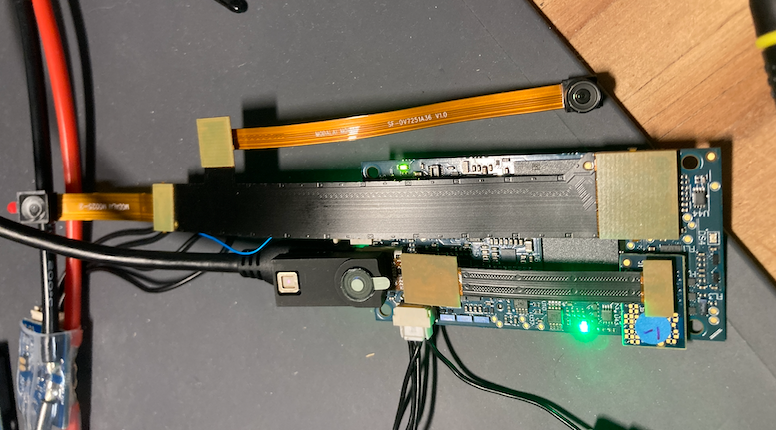
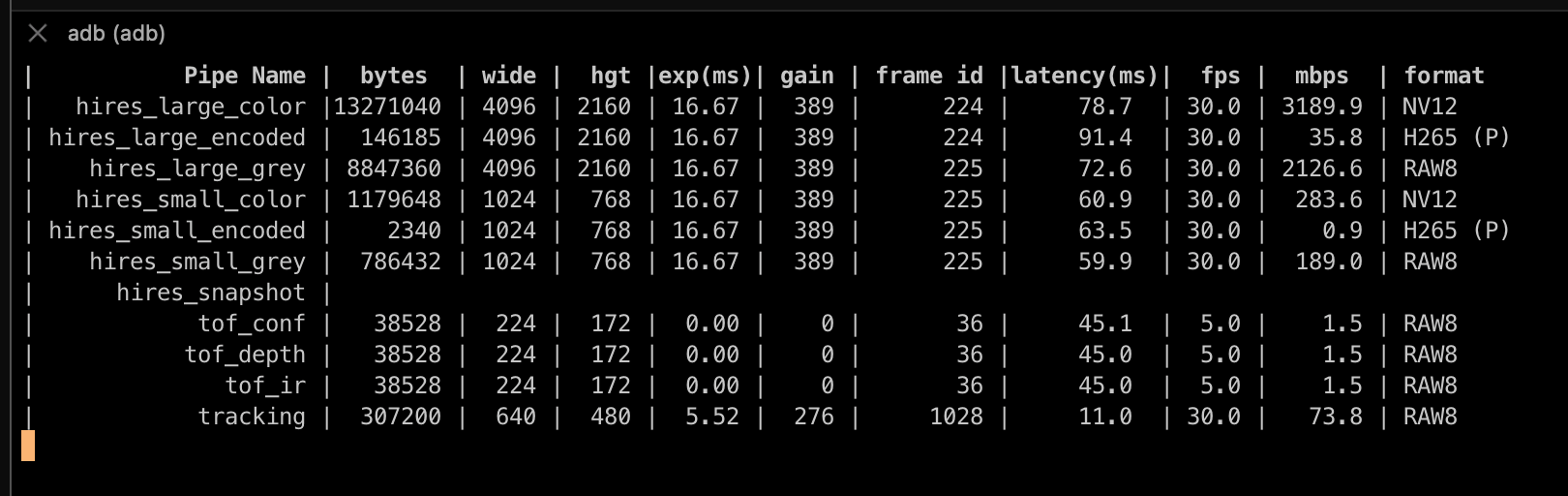
Just tried this on my setup:
-
@hmlow ,
Yes I think we flipped a camera config here inadvertently...
Can you try this?
vi /usr/bin/qrb5165-configure-camerasChange this:
6) # D0005 Starling V2 Hires + TOF + Tracking
                CAM_LIST+=("tof:pmd-tof:0")
                CAM_LIST+=("hires:${HIRES_SENSOR}:1")
                CAM_LIST+=("tracking:ov7251:2")
                BIN_LIST+=("/usr/share/modalai/chi-cdk/ov7251/com.qti.sensormodule.ov7251_3.bin")
                BIN_LIST+=("/usr/share/modalai/chi-cdk/irs1645/com.qti.sensormodule.irs1645_0.bin")
                BIN_LIST+=("/usr/share/modalai/chi-cdk/${HIRES_SENSOR}/com.qti.sensormodule.${HIRES_SENSOR}_2.bin")
                ;;
to this
6) # D0005 Starling V2 Hires + TOF + Tracking
                CAM_LIST+=("tof:pmd-tof:0")
                CAM_LIST+=("hires:${HIRES_SENSOR}:2")
                CAM_LIST+=("tracking:ov7251:1")
                BIN_LIST+=("/usr/share/modalai/chi-cdk/ov7251/com.qti.sensormodule.ov7251_2.bin")
                BIN_LIST+=("/usr/share/modalai/chi-cdk/irs1645/com.qti.sensormodule.irs1645_0.bin")
                BIN_LIST+=("/usr/share/modalai/chi-cdk/${HIRES_SENSOR}/com.qti.sensormodule.${HIRES_SENSOR}_3.bin")
                ;;
                ;;
Just tried this on my setup:
@admin so i have been using this config 6 for the past week, and i am experiencing VIO faults randomly (CAM_MISSING STALLED showsup on QVIO overlay).
Upon much trial and error i realized that voxl-camera-server was crashing randomly. Sometimes 3mins, sometimes 15mins, sometimes 30mins.
I got voxl-camera-server run in debug mode and wait till it crashes, and this are the final few lines that i see:
VERBOSE: Camera: tof processing preview frame
VERBOSE: finished sending request for frame 1477 for camera tof
VERBOSE: returning from SendOneCaptureRequest for frame 1478 for camera tof
VERBOSE: added request for preview stream
VERBOSE: Sending request for frame 1478 for camera tof for 1 streams
VERBOSE: Received result from HAl3 for frame number 1477
VERBOSE: Received 0 buffers from camera tof, partial result:1
VERBOSE: Sent tof data to royale for processing
VERBOSE: Received result from HAl3 for frame number 8847
VERBOSE: Received 0 buffers from camera tracking, partial result:2
VERBOSE: Received metadata for frame 8847 from camera tracking
VERBOSE:        Timestamp: 1277332818009
VERBOSE:        Gain: 169
VERBOSE:        Exposure: 5184081
VERBOSE: Received result from HAl3 for frame number 8847
VERBOSE: Received 1 buffers from camera tracking, partial result:0
VERBOSE: Received output buffer 8847 from camera tracking
VERBOSE: tracking procesing new buffer
VERBOSE: Camera: tracking processing preview frame
VERBOSE: Preview format HAL_PIXEL_FORMAT_RAW10
VERBOSE: finished sending request for frame 8852 for camera tracking
VERBOSE: returning from SendOneCaptureRequest for frame 8853 for camera tracking
VERBOSE: added request for preview stream
VERBOSE: Sending request for frame 8853 for camera tracking for 1 streams
VERBOSE: Received result from HAl3 for frame number 8852
VERBOSE: Received 0 buffers from camera tracking, partial result:1
VERBOSE: Received royale data for camera: tof
ERROR:   Received "Buffer" error from camera: tracking
ERROR:   Received "Result" error from camera: tracking
VERBOSE: Received result from HAl3 for frame number 8848
VERBOSE: Received 1 buffers from camera tracking, partial result:0
VERBOSE: Received output buffer 8848 from camera tracking
VERBOSE: Buffer arrive before meta frame 8848
VERBOSE: finished sending request for frame 8853 for camera tracking
VERBOSE: returning from SendOneCaptureRequest for frame 8854 for camera tracking
VERBOSE: added request for preview stream
VERBOSE: Sending request for frame 8854 for camera tracking for 1 streams
VERBOSE: Received result from HAl3 for frame number 8853
VERBOSE: Received 0 buffers from camera tracking, partial result:1
VERBOSE: Received result from HAl3 for frame number 1473
VERBOSE: Received 0 buffers from camera tof, partial result:2
VERBOSE: Received metadata for frame 1473 from camera tof
VERBOSE:        Timestamp: 1277502314989
VERBOSE:        Gain: 0
VERBOSE:        Exposure: 0
Aborted
I am running cam config 6 (with the "fix" by @admin above) and i have swapped out the ToF and tracking cam module for new ones in case it was a camera or flex cable fault. But no, the problem is still there.
This is SDK 1.0
Can anyone advise?
Thanks
-
@admin so i have been using this config 6 for the past week, and i am experiencing VIO faults randomly (CAM_MISSING STALLED showsup on QVIO overlay).
Upon much trial and error i realized that voxl-camera-server was crashing randomly. Sometimes 3mins, sometimes 15mins, sometimes 30mins.
I got voxl-camera-server run in debug mode and wait till it crashes, and this are the final few lines that i see:
VERBOSE: Camera: tof processing preview frame
VERBOSE: finished sending request for frame 1477 for camera tof
VERBOSE: returning from SendOneCaptureRequest for frame 1478 for camera tof
VERBOSE: added request for preview stream
VERBOSE: Sending request for frame 1478 for camera tof for 1 streams
VERBOSE: Received result from HAl3 for frame number 1477
VERBOSE: Received 0 buffers from camera tof, partial result:1
VERBOSE: Sent tof data to royale for processing
VERBOSE: Received result from HAl3 for frame number 8847
VERBOSE: Received 0 buffers from camera tracking, partial result:2
VERBOSE: Received metadata for frame 8847 from camera tracking
VERBOSE:        Timestamp: 1277332818009
VERBOSE:        Gain: 169
VERBOSE:        Exposure: 5184081
VERBOSE: Received result from HAl3 for frame number 8847
VERBOSE: Received 1 buffers from camera tracking, partial result:0
VERBOSE: Received output buffer 8847 from camera tracking
VERBOSE: tracking procesing new buffer
VERBOSE: Camera: tracking processing preview frame
VERBOSE: Preview format HAL_PIXEL_FORMAT_RAW10
VERBOSE: finished sending request for frame 8852 for camera tracking
VERBOSE: returning from SendOneCaptureRequest for frame 8853 for camera tracking
VERBOSE: added request for preview stream
VERBOSE: Sending request for frame 8853 for camera tracking for 1 streams
VERBOSE: Received result from HAl3 for frame number 8852
VERBOSE: Received 0 buffers from camera tracking, partial result:1
VERBOSE: Received royale data for camera: tof
ERROR:   Received "Buffer" error from camera: tracking
ERROR:   Received "Result" error from camera: tracking
VERBOSE: Received result from HAl3 for frame number 8848
VERBOSE: Received 1 buffers from camera tracking, partial result:0
VERBOSE: Received output buffer 8848 from camera tracking
VERBOSE: Buffer arrive before meta frame 8848
VERBOSE: finished sending request for frame 8853 for camera tracking
VERBOSE: returning from SendOneCaptureRequest for frame 8854 for camera tracking
VERBOSE: added request for preview stream
VERBOSE: Sending request for frame 8854 for camera tracking for 1 streams
VERBOSE: Received result from HAl3 for frame number 8853
VERBOSE: Received 0 buffers from camera tracking, partial result:1
VERBOSE: Received result from HAl3 for frame number 1473
VERBOSE: Received 0 buffers from camera tof, partial result:2
VERBOSE: Received metadata for frame 1473 from camera tof
VERBOSE:        Timestamp: 1277502314989
VERBOSE:        Gain: 0
VERBOSE:        Exposure: 0
Aborted
I am running cam config 6 (with the "fix" by @admin above) and i have swapped out the ToF and tracking cam module for new ones in case it was a camera or flex cable fault. But no, the problem is still there.
This is SDK 1.0
Can anyone advise?
Thanks

Reading along? Create a free ModalAI Forum account to join in.
With an account you can reply, ask your own question, get an email when a ModalAI engineer answers, and mark the reply that solved it. Your place in each thread is saved between visits.
Questions about VOXL, Flight Core, ESCs and ModalAI drones are answered here by the engineers who build them.
Register Login