
Need Assistance Connecting Pure Thermal Mini 2 Pro to Sentinel
-
Hi @A-Evans
Several of our plug-in boards expose USB host ports, such as this:
https://www.modalai.com/products/m0125?variant=40740708876339
or this:
https://www.modalai.com/products/m0078
or our 5G modem product (you do not need a modem to get the USB hub features).
https://www.modalai.com/products/mdk-m0090?variant=40594936463411Please check our cables page to see what option will work best for you based on what HW you have, such as:
https://www.modalai.com/collections/cables-1/products/mcbl-00009
or https://www.modalai.com/collections/cables-1/products/mcbl-00022
all cable specs are here (updated often) and you might find some other options that can help: https://docs.modalai.com/cable-datasheets/Hope this helped!
-
Hi @A-Evans
Several of our plug-in boards expose USB host ports, such as this:
https://www.modalai.com/products/m0125?variant=40740708876339
or this:
https://www.modalai.com/products/m0078
or our 5G modem product (you do not need a modem to get the USB hub features).
https://www.modalai.com/products/mdk-m0090?variant=40594936463411Please check our cables page to see what option will work best for you based on what HW you have, such as:
https://www.modalai.com/collections/cables-1/products/mcbl-00009
or https://www.modalai.com/collections/cables-1/products/mcbl-00022
all cable specs are here (updated often) and you might find some other options that can help: https://docs.modalai.com/cable-datasheets/Hope this helped!
-
@Vinny Thanks for this vinny, appologies for the late reply been on holiday, what is the difference between each suggested?
Hi @A-Evans
The main difference between this board:
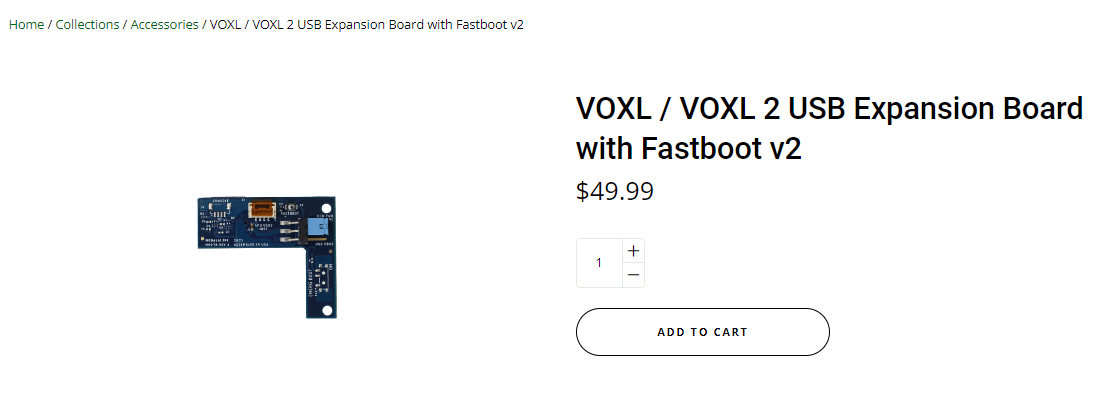
and this board:
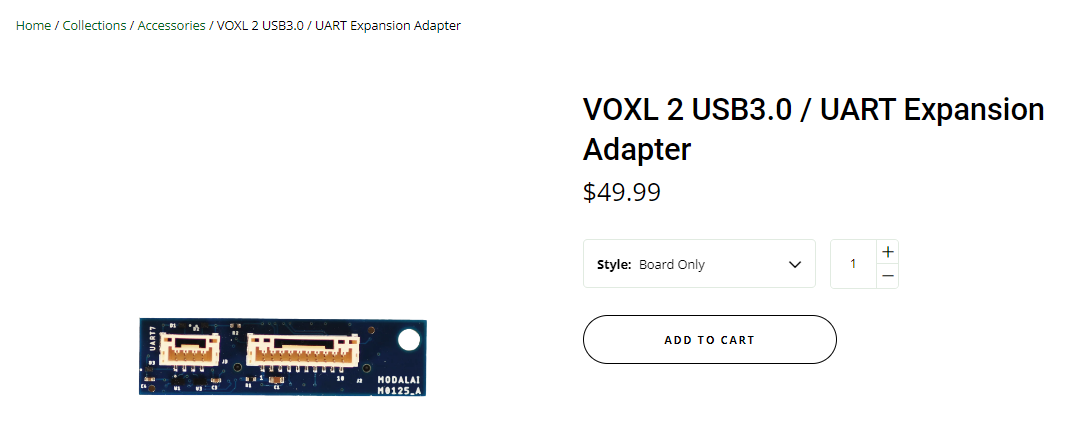
is the UART on the smaller board is not present on the "L" board.
The "L Board" only gives USB2, but has the option to select a high current VBUS option bypassing our USB power switches.
Either one will work for a Pure Thermal Lepton over USB2. The "L" board might be better for drones with high vibe since it can be secured with additional mounting holes.Hope this helps!
-
Cheers Vinny appreciate the detail will get finance to put an order in now.
-
Hi @A-Evans
The main difference between this board:
and this board:
is the UART on the smaller board is not present on the "L" board.
The "L Board" only gives USB2, but has the option to select a high current VBUS option bypassing our USB power switches.
Either one will work for a Pure Thermal Lepton over USB2. The "L" board might be better for drones with high vibe since it can be secured with additional mounting holes.Hope this helps!
@Vinny I've received the parts, and not think I may be missing some pieces, the sentinel comes with the VOXL 2 USB board, but there isn't anyway to connect both these board, I'm assuming the uart on 3.0 can't be used to connect the camera or wifi? or do I need a specific cable for connecting the pure thermal to the uart?
apologies I'm a software man not a hardware man.
-
@Vinny I've received the parts, and not think I may be missing some pieces, the sentinel comes with the VOXL 2 USB board, but there isn't anyway to connect both these board, I'm assuming the uart on 3.0 can't be used to connect the camera or wifi? or do I need a specific cable for connecting the pure thermal to the uart?
apologies I'm a software man not a hardware man.
Hi @A-Evans
In your original post, you wanted to connect Pure Thermal Lepton USB board to Voxl2, correct?
Either of those boards, even if Sentinel came with the USB+ UART adapter, all work to expose a USB2 host which should be suitable for connecting to Lepton.
The originla board you posted from Sparkfun uses a 1mm JST SR connector, so you can make any simple adapter to our USB plug, or you can check out some of our cables as a starting point:
https://docs.modalai.com/cable-datasheets/#mcbl-00071
https://docs.modalai.com/cable-datasheets/#mcbl-00080Generally speaking, yes, you can only have 1 plug-in board at a time connected to J3/J5 on Voxl2. That is why we have so many options of boards for different use cases.
If you need additional USB ports, UARTs, etc, for more expansion support, you might need to consider something like our 5G modem board (you do not need to have a modem for the bulk of it to work).
It exposes multiple USB ports and other UART/I2C ports as well.
However, if all you want is to add Lepton over USB, the Voxl2 USB board should be all you need. -
Hi @A-Evans
In your original post, you wanted to connect Pure Thermal Lepton USB board to Voxl2, correct?
Either of those boards, even if Sentinel came with the USB+ UART adapter, all work to expose a USB2 host which should be suitable for connecting to Lepton.
The originla board you posted from Sparkfun uses a 1mm JST SR connector, so you can make any simple adapter to our USB plug, or you can check out some of our cables as a starting point:
https://docs.modalai.com/cable-datasheets/#mcbl-00071
https://docs.modalai.com/cable-datasheets/#mcbl-00080Generally speaking, yes, you can only have 1 plug-in board at a time connected to J3/J5 on Voxl2. That is why we have so many options of boards for different use cases.
If you need additional USB ports, UARTs, etc, for more expansion support, you might need to consider something like our 5G modem board (you do not need to have a modem for the bulk of it to work).
It exposes multiple USB ports and other UART/I2C ports as well.
However, if all you want is to add Lepton over USB, the Voxl2 USB board should be all you need.@Vinny I think there has been a misunderstanding I need to connect the camera while also having the wifi adapter plugged in, are you saying there is no way to utilise the uart connector on the VOXL2 USB3.0 / UART expansion Adapter, and the only board that is currently on offer with more than one usb connector is the 5g modem?
-
@Vinny I think there has been a misunderstanding I need to connect the camera while also having the wifi adapter plugged in, are you saying there is no way to utilise the uart connector on the VOXL2 USB3.0 / UART expansion Adapter, and the only board that is currently on offer with more than one usb connector is the 5g modem?
Hi @A-Evans
OK, yes, I see. WiFi was not mentioned in the original post, so thanks for clarifying.Yes, in order to have more than 1 USB port, you need to have one of our Microhard or 5G modem boards to expose multiple USB ports. Those boards all have USB hubs on them to enable this. Whereas our very simple plug-in boards only expose the one port direct from Voxl2.
For either 4G/5G Modem or Microhard boards, you do not need to have the module installed. The USB hub portions of the design work with or without wireless modules installed.
Hope that clarifies things.
-
Hi @A-Evans
OK, yes, I see. WiFi was not mentioned in the original post, so thanks for clarifying.Yes, in order to have more than 1 USB port, you need to have one of our Microhard or 5G modem boards to expose multiple USB ports. Those boards all have USB hubs on them to enable this. Whereas our very simple plug-in boards only expose the one port direct from Voxl2.
For either 4G/5G Modem or Microhard boards, you do not need to have the module installed. The USB hub portions of the design work with or without wireless modules installed.
Hope that clarifies things.
-
@Vinny ah could you provide me a parts list, I may have to return the others, shipping is heafty to the UK too. are there any third party board that would work?
Hi @A-Evans
This is our current WiFi solution for Voxl2, or any ModalAI board with a standard USB2 4-position JST GH port.
https://www.modalai.com/products/wifi-usb-cable-add-on?_fid=da227b041&_pos=1&_ss=c
If you want to use our 10-pin USB3 format connector for the Alpha USB Dongle, then you can also consider using this cable: https://www.modalai.com/products/mcbl-00022Note: We use Alpha WiFi since it's NDAA compliant

You are free to use any WiFI USB dongle sourced at the UK, and make your own cables for USB2 (not too hard for proto-type builds).


Reading along? Create a free ModalAI Forum account to join in.
With an account you can reply, ask your own question, get an email when a ModalAI engineer answers, and mark the reply that solved it. Your place in each thread is saved between visits.
Questions about VOXL, Flight Core, ESCs and ModalAI drones are answered here by the engineers who build them.
Register Login