
Changing VOXL2 DSP PX4 Orientation
-
Note, this is exact issue is referenced here and never answered, but we have also run into it:
While testing we had the voxl2 mounted with an 180 degrees roll. We were able to change the extrinsics file for qvio, and vision-px4, but when calibrating the sensors with QGroundcontrol the system was unable to calibrate, because the px4 could not discern the right orientation it was in. The px4 was configures to have a roll of 180 degrees, and when calibrating the sensors while the drone was standing on the ground, px4 still thought it was upside down, and after trying to calibrate that orientation, it gave an error saying the z readout was in the wrong direction. Is it possible that there is a setting on the voxl2 that needs to be set when the voxl is mounted upside down?
-
Note, this is exact issue is referenced here and never answered, but we have also run into it:
While testing we had the voxl2 mounted with an 180 degrees roll. We were able to change the extrinsics file for qvio, and vision-px4, but when calibrating the sensors with QGroundcontrol the system was unable to calibrate, because the px4 could not discern the right orientation it was in. The px4 was configures to have a roll of 180 degrees, and when calibrating the sensors while the drone was standing on the ground, px4 still thought it was upside down, and after trying to calibrate that orientation, it gave an error saying the z readout was in the wrong direction. Is it possible that there is a setting on the voxl2 that needs to be set when the voxl is mounted upside down?
@msberk Yes, when mounting the board in a different orientation the IMU driver needs to know the rotation. So, for example, we have one model of drone that has the board rotated by 180 degrees. So the start line for the imu driver adds
-R 4to specify that (qshell icm42688p start -s -R 4). The number 4 comes from the filesrc/lib/conversion/rotation.hand corresponds toROTATION_YAW_180. For your case I think you would want to specify-R 8forROTATION_ROLL_180. -
@Eric-Katzfey
Ok, that worked. Thanks!How would you advise setting it up to run at boot? I found the target script here but it's set up differently than a typical Pixhawk board target.
-
@Eric-Katzfey
Ok, that worked. Thanks!How would you advise setting it up to run at boot? I found the target script here but it's set up differently than a typical Pixhawk board target.
@msberk There are different ways to go about starting px4. What we do is use the voxl-px4 script to launch everything (In that same target directory). That can be be used in a systemd service file to launch px4 at board startup. That script has command line options that control certain features. Ultimately px4 is passed that voxl-px4.config script using the
-soption. Both voxl-px4 and voxl-px4.config are bash scripts which makes them quite flexible. For a different perspective you can look at our voxl-px4 gitlab project which acts as a wrapper for px4 and creates a debian package that can be installed on target. The package will place all needed files in the correct places during installation and has a voxl-px4.service file example for systemd startup. (https://gitlab.com/voxl-public/voxl-sdk/services/voxl-px4/-/tree/dev) -
@msberk Yes, when mounting the board in a different orientation the IMU driver needs to know the rotation. So, for example, we have one model of drone that has the board rotated by 180 degrees. So the start line for the imu driver adds
-R 4to specify that (qshell icm42688p start -s -R 4). The number 4 comes from the filesrc/lib/conversion/rotation.hand corresponds toROTATION_YAW_180. For your case I think you would want to specify-R 8forROTATION_ROLL_180.from where can add this command?
it is not clear. If you can clarify more about the process
thank you
-
from where can add this command?
it is not clear. If you can clarify more about the process
thank you
@Abdullah01 In voxl-px4 1.12.31 you can find all of the PX4 startup commands in /etc/modalai/voxl-px4.config.
-
@Abdullah01 In voxl-px4 1.12.31 you can find all of the PX4 startup commands in /etc/modalai/voxl-px4.config.
Great thank you.
I checked the file and the imu is already rotated as you can see in the picture
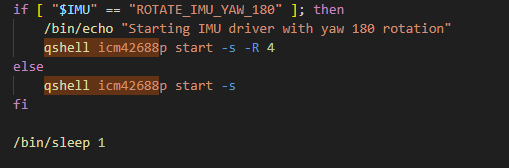
But when I start the calibration process and face the drone's nose upward. it shows that it faces downward
should I make the changes on the config file and on QGC? or just on the file?
thank you
-
Great thank you.
I checked the file and the imu is already rotated as you can see in the picture
But when I start the calibration process and face the drone's nose upward. it shows that it faces downward
should I make the changes on the config file and on QGC? or just on the file?
thank you
Now It works with the correct orientation.
But there are two issues,
1- Once I complete the compass calibration process, and restart the voxl/drone. it shows me that the calibration process has not been done and I need to re-calibrate again.
2- the accelerometer calibration process keeps crashing and it shows this message
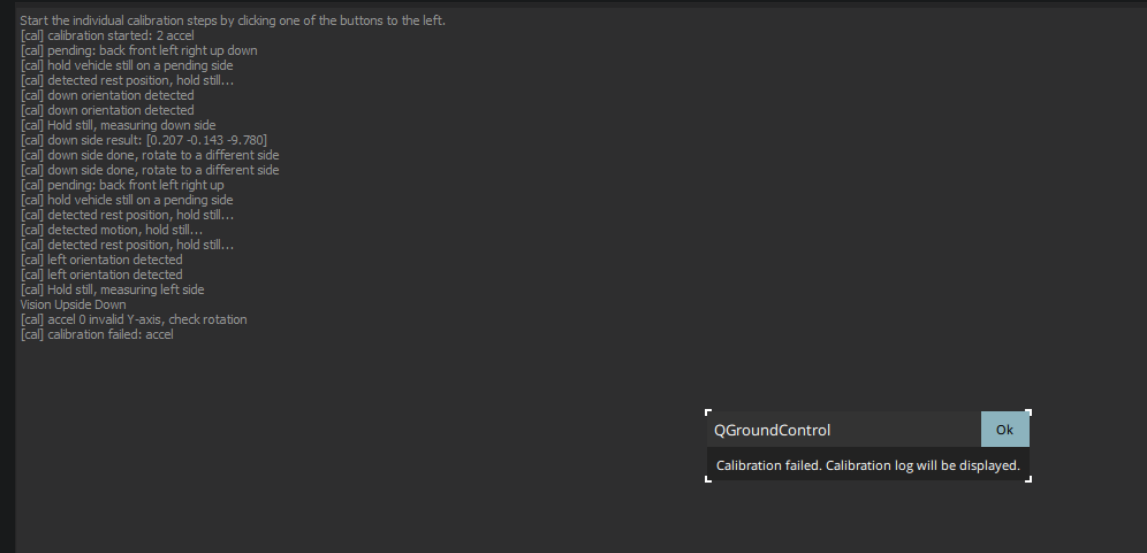
-
Now It works with the correct orientation.
But there are two issues,
1- Once I complete the compass calibration process, and restart the voxl/drone. it shows me that the calibration process has not been done and I need to re-calibrate again.
2- the accelerometer calibration process keeps crashing and it shows this message
@Abdullah01 It still seems like your rotation is not setup correctly. Have you set SENS_BOARD_ROT to anything? Did you change the imu start line to have a rotation of 8 instead of 4?
-
@Abdullah01 It still seems like your rotation is not setup correctly. Have you set SENS_BOARD_ROT to anything? Did you change the imu start line to have a rotation of 8 instead of 4?
I just tried to change it from 4 to 8 but nothing changed.
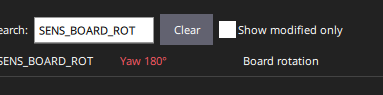
Yes, I changed the SENS_BOARD_ROT to Yaw 180 degrees
-
I just tried to change it from 4 to 8 but nothing changed.
Yes, I changed the SENS_BOARD_ROT to Yaw 180 degrees
@Abdullah01 Leave SENS_BOARD_ROT as the default value. You are specifying the rotation of the board by giving the IMU driver the
-R 4option.


Reading along? Create a free ModalAI Forum account to join in.
With an account you can reply, ask your own question, get an email when a ModalAI engineer answers, and mark the reply that solved it. Your place in each thread is saved between visits.
Questions about VOXL, Flight Core, ESCs and ModalAI drones are answered here by the engineers who build them.
Register Login