
Drone does not switch to Position mode indoors
-
Hi,
We have just received a pair of Seeker drones. One of them works flawlessly indoors (w/ Vision enabled, w/o GPS); however, the other does not switch to the Position mode under the same circumstances, regardless of our efforts. It can switch to Manual, Altitude, and Stabilized modes, though. I made sure that the parameters were the same by exporting/importing; and made the calibrations as well. What else should be considered?
Best
-
@Umut-John Sorry to hear you're having troubles with one of your Seekers. Let's see what we can do to remedy that.
First off, some questions to get a baseline where we're sittin.Was any custom software loaded?
Have you configured MPA?
When I see that the Seeker doesn't go into Position mode, VIO hasn't started or didn't start properly.
Can you post the result of:voxl-inspect-servicesWhat software are you utilizing?
voxl-versionIf you look at local position ned in QGC(Q Ground Control) What does the X and Y data show? If they're zeroed out, then you will have to restart VIO. To get to local position ned, open QGC, navigate to analyze, mavlink inspector, local position ned.
-
@Umut-John Sorry to hear you're having troubles with one of your Seekers. Let's see what we can do to remedy that.
First off, some questions to get a baseline where we're sittin.Was any custom software loaded?
Have you configured MPA?
When I see that the Seeker doesn't go into Position mode, VIO hasn't started or didn't start properly.
Can you post the result of:voxl-inspect-servicesWhat software are you utilizing?
voxl-versionIf you look at local position ned in QGC(Q Ground Control) What does the X and Y data show? If they're zeroed out, then you will have to restart VIO. To get to local position ned, open QGC, navigate to analyze, mavlink inspector, local position ned.
-
Hello Adrian, thanks for the prompt response. There is no custom software/hardware. Configuring MPA didn't seem to help either. And here is the output of "voxl-inspect-services" command:
Service Name         |  Enabled  |   Running   |  CPU Usage
docker-autorun       | Disabled  | Not Running |
docker-daemon        | Disabled  | Not Running |
modallink-relink     | Disabled  | Not Running |
voxl-camera-server   |  Enabled  |   Running   |    23.5
voxl-cpu-monitor     |  Enabled  |   Running   |     0.0
voxl-dfs-server      | Disabled  | Not Running |
voxl-imu-server      |  Enabled  |   Running   |     0.0
voxl-mavlink-server  |  Enabled  |   Running   |     1.8
voxl-modem           | Disabled  | Not Running |
voxl-portal          |  Enabled  |   Running   |     0.0
voxl-qvio-server     |  Enabled  |   Running   |     1.8
voxl-streamer        | Disabled  | Not Running |
voxl-tag-detector    | Disabled  | Not Running |
voxl-tflite-server   | Disabled  | Not Running |
voxl-time-sync       | Disabled  | Not Running |
voxl-vision-px4      |  Enabled  |   Running   |     1.8
voxl-wait-for-fs     |  Enabled  |  Completed  |
And here is the output for "voxl-version":
system-image: 4.0.0
kernel:       #1 SMP PREEMPT Thu Oct 13 17:57:05 UTC 2022 3.18.71-perf
hw version:   VOXL
voxl-suite:   0.9.5
Packages:
Repo: http://voxl-packages.modalai.com/dists/apq8096/sdk-0.9/binary-arm64/
Last Updated: stat: cannot stat '/var/lib/opkg/lists/modalai': No such file or directory
stat: cannot stat '/var/lib/opkg/lists/modalai': No such file or directory
WARNING: repo file has changed since last update,
        packages may have originated from a different repo
List:
        apq8096-dfs-server       0.3.1
        apq8096-imu-server       1.0.3
        apq8096-libpng           1.6.38-1
        apq8096-system-tweaks    0.1.3
        apq8096-tflite           2.8.3-1
        libapq8096-io            0.6.0
        libmodal-cv              0.2.3
        libmodal-exposure        0.0.7
        libmodal-journal         0.2.1
        libmodal-json            0.4.3
        libmodal-pipe            2.8.2
        libvoxl-cci-direct       0.1.5
        libvoxl-cutils           0.1.1
        voxl-camera-calibration  0.2.3
        voxl-camera-server       1.3.5
        voxl-cpu-monitor         0.3.0
        voxl-docker-support      1.2.4
        voxl-gphoto2-server      0.0.10
        voxl-jpeg-turbo          2.1.3-4
        voxl-libgphoto2          0.0.4
        voxl-libuvc              1.0.7
        voxl-logger              0.3.4
        voxl-mavlink             0.1.0
        voxl-mavlink-server      0.3.0
        voxl-modem               0.16.1
        voxl-mongoose            7.7.0-1
        voxl-mpa-to-ros          0.3.6
        voxl-mpa-tools           0.7.6
        voxl-opencv              4.5.5-1
        voxl-portal              0.5.0
        voxl-qvio-server         0.8.2
        voxl-streamer            0.4.1
        voxl-suite               0.9.5
        voxl-system-image        4.0-r0
        voxl-tag-detector        0.0.4
        voxl-tflite-server       0.3.1
        voxl-utils               1.2.2
        voxl-uvc-server          0.1.3
        voxl-vision-px4          1.4.0
        voxl-vpn                 0.0.6
Finally, there is no Local Position NED tab in the MAVlink Analyzer Tool in QGC.
By the way, "voxl-qvio-inspect" command gives the following output:
waiting for server dt(ms) | T_imu_wrt_vio (m) |Roll Pitch Yaw (deg)|features|quality| state| error_codes | 30.3 | 0.00 0.00 0.00| 0.0 -0.0 0.0| 0 | -1% | FAIL | CAM_MISSING STALLED -
@Umut-John can you try restarting the voxl-vision-px4 service and qvio server?
systemctl restart voxl-vision-px4systemctl restart voxl-qvio-server -
-
@Umut-John that's interesting. Do any of the other cameras come up in Portal?
Can you post the print out of
camera-testWhich camera config do you have on your Seeker? Does it have the TOF or Hi-Res?
You may want to try configuring the cameras.It's interesting that the tracking camera is not showing up. The Seekers are test flown and tested before shipping out.
-
Stereo cameras and Tof streams work, but not the tracking. "camera-test" returns the following:
num_cameras = 4
Testing camera id=0
camera-test: /opt/workspace/build/apq8096-le-1-0-1_ap_standard_oem.git/apps_proc/poky/build/tmp-glibc/work/armv7a-vfp-neon-oemllib32-linux-gnueabi/lib32-qmmf-sdk/git-r0/qmmf-sdk/recorder/src/client/qmmf_recorder.cc:326: qmmf::recorder::status_t qmmf::recorder::Recorder::DeleteVideoTrack(uint32_t, uint32_t): Assertion `recorder_client_ != __null' failed.
Aborted
And this is what I see in the portal:
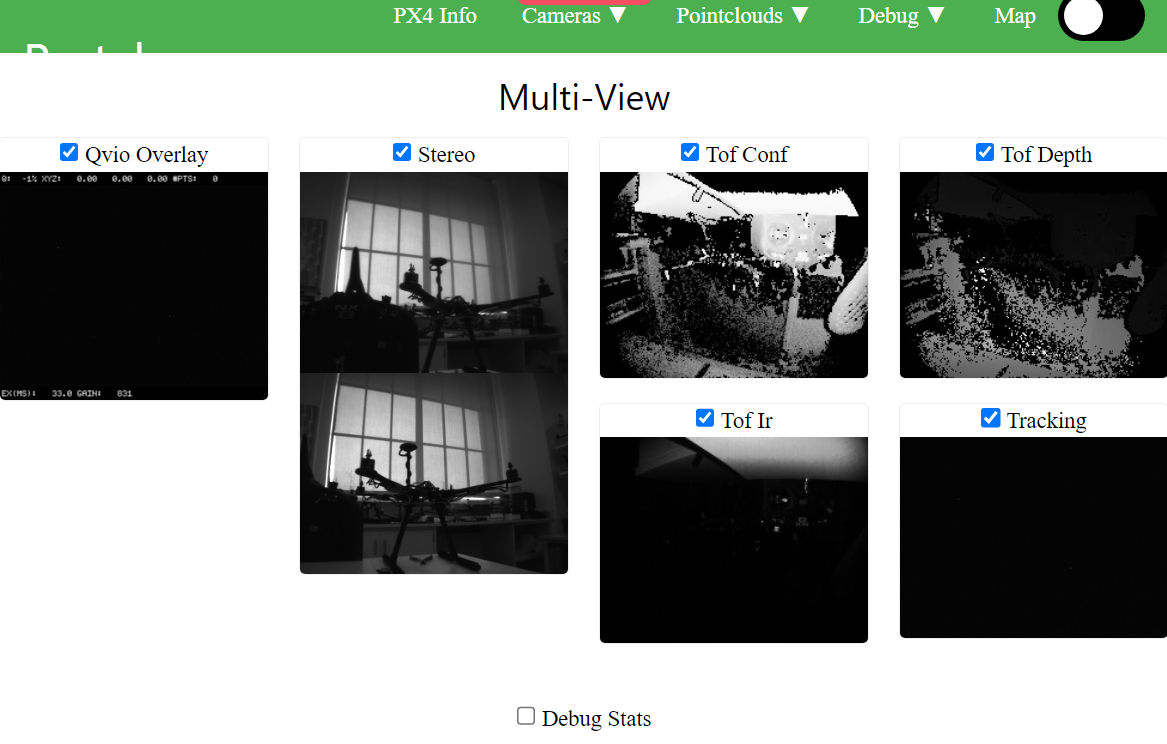
-
@Umut-John hmm. One more thing to check; is there a lens cap on the tracking camera?
It does look like the camera is detected
-
OMG! The protective cap on the camera

You're right! Just saw it minutes before checking it here. There was no cap on the first drone; it was probably dropped or something, so I did not even feel the need to look for it.
Thank you, Adrian; sorry for the trouble. Case closed!


Reading along? Create a free ModalAI Forum account to join in.
With an account you can reply, ask your own question, get an email when a ModalAI engineer answers, and mark the reply that solved it. Your place in each thread is saved between visits.
Questions about VOXL, Flight Core, ESCs and ModalAI drones are answered here by the engineers who build them.
Register Login