
Thanks Tom and Eric, finally resolved this, it ended up being a power supply issue. The unit we used to typically run it on the bench seemingly browned out somewhere in the flashing procedure.
S
simiken1234
@simiken1234
Posts
-
VOXL2 M0054-1 has no USB/ADB after SDK 1.8 upgrade and successful QDL recovery -
VOXL2 M0054-1 has no USB/ADB after SDK 1.8 upgrade and successful QDL recoveryWe tried to roll it back to 1.6.3 but it now remains locked in fastboot. Any recommendations on this @eric-katzfey ?
-
VOXL2 M0054-1 has no USB/ADB after SDK 1.8 upgrade and successful QDL recoveryUpdate on this, I tried following this post which has helped before, but it also did not help in this case:
https://forum.modalai.com/topic/2789/voxl2-stuck-in-fastboot?_=1792769614627So I tried SDK 1.8.0’s
flash-system-image.sh -f: all writes completed, but both boot slots became unbootable and ADB never returned.RAM boot of either M0054-1 kernel (
var00.0orvar00.1) fails withFailed to load/authenticate boot image: Load Error. -
VOXL2 M0054-1 has no USB/ADB after SDK 1.8 upgrade and successful QDL recoveryHardware: VOXL 2 M0054-1 (QRB5165M)
Original SKU: MRB-D0014-4-V1-C27-T0-M18-X8
ADB/fastboot serial: 3f621d35
Original machine/variant/config: 1.0.1
Recorded SoC ID: 455Software version:
Complete voxl-version output saved before the upgrade, when the board was still reachable over ADB:
────────────────────────────────────────────────────────────────────────────────
system-image: 1.8.06-M0054-14.1a-perf
kernel:       #1 SMP PREEMPT Wed Oct 22 04:13:18 UTC 2025 4.19.125
────────────────────────────────────────────────────────────────────────────────
hw platform:  M0054
mach.var:     1.0.1
SKU:          MRB-D0014-4-V1-C27-T0-M18-X8
────────────────────────────────────────────────────────────────────────────────
voxl-suite:   1.6.3
────────────────────────────────────────────────────────────────────────────────
Packages:
Repo:  http://voxl-packages.modalai.com/ ./dists/qrb5165/sdk-1.6/binary-arm64/
Last Updated: 2023-03-02 12:59:12
WARNING: repo file has changed since last update,
	packages may have originated from a different repo
List:
libfc-sensor                   1.0.9
libmodal-cv                    0.6.0
libmodal-exposure              0.1.4
libmodal-flow                  1.0.3
libmodal-journal               0.2.7
libmodal-json                  0.4.8
libmodal-pipe                  2.14.11
libqrb5165-io                  0.6.3
libvoxl-cci-direct             0.3.3
libvoxl-codec                  0.0.2
libvoxl-cutils                 0.1.6
modalai-slpi                   1.2.2
mv-voxl                        0.1-r0
qrb5165-bind                   0.1-r0
qrb5165-dfs-server             0.2.0
qrb5165-mini-tof-server        0.2.2
qrb5165-rangefinder-server     0.1.6
qrb5165-slpi-test-sig          01-r0
qrb5165-tflite                 2.17.2
voxl-bind-spektrum             0.1.1
voxl-camera-calibration        0.6.1
voxl-camera-server             2.2.19
voxl-ceres-solver              2:2.0.0-2
voxl-configurator              1.1.5
voxl-cpu-monitor               0.7.7
voxl-docker-support            1.3.1
voxl-elrs                      1.1.0
voxl-esc                       1.5.7
voxl-esptool                   0.2.0
voxl-feature-tracker           0.5.2
voxl-flow-server               0.3.6
voxl-gphoto2-server            0.0.10
voxl-imu-server                2.0.1
voxl-io-server                 0.0.8
voxl-jpeg-turbo                2.1.3-7
voxl-lepton-server             1.3.3
voxl-lepton-tracker            0.0.4
voxl-libgeographic             1.0.0
voxl-libgphoto2                0.0.4
voxl-libuvc                    1.0.7
voxl-logger                    0.6.1
voxl-mavcam-manager            0.6.0
voxl-mavlink                   0.1.6
voxl-mavlink-server            1.4.14
voxl-modem                     1.2.3
voxl-mongoose                  7.19.0
voxl-mpa-to-ros                0.3.9
voxl-mpa-tools                 1.5.6
voxl-nano-tracker              0.1.7
voxl-open-vins-server          0.6.0
voxl-opencv                    4.5.5-3
voxl-osd                       0.3.8
voxl-portal                    0.8.7
voxl-px4                       1.14.0-2.0.133
voxl-px4-params                0.9.0
voxl-qvio-server               1.2.3
voxl-remote-id                 0.0.9
voxl-reset-slpi                0.0.1
voxl-state-estimator           0.0.6
voxl-streamer                  0.8.0
voxl-suite                     1.6.3
voxl-tag-detector              0.1.0
voxl-tflite-server             0.5.1
voxl-utils                     2.0.2
voxl-uvc-server                0.1.7
voxl-vision-hub                1.9.21
voxl-vtx                       2.0.2
voxl-wavemux                   0.0.3
voxl2-io                       0.0.3
voxl2-security-hardening-utls  1.0-r0
voxl2-system-image             1.8.06-r0
voxl2-wlan                     1.0-r0
────────────────────────────────────────────────────────────────────────────────
Attempted upgrade: official VOXL2 SDK 1.8.0, containing system image 1.8.09-M0054-14.1a-perf-20261009. The archive MD5 matches the published 7c83184458a3d4c89cf153fc8231f712.
The installer automatically selected M0054-1 Config 1/M0173:
kernel: m0054-1-var00.1-kernel.img
devcfg: devcfg-m0054-1-v8.mbn
The system-image flash completed, but ADB never returned, so the SDK 1.8.0 packages were not installed.
Subsequent factory recovery used the official M0054(154)-1.zip flat build and ModalAI's modal-qdl tool, commit 136f4b7941fbaad37066552fbfea3eb47645f592.
This is the pre-upgrade output, not a reading of the recovered image. Current voxl-version output cannot be collected because normal boot exposes no USB/ADB.
Configuration / services:
Current voxl-inspect-services output is unavailable: the board exposes no USB/ADB after boot. Our saved diagnostics do not contain a pre-upgrade output of that command.
The board previously booted and ran PX4 HITL. The intended setup uses a NUC for ModalAI's Gazebo Classic simulator, J18 serial for HITL, and J9 USB for ADB.
For the latest boot checks, the VOXL is bare: only main power and J9 USB are connected, with no cameras, add-on boards or J18 wiring. SW2 is OFF and SW1 is released. Both power and USB were disconnected before each cold boot.
We tested USB on the Ubuntu 24.04 NUC and an Ubuntu 22.04.5 PC. USB 3 repeatedly reset during fastboot communication on both hosts. USB 2 through a hub allowed stable fastboot reads and the full QDL flash, but normal boot still exposes no USB device.
What I am trying to do:
Install SDK 1.8.0 on this VOXL2 and use it as a basic PX4 HITL development rig.
What actually happens:
The SDK system-image flash reports completion, but the board never returns to ADB. Loading the matching SDK kernel with fastboot boot also reports Booting OKAY, then exposes no USB/ADB.
Factory QDL recovery reports success, including both boot partitions, GPT patches and the bootable marker:
[PROGRAM] flashed "boot_a" successfully
[PROGRAM] flashed "boot_b" successfully
[MODALAI] ==== Completed patch_execute ====
partition 1 is now bootable
The final reset prints:
firehose operation timed out
[MODALAI] ==== Completed firehose_reset ====
[MODALAI] Completed firehose_run
QDL exit status: 0
There were 965 successful program operations. After cold boot with SW2 OFF, lsusb shows no VOXL device and adb devices is empty. The current symptom is no USB enumeration, rather than a persistent 900e or 9008 device. In EDL before flashing, the device was detected as 05c6:9008 at 480 Mbps.
LEDs remain unchanged: DS1 solid green; DS2 slow green blinking, approximately a 1–2 second period; D1 greenish solid. Repeated bare-board power/USB cycles have not changed the result.
We have not encountered this problem on our other devices, so we suspect it may be related to this board being the M0054-1 (-1) hardware version. This is a hypothesis; we have not established the root cause.
Steps to reproduce:
- Start with the ADB-accessible M0054-1 and pre-upgrade versions above.
- Run the official SDK 1.8.0 installer with ./install.sh -n -m. It detects Config 1 and selects m0054-1-var00.1-kernel.img.
- Observe Done Flashing and a successful fastboot reboot, followed by an indefinite wait for ADB. Cold power/USB cycles do not restore detection.
- On a stable USB 2 connection, try fastboot boot with the matching SDK kernel. The command succeeds, but ADB still does not appear.
- Stop the waiting installer with no writes active. Enter EDL with SW2 ON and flash M0054(154)-1.zip using ModalAI's programmer, rawprogram XMLs and patch XMLs.
- Observe completed programming/patches, partition 1 is now bootable, the final reset timeout and QDL exit status 0.
- Disconnect both power and USB, set SW2 OFF, wait 10 seconds, then reconnect main power followed by J9 USB with SW1 released.
- With only power and USB attached, observe no VOXL USB device or ADB. Repeat the cold cycle and observe the same LEDs and detection result.
Only one factory QDL flash has been performed. We have stopped further flashing pending guidance. The SDK installer log also contains an unset TERM/tput warning and a shell arithmetic error before flashing; it subsequently reports all flash operations complete. These messages are retained in the log.
Logs / pictures:
Attachment prepared: modalai-support-2026-10-23.zip, containing:
- Full SDK installer log and exit marker (143 after stopping the waiting installer).
- Full QDL recovery log and exit marker (0).
- Original voxl-version output.
- Current USB/ADB/fastboot detection output and a filtered PC kernel USB event log.
- A detailed diagnostic report with image checksums and the recovery command.
No new PX4 flight log is available for this boot failure because we cannot reach or start PX4. The relevant evidence is the installer, recovery and USB logs listed above.
We followed https://docs.modalai.com/voxl2-unbricking/ and https://docs.modalai.com/voxl2-PX4-hitl/.
Could you confirm whether M0054(154)-1.zip and the SDK 1.8.0 Config 1/var00.1 kernel are correct for this board, and whether there is a known issue specific to the -1 hardware? Does the final Firehose reset timeout indicate a problem despite the successful programming and bootable marker? Please advise on a targeted boot-console diagnostic or other steps. Thanks.
-
SDK 1.8 / PX4 1.18: VOXL ESC telemetry is valid in PX4 but MAVLink reports all motors offlineWorks, thanks!
-
SDK 1.8 / PX4 1.18: VOXL ESC telemetry is valid in PX4 but MAVLink reports all motors offlineHardware: Custom drone, VOXL 2 M0054
SKU: TF-M0054-4-V1-C11Software version:
system-image: 1.8.09-M0054-14.1a-perf-20261009
hw platform:  M0054
voxl-suite:   1.8.0

Relevant packages:
voxl-px4            1.18.0-1.0.9
voxl-mavlink-server 1.4.21-202610161525
voxl-px4-params     0.9.35
voxl-esc            1.6.5
Configuration / services:
ESC=VOXL_ESC

voxl-px4            Enabled, Running
voxl-mavlink-server Enabled, Running
What I am trying to do:
View normal ESC health and telemetry in QGroundControl's ESC Status Overview.
What actually happens:
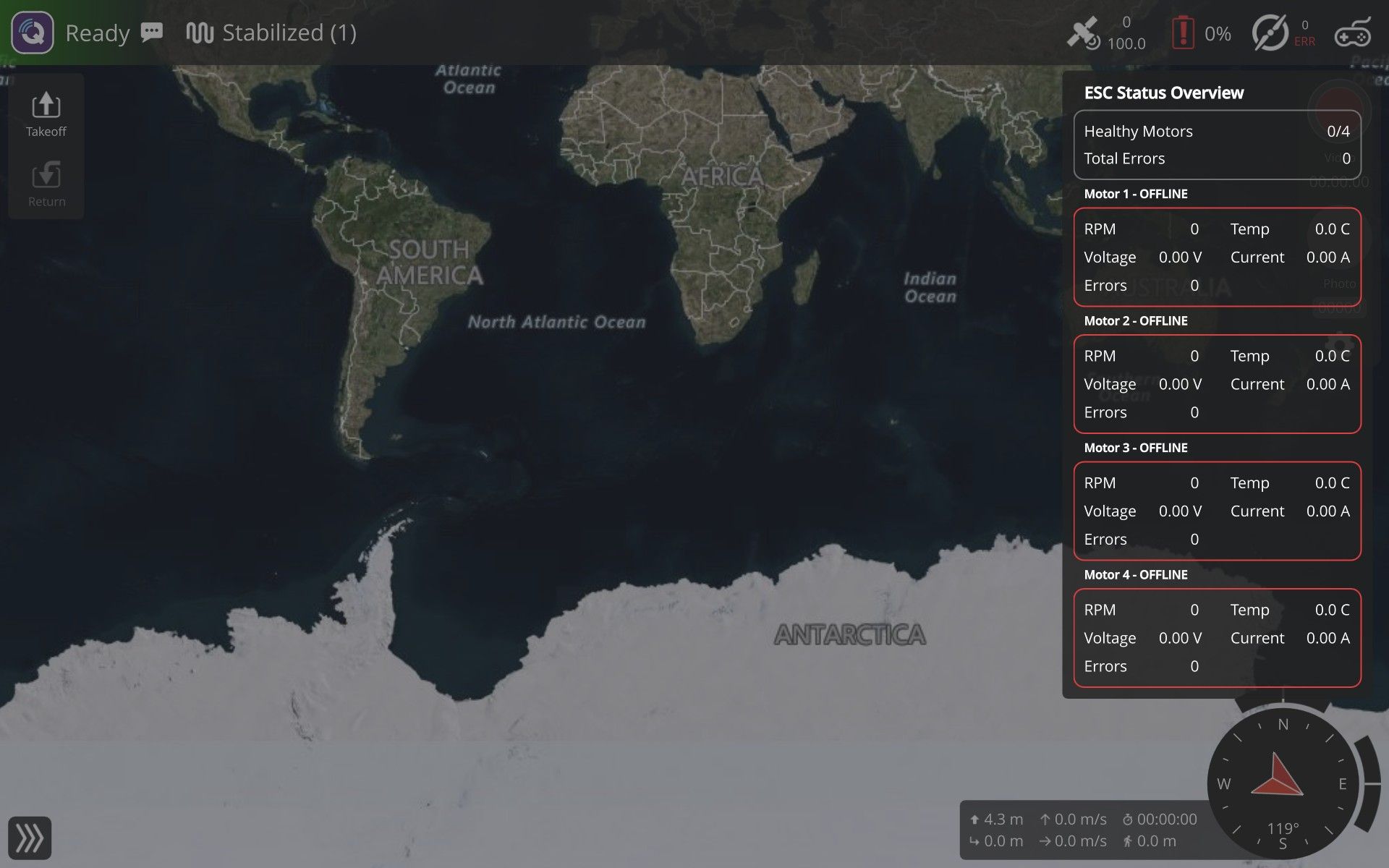
QGC shows
ERRand all four motors as offline. The vehicle can still arm, motors can be spun from the Actuators page, and flight-control outputs work.PX4 itself receives valid ESC telemetry.
px4-listener esc_statusshows all four ESCs online and fresh:esc_online_flags: 15 (0b1111) esc_armed_flags: 15 (0b1111) esc_count: 4 esc_connectiontype: 1 ESC 0-3: fresh timestamps, 12.497-12.513 V, 32-39 C, esc_errorcount: 0, failures: 0However, each of the four reports has:
actuator_function: 0I captured the MAVLink packets leaving the VOXL for the GCS.
ESC_INFOandESC_STATUSare transmitted, so this is not a voxl-mavlink-server forwarding issue. But they contain:ESC_INFO: count=4, info=0 (all ESCs offline) ESC_STATUS: RPM/voltage/current all zeroI traced this to the PX4 MAVLink ESC stream: it now remaps and exports telemetry only for reports with
actuator_functionset toMotor1..MotorN. Thevoxl_escdriver publishes validesc_statustelemetry and online flags, but does not populateesc_status.esc[i].actuator_function, so all reports are filtered out before MAVLink serialization.This appears to be a regression caused by the PX4 MAVLink ESC stream change in commit
efbc9e64(mavlink: esc: fix ESC_STATUS and ESC_INFO message emission, November 2025). That commit is included in the installedv1.18.0-1.0.9source tag. Before that change, the MAVLink stream forwarded theesc_statusarrays andesc_online_flagsdirectly, so it did not depend onactuator_function.Steps to reproduce:
-
Boot a VOXL 2 using the versions above with
ESC=VOXL_ESC. -
Connect QGroundControl to
voxl-mavlink-serveron UDP port 14550. -
Open the ESC Status Overview. All four motors show offline /
ERR. -
On the VOXL, run:
px4-listener esc_status -
Observe that ESC telemetry and online flags are valid, while
actuator_functionis0for ESC 0-3.
Logs / pictures:
I can provide the full
voxl-version,voxl-inspect-services,px4-listener esc_statusoutput, and the MAVLink packet capture.Could you confirm whether
voxl_escshould populate eachesc_status.esc[i].actuator_functionfrom the configuredVOXL_ESC_FUNC1..4motor mapping, and provide or point me to a fix for the SDK 1.8 / PX4 1.18 package? -
-
QGC Actuators metadata unavailable with SDK 1.8 / PX4 1.18 through voxl-mavlink-serverFix verified working, thank you Eric!
-
QGC Actuators metadata unavailable with SDK 1.8 / PX4 1.18 through voxl-mavlink-serverTitle: QGC Actuators metadata unavailable with SDK 1.8 / PX4 1.18 through voxl-mavlink-server
Hardware: Custom drone, VOXL 2 M0054
SKU: TF-M0054-4-V1-C11Software version:
system-image: 1.8.09-M0054-14.1a-perf-20261009
hw platform:  M0054
voxl-suite:   1.8.0

Relevant packages:
voxl-px4            1.18.0-1.0.9
voxl-mavlink-server 1.4.20
voxl-px4-params     0.9.35
I can provide the full voxl-version output if needed.
Configuration / services:
voxl-px4 and voxl-mavlink-server are both enabled and running.
voxl-mavlink-server | Enabled | Running
voxl-px4            | Enabled | Running
What I am trying to do:
Configure the vehicle in QGroundControl and access the PX4 Actuators setup page.
What actually happens:
The Actuators page is absent in both our QGC 5.1.5 build and stock QGC 5.2.0; QGC shows the legacy Motors page instead.
PX4 accepts the component-metadata request and these files exist:
/data/px4/etc/extras/component_general.json.xz
/data/px4/etc/extras/actuators.json.xz
PX4 is started with MAVLink FTP enabled (mavlink start -x).
However, voxl-mavlink-server receives MAVLink FTP open requests for the PX4 metadata files, but no file data is returned to the GCS:
[INFO] FTP opcode: 4
[INFO] FTP seq_number: 1
[INFO] FTP session: 0
[INFO] path request?
etc/extras/component_general.json.xz
Offset: 0
The same occurs for etc/extras/actuators.json.xz. QGC's component-metadata cache remains empty, so it cannot create the Actuators page.
Steps to reproduce:
- Boot VOXL with the versions above.
- Connect QGroundControl to voxl-mavlink-server on UDP port 14550.
- Open Vehicle Setup.
- Observe that Actuators is absent.
- Run journalctl -b -u voxl-mavlink-server and observe FTP opcode 4 requests for etc/extras/component_general.json.xz.
Logs / pictures:
I can attach full voxl-version, voxl-inspect-services, and relevant voxl-mavlink-server journal output.
Could you confirm whether voxl-mavlink-server 1.4.20 is expected to forward PX4-targeted FILE_TRANSFER_PROTOCOL requests for component metadata, or whether there is a newer package/fix for PX4 1.18 component metadata support?
-
Flir Boson+ Application v4.2 install file not available anymore - does anyone have it please?Hi community, I saw in the docs that you need to use v4.2 of the Flir Boson+ App for the camera to work, but I can't find this version anywhere. Does anyone happen to have the install file for it that I could use?
I tried the only versions I could find online v4.6.6 and v3.0.0 and neither of them worked.
Thanks!