Skip to content
  • Categories
  • Recent
  • Tags
  • Popular
  • Users
  • Groups
Collapse
Brand Logo

ModalAI Forum

Samuel LehmanS

Samuel Lehman

@Samuel Lehman
Contributor
Unfollow Follow
About
Posts
14
Topics
7
Shares
0
Groups
1
Followers
0
Following
0

Posts

Recent Best Controversial

  • Trouble configuring Boson+ on Voxl2
    Samuel LehmanS Samuel Lehman

    Hello,

    I am trying to connect a boson+ via mipi on a Voxl2 and I am running into many issues. I am using the M0153 and my voxl system information is below:

    system-image: 1.8.06-M0054-14.1a-perf
    kernel:       #1 SMP PREEMPT Wed Oct 22 03:21:50 UTC 2025 4.19.125
    ────────────────────────────────────────────────────────────────────────────────
    hw platform:  M0054
    mach.var:     1.0.0
    SKU:          MCCA-M0054-CC-T0-M0-X0
    ────────────────────────────────────────────────────────────────────────────────
    voxl-suite:   1.6.2


    One of the issues I am facing is that the the flir boson gui has no option for mipi while according to this guide https://docs.modalai.com/M0153/ there is supposed to be. This may be an issue with the gui not being the right version however when the link to the other versions on flir's website is 404'd. Is there a way I can configure the boson+ without the gui?

    Another issue I am facing is that I do not know which connector I am supposed to be connected to. The guide switches between J8 and J7 for the full size Voxl2 and I am a little confused on which one I am supposed to use.

    In the guide it also mentions that in the voxl-configure-cameras wizard there are supposed to be options

    voxl-configure-cameras 36
    voxl-configure-cameras 37
    

    however I do not see the options, it only goes up to 32.

    voxl2 (M0054):~$ voxl-configure-cameras 
    
    Available camera config IDs are as follows:
    
    01 - ov7251 tracking ov7251 stereo
    02 - ov7251 tracking
    03 - ov7251 tracking ov7251 stereo imx214 hires
    04 - ov7251 tracking imx214 hires
    05 - pmd-tof ov7251 tracking
    06 - D0005 Starling pmd-tof imx214 hires ov7251 tracking
    08 - imx214
    09 - pmd-tof
    10 - ov7251 stereo
    11 - D0006 Sentinel
    12 - ov9782 stereo
    13 - ov9782 stereo imx214 hires
    14 - ov9782 stereo pmd-tof ov7251 tracking (copy)
    15 - D0008 dual 9782 tracking
    16 - pmd-tof ov7251 dual tracking imx214 hires
    17 - D0010 pmd-tof imx412 hires ov7251 tracking ov9782 stereo
    18 - D0008 triple ov9782
    19 - D0005 without tof imx214 hires ov7251 tracking
    20 - D0011 imx412 hires ar0144 tracking
    21 - old C6
    23 - D0010 without stereo
    24 - pmd-tof LIOW2 (new TOF)
    25 - dual ar0144
    31 - D0013 Prototype M0135 dual ar0144
    32 - D0008 triple ov9782 rotated
     C - use user-defined custom camera config in
         (/data/modalai/custom_camera_config.txt)
     q - Quit The Wizard
    
    selection: 
    

    Is there a more updated guide on how to configure the boson+ working with mipi?

    VOXL SDK

  • Mavcam manager uvc stream not working
    Samuel LehmanS Samuel Lehman

    After further experimentation, if I start up two standalone instances of voxl streamer with ports and pipes specified then it works with mavcam manager. Is that not what specifying inputs in mavcam supposed to for me anyway? Does that mean I have to manually setup the voxl streamer instances every time I boot up the voxl?

    VOXL SDK

  • Mavcam manager uvc stream not working
    Samuel LehmanS Samuel Lehman

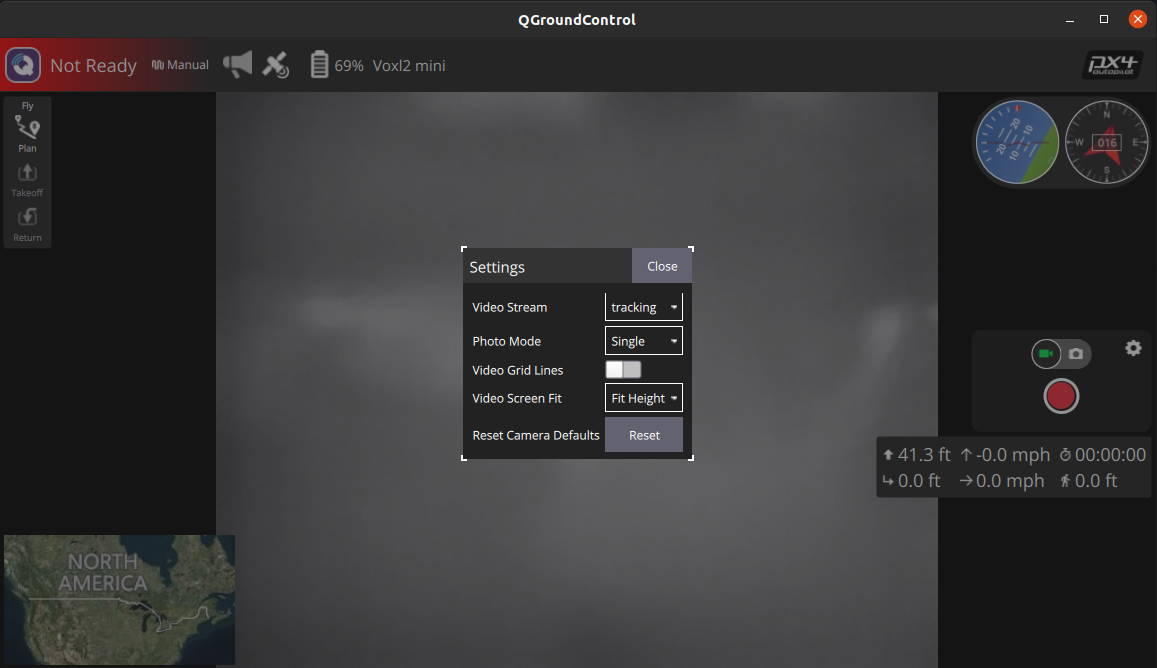
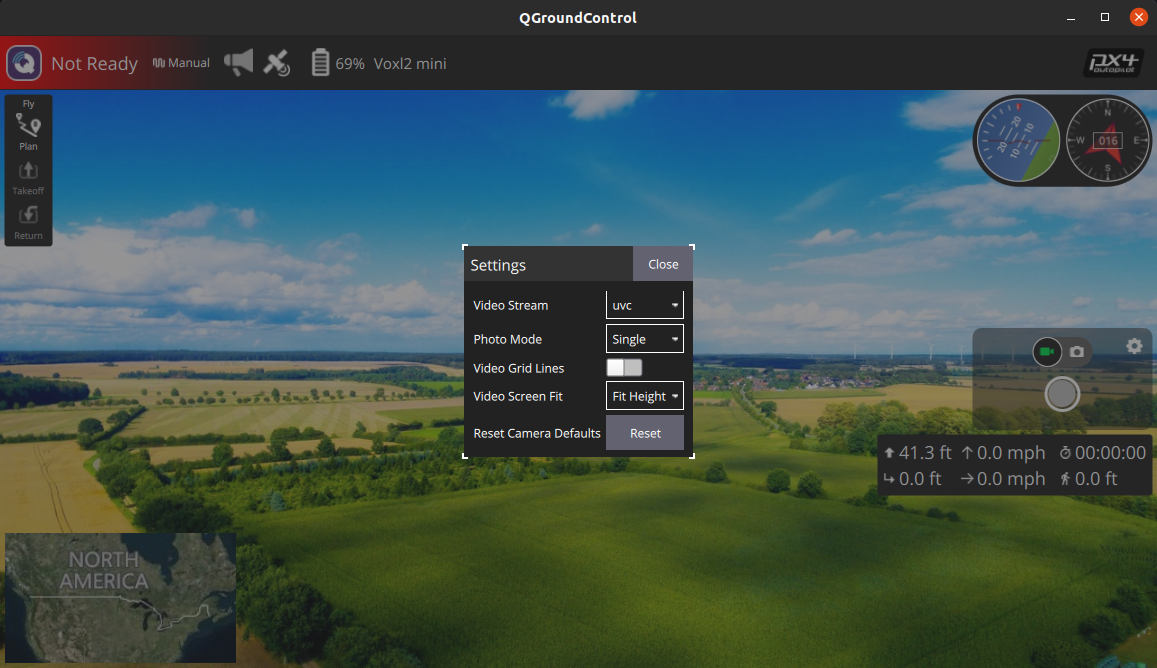
    I have a problem on my voxl2 mini with the mavcam manager seemingly not able to stream uvc video out to qGroundControl. My config for the mavcam manger looks like this:

    {
    	"mavcam_inputs":	[{
    			"snapshot_pipe_name":	"tracking",
    			"video_record_pipe_name":	"tracking",
    			"default_uri":	"rtsp://192.168.0.57:8900/live",
    			"enable_auto_ip":	false,
    			"mavlink_sys_id":	1
    		},
    		{
    			"snapshot_pipe_name":	"uvc",
    			"video_record_pipe_name":	"uvc",
    			"default_uri":	"rtsp://192.168.0.57:8901/live",
    			"enable_auto_ip":	false,
    			"mavlink_sys_id":	1
    		}]
    }
    

    uvc server config:

    {
    	"pipe_name":	"uvc",
    	"width":	1920,
    	"height":	1080,
    	"fps":	60
    }
    

    I make sure to start the uvc server before I start the mavcam server however when in qgc i see the following:94714705-6d1c-4b49-9e1f-2c511811c0c7-image.png c95a69b1-0a6e-4d3d-87ab-29b1ea349be1-image.png

    I also get these logs from voxl-mavcam-manager:

    Received msg: ID: 0 sys:255 comp:190
    Received msg: ID: 0 sys:255 comp:190
    Received msg: ID: 0 sys:255 comp:190
    Received msg: ID: 0 sys:255 comp:190
    Received msg: ID: 4 sys:255 comp:190
    Got a Ping Response
            time_usec: 4585422978, seq: 456, target_system: 1, target_component: 1
    Received msg: ID: 0 sys:255 comp:190
    Received msg: ID: 0 sys:255 comp:190
    Received msg: ID: 0 sys:255 comp:190
    Received msg: ID: 0 sys:255 comp:190
    Received msg: ID: 76 sys:255 comp:190
    Command long message at camera
    Got unknown command 512
    

    I am able to see both camera feeds in voxl portal and I am even able to stream both the uvc camera and the tracking camera using separate voxl-streamer instances and viewing it on my host pc using vlc but it doesnt seem to wok with the mavcam manager and qgc.

    Has anyone had a similar issue and/or know how to fix this?

    VOXL SDK

  • cannot get model conversion script to work
    Samuel LehmanS Samuel Lehman

    @aditya24 thanks for the reply, I retrained my model and converted it from a saved model to a tfite however using it in the tflite server gives me the following error

    INFO: Created TensorFlow Lite XNNPACK delegate for CPU.
    ERROR: Encountered unresolved custom op: TensorArrayV3.
    See instructions: https://www.tensorflow.org/lite/guide/ops_custom
    ERROR: Node number 3 (TensorArrayV3) failed to prepare.
    ERROR: Encountered unresolved custom op: TensorArrayV3.
    See instructions: https://www.tensorflow.org/lite/guide/ops_custom
    ERROR: Node number 3 (TensorArrayV3) failed to prepare.
    Failed to allocate tensors!
    

    This is probably due to how I trained it but I am no machine learning expert so I have very little clue as to how to fix it and most other guides on how to train a new model specifically for mobilenet v1 seems to be broken. If you have any resources on how to train mobilenet v1 ssd that work I would love to seem them.

    Software Development

  • cannot get model conversion script to work
    Samuel LehmanS Samuel Lehman

    Hello, I have been trying to get my model converted using the script on the deep learning page of the docs but have been unsuccessful in doing so. Here is the code I have been using:

    # IF ON VOXL 1, MAKE SURE TF VERSION IS <= 2.2.3
    # i.e., pip install tensorflow==2.2.3
    import tensorflow as tf
    
    # if you have a saved model and not a frozen graph, see: 
    # converter = tf.compat.v1.lite.TFLiteConverter.from_saved_model()
    
    tf.compat.v1.enable_control_flow_v2()
    
    # INPUT_ARRAYS, INPUT_SHAPES, and OUTPUT_ARRAYS may vary per model
    # please check these by opening up your frozen graph/saved model in a tool like netron
    converter =  tf.compat.v1.lite.TFLiteConverter.from_frozen_graph(
      graph_def_file = '/home/sam/Desktop/model_to_convert/frozen_inference_graph.pb', 
      input_arrays = ['image_tensor'],
      input_shapes={'image_tensor': [1,300,300,3]},
      output_arrays = ['detection_boxes','detection_scores','num_detections','detection_classes'] 
    )
    
    # IMPORTANT: FLAGS MUST BE SET BELOW #
    converter.use_experimental_new_converter = True
    converter.allow_custom_ops = True
    converter.target_spec.supported_types = [tf.float16]
    
    tflite_model = converter.convert()
    with tf.io.gfile.GFile('model_converted.tflite', 'wb') as f:
      f.write(tflite_model)
    

    The errors I receive are:

    2025-03-20 09:57:55.030795: I tensorflow/core/util/port.cc:153] oneDNN custom operations are on. You may see slightly different numerical results due to floating-point round-off errors from different computation orders. To turn them off, set the environment variable `TF_ENABLE_ONEDNN_OPTS=0`.
    2025-03-20 09:57:55.038034: E external/local_xla/xla/stream_executor/cuda/cuda_fft.cc:467] Unable to register cuFFT factory: Attempting to register factory for plugin cuFFT when one has already been registered
    WARNING: All log messages before absl::InitializeLog() is called are written to STDERR
    E0000 00:00:1742489875.046979   73285 cuda_dnn.cc:8579] Unable to register cuDNN factory: Attempting to register factory for plugin cuDNN when one has already been registered
    E0000 00:00:1742489875.049574   73285 cuda_blas.cc:1407] Unable to register cuBLAS factory: Attempting to register factory for plugin cuBLAS when one has already been registered
    W0000 00:00:1742489875.056635   73285 computation_placer.cc:177] computation placer already registered. Please check linkage and avoid linking the same target more than once.
    W0000 00:00:1742489875.056657   73285 computation_placer.cc:177] computation placer already registered. Please check linkage and avoid linking the same target more than once.
    W0000 00:00:1742489875.056658   73285 computation_placer.cc:177] computation placer already registered. Please check linkage and avoid linking the same target more than once.
    W0000 00:00:1742489875.056660   73285 computation_placer.cc:177] computation placer already registered. Please check linkage and avoid linking the same target more than once.
    2025-03-20 09:57:55.059151: I tensorflow/core/platform/cpu_feature_guard.cc:210] This TensorFlow binary is optimized to use available CPU instructions in performance-critical operations.
    To enable the following instructions: AVX2 AVX_VNNI FMA, in other operations, rebuild TensorFlow with the appropriate compiler flags.
    2025-03-20 09:57:56.025478: E external/local_xla/xla/stream_executor/cuda/cuda_platform.cc:51] failed call to cuInit: INTERNAL: CUDA error: Failed call to cuInit: UNKNOWN ERROR (303)
    WARNING: All log messages before absl::InitializeLog() is called are written to STDERR
    W0000 00:00:1742489876.400603   73285 tf_tfl_flatbuffer_helpers.cc:365] Ignored output_format.
    W0000 00:00:1742489876.400628   73285 tf_tfl_flatbuffer_helpers.cc:368] Ignored drop_control_dependency.
    Traceback (most recent call last):
      File "/home/sam/Desktop/model_to_convert/convert.py", line 24, in <module>
        tflite_model = converter.convert()
                       ^^^^^^^^^^^^^^^^^^^
      File "/home/sam/miniconda3/lib/python3.12/site-packages/tensorflow/lite/python/lite.py", line 3385, in convert
        return super(TFLiteConverter, self).convert()
               ^^^^^^^^^^^^^^^^^^^^^^^^^^^^^^^^^^^^^^
      File "/home/sam/miniconda3/lib/python3.12/site-packages/tensorflow/lite/python/lite.py", line 1250, in wrapper
        return self._convert_and_export_metrics(convert_func, *args, **kwargs)
               ^^^^^^^^^^^^^^^^^^^^^^^^^^^^^^^^^^^^^^^^^^^^^^^^^^^^^^^^^^^^^^^
      File "/home/sam/miniconda3/lib/python3.12/site-packages/tensorflow/lite/python/lite.py", line 1202, in _convert_and_export_metrics
        result = convert_func(self, *args, **kwargs)
                 ^^^^^^^^^^^^^^^^^^^^^^^^^^^^^^^^^^^
      File "/home/sam/miniconda3/lib/python3.12/site-packages/tensorflow/lite/python/lite.py", line 3009, in convert
        return super(TFLiteFrozenGraphConverter, self).convert()
               ^^^^^^^^^^^^^^^^^^^^^^^^^^^^^^^^^^^^^^^^^^^^^^^^^
      File "/home/sam/miniconda3/lib/python3.12/site-packages/tensorflow/lite/python/lite.py", line 2609, in convert
        result = _convert_graphdef(
                 ^^^^^^^^^^^^^^^^^^
      File "/home/sam/miniconda3/lib/python3.12/site-packages/tensorflow/lite/python/convert_phase.py", line 212, in wrapper
        raise converter_error from None  # Re-throws the exception.
        ^^^^^^^^^^^^^^^^^^^^^^^^^^^^^^^
      File "/home/sam/miniconda3/lib/python3.12/site-packages/tensorflow/lite/python/convert_phase.py", line 205, in wrapper
        return func(*args, **kwargs)
               ^^^^^^^^^^^^^^^^^^^^^
      File "/home/sam/miniconda3/lib/python3.12/site-packages/tensorflow/lite/python/convert.py", line 885, in convert_graphdef
        data = convert(
               ^^^^^^^^
      File "/home/sam/miniconda3/lib/python3.12/site-packages/tensorflow/lite/python/convert.py", line 350, in convert
        raise converter_error
    tensorflow.lite.python.convert_phase.ConverterError: Merge of two inputs that differ on more than one predicate {s(Postprocessor/BatchMultiClassNonMaxSuppression/map/while/PadOrClipBoxList/Greater:0,else), s(Postprocessor/BatchMultiClassNonMaxSuppression/map/while/PadOrClipBoxList/cond/cond/pred_id/_61__cf__64:0,then), s(Postprocessor/BatchMultiClassNonMaxSuppression/map/while/PadOrClipBoxList/cond/Greater/_60__cf__63:0,then)} and {s(Postprocessor/BatchMultiClassNonMaxSuppression/map/while/PadOrClipBoxList/Greater:0,else), s(Postprocessor/BatchMultiClassNonMaxSuppression/map/while/PadOrClipBoxList/cond/cond/pred_id/_61__cf__64:0,else), s(Postprocessor/BatchMultiClassNonMaxSuppression/map/while/PadOrClipBoxList/cond/Greater/_60__cf__63:0,else)}
            for node {{node Postprocessor/BatchMultiClassNonMaxSuppression/map/while/PadOrClipBoxList/cond/cond/Merge}}
            Failed to functionalize Control Flow V1 ops. Consider using Control Flow V2 ops instead. See https://www.tensorflow.org/api_docs/python/tf/compat/v1/enable_control_flow_v2.
    

    I am using tensorflow 2.19.0 and python version 3.12.4. My model is mobilenetv1 ssd that i trained on a custom dataset a couple of years ago.

    If for some reason it isnt possible, or if it would just be easier, if anyone knows of a good jupyter notebook for training a new mobilenetv1 ssd model on a custom data set, i would appreciate a link to it.

    Software Development

  • How to use UART in custom applications
    Samuel LehmanS Samuel Lehman

    @Alex-Kushleyev I have it included, heres my full main file:

    #include <stdio.h> // for fprintf
    #include <unistd.h>
    #include <getopt.h>
    #include <string.h>
    #include <modal_pipe.h>
    #include <voxl_cutils.h>
    #include <voxl_io.h>
    #include "hello_cross.h"
    
    #define CLIENT_NAME "hello-cross"
    
    static char en_newline = 0;
    static char imu_name[64];
    static int opt = 0;
    static int device = 1; // default. /dev/ttyHS1
    static int baud = 115200;
    
    void printHelloCross(void);
    
    // called whenever we disconnect from the server
    static void _disconnect_cb(__attribute__((unused)) int ch, __attribute__((unused)) void *context)
    {
        fprintf(stderr, "\r" CLEAR_LINE FONT_BLINK "server disconnected" RESET_FONT);
        return;
    }
    
    // called when the simple helper has data for us
    static void _helper_cb(__attribute__((unused)) int ch, char *data, int bytes, __attribute__((unused)) void *context)
    {
    
        const uint8_t MIN_WRITE_LEN = 32;
        uint8_t write_buf[MIN_WRITE_LEN];
    
        // validate that the data makes sense
        int n_packets;
        imu_data_t *data_array = pipe_validate_imu_data_t(data, bytes, &n_packets);
        if (data_array == NULL)
            return;
    
        // print everything in one go.
        if (!en_newline)
            printf("\r" CLEAR_LINE);
        printf("%7.2f|%7.2f|%7.2f|%7.2f|%7.2f|%7.2f",
               (double)data_array[n_packets - 1].accl_ms2[0],
               (double)data_array[n_packets - 1].accl_ms2[1],
               (double)data_array[n_packets - 1].accl_ms2[2],
               (double)data_array[n_packets - 1].gyro_rad[0],
               (double)data_array[n_packets - 1].gyro_rad[1],
               (double)data_array[n_packets - 1].gyro_rad[2]);
    
        if (en_newline)
            printf("\n");
    
        int write_res = voxl_uart_write(device, write_buf, MIN_WRITE_LEN);
        if (write_res < 0)
        {
            //ERROR("Failed to write to UART");
            return;
        }
    
        fflush(stdout);
        return;
    }
    
    int main(int argc, char *const argv[])
    {
    
        enable_signal_handler();
        main_running = 1;
    
        int uart_res = voxl_uart_init(device, baud, 1.0, 0, 1, 0);
        if (uart_res < 0)
        {
            //ERROR("Failed to open port");
            return 1;
        }
    
        pipe_client_set_simple_helper_cb(0, _helper_cb, NULL);
        pipe_client_set_disconnect_cb(0, _disconnect_cb, NULL);
    
        int pipe_open_res = pipe_client_open(0, imu_name, CLIENT_NAME,
                                             EN_PIPE_CLIENT_SIMPLE_HELPER,
                                             IMU_RECOMMENDED_READ_BUF_SIZE);
    
        if (pipe_open_res < 0)
        {
            pipe_print_error(pipe_open_res);
            printf(ENABLE_WRAP);
            return -1;
        }
    
        // keep going until the  signal handler sets the running flag to 0
        while (main_running)
            usleep(500000);
    
        // all done, signal pipe read threads to stop
        printf("\nclosing and exiting\n" RESET_FONT ENABLE_WRAP);
        pipe_client_close_all();
    
        int ret = voxl_uart_close(device);
        if (ret < 0)
        {
            //ERROR("Failed to close UART device");
            return 1;
        }
    }
    
    void printHelloCross()
    {
        printf("   Imu Acceleration and Gyro\n");
        printf("   X   |   Y   |   Z   |  X   |   Y   |   Z\n");
    }
    
    Software Development

  • How to use UART in custom applications
    Samuel LehmanS Samuel Lehman

    @Alex-Kushleyev after adding $(VOXL_IO) i get:

    -- Build files have been written to: /home/root/build
    [ 50%] Building C object src/CMakeFiles/hello-cross.dir/main.c.o
    /home/root/src/main.c: In function '_helper_cb':
    /home/root/src/main.c:88:21: warning: implicit declaration of function 'voxl_uart_write'; did you mean 'voxl_spi_write'? [-Wimplicit-function-declaration]
         int write_res = voxl_uart_write(device, write_buf, MIN_WRITE_LEN);
                         ^~~~~~~~~~~~~~~
                         voxl_spi_write
    /home/root/src/main.c: In function 'main':
    /home/root/src/main.c:105:20: warning: implicit declaration of function 'voxl_uart_init'; did you mean 'voxl_i2c_init'? [-Wimplicit-function-declaration]
         int uart_res = voxl_uart_init(device, baud, 1.0, 0, 1, 0);
                        ^~~~~~~~~~~~~~
                        voxl_i2c_init
    /home/root/src/main.c:134:15: warning: implicit declaration of function 'voxl_uart_close'; did you mean 'voxl_i2c_close'? [-Wimplicit-function-declaration]
         int ret = voxl_uart_close(device);
                   ^~~~~~~~~~~~~~~
                   voxl_i2c_close
    [100%] Linking C executable hello-cross
    CMakeFiles/hello-cross.dir/main.c.o: In function `_helper_cb':
    main.c:(.text+0xb8): undefined reference to `voxl_uart_write'
    CMakeFiles/hello-cross.dir/main.c.o: In function `main':
    main.c:(.text.startup+0x44): undefined reference to `voxl_uart_init'
    main.c:(.text.startup+0xd0): undefined reference to `voxl_uart_close'
    collect2: error: ld returned 1 exit status
    src/CMakeFiles/hello-cross.dir/build.make:100: recipe for target 'src/hello-cross' failed
    make[2]: *** [src/hello-cross] Error 1
    CMakeFiles/Makefile2:97: recipe for target 'src/CMakeFiles/hello-cross.dir/all' failed
    make[1]: *** [src/CMakeFiles/hello-cross.dir/all] Error 2
    Makefile:135: recipe for target 'all' failed
    make: *** [all] Error 2
    Package Name:  voxl-cross-template
    version Number:  0.0.1
    Consolidate compiler generated dependencies of target hello-cross
    [ 50%] Linking C executable hello-cross
    CMakeFiles/hello-cross.dir/main.c.o: In function `_helper_cb':
    main.c:(.text+0xb8): undefined reference to `voxl_uart_write'
    CMakeFiles/hello-cross.dir/main.c.o: In function `main':
    main.c:(.text.startup+0x44): undefined reference to `voxl_uart_init'
    main.c:(.text.startup+0xd0): undefined reference to `voxl_uart_close'
    collect2: error: ld returned 1 exit status
    src/CMakeFiles/hello-cross.dir/build.make:100: recipe for target 'src/hello-cross' failed
    make[2]: *** [src/hello-cross] Error 1
    
    Software Development

  • How to use UART in custom applications
    Samuel LehmanS Samuel Lehman

    @Alex-Kushleyev thank you for your response, however I am still unable to build the project. I have libqrb5165-io added to my install_build_deps.sh and I do have the voxl_io header included in my main file. Maybe I am placing the cmake line in the wrong spot or in the wrong cmake file altogether as I have two of them. Here are the cmake files in my src folder and root folder respectively:

    // ./src/CMakeLists.txt
    
    cmake_minimum_required(VERSION 3.3)
    
    SET(TARGET hello-cross)
    
    # Build from all source files
    file(GLOB all_src_files *.c*)
    
    add_executable(${TARGET}
    	${all_src_files}
    )
    
    
    include_directories(
        ../include
    )
    
    find_library(MODAL_JSON  modal_json  HINTS /usr/lib /usr/lib64)
    find_library(MODAL_PIPE  modal_pipe  HINTS /usr/lib /usr/lib64)
    find_library(VOXL_CUTILS voxl_cutils HINTS /usr/lib /usr/lib64)
    find_library(VOXL_IO libvoxl_io HINTS /usr/lib /usr/lib64)
    
    target_link_libraries(
        ${TARGET}
        pthread
        ${MODAL_JSON}
        ${MODAL_PIPE}
        ${VOXL_CUTILS}
        ${app_name} LINK_PUBLIC voxl-io
    )
    
    # make sure everything is installed where we want
    # LIB_INSTALL_DIR comes from the parent cmake file
    install(
        TARGETS			${TARGET}
    	LIBRARY			DESTINATION ${LIB_INSTALL_DIR}
    	RUNTIME			DESTINATION /usr/bin
    	PUBLIC_HEADER	DESTINATION /usr/include
    )
    
    // ./CMakeLists.txt
    
    cmake_minimum_required(VERSION 3.3)
    
    project(voxl-hello-cross C)
    
    include_directories(
    	"include/"
    )
    
    
    # Strawson's list of standard list of default gcc flags. Yes, I treat
    # warnings as errors. Warnings exist to point out sloppy code and potential
    # failure points for good reason. We do not approve of sloppy code.
    # set(CMAKE_C_FLAGS "-std=gnu99 -Werror -Wall -Wextra -Wuninitialized \
    # 	-Wunused-variable -Wdouble-promotion -Wmissing-prototypes \
    # 	-Wmissing-declarations -Werror=undef -Wno-unused-function ${CMAKE_C_FLAGS}")
    set(CMAKE_C_FLAGS "-std=gnu99 -Wuninitialized \
    	-Wdouble-promotion -Wmissing-prototypes \
    	-Wmissing-declarations -Werror=undef ${CMAKE_C_FLAGS}")
    
    
    # for VOXL, install 64-bit libraries to lib64, 32-bit libs go in /usr/lib
    if(CMAKE_SYSTEM_PROCESSOR MATCHES "^aarch64")
    	set(LIB_INSTALL_DIR /usr/lib64)
    else()
    	set(LIB_INSTALL_DIR /usr/lib)
    endif()
    
    # include each subdirectory, may have others in example/ or lib/ etc
    add_subdirectory (src)
    

    here is the output when I run the install and build scripts:

    using qrb5165 sdk-1.0 debian repo
    Ign:1 http://voxl-packages.modalai.com ./dists/qrb5165/sdk-1.0/binary-arm64/ InRelease
    Ign:2 http://voxl-packages.modalai.com ./dists/qrb5165/sdk-1.0/binary-arm64/ Release
    Get:3 http://voxl-packages.modalai.com ./dists/qrb5165/sdk-1.0/binary-arm64/ Packages [23.2 kB]
    Fetched 23.2 kB in 0s (61.3 kB/s)
    Reading package lists... Done
    installing: 
    libmodal-json
    libmodal-pipe
    libvoxl-cutils
    libqrb5165-io
    
    Reading package lists... Done
    Building dependency tree       
    Reading state information... Done
    libmodal-json:arm64 is already the newest version (0.4.3).
    libvoxl-cutils:arm64 is already the newest version (0.1.1).
    libqrb5165-io:arm64 is already the newest version (0.4.7).
    libmodal-pipe:arm64 is already the newest version (2.10.4).
    0 upgraded, 0 newly installed, 0 to remove and 1 not upgraded.
    
    Done installing dependencies
    
    -- The C compiler identification is GNU 7.5.0
    -- Detecting C compiler ABI info
    -- Detecting C compiler ABI info - done
    -- Check for working C compiler: /usr/bin/aarch64-linux-gnu-gcc-7 - skipped
    -- Detecting C compile features
    -- Detecting C compile features - done
    CMake Error at src/CMakeLists.txt:22 (target_link_libraries):
      The LINK_PUBLIC or LINK_PRIVATE option must appear as the second argument,
      just after the target name.
    

    Im new to cmake so I have no idea what I am doing.

    Software Development

  • How to use UART in custom applications
    Samuel LehmanS Samuel Lehman

    I am currently trying to make a simple application that gets imu data and sends it out through uart. I am using the voxl-cross-template project as a base for this application. I have tried using some of the code in the libqrb5165-io project to get the uart to work however I have been unable to compile it. I believe it might be an issue with my cmake files.

    [ 50%] Linking C executable hello-cross
    CMakeFiles/hello-cross.dir/main.c.o: In function `_helper_cb':
    main.c:(.text+0xb8): undefined reference to `voxl_uart_write'
    main.c:(.text+0xfc): undefined reference to `ERROR'
    CMakeFiles/hello-cross.dir/main.c.o: In function `main':
    main.c:(.text.startup+0x3c): undefined reference to `voxl_uart_init'
    main.c:(.text.startup+0xcc): undefined reference to `voxl_uart_close'
    main.c:(.text.startup+0xec): undefined reference to `ERROR'
    main.c:(.text.startup+0x100): undefined reference to `ERROR'
    collect2: error: ld returned 1 exit status
    src/CMakeFiles/hello-cross.dir/build.make:99: recipe for target 'src/hello-cross' failed
    make[2]: *** [src/hello-cross] Error 1
    CMakeFiles/Makefile2:97: recipe for target 'src/CMakeFiles/hello-cross.dir/all' failed
    make[1]: *** [src/CMakeFiles/hello-cross.dir/all] Error 2
    Makefile:135: recipe for target 'all' failed
    make: *** [all] Error 2
    starting building Debian Package
    mkdir: cannot create directory 'pkg/DEB': No such file or directory


    Is there a better way to send data out through uart? Is there an example of something similar to what I'm trying to do out there that I can look at?

    Here is my current main function and helper_cb for reference:

    int main(int argc, char *const argv[])
    {
    
        enable_signal_handler();
        main_running = 1;
    
        int uart_res = voxl_uart_init(device, baud, 1.0, 0, 1, 0);
        if (uart_res < 0)
        {
            ERROR("Failed to open port");
            resurn 1;
        }
    
        pipe_client_set_simple_helper_cb(0, _helper_cb, NULL);
        pipe_client_set_disconnect_cb(0, _disconnect_cb, NULL);
    
        int pipe_open_res = pipe_client_open(0, imu_name, CLIENT_NAME,
                                             EN_PIPE_CLIENT_SIMPLE_HELPER,
                                             IMU_RECOMMENDED_READ_BUF_SIZE);
    
        if (pipe_open_res < 0)
        {
            pipe_print_error(pipe_open_res);
            printf(ENABLE_WRAP);
            return -1;
        }
    
        // keep going until the  signal handler sets the running flag to 0
        while (main_running)
            usleep(500000);
    
        // all done, signal pipe read threads to stop
        printf("\nclosing and exiting\n" RESET_FONT ENABLE_WRAP);
        pipe_client_close_all();
    
        int ret = voxl_uart_close(device);
        if (ret < 0)
        {
            ERROR("Failed to close UART device");
            return 1;
        }
    }
    static void _helper_cb(__attribute__((unused)) int ch, char *data, int bytes, __attribute__((unused)) void *context)
    {
    
        const uint8_t MIN_WRITE_LEN = 32;
        uint8_t write_buf[MIN_WRITE_LEN];
    
        // validate that the data makes sense
        int n_packets;
        imu_data_t *data_array = pipe_validate_imu_data_t(data, bytes, &n_packets);
        if (data_array == NULL)
            return;
    
        // print everything in one go.
        if (!en_newline)
            printf("\r" CLEAR_LINE);
        printf("%7.2f|%7.2f|%7.2f|%7.2f|%7.2f|%7.2f",
               (double)data_array[n_packets - 1].accl_ms2[0],
               (double)data_array[n_packets - 1].accl_ms2[1],
               (double)data_array[n_packets - 1].accl_ms2[2],
               (double)data_array[n_packets - 1].gyro_rad[0],
               (double)data_array[n_packets - 1].gyro_rad[1],
               (double)data_array[n_packets - 1].gyro_rad[2]);
    
        if (en_newline)
            printf("\n");
    
        int write_res = voxl_uart_write(device, write_buf, MIN_WRITE_LEN);
        if (write_res < 0)
        {
            ERROR("Failed to write to UART");
            return;
        }
    
        fflush(stdout);
        return;
    }
    
    Software Development

  • Running inference on a gstream with tflite
    Samuel LehmanS Samuel Lehman

    Hello, I was wondering if any one knows a way to pipe a video stream from gstream into the tflite server so I can run inference on it. I am currently running the commands:

    gst-launch-1.0 v4l2src device=/dev/video2 ! "video/x-raw, width=1920,height=1080" ! videoconvert ! video/x-raw,format=YUY2 ! videoconvert ! x264enc ! rtph264pay ! udpsink host=192.168.0.149 port=8554


    on the voxl2 and

    gst-launch-1.0 udpsrc port=8554 ! "application/x-rtp, payload=127" ! rtph264depay ! avdec_h264 ! videoconvert ! xvimagesink
    

    on my host machine which gives me a video stream.

    Ideally I would just use the uvc server but I dont believe the uvc server supports the camera I am using. Is there a way to make a pipe out of the stream to then be the source for the tflite server? Or preferably a way to get it working with the uvc server?

    For reference I am using a Sony FCB-ER8530/J 20x 4K CMOS Block Camera. Running voxl-uvc-server -l gives me

    Got device descriptor for 04b4:00f9 USB3Neo 07780
    
    Found device 04b4:00f9
    
    DEVICE CONFIGURATION (04b4:00f9/USB3Neo 07780) ---
    Status: idle
    VideoControl:
    	bcdUVC: 0x0110
    VideoStreaming(1):
    	bEndpointAddress: 131
    	Formats:
    	UncompressedFormat(1)
    		  bits per pixel: 12
    		  GUID: 4934323000001000800000aa00389b71 (I420)
    		  default frame: 1
    		  aspect ratio: 16x9
    		  interlace flags: 00
    		  copy protect: 00
    			FrameDescriptor(1)
    			  capabilities: 00
    			  size: 1920x1080
    			  bit rate: -446365696--446365696
    			  max frame size: 16588800
    			  default interval: 1/29
    			  interval[0]: 1/29
    			  interval[1]: 1/14
    			  interval[2]: 1/7
    			  interval[3]: 1/3
    			  interval[4]: 1/1
    			FrameDescriptor(2)
    			  capabilities: 00
    			  size: 3840x2160
    			  bit rate: 962150400-962150400
    			  max frame size: 4147200
    			  default interval: 1/29
    			  interval[0]: 1/29
    			  interval[1]: 1/14
    			  interval[2]: 1/7
    			  interval[3]: 1/3
    			  interval[4]: 1/1
    
    
    Software Development

  • gstreamer uyvy camera stream not working on voxl2
    Samuel LehmanS Samuel Lehman

    @cegeyer when streaming from the host to the voxl using the command you suggested I get

    voxl2:~$ gst-launch-1.0 udpsrc port=8554 num-buffers=1 ! fakesink dump=true
    Setting pipeline to PAUSED ...
    Pipeline is live and does not need PREROLL ...
    Setting pipeline to PLAYING ...
    New clock: GstSystemClock
    00000000 (0x7fa0004e80): 80 60 6f 28 47 41 41 80 bc 30 17 35 09 30        .`o(GAA..0.5.0  
    Got EOS from element "pipeline0".
    Execution ended after 0:00:00.034007066
    Setting pipeline to PAUSED ...
    Setting pipeline to READY ...
    Setting pipeline to NULL ...
    Freeing pipeline ...
    

    I assume this means I am able to get data into the voxl. When running the second command I get this

    voxl2:~$ gst-launch-1.0  udpsrc port=8554 caps = "application/x-rtp, media=(string)video, clock-rate=(int)90000, encoding-name=(string)H264, payload=(int)96" ! rtph264depay ! h264parse ! omxh264dec ! videoconvert ! autovideosink sync=false
    Setting pipeline to PAUSED ...
    gbm_create_device(156): Info: backend name is: msm_drm
    Pipeline is live and does not need PREROLL ...
    WARNING: from element /GstPipeline:pipeline0/GstAutoVideoSink:autovideosink0: Could not initialise Xv output
    Additional debug info:
    xvimagesink.c(1773): gst_xv_image_sink_open (): /GstXvImageSink:autovideosink0-actual-sink-xvimage:
    Could not open display (null)
    Setting pipeline to PLAYING ...
    New clock: GstSystemClock
    gbm_create_device(156): Info: backend name is: msm_drm
    gbm_create_device(156): Info: backend name is: msm_drm
    gbm_create_device(156): Info: backend name is: msm_drm
    gbm_create_device(156): Info: backend name is: msm_drm
    gbm_create_device(156): Info: backend name is: msm_drm
    gbm_create_device(156): Info: backend name is: msm_drm
    gbm_create_device(156): Info: backend name is: msm_drm
    gbm_create_device(156): Info: backend name is: msm_drm
    gbm_create_device(156): Info: backend name is: msm_drm
    gbm_create_device(156): Info: backend name is: msm_drm
    gbm_create_device(156): Info: backend name is: msm_drm
    gbm_create_device(156): Info: backend name is: msm_drm
    gbm_create_device(156): Info: backend name is: msm_drm
    gbm_create_device(156): Info: backend name is: msm_drm
    gbm_create_device(156): Info: backend name is: msm_drm
    gbm_create_device(156): Info: backend name is: msm_drm
    gbm_create_device(156): Info: backend name is: msm_drm
    gbm_create_device(156): Info: backend name is: msm_drm
    gbm_create_device(156): Info: backend name is: msm_drm
    gbm_create_device(156): Info: backend name is: msm_drm
    gbm_create_device(156): Info: backend name is: msm_drm
    gbm_create_device(156): Info: backend name is: msm_drm
    gbm_create_device(156): Info: backend name is: msm_drm
    gbm_create_device(156): Info: backend name is: msm_drm
    ERROR: from element /GstPipeline:pipeline0/GstOMXH264Dec-omxh264dec:omxh264dec-omxh264dec0: GStreamer encountered a general supporting library error.
    Additional debug info:
    ../../gst-omx-1.14.4/omx/gstomxvideodec.c(1819): gst_omx_video_dec_loop (): /GstPipeline:pipeline0/GstOMXH264Dec-omxh264dec:omxh264dec-omxh264dec0:
    OpenMAX component in error state Hardware (0x80001009)
    Execution ended after 0:00:07.897981343
    Setting pipeline to PAUSED ...
    Setting pipeline to READY ...
    Setting pipeline to NULL ...
    Freeing pipeline ...
    
    
    Software Development

  • gstreamer uyvy camera stream not working on voxl2
    Samuel LehmanS Samuel Lehman

    Hello, I have been trying to use gstreamer to stream video from a usb camera that outputs uyvy but I have been unsuccessful. I am connected to the same network as the voxl2 and I am interacting with it through ssh. Running the following command

    gst-launch-1.0 v4l2src device=/dev/video2 ! video/x-raw,format=UYVY ! videoconvert ! x264enc ! rtph264pay name=pay0 ! udpsink host=192.168.0.149 port=8554


    on the voxl2 and

    gst-launch-1.0  udpsrc port=8554 caps = "application/x-rtp, media=(string)video, clock-rate=(int)90000, encoding-name=(string)H264, payload=(int)96" ! rtph264depay ! decodebin ! videoconvert  ! autovideosink
    

    on my host machine results in the gstreamer on the voxl2 doing nothing and then eventually crashing.

    $ gst-launch-1.0 v4l2src device=/dev/video2 ! video/x-raw,format=UYVY ! videoconvert ! x264enc ! rtph264pay name=pay0 ! udpsink host=192.168.0.149 port=8554
    Setting pipeline to PAUSED ...
    Pipeline is live and does not need PREROLL ...
    Setting pipeline to PLAYING ...
    New clock: GstSystemClock
    Redistribute latency...
    # it waits here for some time
    ERROR: from element /GstPipeline:pipeline0/GstV4l2Src:v4l2src0: Could not read from resource.
    Additional debug info:
    gstv4l2bufferpool.c(1040): gst_v4l2_buffer_pool_poll (): /GstPipeline:pipeline0/GstV4l2Src:v4l2src0:
    poll error 1: Invalid argument (22)
    Execution ended after 0:08:31.639262049
    Setting pipeline to PAUSED ...
    Setting pipeline to READY ...
    Setting pipeline to NULL ...
    Freeing pipeline ...
    

    However when I run the same commands on my host machine it works. Does anyone know of a way to get this working?

    Software Development

  • Video out
    Samuel LehmanS Samuel Lehman

    @Alex-Kushleyev I see, that's unfortunate but thanks for letting me know.

    Software Development

  • Video out
    Samuel LehmanS Samuel Lehman

    Hello, I was wondering if there was anyway to get video out from the voxl2 and/or the voxl2 mini. According the docs on your website, I see that J9 on the voxl2 supports display port alternate mode; I was wondering if I can somehow connect a usb to displayport cable and get video from it to display on a local monitor. I know I can stream video over wifi/ethernet, but for my project I want to get video locally.

    Software Development
  • Login

  • Login or register to search.
  • First post
    Last post
0
  • Categories
  • Recent
  • Tags
  • Popular
  • Users
  • Groups