
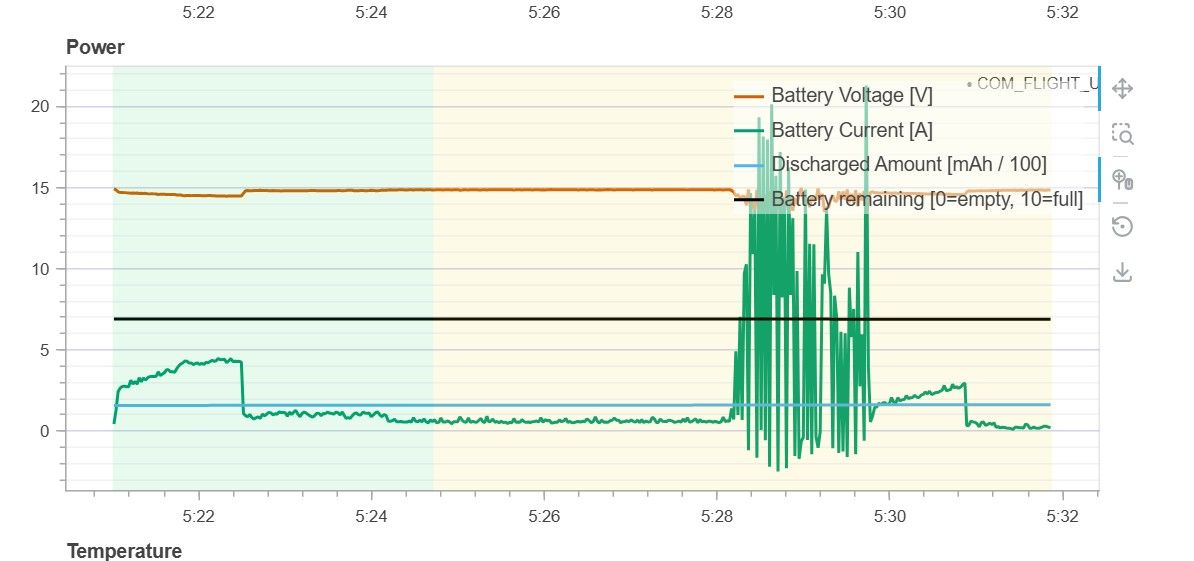
Thanks for the quick response. The stack does subscribe to PX4 dds on start up as well as one of the cameras. There should be no commands to PX4 until we set offboard flight mode. It's not pegging CPU usage, at least not when I've run it on the bench. The vehicle did seem to lose thrust, likely from the duty cycling I'm seeing in the logs. I'll see what I can find in our ROS bags, but here is the flight log:
https://review.px4.io/plot_app?log=7134a7a7-de47-4827-8dad-5bcc7e39bd97
 R
R
rozner88
@rozner88
Posts
-
Starling 2 Max - Power issues when starting process -
Starling 2 Max - Power issues when starting processHardware: (board / drone / SKU, serial # if you have it)
Starling 2 MaxSoftware version: (paste the output of
voxl-version)
system-image: 1.8.06-M0054-14.1a-perf
kernel: #1 SMP PREEMPT Wed Oct 22 04:29:38 UTC 2025 4.19.125
────────────────────────────────────────────────────────────────────────────────
hw platform: M0054
mach.var: 1.2.1
SKU: MRB-D0012-4-V3-C28-T8-M11-X0
────────────────────────────────────────────────────────────────────────────────
voxl-suite: 1.6.4~alpha2
────────────────────────────────────────────────────────────────────────────────
Packages:
Repo: http://voxl-packages.modalai.com/ ./dists/qrb5165/sdk-1.6/binary-arm64/
Last Updated: 2026-09-10 19:58:25
List:
libfc-sensor 1.0.11
libmodal-cv 0.6.1
libmodal-exposure 0.1.5
libmodal-flow 1.0.4
libmodal-journal 0.2.7
libmodal-json 0.4.8
libmodal-pipe 2.14.12
libqrb5165-io 0.6.3
libvoxl-cci-direct 0.4.0
libvoxl-codec 0.0.4
libvoxl-cutils 0.1.6
modalai-slpi 1.2.2
mv-voxl 0.1-r0
qrb5165-bind 0.1-r0
qrb5165-dfs-server 0.2.0
qrb5165-mini-tof-server 0.2.2
qrb5165-rangefinder-server 0.1.6
qrb5165-slpi-test-sig 01-r0
qrb5165-tflite 2.17.2
voxl-camera-calibration 0.6.2
voxl-camera-server 2.2.23
voxl-ceres-solver 2:2.0.0-2
voxl-configurator 1.1.14
voxl-cpu-monitor 0.7.7
voxl-docker-support 1.3.1
voxl-elrs 1.1.5
voxl-esc 1.6.2
voxl-esptool 0.2.1
voxl-feature-tracker 0.5.2
voxl-flow-server 0.3.6
voxl-focus-camera 0.6.1
voxl-gphoto2-server 0.0.10
voxl-imu-server 2.0.2
voxl-io-server 0.1.1
voxl-jpeg-turbo 2.1.3-7
voxl-lepton-server 1.4.0
voxl-lepton-tracker 0.0.4
voxl-libgeographic 1.0.0
voxl-libgphoto2 0.0.4
voxl-libuvc 1.0.7
voxl-logger 0.6.2
voxl-mavcam-manager 0.6.1
voxl-mavlink 0.1.6
voxl-mavlink-server 1.4.16
voxl-microdds-agent 3.0.0-0
voxl-modem 1.2.4
voxl-mongoose 7.19.0-1
voxl-mpa-to-ros 0.3.9
voxl-mpa-to-ros2 0.0.7
voxl-mpa-tools 1.5.7
voxl-nano-tracker 0.1.7
voxl-open-vins-server 0.6.1
voxl-opencv 4.5.5-3
voxl-osd 0.4.3
voxl-portal 0.9.2
voxl-px4 1.14.0-2.0.138
voxl-px4-params 0.9.5
voxl-qvio-server 1.2.3
voxl-remote-id 0.0.9
voxl-reset-slpi 0.0.3
voxl-ros2-foxy 0.0.1
voxl-state-estimator 0.0.6
voxl-streamer 0.8.1
voxl-suite 1.6.4~alpha2
voxl-tag-detector 0.1.0
voxl-tflite-server 0.5.1
voxl-utils 2.0.3
voxl-uvc-server 0.1.7
voxl-vision-hub 1.9.21
voxl-vtx 2.2.7
voxl-wavemux 0.0.3
voxl2-io 0.0.3
voxl2-security-hardening-utls 1.0-r0
voxl2-system-image 1.8.06-r0
voxl2-wlan 1.0-r0Configuration / services: (paste the output of
voxl-inspect-services)
Service Name | Enabled | Running | CPU Usage
───────────────────────────────────────────────────────────────────
docker-autorun | Disabled | Not Running |
docker.d | Disabled | Not Running |
modallink-relink | Disabled | Not Running |
voxl-camera-server | Enabled | Running | 82.1%
voxl-cpu-monitor | Enabled | Running | 0.0%
voxl-dfs-server | Disabled | Not Running |
voxl-dma-latency | Enabled | Running |
voxl-feature-tracker | Disabled | Not Running |
voxl-flow-server | Disabled | Not Running |
voxl-imu-server | Enabled | Running | 1.8%
voxl-io-server | Disabled | Not Running |
voxl-lepton-server | Disabled | Not Running |
voxl-lepton-tracker | Disabled | Not Running |
voxl-logger | Disabled | Not Running |
voxl-mavcam-manager | Enabled | Running | 0.0%
voxl-mavlink-server | Enabled | Running | 1.8%
voxl-microdds-agent | Disabled | Not Running |
voxl-mini-tof-server | Disabled | Not Running |
voxl-modem-doodle | Disabled | Not Running |
voxl-modem | Enabled | Not Running |
voxl-nano-tracker | Disabled | Not Running |
voxl-open-vins-server | Disabled | Not Running |
voxl-osd | Disabled | Not Running |
voxl-portal | Disabled | Not Running |
voxl-px4 | Enabled | Running | 28.6%
voxl-qvio-server | Disabled | Not Running |
voxl-rangefinder-server | Disabled | Not Running |
voxl-remote-id | Disabled | Not Running |
voxl-softap | Disabled | Not Running |
voxl-state-estimator | Disabled | Not Running |
voxl-static-ip-watcher | Disabled | Not Running |
voxl-static-ip | Disabled | Not Running |
voxl-streamer | Disabled | Not Running |
voxl-tag-detector | Disabled | Not Running |
voxl-tflite-server | Disabled | Not Running |
voxl-time-sync | Disabled | Not Running |
voxl-uvc-server | Disabled | Not Running |
voxl-vision-hub | Enabled | Running | 1.8%
voxl-vrx | Disabled | Not Running |
voxl-vtx | Disabled | Not Running |
voxl-wait-for-fs | Enabled | Completed |What I am trying to do:
Starting a modestly heavy autonomy service in flight/before flightWhat actually happens: (error messages, behavior)
When starting our autonomy software the vehicle starts to chatter and have poor throttle control. The processes are modest on CPU usage, but not maxing out CPU cores.I pulled a flight log where I take off and hover a couple feet off the ground, then start the autonomy stack and see the vehicle control degrade. I stay in altitude control mode, not offboard, so nothing from the stack should be sending any commands that the vehicle would listen to. I noticed in the flight log there are drops to zero throttle and a massive increase in current draw.
Flight logs show drops in mavlink data at the same time
Could this be PX4 being throttled because of CPU usage? I thought PX4 ran on DSP, but I'm seeing a relatively high PX4 CPU allocation.
Logs / pictures: (attach files; PX4 logs -> https://logs.px4.io)


-
Starling 2 - Mag Alignment@Eric-Katzfey CAL_MAG0_ROT yaw 90 worked. Why isn't that the default parameter on the starling? Are some of the GPS/mag boards different?
-
Starling 2 - Mag AlignmentEvery time I restart px4 on the Starling v2, my heading is off by 90 degrees. To troubleshoot, I turned off External Vision in PX4 parameters, and use mag for heading. This did not fix the heading issue. I can manually fly in Position control without any "toilet bowling" or control issues, but during Auto Missions the vehicle initially doesn't fly as expected. I planned a Mission with a takeoff, two waypoints, and landing. On takeoff and initial transit to the first waypoint the vehicle drifts around a lot. I see resetQuatStateYaw warnings in flight and then it starts to fly better. In flight the heading adjusts to point the correct direction. I've tried doing mag calibrations, and that didn't help. After rebooting PX4, the heading starts off by 90 degrees again.
Here is an example log
https://review.px4.io/plot_app?log=2a1c9b0e-6b82-456e-8808-fe8a18a9dde8Is Mag0 ROT = 0 correct? Should it be rotated 90? I know there are documented GPS issues, and the Mag/GPS are mounted together. Is this a related issue?