Skip to content
  • Categories
  • Recent
  • Tags
  • Popular
  • Users
  • Groups
Collapse
Brand Logo

ModalAI Forum

Jeremy FrederickJ

Jeremy Frederick

@Jeremy Frederick
Regular
Unfollow Follow
About
Posts
61
Topics
24
Shares
0
Groups
1
Followers
1
Following
0

Posts

Recent Best Controversial

  • open-vins mask file location
    Jeremy FrederickJ Jeremy Frederick

    Hello,

    In the QVIO service, the config file has a line item for path to mask to use for QVIO. On the new, open-vins service, the config file has a line item for enabling the use of a mask, but does not have a line for specifying the path to the mask. Where do we identify the path to the mask file used, or otherwise where should the file be positioned. We will be using two masks for two separate tracking cameras.

    Ask your questions right here!

  • Fact Checking my Understanding of the Extrinsic Configuration
    Jeremy FrederickJ Jeremy Frederick

    Hello,

    Setup: VOXL 2, SDK 1.4.1, Open-VINs Dual-ARR0144 Cameras

    One of my setups will require the VOXL 2 to be mounted upside down, with the MIPI connectors for the cameras facing upwards. I've been preparing the extrinsic file for the setup and wanted confirmation on my understanding of how to properly configure the upside down configuration.

    My understanding is such: You must configure PX4 to know the flight controller is upside down, simple enough, with this done, I then go into the extrinsic file and begin setting the rotation and positions offsets.

    My question is this: For the "parent": "body",
    "child": "imu1",

    do you set a rotational value of 180 degrees to let the system know the imu is upside down? Then, do you set the camera rotational values to also include the rotation in the board.

    For example, the default extrinsic for a forward facing camera and right side up VOXL 2 are:
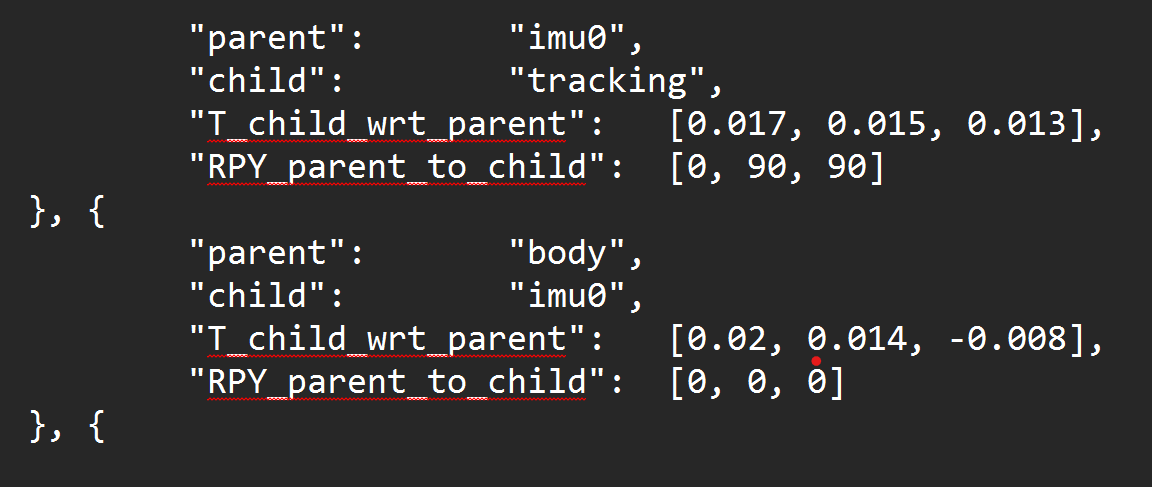
    a7e011ee-0b71-4318-92ee-7b055f328eac-image.png

    If the VOXL 2 were upside down, would the extrinsics be:
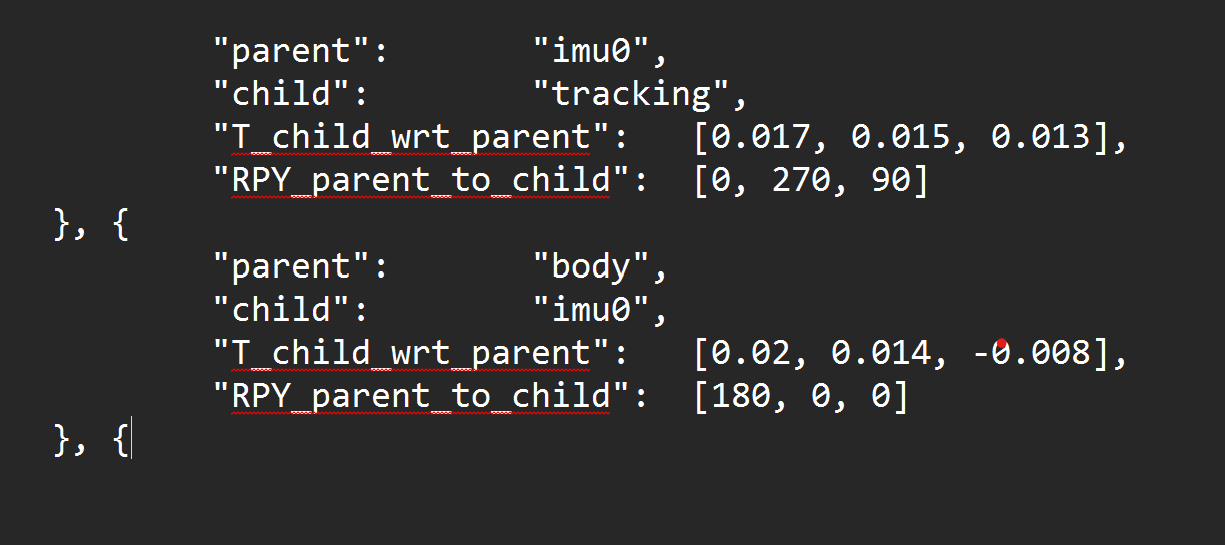
    644b3f8c-5c5b-4e98-8629-3f21f2ce5c31-image.png

    Ask your questions right here!

  • VOXL FPV ESC Not Being detected (VOXL 2 SDK 1.4.1)
    Jeremy FrederickJ Jeremy Frederick

    Hello,

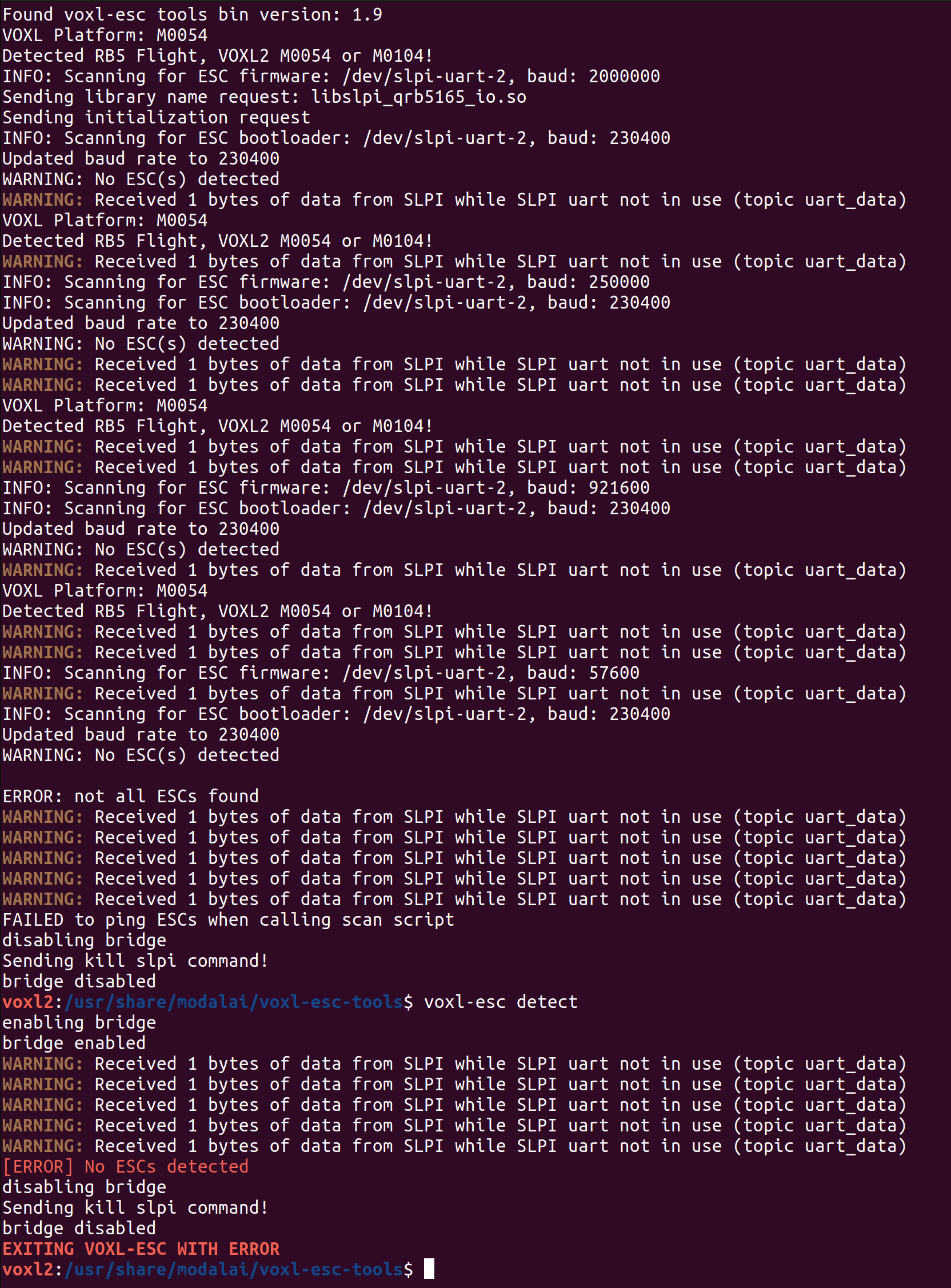
    Currently troubleshooting some issues with the FPV ESC not being detected when using voxl-esc scan and voxl-esc detect. The FPV ESC is receiving battery power, powering the VOXL 2 as expected, and its LED pattern shows nothing out of the ordinary. Here is the output from voxl-esc scan and voxl-esc detect.

    ad2908b6-69a3-41f7-bf79-3130f65c4d76-image.png

    Ask your questions right here!

  • Microhard USB Carrier Board Integration with VOXL 2 (As opposed to the add on board)
    Jeremy FrederickJ Jeremy Frederick

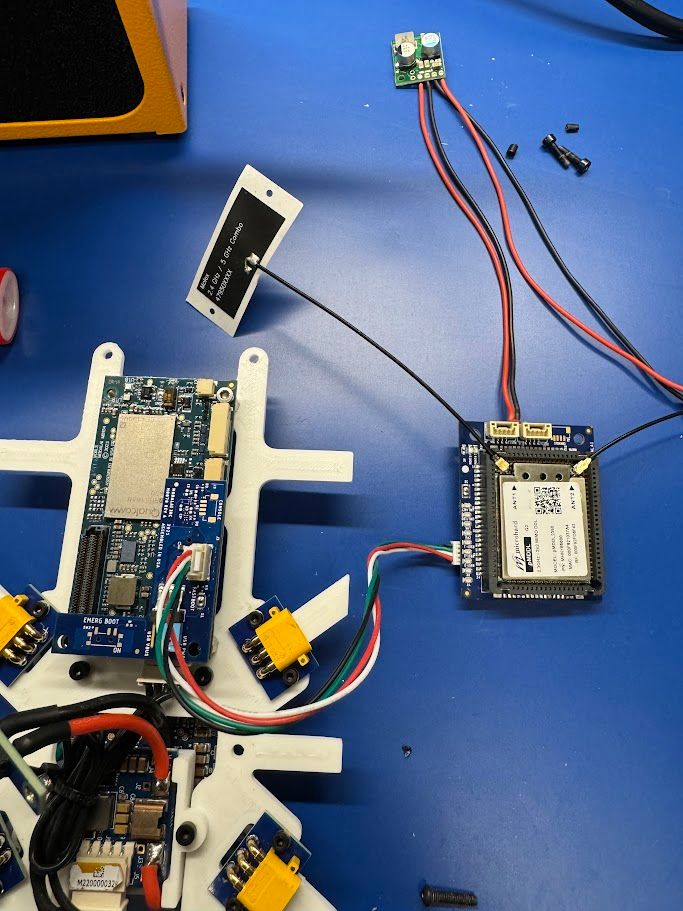
    @Jetson-Nano I've integrated the Pico Radio from airborne innovations, as well as the USB carrier for Microhard, both 2350 and 2450 pMDDL chips. My best approach so far has been to connect the 4pin USB port from the USB Carrier to the USB3 expansion board of the Modal AI series (still requires an external board unfortunately). However, by connecting the power of the USB carrier for Microhard to the 6A 5V supply from the FPV ESC, I have been able to max the power output. Note, this does disable the extra USB ports on the microhard however.

    Best,
    Jeremy Frederick

    Ask your questions right here!

  • External MAVLink Connection using VOXL 2 through ttyHS1
    Jeremy FrederickJ Jeremy Frederick

    @Eric-Katzfey Dronetag DRI, It expects to accept MAVLink data from the flight controller.

    Ask your questions right here!

  • VOXL 2 IO Board troubleshooting - Driver will not start
    Jeremy FrederickJ Jeremy Frederick

    @Vinny Appreciate the heads up

    VOXL 2 IO

  • External MAVLink Connection using VOXL 2 through ttyHS1
    Jeremy FrederickJ Jeremy Frederick

    @Zachary-Lowell-0 I'm attempting to communicate through the UART ttyHS1 that is made available on the USB expansion board.

    Ask your questions right here!

  • External MAVLink Connection using VOXL 2 through ttyHS1
    Jeremy FrederickJ Jeremy Frederick

    I'm looking to establish an external MAVLink connection to the voxl-px4 service on VOXL 2 through the ttyHS1 of the USB3 expansion board. I'm looking to integrate a third party RemoteID module, and am not implementing an external flight controller.

    All the documentation and questions on the forum I could find seem to reference an external flight controller use case, or an internal MAVROS/MAVSDK use case. How do I go about configuring the mavlink-server to output MAVLink on this external UART while maintaining the VOXL 2's PX4 capability.

    Ask your questions right here!

  • VOXL 2 IO Board troubleshooting - Driver will not start
    Jeremy FrederickJ Jeremy Frederick

    @valvarez Any PWM based servo should work, we're using 5g servos with very little torque capability and haven't seen any issues with the power supply capabilities of the IO board in this regard. I connected the PWM Signal to output 1 on the IO board and the 5V and G of the same port. Has been working consistently through QGC.

    VOXL 2 IO

  • FPV ESC PWM Signal Control
    Jeremy FrederickJ Jeremy Frederick

    Currently using the VOXL IO board for PWM control on the VOXL 2 using SDK 1.3.5, I am beginning to integrate the FPV ESC and noticed that it has listed PWM output capabilities. If I can remove the VOXL IO board from the loop that would be ideal from a SWaP perspective. However, there is little documentation on how to get the PWM control to work through PX4 outside of what is listed in the test script. Has PWM output on the ESCs been fully integrated, separate from the ESC control which we would prefer to keep over the UART. Or, is the VOXL IO board still the only way to integrate PWM control out of the box with the Modal AI ecosystem? PWM control will be used for Payload control specifically.

    Ask your questions right here!

  • Looking for Help Understanding the GPIO mapping on the QRB5165
    Jeremy FrederickJ Jeremy Frederick

    @tom Looks like I just needed to update the ESC firmware to the latest variant, that got the python script to work, still working on PX4 though, I'm using Joystick controls through QGC rather than an RC radio so I cannot Map an RC channel, using the actuator testing panel instead and set GPIO_CTL_CH = 3 and RC AUX 3 to one of the outputs, doesn't seem to be triggering the LED yet but I'm not sure if RC AUX 3 sends the same message as with a RC Controller, going to try going through the VOXL IO functionality instead of the ESC output next. In the end, we'll just be integrating it into our custom QGC fork, however want to test it before going through the effort.

    Ask your questions right here!

  • Looking for Help Understanding the GPIO mapping on the QRB5165
    Jeremy FrederickJ Jeremy Frederick

    @tom Seems like neither the voxl-esc-gpio.py test script or the PX4 triggering via RC_AUX seems to be having an effect on the PF0 GPIO on the ESC. Currently, I am using SDK 1.3.5. I did notice that the voxl-esc-gpio.py has the packet = wrap_data(ESC_PACKET_TYPE_GPIO_CMD,req_data) line commented out, is there anything else that I should check? Perhaps a different ESC firmware?

    Ask your questions right here!

  • Looking for Help Understanding the GPIO mapping on the QRB5165
    Jeremy FrederickJ Jeremy Frederick

    @Alex-Kushleyev Yeah, even if we can't trigger it through PX4, having to stop voxl-px4 will not work

    Ask your questions right here!

  • Looking for Help Understanding the GPIO mapping on the QRB5165
    Jeremy FrederickJ Jeremy Frederick

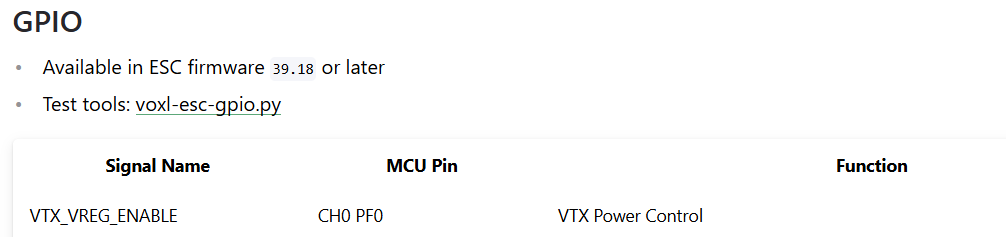
    @Alex-Kushleyev I'm specifically interested in toggling the VTX on/off GPIO on the ESC as described in the attached image.

    93b9fa39-3fec-4ad0-ba59-048c6ad58682-image.png

    Ask your questions right here!

  • Looking for Help Understanding the GPIO mapping on the QRB5165
    Jeremy FrederickJ Jeremy Frederick

    I'm using the FPV ESC and noticed the feature for switching VTX power on/off. I see in the documentation that the pin is labeled as CH0 PF0, and am struggling to figure out which pin in sys/class/gpio this refers too. Some clarity on this would be very helpful.

    Ask your questions right here!

  • Microhard USB Carrier Board Integration with VOXL 2 (As opposed to the add on board)
    Jeremy FrederickJ Jeremy Frederick

    @Vinny I've been assessing the FPV ESC with its built in 5V regulator for the VOXL 2 up to 6A. On the bench, I haven't clocked the VOXL 2 drawing any more then 2A, (albeit we're not using many of the CPU heavy services). Do you think this regulator would be capable of powering the VOXL 2 as well as the Microhard modem up to 2A?

    Ask your questions right here!

  • Microhard USB Carrier Board Integration with VOXL 2 (As opposed to the add on board)
    Jeremy FrederickJ Jeremy Frederick

    @Vinny Appreciate the option, just now noticing that the USB2 Fast boot board is no longer being sold, I assume its been replaced by the USB3 breakout board. Is this board still capable of providing up to 5A to the peripheral modem as demonstrated in the doodle labs radio integration guide?

    Ask your questions right here!

  • Microhard USB Carrier Board Integration with VOXL 2 (As opposed to the add on board)
    Jeremy FrederickJ Jeremy Frederick

    @Jeremy-Frederick Just tried a separate carrier board and modem and it seems to be working just fine now

    Ask your questions right here!

  • Microhard USB Carrier Board Integration with VOXL 2 (As opposed to the add on board)
    Jeremy FrederickJ Jeremy Frederick

    @tom MicrohardSetup.jpg

    Ask your questions right here!

  • Microhard USB Carrier Board Integration with VOXL 2 (As opposed to the add on board)
    Jeremy FrederickJ Jeremy Frederick

    Hello, for form factor reasons, and to get the maximum db output of the microhard module, I want to try and integrate the Microhard USB Carrier Board with the VOXL 2 instead of the standard Add on Board. I'm attempting to set it up identical to how the doodle labs radios integrate, through the USB 2 fastboot board on the VOXL 2. I have been unsuccessful in creating a network connection to the radio.

    Is there any reason why this integration wouldn't work? Is there anything that can be done to get this integration to work?

    Ask your questions right here!
  • Login

  • Don't have an account? Register

  • Login or register to search.
  • First post
    Last post
0
  • Categories
  • Recent
  • Tags
  • Popular
  • Users
  • Groups