
Persistent Log Storage
-
I am looking to have journald logs persist.
I understand that journald stores logs under/var/log/journal
However, I can see that/var/log/is under volatile storage.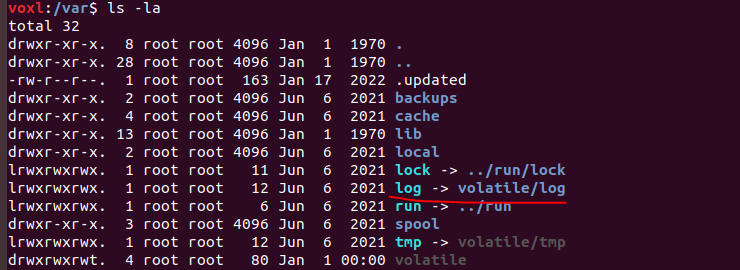
I understand that I should be logging to
/dataif I would like things to persist. Is there a configuration that ModalAI recommends to log service file output on VOXL? -
I might end up having to specify specific log files to write to in my .service files per
https://www.freedesktop.org/software/systemd/man/systemd.exec.html#StandardOutput= -
Was going to use syslog, but saw that the service file points to null. Was wondering if this is done on purpose?

-
Thinking an easier way here is to just change the symbolic link here
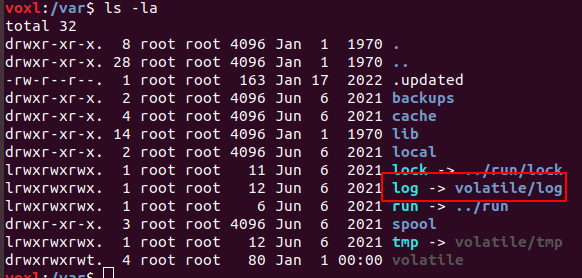
and then modify journald config file to make sure we do not fill up storage with logs
-
This seems to work, but not from bootup.
Usually, thesystemd-journal-flush.servicewatches for/var/log/journalto be mounted and then switches logging over to that folder, but that does not seem to be happening.Instead, I have to restart the
systemd-journald.serviceto get it to log in the correct spot.Maybe because it is a symbolic link, and that is why the service does not see it mounted.... going to try and test that theory
-
Yeah, all
systemd-journal-flush.serviceis doing is runningjournalctl --flushwhich is not doing anything when run manually

Reading along? Create a free ModalAI Forum account to join in.
With an account you can reply, ask your own question, get an email when a ModalAI engineer answers, and mark the reply that solved it. Your place in each thread is saved between visits.
Questions about VOXL, Flight Core, ESCs and ModalAI drones are answered here by the engineers who build them.
Register Login