
VOXL 2 / M0062 Configuration Questions
-
Hardware: (board / drone / SKU, serial # if you have it): voxl2
Software version: (paste the output of
voxl-version
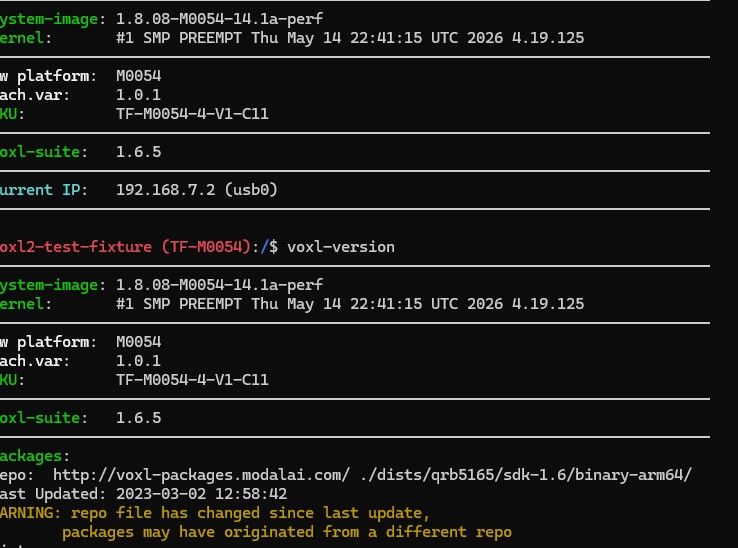
Configuration / services: (paste the output of
voxl-inspect-services)bolded textWhat I am trying to do:
1. IMX412 Camera Frame Rate Configuration-
list itemCould you confirm whether the IMX412 camera’s frame rate can be set to 8.6 fps to match the operating frequency of our IR camera (Lenton)?
-
list itemIf this requires modifications to the kernel or camera driver, could you provide instructions for building and flashing the modified software?
-
list itemIs it possible to change the frame rate through software configuration after boot without modifying the kernel?
2. UART Configuration on the J3 Connector
- list itemCould you explain how to configure and enable the UART7 and UART13 pins on the VOXL 2 J3 connector for communication with an STM32?
3. Camera FSync Configuration on the J3 Connector
-
list itemCould you confirm the GPIO assignment and control mechanism for outputting an FSync (Frame Sync) signal to a camera through the J3 connector?
-
list itemCould you provide instructions for enabling the FSync signal, configuring its period, and applying the settings?
4. Clarification Regarding the Boot Mode Switches on the M0062 Board
Our understanding is as follows:
-
list itemFastboot is a bootloader mode used to install or update system images.
-
list itemEDL is a low-level recovery mode used when a boot failure prevents access to Fastboot.
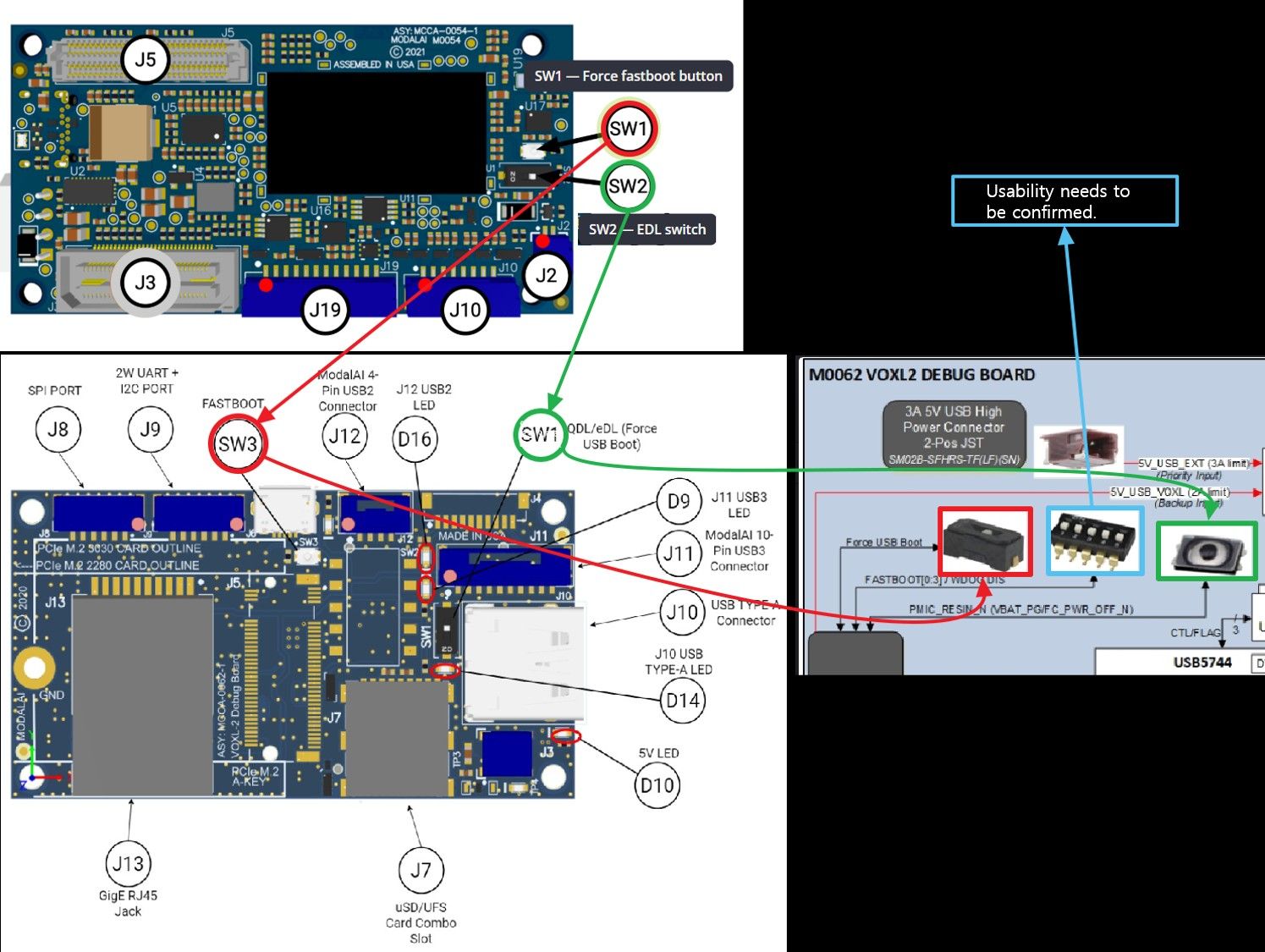
The VOXL 2 includes Fastboot and EDL switches. We believe access to these switches may be necessary during development and operation in case recovery is required. Please refer to the image below for the connections between the VOXL 2 and the M0062 board.
However, based on the M0062 board block diagram, the boot mode switches on the M0062 board appear to be unused. Could you confirm whether these switches are actually used and, if so, under what circumstances?
What actually happens: (error messages, behavior)Steps to reproduce:
Logs / pictures: (attach files; PX4 logs -> https://logs.px4.io)bolded text
-
-
Hi @김다연
Responses in order:- IMX412 frame rate
Frame rate is set per-camera in /etc/modalai/voxl-camera-server.conf, no kernel rebuild required, but you are limited to the sensor modes the driver defines. 8.6 fps is not a standard IMX412 mode, so it almost certainly requires a new mode in the sensor driver and a kernel rebuild. Before going down that path: if you only need the two cameras aligned, use the frame sync hardware rather than matching free-run rates. Camera config: https://docs.modalai.com/configure-cameras/
- UART on J3
J3 exposes UART7 only, on pins 3 and 5 (GPIO_23 RXD, GPIO_22 TXD), enumerated as /dev/ttyHS1. UART13 is not on J3, it is on J5, the high-speed B2B. Full J3 and J5 pinouts: https://docs.modalai.com/voxl2-connectors/
- FSync on J3
J3 does not carry a camera sync signal. FSync is GPIO 109 on the camera group connectors (J6/J7/J8) and is driven by voxl-fsync-mod, enabled through voxl-camera-server. There is nothing on J3 to configure for this.
- M0062 boot mode switches
Your understanding of the two modes is correct. The DIP switch on the M0062 is unused. The Fastboot and EDL switches are wired in parallel with VOXL 2’s own SW1 and SW2 and do exactly the same thing, so use whichever is physically accessible in your build. Recovery procedures are documented here: https://docs.modalai.com/voxl2-connectors/#buttons and https://docs.modalai.com/voxl2-unbricking/
SW2 (EDL) should be left OFF in normal operation.


Reading along? Create a free ModalAI Forum account to join in.
With an account you can reply, ask your own question, get an email when a ModalAI engineer answers, and mark the reply that solved it. Your place in each thread is saved between visits.
Questions about VOXL, Flight Core, ESCs and ModalAI drones are answered here by the engineers who build them.
Register Login