
VOXL2 gyro unresponsive after enabling qvio
-
After calibrating the cameras and enabling the qvio-server, the gyro meets an error in qgc even if the imu works properly in the portal. Trying to calibrate via qgc but gets stuck because it does not get data from the imus and ends up with error 241. The gyro can be calibrated using voxl-calibrate-imu but the problem persists.
I have to add that I have changed the parameters in a way to allow flight in gps denied environments. Could it be possible that a parameter change led to that? -
After calibrating the cameras and enabling the qvio-server, the gyro meets an error in qgc even if the imu works properly in the portal. Trying to calibrate via qgc but gets stuck because it does not get data from the imus and ends up with error 241. The gyro can be calibrated using voxl-calibrate-imu but the problem persists.
I have to add that I have changed the parameters in a way to allow flight in gps denied environments. Could it be possible that a parameter change led to that?@NikosMav There are two IMUs on a VOXL2. One is accessible from the applications processor and is used by VIO and voxl-calibrate-imu. The other is accessible by the SLPI DSP and that is where PX4 runs. Are you using a ModalAI drone or a custom drone? What SDK release are you on? Which parameters are you talking about, PX4 parameters? If you
adbinto the drone and issuepx4-listener sensor_accelorpx4-listener sensor_gyrodo you see values? -
@NikosMav There are two IMUs on a VOXL2. One is accessible from the applications processor and is used by VIO and voxl-calibrate-imu. The other is accessible by the SLPI DSP and that is where PX4 runs. Are you using a ModalAI drone or a custom drone? What SDK release are you on? Which parameters are you talking about, PX4 parameters? If you
adbinto the drone and issuepx4-listener sensor_accelorpx4-listener sensor_gyrodo you see values? -
@Eric-Katzfey It is a custom drone with three tracking cameras and one IMX412. Here is a screenshot with the suite code and the response to the suggested commands.
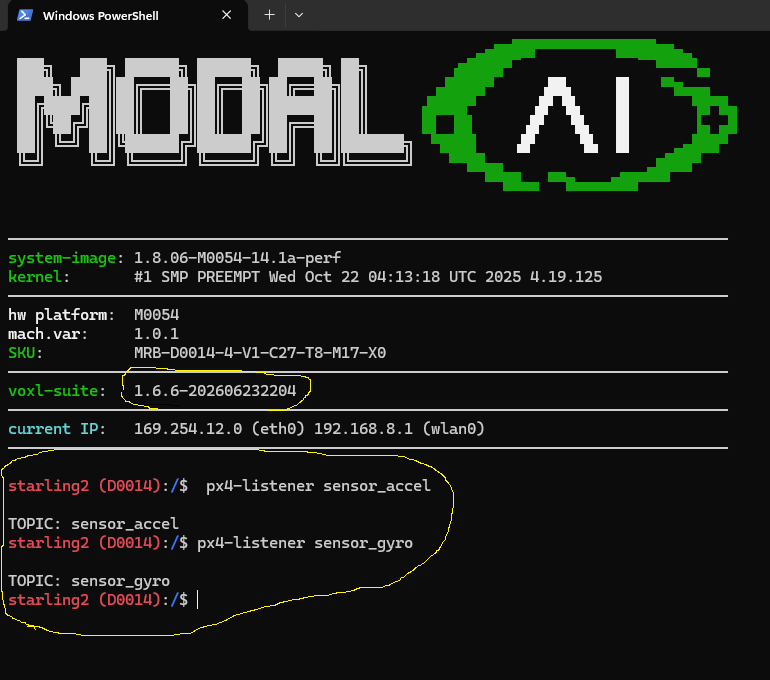
@NikosMav Well, try each command a few times. But I think that is enough to show that the IMU is generating the data, otherwise it would have printed "never published". When you are connected to QGC and you move the drone around do you see the horizon indicator on the main screen also moving around? That's another indication that IMU data is making it to QGC. How are you connecting to QGC? Is it over WiFi? You can do the gyro calibration directly on the drone from the command line. I would adb into the drone and disable voxl-px4 from running automatically with
systemctl disable voxl-px4, then power cycling. Once that is done adb in and start voxl-px4 from the command line withvoxl-px4 -d. Once it has finished the start script enter this command at the prompt:qshell commander calibrate gyroand see what it does. Don't forget when you are done with your testing to re-enable voxl-px4 withsystemctl enable voxl-px4. -
@NikosMav Well, try each command a few times. But I think that is enough to show that the IMU is generating the data, otherwise it would have printed "never published". When you are connected to QGC and you move the drone around do you see the horizon indicator on the main screen also moving around? That's another indication that IMU data is making it to QGC. How are you connecting to QGC? Is it over WiFi? You can do the gyro calibration directly on the drone from the command line. I would adb into the drone and disable voxl-px4 from running automatically with
systemctl disable voxl-px4, then power cycling. Once that is done adb in and start voxl-px4 from the command line withvoxl-px4 -d. Once it has finished the start script enter this command at the prompt:qshell commander calibrate gyroand see what it does. Don't forget when you are done with your testing to re-enable voxl-px4 withsystemctl enable voxl-px4.@Eric-Katzfey Thank you for your feedback, well it does not seem to respond. This the response I got.
pxh> qshell commander start
INFO [qshell] Send cmd: 'commander start'
INFO [muorb] [uORB] Marking DeviceNode(qshell_req) as advertised in process_remote_topic
INFO [muorb] [qshell] qshell gotten: commander start
INFO [muorb] [qshell] arg0 = 'commander'
INFO [muorb] [qshell] arg1 = 'start'
INFO [muorb] [tasks] Creating pthread commander
INFO [muorb] [tasks] Successfully created px4 task PX4_commander with tid 2097651
INFO [uORB] Advertising remote topic led_control
INFO [muorb] [commander] LED: open /dev/led0 failed (22)
INFO [uORB] Advertising remote topic tune_control
INFO [muorb] [qshell] Ok executing command: commander start
INFO [qshell] qshell return value timestamp: 62472993, local time: 62475486
pxh> INFO [muorb] [health_and_arming_checks] Too many arming check events (1, 14 > 14). Not reporting all
INFO [uORB] Advertising remote topic event
INFO [uORB] Advertising remote topic mavlink_log
INFO [muorb] [health_and_arming_checks] Preflight Fail: Accel Sensor 0 missing
INFO [muorb] [health_and_arming_checks] Preflight Fail: barometer 0 missing
INFO [muorb] [health_and_arming_checks] Preflight Fail: No CPU load information
INFO [muorb] [health_and_arming_checks] Preflight Fail: ekf2 missing data
INFO [muorb] [health_and_arming_checks] Preflight Fail: Gyro Sensor 0 missing
INFO [muorb] [health_and_arming_checks] Preflight Fail: Compass Sensor 0 missing
INFO [muorb] [health_and_arming_checks] Preflight Fail: system power unavailable
INFO [uORB] Advertising remote topic health_report
INFO [uORB] Advertising remote topic failsafe_flags
INFO [uORB] Advertising remote topic actuator_armed
INFO [uORB] Advertising remote topic vehicle_control_mode
INFO [uORB] Advertising remote topic vehicle_status
INFO [uORB] Advertising remote topic failure_detector_status
INFO [muorb] [health_and_arming_checks] Too many arming check events (1, 14 > 14). Not reporting all
INFO [muorb] [health_and_arming_checks] Preflight Fail: Accel Sensor 0 missing
INFO [muorb] [health_and_arming_checks] Preflight Fail: barometer 0 missing
INFO [muorb] [health_and_arming_checks] Preflight Fail: No CPU load information
INFO [muorb] [health_and_arming_checks] Preflight Fail: ekf2 missing data
INFO [muorb] [health_and_arming_checks] Preflight Fail: Gyro Sensor 0 missing
INFO [muorb] [health_and_arming_checks] Preflight Fail: Compass Sensor 0 missing
INFO [muorb] [health_and_arming_checks] Preflight Fail: system power unavailable
pxh> qshell commander calibrate accel
INFO [qshell] Send cmd: 'commander calibrate accel'
INFO [muorb] [uORB] Marking DeviceNode(qshell_req) as advertised in process_remote_topic
INFO [muorb] [qshell] qshell gotten: commander calibrate accel
INFO [muorb] [qshell] arg0 = 'commander'
INFO [muorb] [qshell] arg1 = 'calibrate'
INFO [muorb] [qshell] arg2 = 'accel'
INFO [uORB] Advertising remote topic vehicle_command
INFO [muorb] [qshell] Ok executing command: commander calibrate accel
INFO [qshell] qshell return value timestamp: 69545323, local time: 69549068
pxh> INFO [uORB] Advertising remote topic vehicle_command_ack
INFO [uORB] Marking DeviceNode(mavlink_log) as advertised in process_remote_topic
INFO [muorb] [commander] [cal] calibration started: 2 accel
INFO [muorb] [commander] [cal] calibration failed: reading sensor
pxh> qshell commander calibrate gyro
INFO [qshell] Send cmd: 'commander calibrate gyro'
INFO [muorb] [uORB] Marking DeviceNode(qshell_req) as advertised in process_remote_topic
INFO [muorb] [qshell] qshell gotten: commander calibrate gyro
INFO [muorb] [qshell] arg0 = 'commander'
INFO [muorb] [qshell] arg1 = 'calibrate'
INFO [muorb] [qshell] arg2 = 'gyro'
INFO [uORB] Marking DeviceNode(vehicle_command) as advertised in process_remote_topic
INFO [muorb] [qshell] Ok executing command: commander calibrate gyro
INFO [muorb] [commander] [cal] calibration started: 2 gyro
INFO [qshell] qshell return value timestamp: 75230319, local time: 75237494
pxh> INFO [muorb] [commander] No gyros found -
@Eric-Katzfey Thank you for your feedback, well it does not seem to respond. This the response I got.
pxh> qshell commander start
INFO [qshell] Send cmd: 'commander start'
INFO [muorb] [uORB] Marking DeviceNode(qshell_req) as advertised in process_remote_topic
INFO [muorb] [qshell] qshell gotten: commander start
INFO [muorb] [qshell] arg0 = 'commander'
INFO [muorb] [qshell] arg1 = 'start'
INFO [muorb] [tasks] Creating pthread commander
INFO [muorb] [tasks] Successfully created px4 task PX4_commander with tid 2097651
INFO [uORB] Advertising remote topic led_control
INFO [muorb] [commander] LED: open /dev/led0 failed (22)
INFO [uORB] Advertising remote topic tune_control
INFO [muorb] [qshell] Ok executing command: commander start
INFO [qshell] qshell return value timestamp: 62472993, local time: 62475486
pxh> INFO [muorb] [health_and_arming_checks] Too many arming check events (1, 14 > 14). Not reporting all
INFO [uORB] Advertising remote topic event
INFO [uORB] Advertising remote topic mavlink_log
INFO [muorb] [health_and_arming_checks] Preflight Fail: Accel Sensor 0 missing
INFO [muorb] [health_and_arming_checks] Preflight Fail: barometer 0 missing
INFO [muorb] [health_and_arming_checks] Preflight Fail: No CPU load information
INFO [muorb] [health_and_arming_checks] Preflight Fail: ekf2 missing data
INFO [muorb] [health_and_arming_checks] Preflight Fail: Gyro Sensor 0 missing
INFO [muorb] [health_and_arming_checks] Preflight Fail: Compass Sensor 0 missing
INFO [muorb] [health_and_arming_checks] Preflight Fail: system power unavailable
INFO [uORB] Advertising remote topic health_report
INFO [uORB] Advertising remote topic failsafe_flags
INFO [uORB] Advertising remote topic actuator_armed
INFO [uORB] Advertising remote topic vehicle_control_mode
INFO [uORB] Advertising remote topic vehicle_status
INFO [uORB] Advertising remote topic failure_detector_status
INFO [muorb] [health_and_arming_checks] Too many arming check events (1, 14 > 14). Not reporting all
INFO [muorb] [health_and_arming_checks] Preflight Fail: Accel Sensor 0 missing
INFO [muorb] [health_and_arming_checks] Preflight Fail: barometer 0 missing
INFO [muorb] [health_and_arming_checks] Preflight Fail: No CPU load information
INFO [muorb] [health_and_arming_checks] Preflight Fail: ekf2 missing data
INFO [muorb] [health_and_arming_checks] Preflight Fail: Gyro Sensor 0 missing
INFO [muorb] [health_and_arming_checks] Preflight Fail: Compass Sensor 0 missing
INFO [muorb] [health_and_arming_checks] Preflight Fail: system power unavailable
pxh> qshell commander calibrate accel
INFO [qshell] Send cmd: 'commander calibrate accel'
INFO [muorb] [uORB] Marking DeviceNode(qshell_req) as advertised in process_remote_topic
INFO [muorb] [qshell] qshell gotten: commander calibrate accel
INFO [muorb] [qshell] arg0 = 'commander'
INFO [muorb] [qshell] arg1 = 'calibrate'
INFO [muorb] [qshell] arg2 = 'accel'
INFO [uORB] Advertising remote topic vehicle_command
INFO [muorb] [qshell] Ok executing command: commander calibrate accel
INFO [qshell] qshell return value timestamp: 69545323, local time: 69549068
pxh> INFO [uORB] Advertising remote topic vehicle_command_ack
INFO [uORB] Marking DeviceNode(mavlink_log) as advertised in process_remote_topic
INFO [muorb] [commander] [cal] calibration started: 2 accel
INFO [muorb] [commander] [cal] calibration failed: reading sensor
pxh> qshell commander calibrate gyro
INFO [qshell] Send cmd: 'commander calibrate gyro'
INFO [muorb] [uORB] Marking DeviceNode(qshell_req) as advertised in process_remote_topic
INFO [muorb] [qshell] qshell gotten: commander calibrate gyro
INFO [muorb] [qshell] arg0 = 'commander'
INFO [muorb] [qshell] arg1 = 'calibrate'
INFO [muorb] [qshell] arg2 = 'gyro'
INFO [uORB] Marking DeviceNode(vehicle_command) as advertised in process_remote_topic
INFO [muorb] [qshell] Ok executing command: commander calibrate gyro
INFO [muorb] [commander] [cal] calibration started: 2 gyro
INFO [qshell] qshell return value timestamp: 75230319, local time: 75237494
pxh> INFO [muorb] [commander] No gyros found -
@NikosMav Can you reinstall the SDK from scratch and verify that everything works properly? Was everything working before you changed the parameters?
-
@NikosMav Also, before changing anything can you capture a PX4 log and send that? From the adb command line you can use
px4-logger on, wait a few seconds, then issuepx4-logger off. You should see a log file somewhere in/data/px4/log. Perhaps to make sure it's the correct log delete all current logs before running this such that there is only one log file there. -
@NikosMav Also, before changing anything can you capture a PX4 log and send that? From the adb command line you can use
px4-logger on, wait a few seconds, then issuepx4-logger off. You should see a log file somewhere in/data/px4/log. Perhaps to make sure it's the correct log delete all current logs before running this such that there is only one log file there. -
@NikosMav Can you reinstall the SDK from scratch and verify that everything works properly? Was everything working before you changed the parameters?
-
@Eric-Katzfey Will try that too. Yeah everything had been working until I completed the tracking cameras calibration procedure and enabled qvio. It also since enablin the qvio the temperature can go up to 70 degrees Celsius.
@NikosMav Yes, things will get hotter when running QVIO. But once you arm and start the props everything will cool down. When reflashing the SDK I would grab one of the official releases from our downloads page and not a nightly.

Reading along? Create a free ModalAI Forum account to join in.
With an account you can reply, ask your own question, get an email when a ModalAI engineer answers, and mark the reply that solved it. Your place in each thread is saved between visits.
Questions about VOXL, Flight Core, ESCs and ModalAI drones are answered here by the engineers who build them.
Register Login