
Starling 2 / VOXL2 M0129 ESC not detected during voxl-esc scan or firmware upgrade
-
Hi ModalAI team,
I am working on a Starling 2 / VOXL2 setup and I am stuck with an ESC communication / firmware issue. I would appreciate your guidance on whether this looks like a software mismatch, a known M0129 compatibility issue, or a hardware-side comms problem.
Hardware / platform:
- VOXL2 (M0054)
- Starling 2 platform
- ESC board label: M0129
- SKU shown on device:
MRB-D0014-4-V1-C27-T9-M22-X0
Current software versions:
- system-image: 1.8.06-M0054-14.1a-perf
- voxl-suite: 1.6.3
- voxl-esc package manually upgraded from 1.5.7 to 1.6.1
What I did:
- Reflashed the board
- Restored / checked calibration as needed
- Verified Wi-Fi and internet access
- Confirmed newer voxl-esc was available in sdk-1.6 and manually installed:
dpkg -i /data/voxl-esc_1.6.1_arm64.deb - Checked available firmware files under:
/usr/share/modalai/voxl-esc-tools/firmware/
Firmware files present for M0129:
- modalai_esc_firmware_m0129_3_v39_25_a58f5f6f.bin
- modalai_esc_firmware_m0129_6_v39_25_a58f5f6f.bin
Note:
- My physical ESC only says M0129
- I do not see a suffix like M0129-3 or M0129-6 printed on the board
- I also do not see an m0129_1 firmware file in the installed firmware folder
Main issue:
- voxl-esc scan does not reliably detect any ESCs
- voxl-esc upgrade_firmware sometimes previously said “successfully pinged ESCs” but then failed with:
[ERROR] Unknown board detected: - After deeper testing, the underlying Python tools also fail to detect the ESC consistently
Direct tool results:
- No ESCs detected at all baud rates
- Sometimes reports:
ERROR: voxl_uart_read_bytes: Bus '12' is not initialized
- Ends with:
ERROR: No ESC(s) detected, exiting.
- Debug scan:
Command used:
python3 voxl-esc-scan.py --enable-debug True --force-scan-all-baud-rates True
Observed behavior:
- UART TX packets are clearly being sent
- No valid UART RX from ESC
- In one case RX was all zeros after:
ERROR: voxl_uart_read_bytes: Bus '12' is not initialized - Every scan ends with:
WARNING: No ESC(s) detected
ERROR: not all ESCs found
Relevant logs:
- dmesg shows SLPI restart events after reset commands, for example:
Fatal error on slpi!
... Got kill command from apps processor. - /dev shows SLPI subsystem nodes, but the scan path still fails to get a valid ESC reply
Important observations:
- The VOXL side appears to be transmitting on the ESC link
- The ESC side does not appear to respond
- This now looks more like a low-level comms / wiring / power / bootloader issue than just a wrapper-script issue
Questions:
- Is system-image 1.8.06 with voxl-suite 1.6.3 a supported combination for Starling 2 + M0129 ESC?
- For an ESC labeled only “M0129”, which firmware should be used:
- m0129_3
- m0129_6
- or is there another variant / package expected?
- Is the missing response from the ESC more indicative of:
- incorrect harness / connector / pinout
- ESC not powered correctly
- damaged ESC MCU
- wrong firmware / bootloader state
- Is there a recommended low-level recovery path for M0129 when voxl-esc-scan.py cannot detect any ESCs?
- Are there any additional commands you want me to run to verify the ESC UART / SLPI bridge path on this platform?
Example command outputs:
system image / suite:
- system-image: 1.8.06-M0054-14.1a-perf
- voxl-suite: 1.6.3
voxl-esc version after manual install:
- 1.6.1
Direct scan result:
- WARNING: No ESC(s) detected
- ERROR: not all ESCs found
Direct board detect result:
- ERROR: No ESC(s) detected, exiting.
Any help would be greatly appreciated. I can also provide full logs or photos of the ESC board/harness if needed.
Thank you.
-
Hi ModalAI team,
I am working on a Starling 2 / VOXL2 setup and I am stuck with an ESC communication / firmware issue. I would appreciate your guidance on whether this looks like a software mismatch, a known M0129 compatibility issue, or a hardware-side comms problem.
Hardware / platform:
- VOXL2 (M0054)
- Starling 2 platform
- ESC board label: M0129
- SKU shown on device:
MRB-D0014-4-V1-C27-T9-M22-X0
Current software versions:
- system-image: 1.8.06-M0054-14.1a-perf
- voxl-suite: 1.6.3
- voxl-esc package manually upgraded from 1.5.7 to 1.6.1
What I did:
- Reflashed the board
- Restored / checked calibration as needed
- Verified Wi-Fi and internet access
- Confirmed newer voxl-esc was available in sdk-1.6 and manually installed:
dpkg -i /data/voxl-esc_1.6.1_arm64.deb - Checked available firmware files under:
/usr/share/modalai/voxl-esc-tools/firmware/
Firmware files present for M0129:
- modalai_esc_firmware_m0129_3_v39_25_a58f5f6f.bin
- modalai_esc_firmware_m0129_6_v39_25_a58f5f6f.bin
Note:
- My physical ESC only says M0129
- I do not see a suffix like M0129-3 or M0129-6 printed on the board
- I also do not see an m0129_1 firmware file in the installed firmware folder
Main issue:
- voxl-esc scan does not reliably detect any ESCs
- voxl-esc upgrade_firmware sometimes previously said “successfully pinged ESCs” but then failed with:
[ERROR] Unknown board detected: - After deeper testing, the underlying Python tools also fail to detect the ESC consistently
Direct tool results:
- No ESCs detected at all baud rates
- Sometimes reports:
ERROR: voxl_uart_read_bytes: Bus '12' is not initialized
- Ends with:
ERROR: No ESC(s) detected, exiting.
- Debug scan:
Command used:
python3 voxl-esc-scan.py --enable-debug True --force-scan-all-baud-rates True
Observed behavior:
- UART TX packets are clearly being sent
- No valid UART RX from ESC
- In one case RX was all zeros after:
ERROR: voxl_uart_read_bytes: Bus '12' is not initialized - Every scan ends with:
WARNING: No ESC(s) detected
ERROR: not all ESCs found
Relevant logs:
- dmesg shows SLPI restart events after reset commands, for example:
Fatal error on slpi!
... Got kill command from apps processor. - /dev shows SLPI subsystem nodes, but the scan path still fails to get a valid ESC reply
Important observations:
- The VOXL side appears to be transmitting on the ESC link
- The ESC side does not appear to respond
- This now looks more like a low-level comms / wiring / power / bootloader issue than just a wrapper-script issue
Questions:
- Is system-image 1.8.06 with voxl-suite 1.6.3 a supported combination for Starling 2 + M0129 ESC?
- For an ESC labeled only “M0129”, which firmware should be used:
- m0129_3
- m0129_6
- or is there another variant / package expected?
- Is the missing response from the ESC more indicative of:
- incorrect harness / connector / pinout
- ESC not powered correctly
- damaged ESC MCU
- wrong firmware / bootloader state
- Is there a recommended low-level recovery path for M0129 when voxl-esc-scan.py cannot detect any ESCs?
- Are there any additional commands you want me to run to verify the ESC UART / SLPI bridge path on this platform?
Example command outputs:
system image / suite:
- system-image: 1.8.06-M0054-14.1a-perf
- voxl-suite: 1.6.3
voxl-esc version after manual install:
- 1.6.1
Direct scan result:
- WARNING: No ESC(s) detected
- ERROR: not all ESCs found
Direct board detect result:
- ERROR: No ESC(s) detected, exiting.
Any help would be greatly appreciated. I can also provide full logs or photos of the ESC board/harness if needed.
Thank you.
If your M0129 ESC only has a label that says M0129, it most likely means it is M012-3. The only difference between -3 and -6 is that -6 is rated for 6S battery voltage (which is irrelevant for Starling 2).
Was the ESC working? How did it get into non-working state?
Please make sure PX4 is not running before you use the
voxl-esctools :systemctl stop voxl-px4. You should reboot, disable voxl-px4 and try to usevoxl-esctools directly from/usr/share/modalai/voxl-esc/In order to test if the ESC itself is working, the best way to connect it directly to a Linux PC using a serial-to-usb adapter and use
voxl-escto scan, test, etc. You can make your own adapter or purchase one here.Also, double check if the status of ESC LEDs when you turn on the power. Additionally, does the ESC make motor sounds? See additional debugging information here : https://docs.modalai.com/voxl-escs/faq/
Alex
-
If your M0129 ESC only has a label that says M0129, it most likely means it is M012-3. The only difference between -3 and -6 is that -6 is rated for 6S battery voltage (which is irrelevant for Starling 2).
Was the ESC working? How did it get into non-working state?
Please make sure PX4 is not running before you use the
voxl-esctools :systemctl stop voxl-px4. You should reboot, disable voxl-px4 and try to usevoxl-esctools directly from/usr/share/modalai/voxl-esc/In order to test if the ESC itself is working, the best way to connect it directly to a Linux PC using a serial-to-usb adapter and use
voxl-escto scan, test, etc. You can make your own adapter or purchase one here.Also, double check if the status of ESC LEDs when you turn on the power. Additionally, does the ESC make motor sounds? See additional debugging information here : https://docs.modalai.com/voxl-escs/faq/
Alex
@Alex-Kushleyev Hi Alex,
Thanks for your response.
To answer your question - the ESC does not appear to be booting at all.
I tested the ESC independently:
- Connected battery directly to ESC (no VOXL connected)
- There are no motor tones and no visible LED activity
Additionally:
- voxl-esc-scan.py does not detect any ESCs at any baud rate
- UART debug shows TX packets being sent but no valid RX response
- SLPI reports “Bus 12 not initialized”
Since the ESC does not produce any startup tones even when powered directly, it seems the ESC MCU is not booting.
Could this indicate a hardware failure of the ESC logic section?
Please let me know if you would still recommend testing via USB-to-serial, or if this is sufficient to consider the ESC faulty.
Thanks,
Koti. -
@Alex-Kushleyev Hi Alex,
Thanks for your response.
To answer your question - the ESC does not appear to be booting at all.
I tested the ESC independently:
- Connected battery directly to ESC (no VOXL connected)
- There are no motor tones and no visible LED activity
Additionally:
- voxl-esc-scan.py does not detect any ESCs at any baud rate
- UART debug shows TX packets being sent but no valid RX response
- SLPI reports “Bus 12 not initialized”
Since the ESC does not produce any startup tones even when powered directly, it seems the ESC MCU is not booting.
Could this indicate a hardware failure of the ESC logic section?
Please let me know if you would still recommend testing via USB-to-serial, or if this is sufficient to consider the ESC faulty.
Thanks,
Koti.If the ESC is not showing any signs of life (no blue led blink), it probably means the ESC power regulator is not working properly. However, you mentioned that VOXL2 is actually booting fine? Can you measure the voltage on the connector / pads that provide 5V power from M0129 ESC to VOXL2?
Please see the following post, where a capacitor on the ESC next to the main voltage regulator was knocked off, resulting in ESC not starting up. https://forum.modalai.com/topic/4151/voxl-mini-4-in-1-esc-missing-capacitor/ . However, in that post, i think VOXL2 was not booting either. In your case the issue may be something different.
It is worth carefully inspecting the ESC.
Also, if you have a power supply that can measure current, you can set it to 8V and measure the current draw of the ESC alone, it should be very small (maybe 20-30mA) but not zero.
Alex
-
If the ESC is not showing any signs of life (no blue led blink), it probably means the ESC power regulator is not working properly. However, you mentioned that VOXL2 is actually booting fine? Can you measure the voltage on the connector / pads that provide 5V power from M0129 ESC to VOXL2?
Please see the following post, where a capacitor on the ESC next to the main voltage regulator was knocked off, resulting in ESC not starting up. https://forum.modalai.com/topic/4151/voxl-mini-4-in-1-esc-missing-capacitor/ . However, in that post, i think VOXL2 was not booting either. In your case the issue may be something different.
It is worth carefully inspecting the ESC.
Also, if you have a power supply that can measure current, you can set it to 8V and measure the current draw of the ESC alone, it should be very small (maybe 20-30mA) but not zero.
Alex
@Alex-Kushleyev Hi, thanks for your response.
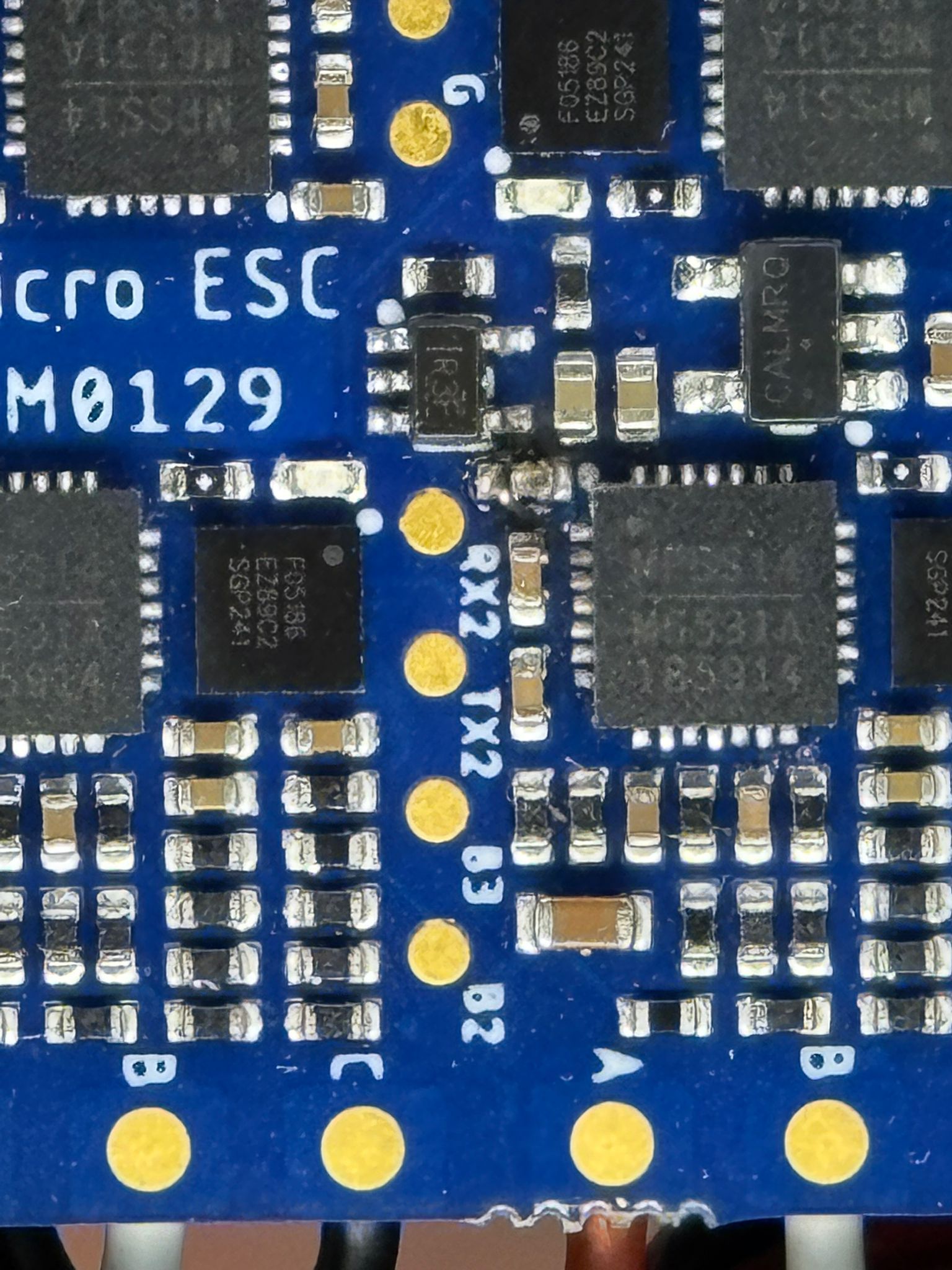
While inspecting the ESC, we noticed that one of the components (looks like a resistor) is visibly burnt/damaged (attached image). The surrounding area also shows clear signs of overheating.
Do you think this failure could be the root cause of the ESC not powering up or being detected? From your previous message, it seems likely related to the power regulation stage.
We will also proceed with the voltage measurement on the 5V rail and current draw test as you suggested to confirm.
Thanks again for your guidance.
-
@Alex-Kushleyev Hi, thanks for your response.
While inspecting the ESC, we noticed that one of the components (looks like a resistor) is visibly burnt/damaged (attached image). The surrounding area also shows clear signs of overheating.
Do you think this failure could be the root cause of the ESC not powering up or being detected? From your previous message, it seems likely related to the power regulation stage.
We will also proceed with the voltage measurement on the 5V rail and current draw test as you suggested to confirm.
Thanks again for your guidance.
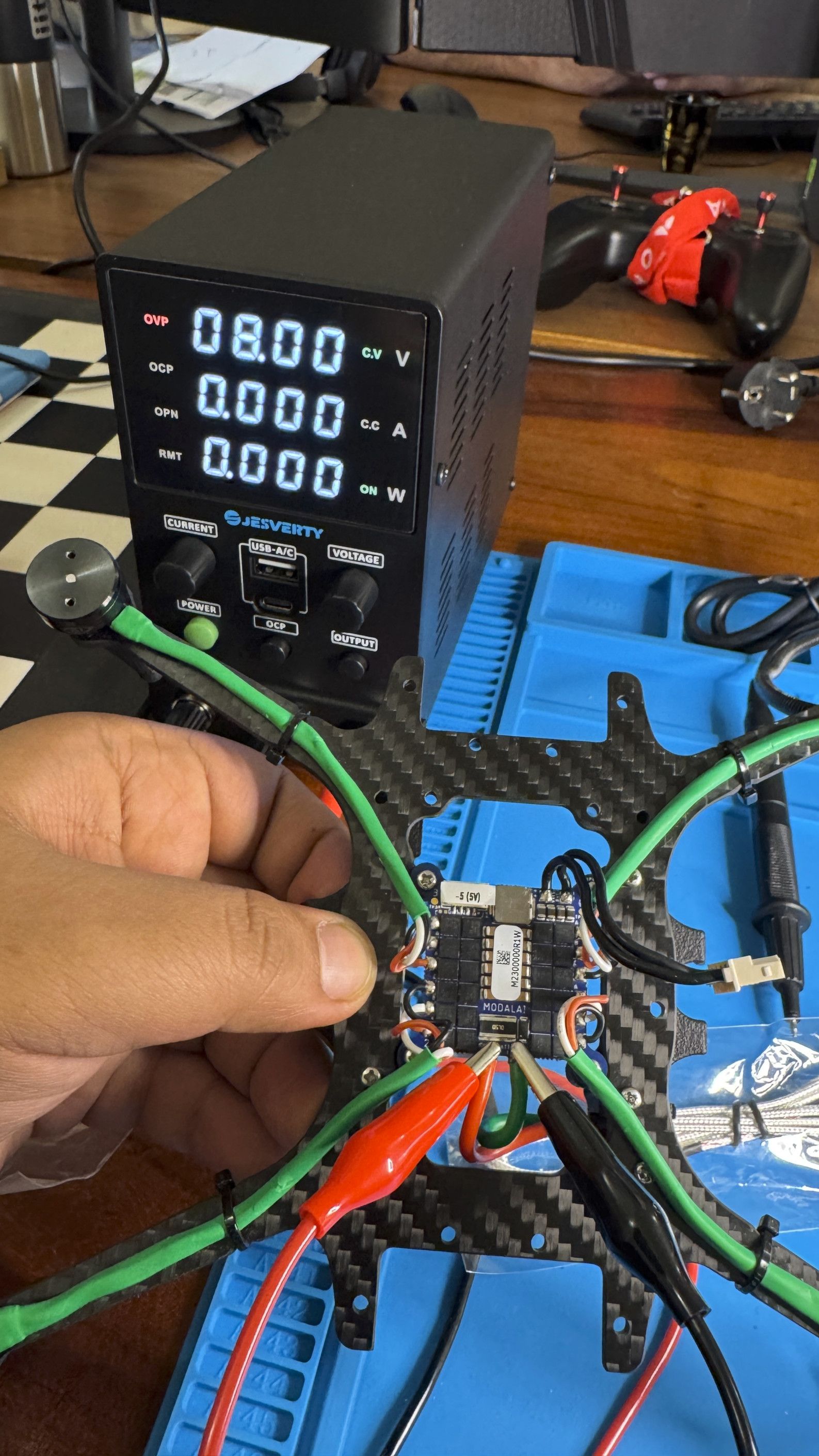
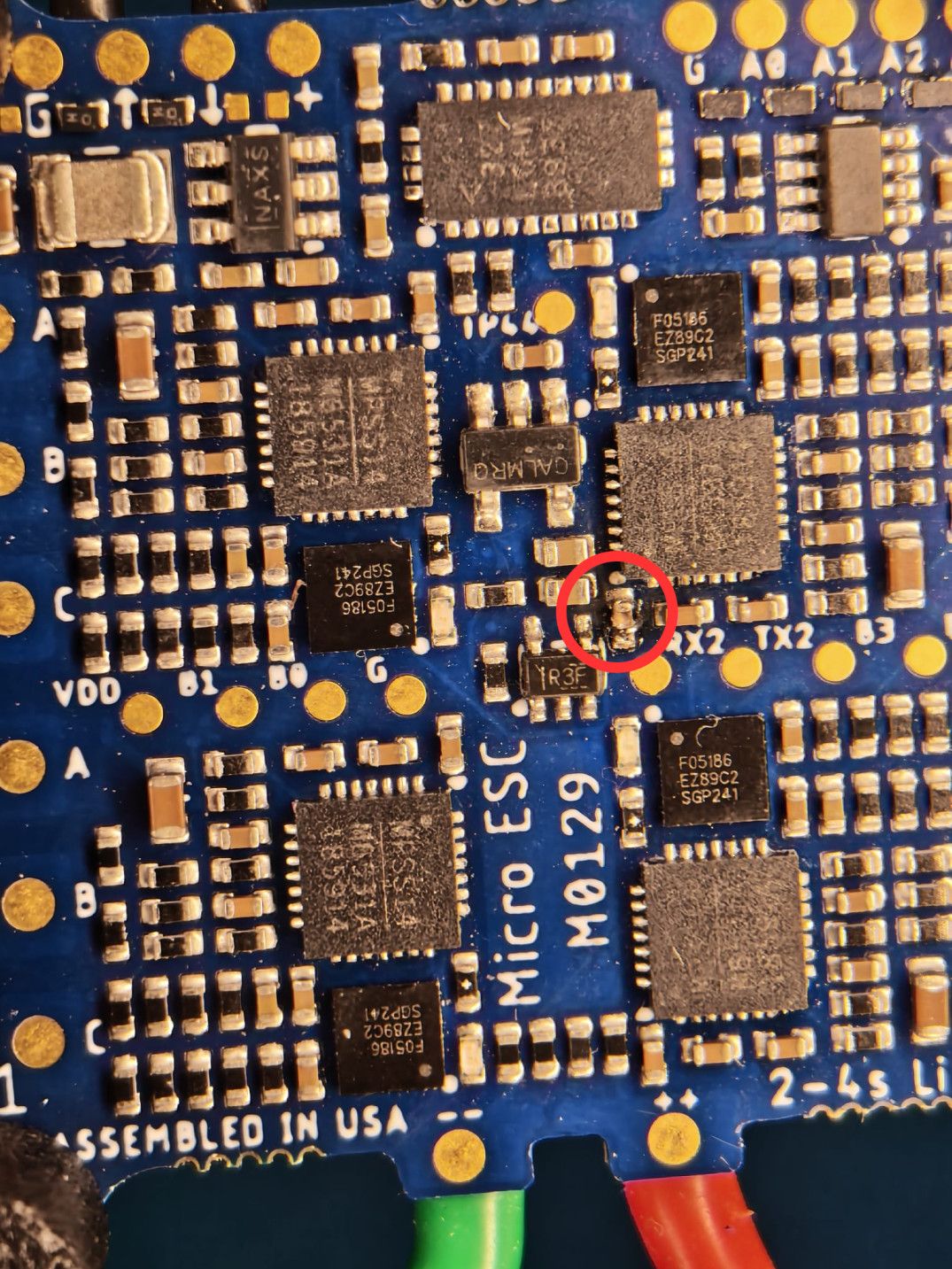
@Alex-Kushleyev I am a colleague of @syamala-kotireddy. We measured current draw of the ESC alone which is coming out to be zero. Please find the pictures attached.
-
@Alex-Kushleyev I am a colleague of @syamala-kotireddy. We measured current draw of the ESC alone which is coming out to be zero. Please find the pictures attached.
@boron , thank you for performing the test. Were you also to check if the 5V output (that normally goes to VOXL2) has 5V on it?
The capacitor that you circled in RED definitely appears to be damaged. This is a bypass capacitor on VBATT that is right next to the Mosfet Driver. It is possible that the capacitor was faulty and burned out, however since there is no short circuit or further overheating (based on the zero current draw from the power supply), the capacitor is probably not preventing the ESC MCUs from booting.
I suspect that there is another issue somewhere, but it would be good to know if the 5V rail is functional (i suspect that it is not). There is no on/off power switch on the ESC, so the main 5V regulator provides 5V from VBATT (which is used for VOXL2) and then another regulator that provides 3.3V (from 5.0V) for the four MCUs.
Alex
-
@boron , thank you for performing the test. Were you also to check if the 5V output (that normally goes to VOXL2) has 5V on it?
The capacitor that you circled in RED definitely appears to be damaged. This is a bypass capacitor on VBATT that is right next to the Mosfet Driver. It is possible that the capacitor was faulty and burned out, however since there is no short circuit or further overheating (based on the zero current draw from the power supply), the capacitor is probably not preventing the ESC MCUs from booting.
I suspect that there is another issue somewhere, but it would be good to know if the 5V rail is functional (i suspect that it is not). There is no on/off power switch on the ESC, so the main 5V regulator provides 5V from VBATT (which is used for VOXL2) and then another regulator that provides 3.3V (from 5.0V) for the four MCUs.
Alex
-
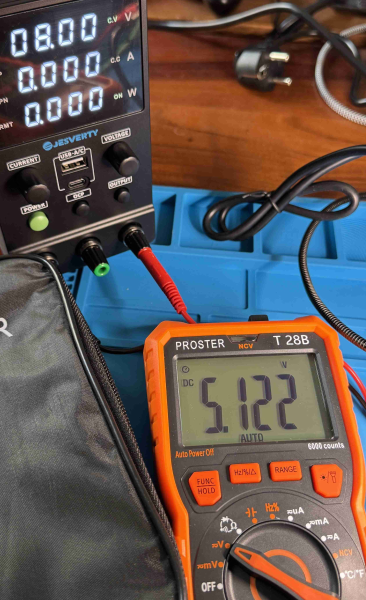
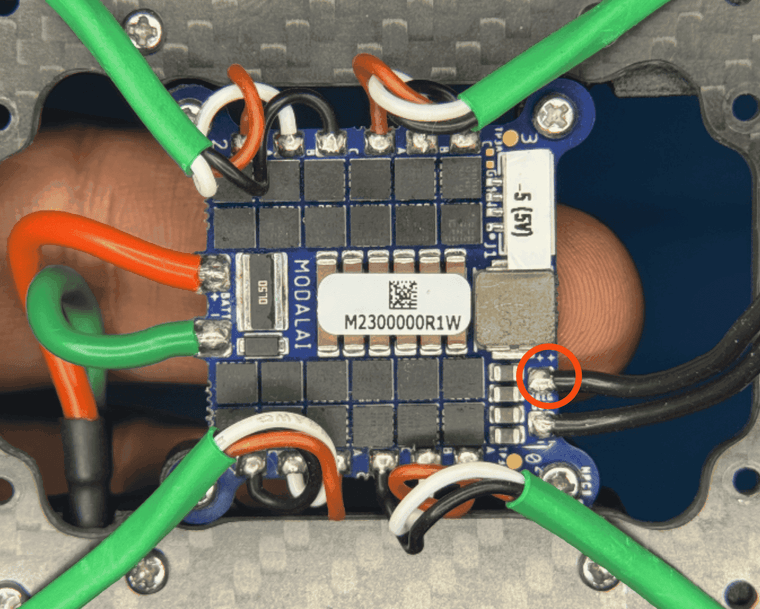
@Alex-Kushleyev Thank you for the clarifications. Suprisingly, the 5v rail seems to be working. Please find the pictures attached.
@boron Please submit an RMA, https://modalai.com/rma and just refer to this thread. Include your shipping information and we'll send you a new one



Reading along? Create a free ModalAI Forum account to join in.
With an account you can reply, ask your own question, get an email when a ModalAI engineer answers, and mark the reply that solved it. Your place in each thread is saved between visits.
Questions about VOXL, Flight Core, ESCs and ModalAI drones are answered here by the engineers who build them.
Register Login