
How to fix the UVC camera DEVICE ID
-
Hi Support Team,
[This is an inquiry regarding a UVC camera.]
We are using the voxl-mini as shown below.- hw platform: M0104
- voxl-suite: 1.4.5
- SKU: TF-M0104-6-V1-C6
- video codec(voxl-streamer): h.264
- Web camera: uvc(YUY2) format
[Inquiry]
- We are using a web camera.
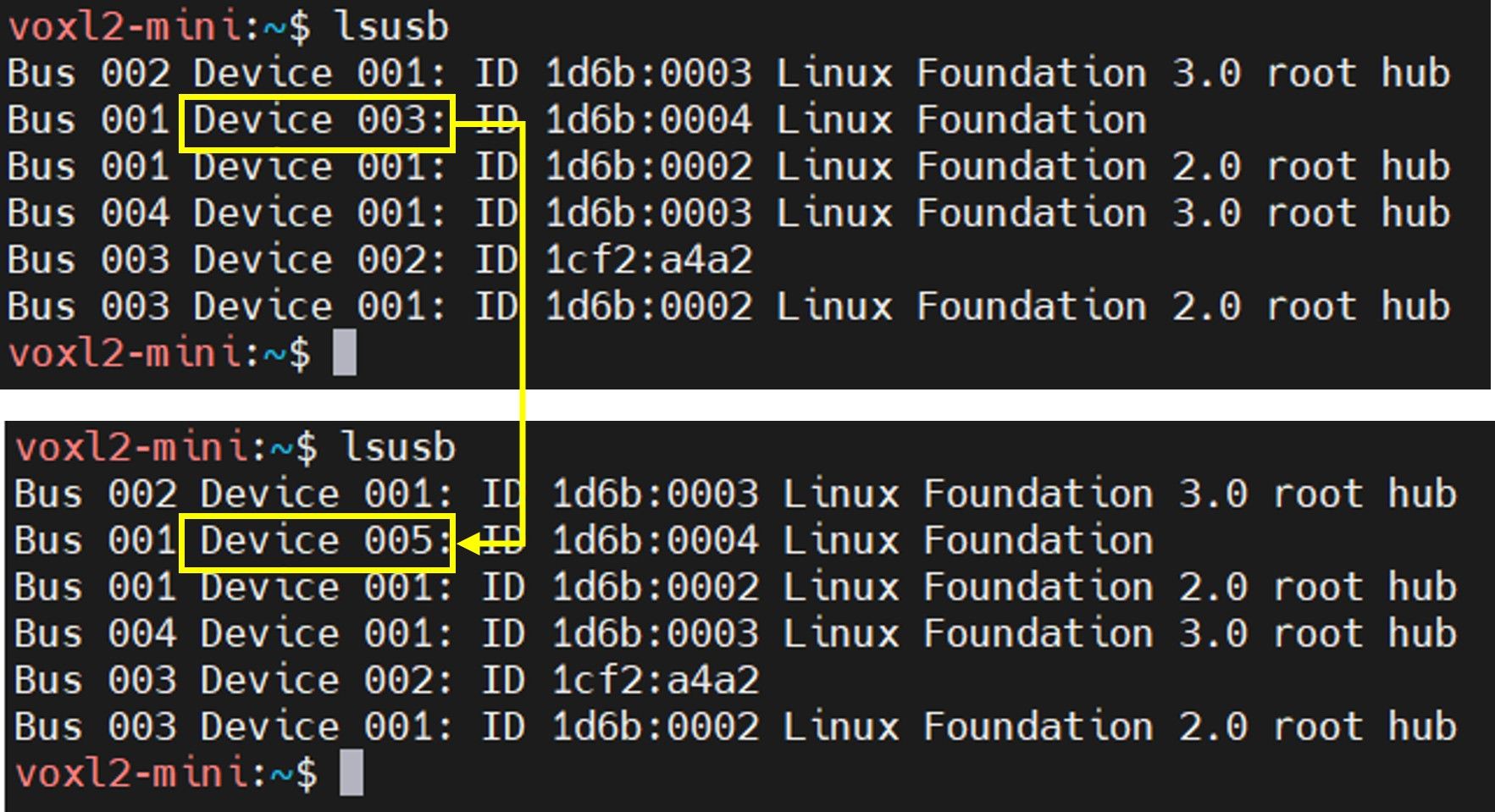
- The Device ID changes when the camera is turned back on (see figure below).
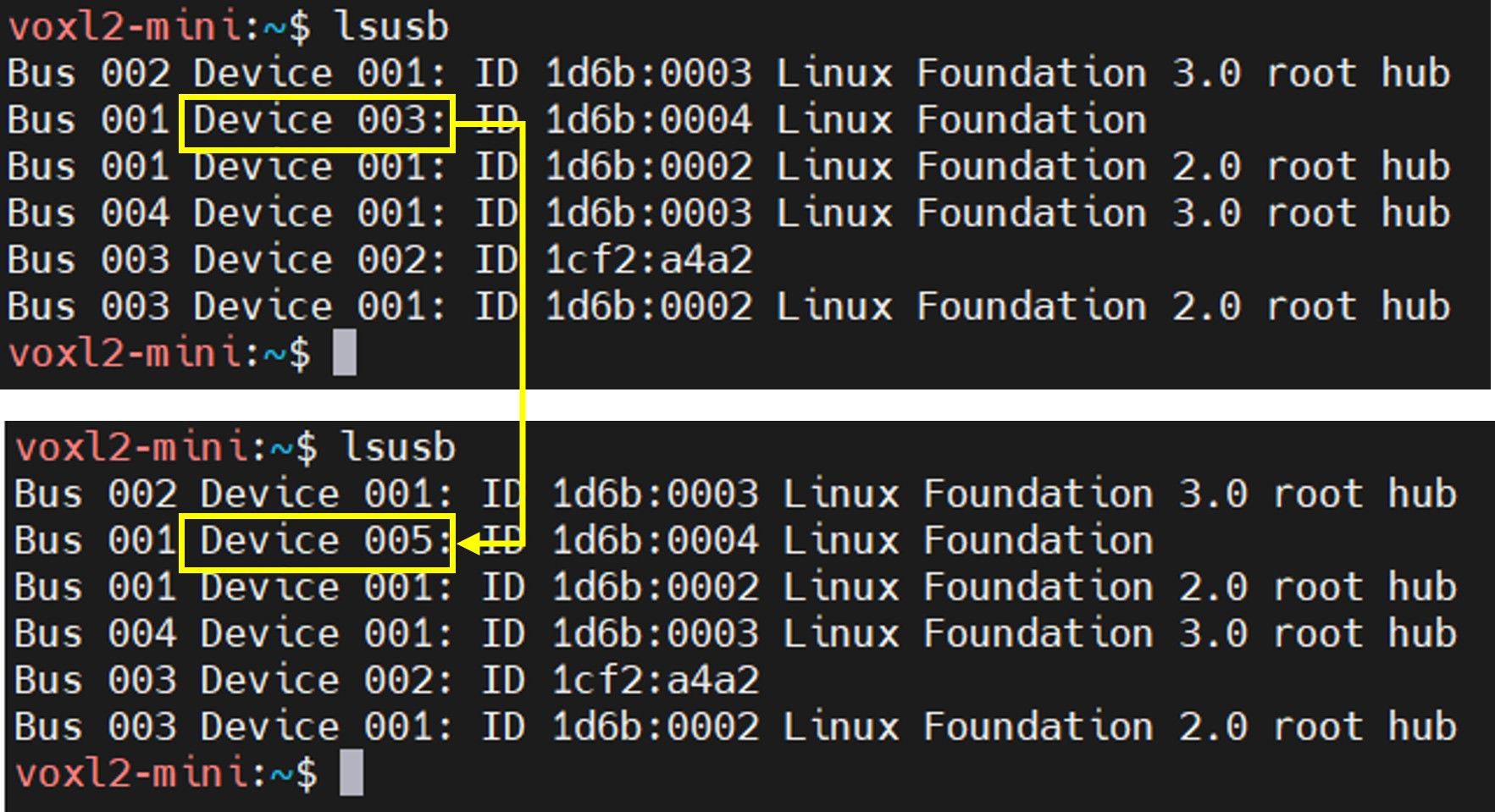
Therefore, we execute the command "systemctl restart voxl-uvc-server" every time. - Please tell me how to fix the Device ID.???
Thank you.
Kim. -
Hi Support team,
I would like to know how to resolve the issue regarding the DEVICE ID change.
Could you please provide a solution for the above?
e.g., Will creating a udev rule file resolve the issue?
Thank you.
Kim,
@Jskim , you should check dmesg to see maybe there are some warnings. Perhaps the device is not de-initialized properly (how are you powering it off?) and next time the OS allocates a new Device ID.
Either way, using
udevrule should help resolve the issue, however make sure there is no resource leak as a result of the device on/off. Also, if you keep turning the device on/off, does the device ID increment indefinitely?Alex
-
The Device ID continues to increase.
We are using a webcam with a built-in SD card.
We switch between SD card mode and Webcam mode by pressing a button.
When power is supplied to the camera, SD card mode is set by default, and pressing the button switches it to Webcam mode.
The DEVICE ID number increases every time the camera is connected.Thank you.
Kim -
The Device ID continues to increase.
We are using a webcam with a built-in SD card.
We switch between SD card mode and Webcam mode by pressing a button.
When power is supplied to the camera, SD card mode is set by default, and pressing the button switches it to Webcam mode.
The DEVICE ID number increases every time the camera is connected.Thank you.
Kim@Jskim , maybe it's ok that the Device ID is increasing, however it could mean the USB device is not de-initializing properly (according to the Kernel). Perhaps the device is still open / in use by
voxl-uvc-serverwhen you power the camera off (switch to the SD card mode).Please see some more information below that may be helpful.
Fix 1: Configure
voxl-uvc-serverto identify the camera by Vendor/Product IDInstead of relying on the device index, tell
voxl-uvc-serverto always find your camera by its USB VID:PID. This is the most robust approach.Step 1: Find your camera's Vendor ID and Product ID
lsusbLook for your UVC webcam in the output. The ID is in
VENDOR:PRODUCThex format, e.g.:Bus 001 Device 003: ID 090c:337b <-- vendor=090c, product=337bYou can also use the ModalAI helper script:
show-video-device-info.shStep 2: Update the
voxl-uvc-serverservice to pass VID/PIDEdit the systemd service override so the server always targets your specific camera:
mkdir -p /etc/systemd/system/voxl-uvc-server.service.d/
cat > /etc/systemd/system/voxl-uvc-server.service.d/override.conf << EOF
[Service]
ExecStart=
ExecStart=/usr/bin/voxl-uvc-server -v <your-vendor-id> -p <your-product-id>
EOF
systemctl daemon-reload
systemctl restart voxl-uvc-server
Replace
<your-vendor-id>and<your-product-id>with the hex values fromlsusb. With this in place,voxl-uvc-serverwill find the camera by identity rather than by device node index, so it will survive power cycles without needing a manual restart.
Fix 2: Create a udev rule for a persistent
/devsymlinkThis assigns a stable name (e.g.,
/dev/uvc_cam) to your camera regardless of enumeration order:cat > /etc/udev/rules.d/99-uvc-camera.rules << EOF SUBSYSTEM=="video4linux", ATTRS{idVendor}=="<your-vendor-id>", ATTRS{idProduct}=="<your-product-id>", SYMLINK+="uvc_cam", MODE="0660" EOF udevadm control --reload-rules udevadm triggerAfter this,
/dev/uvc_camwill always point to your camera. You can reference this stable symlink in any configuration.
Fix 3: Check
dmesgfor resource leak warningsIf the device ID keeps incrementing (e.g.,
/dev/video0→/dev/video1→/dev/video2...) rather than re-using the same node, there may be an underlying resource leak from improper de-initialization:dmesg | grep -i "uvc\|video\|usb" | tail -50Look for warnings about disconnection or failed cleanup. If the ID increments indefinitely, this points to a kernel-side resource not being released properly on power-off — that may require a deeper fix or a
systemctl stop voxl-uvc-serverbefore powering down the camera.
Summary
Step Action 1 Run lsusbto get your camera's Vendor ID and Product ID2 Pass -v <vid> -p <pid>tovoxl-uvc-servervia a systemd override3 Optionally create a udev rule for a stable /dev/uvc_camsymlink4 Check dmesgfor warnings if the device ID keeps incrementingThe vendor/product ID approach (Fix 1) should eliminate the need for the manual
systemctl restartworkaround entirely.

Reading along? Create a free ModalAI Forum account to join in.
With an account you can reply, ask your own question, get an email when a ModalAI engineer answers, and mark the reply that solved it. Your place in each thread is saved between visits.
Questions about VOXL, Flight Core, ESCs and ModalAI drones are answered here by the engineers who build them.
Register Login