
No ov_overlay in portal
-
Hi everyone,
we managed to get OpenVINS running on our setup (similar to a Starling C27). In the VOXL Portal, under the VIO tab, the trajectories and motion estimates look good so far, so OpenVINS itself seems to be working correctly.
However, we can’t find the ov_overlay in the Camera tab to visualize the tracked features from the tracking cameras. According to the documentation
(https://docs.modalai.com/voxl-open-vins-server), there should be an ov_overlay available in the camera view, but it doesn’t appear for us.Has anyone encountered this issue before or knows what might be missing or misconfigured on our side?
Thanks a lot for your help!
-
Hi everyone,
we managed to get OpenVINS running on our setup (similar to a Starling C27). In the VOXL Portal, under the VIO tab, the trajectories and motion estimates look good so far, so OpenVINS itself seems to be working correctly.
However, we can’t find the ov_overlay in the Camera tab to visualize the tracked features from the tracking cameras. According to the documentation
(https://docs.modalai.com/voxl-open-vins-server), there should be an ov_overlay available in the camera view, but it doesn’t appear for us.Has anyone encountered this issue before or knows what might be missing or misconfigured on our side?
Thanks a lot for your help!
@Dronodev
ov_overlay is now available under the VIO tab in voxl-portal. Please make sure to update your system to the latest released SDK. -
@Dronodev
ov_overlay is now available under the VIO tab in voxl-portal. Please make sure to update your system to the latest released SDK.@zauberflote1 I updated my system to the latest SDK 1.6.2 but unfortunately when I am in the VIO tab in voxl-portal, nothing happens when I click on the little tv-icon. Is there anything I need to configure to display the camera overlay?
-
@zauberflote1 I updated my system to the latest SDK 1.6.2 but unfortunately when I am in the VIO tab in voxl-portal, nothing happens when I click on the little tv-icon. Is there anything I need to configure to display the camera overlay?
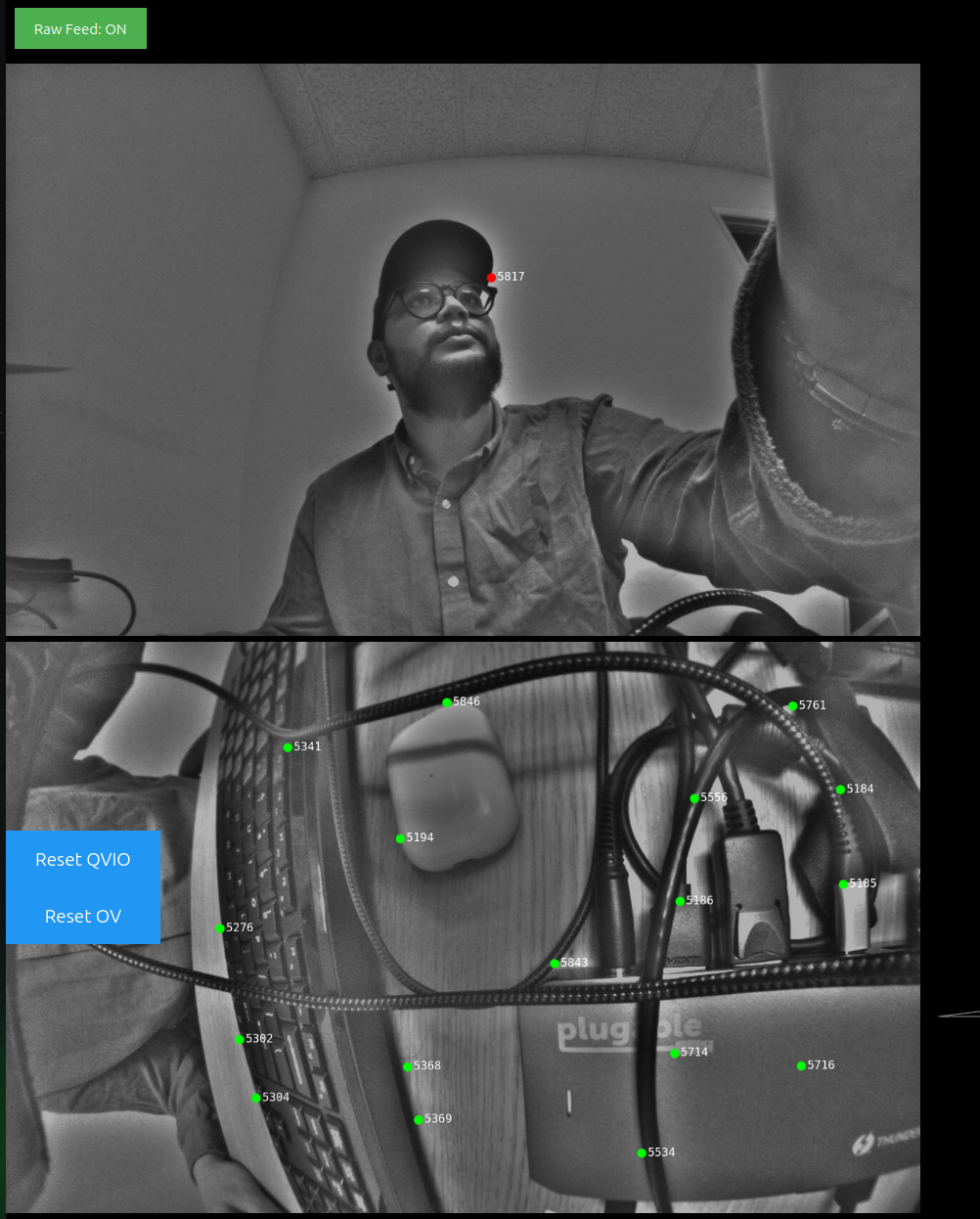
Can you confirm you have the raw feed button? Please give a try if you have.
Example follows:
-
Can you confirm you have the raw feed button? Please give a try if you have.
Example follows:
Unfortunately i don't have the raw feed button. This is what my vio tab looks like:
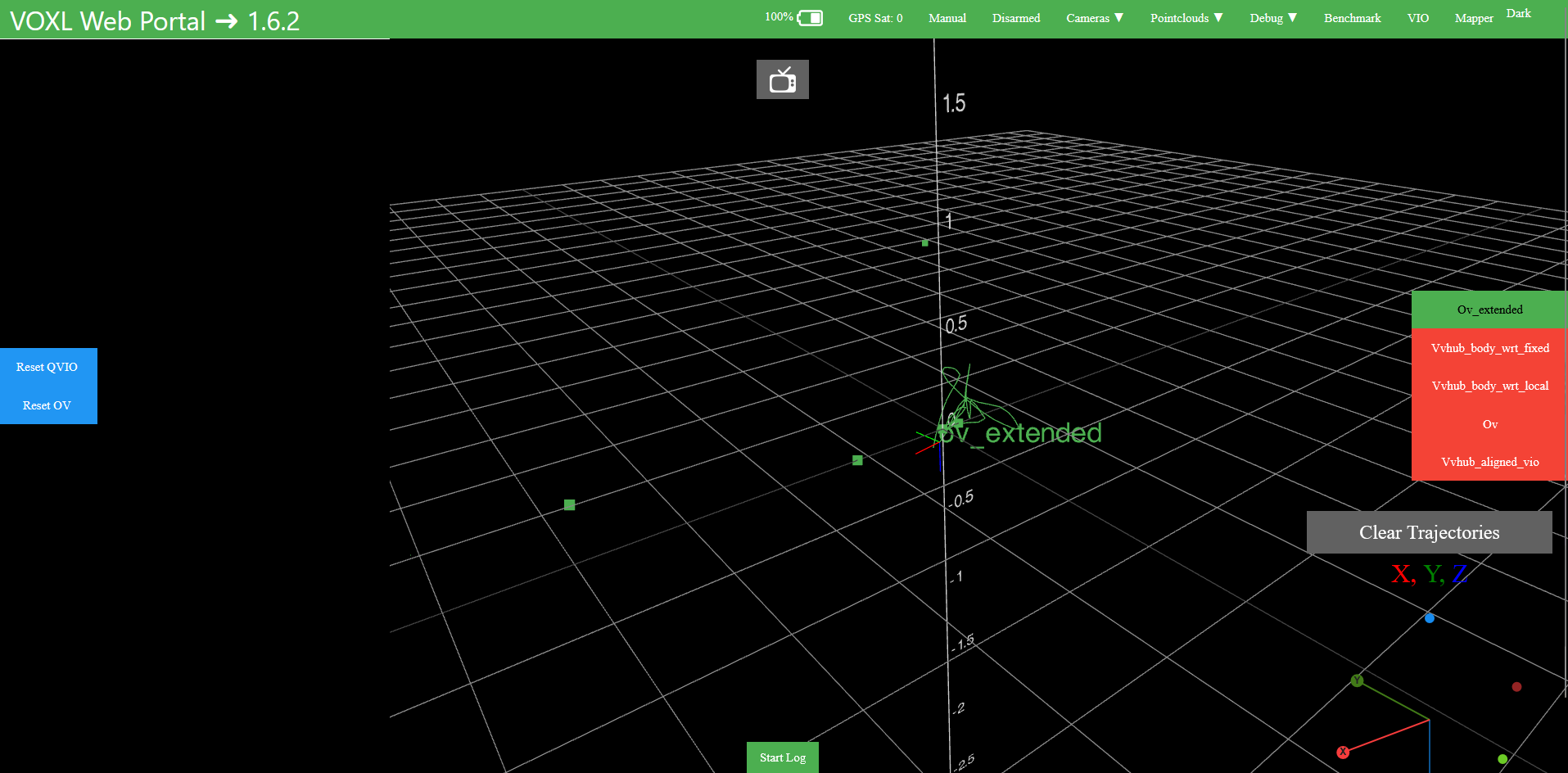
When I try clicking on the little tv-icon at the top, nothing happens.
To be sure I configured everything correctly here is my config:
system-image: 1.8.06-M0054-14.1a-perf
kernel: #1 SMP PREEMPT Wed Oct 22 04:13:18 UTC 2025 4.19.125
mach.var: 1.0.1
SKU: MRB-D0014-4-V1-C27-T0-M28-X0
voxl-suite: 1.6.2Is 1.6.2 the newest SDK ?
I donwloaded the SDK from here: https://developer.modalai.com/asset/eula-download/188 -
It will be released on 1.6.3. If you need the feature now, you can always build it from source and deploy to your voxl.
https://gitlab.com/voxl-public/voxl-sdk/services/voxl-portal/-/tree/dev?ref_type=heads
-
It will be released on 1.6.3. If you need the feature now, you can always build it from source and deploy to your voxl.
https://gitlab.com/voxl-public/voxl-sdk/services/voxl-portal/-/tree/dev?ref_type=heads
alright, thanks for your help!

Reading along? Create a free ModalAI Forum account to join in.
With an account you can reply, ask your own question, get an email when a ModalAI engineer answers, and mark the reply that solved it. Your place in each thread is saved between visits.
Questions about VOXL, Flight Core, ESCs and ModalAI drones are answered here by the engineers who build them.
Register Login