
Be careful building voxl-cross on older SDKS (Other than V1.50.0)
-
Good day everyone!
Currently my voxl board is on sdk 1.4.5 and I had to make changes on voxl-vision-hub (1.8.21). I was building the package on voxl-cross:V4.4 and running the relocalization stack. Afterwards, when running
voxl-inspect-pose, I came across the error about:ERROR validating pose_vel_6dof_t data received through pipe: 1 of 1 packets failedAfter more digging, it turns out to be a magic number mismatch.
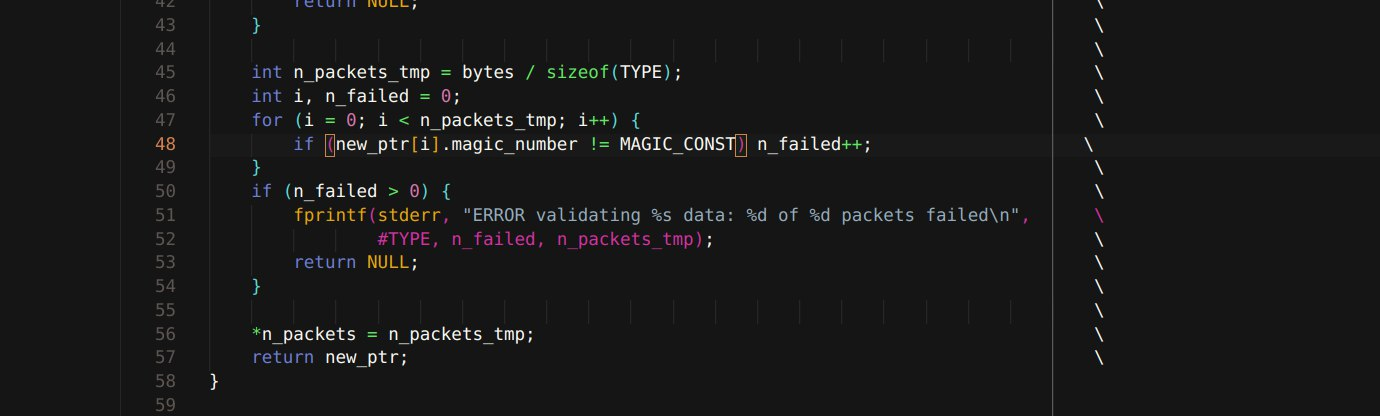
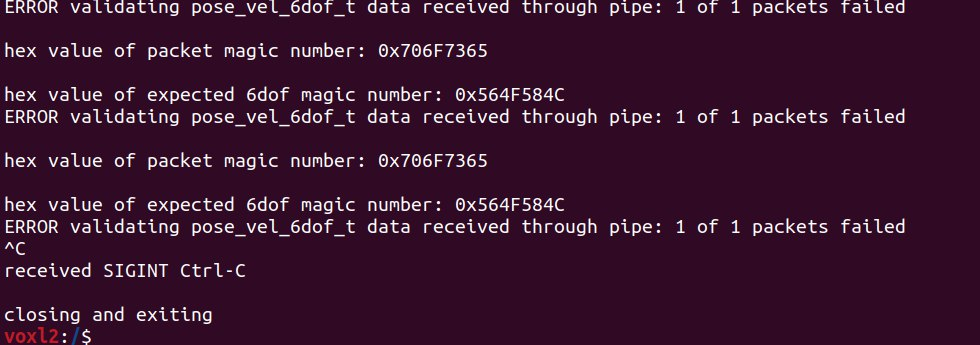
This is because of a recent magic number update in voxl sdk v1.5.0 (https://gitlab.com/voxl-public/voxl-sdk/core-libs/libmodal-pipe/-/blob/master/library/include/pipe_interfaces/magic_number.h?ref_type=heads).Based on voxl-cross:V4.4's dockerfile, https://gitlab.com/voxl-public/support/voxl-docker/-/blob/master/voxl-cross/voxl-cross.Dockerfile?ref_type=heads, the sdk is downloaded through
RUN wget http://voxl-packages.modalai.com/dists/qrb5165/sdk-1.5/binary-arm64/voxl-opencv_4.5.5-3_arm64.debThis results in any package being built by voxl-cross:v4.4 to inherit the new sdk's header files which lead to the magic number mismatch.
I cannot think of a better fix other than to rebuild the docker container to match your own custom sdk. For others that might face the same problem or are not using V1.5.0 sdk, just be careful about the upstream dependencies(Especially the core libraries) when building voxl-cross.
-
Good day everyone!
Currently my voxl board is on sdk 1.4.5 and I had to make changes on voxl-vision-hub (1.8.21). I was building the package on voxl-cross:V4.4 and running the relocalization stack. Afterwards, when running
voxl-inspect-pose, I came across the error about:ERROR validating pose_vel_6dof_t data received through pipe: 1 of 1 packets failedAfter more digging, it turns out to be a magic number mismatch.
This is because of a recent magic number update in voxl sdk v1.5.0 (https://gitlab.com/voxl-public/voxl-sdk/core-libs/libmodal-pipe/-/blob/master/library/include/pipe_interfaces/magic_number.h?ref_type=heads).Based on voxl-cross:V4.4's dockerfile, https://gitlab.com/voxl-public/support/voxl-docker/-/blob/master/voxl-cross/voxl-cross.Dockerfile?ref_type=heads, the sdk is downloaded through
RUN wget http://voxl-packages.modalai.com/dists/qrb5165/sdk-1.5/binary-arm64/voxl-opencv_4.5.5-3_arm64.debThis results in any package being built by voxl-cross:v4.4 to inherit the new sdk's header files which lead to the magic number mismatch.
I cannot think of a better fix other than to rebuild the docker container to match your own custom sdk. For others that might face the same problem or are not using V1.5.0 sdk, just be careful about the upstream dependencies(Especially the core libraries) when building voxl-cross.
@monkescripts said in Be careful building voxl-cross on older SDKS (Other than V1.50.0):
RUN wget http://voxl-packages.modalai.com/dists/qrb5165/sdk-1.5/binary-arm64/voxl-opencv_4.5.5-3_arm64.deb
This line installs only the opencv package into the
voxl-crossdocker image, it does not install the SDK.The mismatch you are referring to is related to to applications being built against one version of header files, while being deployed on a system that has a different version of the corresponding library. In this case, the library is
libmodal-pipe, which has had a change affecting the structure of some data types.Most likely, what happened was that you hand an older version of SDK and other libraries installed on the VOXL2, but when you built your application using
voxl-cross, the step which installs the dependecies (./install_build_deps.sh qrb5165 <....>) pulled in a newer version of thelibmodal-pipelibrary and headers. When the application was deployed to voxl2, at run-time, it linked to the oldlibmodal-pipeshared library, causing the mismatch.There are many updates to
libmodal-pipeand most of them do not cause any issues because there are added features, which do not break existing functionality. However, sometimes, a breaking change like this happens..Alex
-
@monkescripts said in Be careful building voxl-cross on older SDKS (Other than V1.50.0):
RUN wget http://voxl-packages.modalai.com/dists/qrb5165/sdk-1.5/binary-arm64/voxl-opencv_4.5.5-3_arm64.deb
This line installs only the opencv package into the
voxl-crossdocker image, it does not install the SDK.The mismatch you are referring to is related to to applications being built against one version of header files, while being deployed on a system that has a different version of the corresponding library. In this case, the library is
libmodal-pipe, which has had a change affecting the structure of some data types.Most likely, what happened was that you hand an older version of SDK and other libraries installed on the VOXL2, but when you built your application using
voxl-cross, the step which installs the dependecies (./install_build_deps.sh qrb5165 <....>) pulled in a newer version of thelibmodal-pipelibrary and headers. When the application was deployed to voxl2, at run-time, it linked to the oldlibmodal-pipeshared library, causing the mismatch.There are many updates to
libmodal-pipeand most of them do not cause any issues because there are added features, which do not break existing functionality. However, sometimes, a breaking change like this happens..Alex
Thank you @Alex-Kushleyev for the clarification. Currently I just redefined the magic numbers on my own and voxl-inspect-pose works as usual. I am hoping that this breaking change only affects a small number of use cases. If anyone else faces the same issue with magic numbers theres at least the discussion that might help them as well



Reading along? Create a free ModalAI Forum account to join in.
With an account you can reply, ask your own question, get an email when a ModalAI engineer answers, and mark the reply that solved it. Your place in each thread is saved between visits.
Questions about VOXL, Flight Core, ESCs and ModalAI drones are answered here by the engineers who build them.
Register Login