
setting up VIO on VOXL2 (custom frame)
-
I am trying to set up VIO for a custom frame which has two ar0144 (down and front) cameras.
I have followed this sequence so far:
1- voxl-camera-serveris up and running and I can see both camera feed in portal and using voxl-inspect-cam
2- saved Extrinsics to /etc/modal/extrinsics.conf
3- made sure vio_cams.conf exists and information makes sense
4- following instructions as outlined here: https://docs.modalai.com/open-vins/ (with the exception of my SDK version which in my case is 1.5.0)here is the default content of voxl-open-vins-server.conf:
/**
 * This file contains configuration that's specific to voxl-open-vins-server.
 *
 * *NOTE*: all time variables are measured in seconds
 */
{
	"en_auto_reset":	true,
	"auto_reset_max_velocity":	20,
	"auto_reset_max_v_cov_instant":	0.20000000298023224,
	"auto_reset_max_v_cov":	0.20000000298023224,
	"auto_reset_max_v_cov_timeout_s":	0.5,
	"auto_reset_min_features":	1,
	"auto_reset_min_feature_timeout_s":	3,
	"auto_fallback_timeout_s":	3,
	"auto_fallback_min_v":	0.600000023841858,
	"en_cont_yaw_checks":	false,
	"fast_yaw_thresh":	5,
	"fast_yaw_timeout_s":	1.75,
	"yaml_folder":	"/usr/share/modalai/voxl-open-vins/VoxlConfig/starling2",
	"using_stereo":	0,
	"takeoff_alt_threshold":	0.5,
	"takeoff_occlude_stereo_left":	false,
	"takeoff_occlude_stereo_right":	false,
	"sync_config":	true
}
5- I see voxl-open-vins-server process is not running and when I try to run it manually I get the following warning/error:
WARNING: cal file opencv_tracking_front_intrinsics.yml is missing or invalid
run voxl-check-calibration to see what calibration files are missing
WARNING: cal file opencv_tracking_down_intrinsics.yml is missing or invalid
run voxl-check-calibration to see what calibration files are missing
failed to find cam cal for vio cam tracking_front
ERROR cam_config_file_read
QUIT REQUESTED
Shutting down cameras...
Camera shutdown complete
error code: -1
I am currently in the process of calibrating the camera but I am unable to complete it. I can see the overlay in the portal and all corners being detected but calibration is not progressing beyond %0
-
I am trying to set up VIO for a custom frame which has two ar0144 (down and front) cameras.
I have followed this sequence so far:
1- voxl-camera-serveris up and running and I can see both camera feed in portal and using voxl-inspect-cam
2- saved Extrinsics to /etc/modal/extrinsics.conf
3- made sure vio_cams.conf exists and information makes sense
4- following instructions as outlined here: https://docs.modalai.com/open-vins/ (with the exception of my SDK version which in my case is 1.5.0)here is the default content of voxl-open-vins-server.conf:
/**
 * This file contains configuration that's specific to voxl-open-vins-server.
 *
 * *NOTE*: all time variables are measured in seconds
 */
{
	"en_auto_reset":	true,
	"auto_reset_max_velocity":	20,
	"auto_reset_max_v_cov_instant":	0.20000000298023224,
	"auto_reset_max_v_cov":	0.20000000298023224,
	"auto_reset_max_v_cov_timeout_s":	0.5,
	"auto_reset_min_features":	1,
	"auto_reset_min_feature_timeout_s":	3,
	"auto_fallback_timeout_s":	3,
	"auto_fallback_min_v":	0.600000023841858,
	"en_cont_yaw_checks":	false,
	"fast_yaw_thresh":	5,
	"fast_yaw_timeout_s":	1.75,
	"yaml_folder":	"/usr/share/modalai/voxl-open-vins/VoxlConfig/starling2",
	"using_stereo":	0,
	"takeoff_alt_threshold":	0.5,
	"takeoff_occlude_stereo_left":	false,
	"takeoff_occlude_stereo_right":	false,
	"sync_config":	true
}
5- I see voxl-open-vins-server process is not running and when I try to run it manually I get the following warning/error:
WARNING: cal file opencv_tracking_front_intrinsics.yml is missing or invalid
run voxl-check-calibration to see what calibration files are missing
WARNING: cal file opencv_tracking_down_intrinsics.yml is missing or invalid
run voxl-check-calibration to see what calibration files are missing
failed to find cam cal for vio cam tracking_front
ERROR cam_config_file_read
QUIT REQUESTED
Shutting down cameras...
Camera shutdown complete
error code: -1
I am currently in the process of calibrating the camera but I am unable to complete it. I can see the overlay in the portal and all corners being detected but calibration is not progressing beyond %0
@psafi Here are the steps I am taking for camera calibration:
1- run the following command:
voxl-calibrate-camera tracking_down -f -s 6x9 -l 0.0222- look at the overlay in portal (see the screenshot below)
3- calibration process is not progressing automatically even though it seems like the checkerboard is detected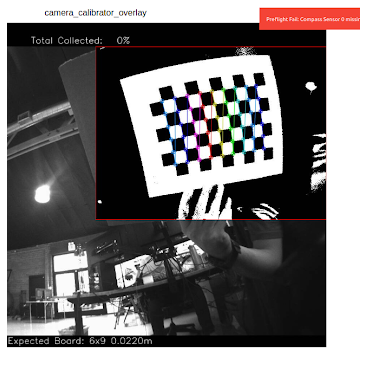
Reading along? Create a free ModalAI Forum account to join in.
With an account you can reply, ask your own question, get an email when a ModalAI engineer answers, and mark the reply that solved it. Your place in each thread is saved between visits.
Questions about VOXL, Flight Core, ESCs and ModalAI drones are answered here by the engineers who build them.
Register Login