
QVIO NO DATA - MAVLINK MISSING TOPICS
-
Hi everyone
We re developing a small robot with a voxl2 dev kit flight deck. We aally the imu), process it and control external inputs through a custom PCB with I2C.
Our objective is to gather info from qVIO/VIO but right now we cant read data from the sensors... we only managed to do it through uorb using listeners (px4-listener vehicle_visual_odometry) but its not efficient to develop scripts that gather info from the listeners... we were hoping to subscribe to the topics using mavlink... When we attempt to check them on qground control or like this: https://docs.modalai.com/mavlink/#debugging-with-voxl-inspect-mavlink , doesnt have odometry listed (e.g.), and several others are missing.
We already tried reconfiguring all the px4 parameters including the ekf2 and it still has the same error of missing data ... The only sensors that we are able to utilize for this project are the cameras (VIO) and px4 IMU.I was wondering if there is any special configuration that we re missing...or just simply the px4 isnt broadcasting through mavlink some of the topics but if that is the case ... What do you guys recommend? We are quite stuck.
Thanks in advance. -
Hi everyone
We re developing a small robot with a voxl2 dev kit flight deck. We aally the imu), process it and control external inputs through a custom PCB with I2C.
Our objective is to gather info from qVIO/VIO but right now we cant read data from the sensors... we only managed to do it through uorb using listeners (px4-listener vehicle_visual_odometry) but its not efficient to develop scripts that gather info from the listeners... we were hoping to subscribe to the topics using mavlink... When we attempt to check them on qground control or like this: https://docs.modalai.com/mavlink/#debugging-with-voxl-inspect-mavlink , doesnt have odometry listed (e.g.), and several others are missing.
We already tried reconfiguring all the px4 parameters including the ekf2 and it still has the same error of missing data ... The only sensors that we are able to utilize for this project are the cameras (VIO) and px4 IMU.I was wondering if there is any special configuration that we re missing...or just simply the px4 isnt broadcasting through mavlink some of the topics but if that is the case ... What do you guys recommend? We are quite stuck.
Thanks in advance.@andrevs01 I'm not really understanding your question. You seem to want access to VIO data. Is this for an application running on the VOXL 2? What VIO data do you need?
-
@andrevs01 I'm not really understanding your question. You seem to want access to VIO data. Is this for an application running on the VOXL 2? What VIO data do you need?
@Eric-Katzfey Hi, thank you for the quick response.
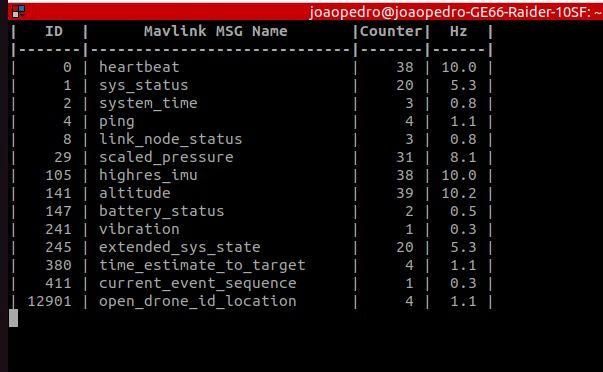
I'm sorry if my message wasn't clear. I want to access VIO data, especially the data from the attitude and translational: quaternions (q), angular velocity (w), general position of the robot (x), and linear velocity (v). I was hoping to get these parameters through the MAVLINK ODOMETRY #331 parameter, but it's inaccessible through QGroundControl, or the mavlink/mavsdk (voxl-inspect-mavlink mavlink_onboard)I ultimately aim to run an application inside the VOXL2 that subscribes to the topic, processes its information + some calculations, and delivers a command message through I2C for an external board that we developed for the control of our actuators.
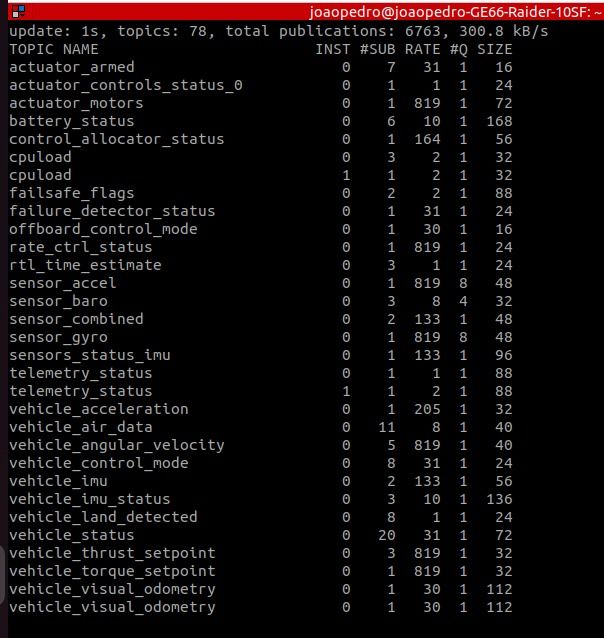
I can view the data through the QORB topic (using the px4-listener command), and it is working just fine... I just don't get why I can't access this data through MAVLINK.. any suggestions? We've tried manually enabling the streaming like this mavlink stream -u 14550 -s ODOMETRY -r 10 with no avail.
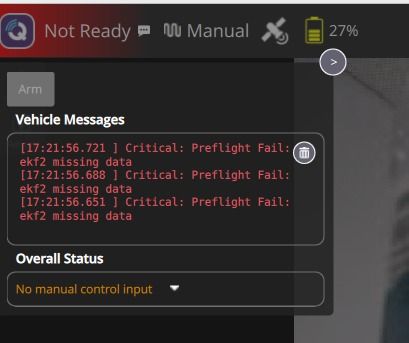
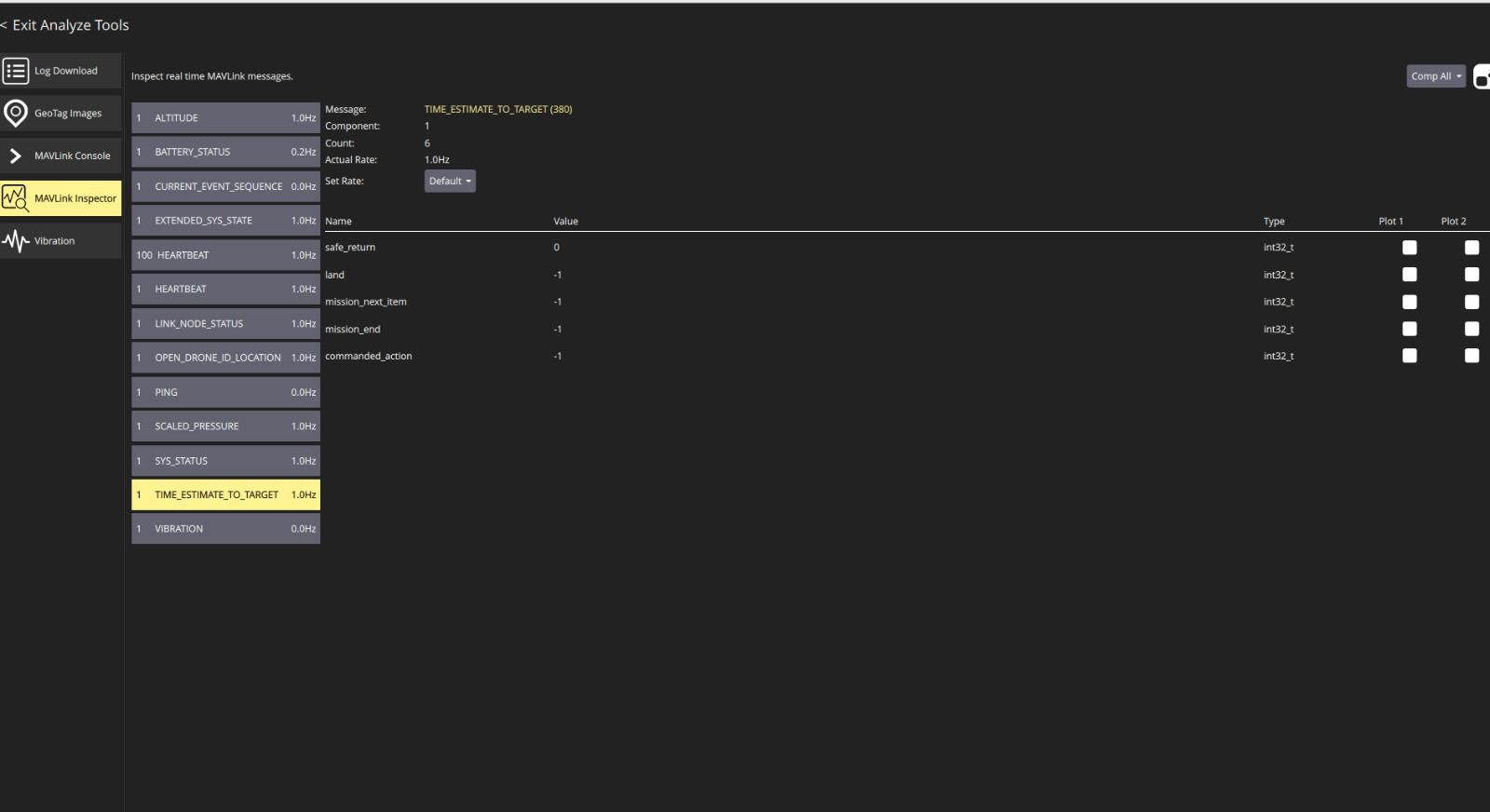
I will send you some of the pictures of the errors we're getting / some of the outputs of commands.
Thanks again in advance!!
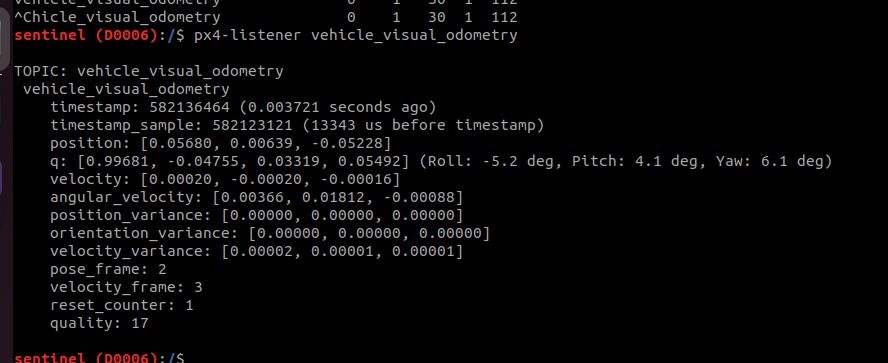
-
@Eric-Katzfey Hi, thank you for the quick response.
I'm sorry if my message wasn't clear. I want to access VIO data, especially the data from the attitude and translational: quaternions (q), angular velocity (w), general position of the robot (x), and linear velocity (v). I was hoping to get these parameters through the MAVLINK ODOMETRY #331 parameter, but it's inaccessible through QGroundControl, or the mavlink/mavsdk (voxl-inspect-mavlink mavlink_onboard)I ultimately aim to run an application inside the VOXL2 that subscribes to the topic, processes its information + some calculations, and delivers a command message through I2C for an external board that we developed for the control of our actuators.
I can view the data through the QORB topic (using the px4-listener command), and it is working just fine... I just don't get why I can't access this data through MAVLINK.. any suggestions? We've tried manually enabling the streaming like this mavlink stream -u 14550 -s ODOMETRY -r 10 with no avail.
I will send you some of the pictures of the errors we're getting / some of the outputs of commands.
Thanks again in advance!!
@andrevs01 voxl-vision-hub sends the Mavlink ODOMETRY message to PX4. Generally, VOXL applications send data around using Modal Pipe Architecture (MPA). If you need this information in your application you can subscribe to the pipe producing VIO data and get it straight from there. Or, you can get it via the Mavlink messages sent via MPA. I'm not sure why you cannot configure PX4 to send out the stream though. There are 2 streams sent out, one for QGC with lower bandwidth and one for onboard processes that has higher bandwidth.
-
@Eric-Katzfey Hi, thank you for the quick response.
I'm sorry if my message wasn't clear. I want to access VIO data, especially the data from the attitude and translational: quaternions (q), angular velocity (w), general position of the robot (x), and linear velocity (v). I was hoping to get these parameters through the MAVLINK ODOMETRY #331 parameter, but it's inaccessible through QGroundControl, or the mavlink/mavsdk (voxl-inspect-mavlink mavlink_onboard)I ultimately aim to run an application inside the VOXL2 that subscribes to the topic, processes its information + some calculations, and delivers a command message through I2C for an external board that we developed for the control of our actuators.
I can view the data through the QORB topic (using the px4-listener command), and it is working just fine... I just don't get why I can't access this data through MAVLINK.. any suggestions? We've tried manually enabling the streaming like this mavlink stream -u 14550 -s ODOMETRY -r 10 with no avail.
I will send you some of the pictures of the errors we're getting / some of the outputs of commands.
Thanks again in advance!!
@andrevs01 You can see the PX4 start up script in
/usr/bin/voxl-px4-start. You can see the streams being configured there. -
@andrevs01 You can see the PX4 start up script in
/usr/bin/voxl-px4-start. You can see the streams being configured there.@Eric-Katzfey Hi.
Thank you for the messages. Sorry for not updating the forum.We decided to reinstall everything regarding voxl and made some changes which quite frankly, we dont remember (some config files). All of these efforts were to try to get it via the Mavlink messages sent via MPA. Mavlink never worked ... until randomly, today!
Meanwhile, we decided to use ROS2 via MPA as an alternative for getting the data for our scripts and we've using that since it works well.
Today we logged into QGroundControl and every topic was broadcasted... does the ROS2 have any relation to the topics broadcasted by Mavlink? Curious about this...
Thank you again!
-
@Eric-Katzfey Hi.
Thank you for the messages. Sorry for not updating the forum.We decided to reinstall everything regarding voxl and made some changes which quite frankly, we dont remember (some config files). All of these efforts were to try to get it via the Mavlink messages sent via MPA. Mavlink never worked ... until randomly, today!
Meanwhile, we decided to use ROS2 via MPA as an alternative for getting the data for our scripts and we've using that since it works well.
Today we logged into QGroundControl and every topic was broadcasted... does the ROS2 have any relation to the topics broadcasted by Mavlink? Curious about this...
Thank you again!
@andrevs01 No, what Mavlink broadcasts is configured separately from anything related to ROS2
-
@andrevs01 No, what Mavlink broadcasts is configured separately from anything related to ROS2
-
@Eric-Katzfey Well i dont really know then, because we rebooted the board again and stopped working.. maybe we have to configure something prior in order to the mavlink to start working with all the topics.. thanks
@andrevs01 But, the configuration of what Mavlink broadcasts can be different than what it actually broadcasts. It will only broadcast something that it is configured to broadcast if it is receiving data from the required topic(s) internally.

Reading along? Create a free ModalAI Forum account to join in.
With an account you can reply, ask your own question, get an email when a ModalAI engineer answers, and mark the reply that solved it. Your place in each thread is saved between visits.
Questions about VOXL, Flight Core, ESCs and ModalAI drones are answered here by the engineers who build them.
Register Login