
Camera server: Preview stream stops when Large video activated
-
We at Cleo recently started using the hires large encoded stream.
We realized that when we started a client for the large pipe, the preview stream results would stop coming through. I confirmed this by adding the following prints
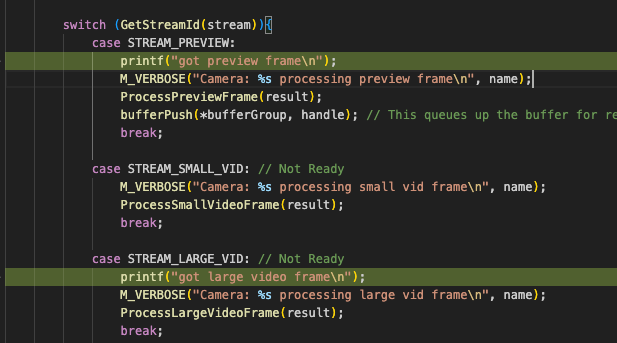
When I just run the camera server and then
voxl-inspect-cam hires_roiI get preview frames, but then when I add avoxl-inspect-cam hires_large_encodedI only get large video and no preview.I confirmed that the requests for the preview stream buffers are still being issued.
We at Cleo need the preview stream at the same time as we need the large stream because we need to stream the ROI to the ground station while simulateously saving the large encoded video to disk.
Any advice here? Is this a limitation of the ISP and what sort of streams it can provide in unison? Any other way to achieve our requirement of having ROI functionality at the same time as large encoded functionality?
Thank you,
Rowan and the Cleo team -
We at Cleo recently started using the hires large encoded stream.
We realized that when we started a client for the large pipe, the preview stream results would stop coming through. I confirmed this by adding the following prints
When I just run the camera server and then
voxl-inspect-cam hires_roiI get preview frames, but then when I add avoxl-inspect-cam hires_large_encodedI only get large video and no preview.I confirmed that the requests for the preview stream buffers are still being issued.
We at Cleo need the preview stream at the same time as we need the large stream because we need to stream the ROI to the ground station while simulateously saving the large encoded video to disk.
Any advice here? Is this a limitation of the ISP and what sort of streams it can provide in unison? Any other way to achieve our requirement of having ROI functionality at the same time as large encoded functionality?
Thank you,
Rowan and the Cleo team@Rowan-Dempster can you please point me to the version of camera server that you are using? Or the base version which you branched off from? Thanks!
Alex
-
@Rowan-Dempster can you please point me to the version of camera server that you are using? Or the base version which you branched off from? Thanks!
Alex
@Alex-Kushleyev Hi Alex, based on the change log we have up to 1.9.2:
Here's a snippet1.9.2 * fix -C22 for D0013 1.9.1 * liow2 tof * new royale support 1.9.0 * targeted for SDK 1.2.x * swap to tof2_data_t type for tof publication to MPA * support for new voxl-fsync kernel module for synced cameras * temperarily add ar0144_slave drivers * new build dependency on voxl-cross:V2.7 * (qrb5165) requires new system image with royale-5-8-spectre-6-10 1.8.10 * fix cpu monitor not starting libmodalpipe helper (tof decimator feature) 1.8.9 * allow duplicate cam id's in config file as long as they are disabled * parse independent exposure setting if stereo cam has secondary id=0 * start the gps client later, after all normal setup steps 1.8.8 * add feature to attempt skipping potentially unplugged cameras during startup * fix bug that might retrieve gain limits incorrectly where camId doesn't match the camera index in config file (rare) * now exit with an error if no cameras could be started instead of spinning forever. * add temporary fixed ar0144 driver * change cam config 20 for D0011 Starling PX4 edition * add cci-direct tweaks to set ov7251 blc to every frame. fixes flicker 1.8.7 * fix bug where color images debayered to RGB still said NV12 in the pipe info json * add support for rotating AR0144 image 1.8.6 * put old exposure settings back for now until we do testing * more ar0144 support * add exposure and gain upper and lower limits to config file 1.8.5 * add cam config 22 for D0013 * fix sentinel front stereo flip on old system image * fix jpeg snapshots being cut short by 1 byte 1.8.4 * voxl-configure-cameras better handling of new custom config file when fresh/missing * dynamically set libmodal_exposure gain limits based on hal3 reported numbers in prep for system image 1.7.x gain scaling change * set C18 config name * favor faster exposure times for vio cameras 1.8.3 * config file now has simple boolean for raw data preview true/false * remove old pre_format field from config file * fix regression in debayer processing * white balance for m0113 ov9782 without IR filter * add single mode option for combo sensors * allow both "snapshot-no-save" and "snapshot_no_save" commands``` -
@Rowan-Dempster can you please point me to the version of camera server that you are using? Or the base version which you branched off from? Thanks!
Alex
@Alex-Kushleyev Also if it's helpful here's all the source code we are using for the camera server https://drive.google.com/file/d/1ZjcIAvNpQpGPDnzcirZ4OE0acJhEDwZH/view?usp=sharing
-
@Alex-Kushleyev Also if it's helpful here's all the source code we are using for the camera server https://drive.google.com/file/d/1ZjcIAvNpQpGPDnzcirZ4OE0acJhEDwZH/view?usp=sharing
Hello @Rowan-Dempster ,
I am assuming that you are using non-raw preview stream (YUV) at resolution around 4000x3000 and similar resolution for the large encoded stream. Then the ROI stream is the downscaled version of the preview stream (please correct me if I am wrong).
I just tested this setup using IMX412 camera, and using the following branch (which I believe you used as a starting point):
It seems to be running just fine. Please test using the above branch and then if that works, then it's possible that you have some changes that cause an issue. Also try disabling all other cameras and seeing if the issue goes away.
|           Pipe Name |  bytes  | wide |  hgt |exp(ms)| gain | frame id |latency(ms)|  fps |  mbps  | format
|           hires_roi | 1382400 | 1280 |  720 | 33.00 | 4035 |     3752 |     53.3  | 30.0 |  331.8 | NV12
| hires_large_encoded |     723 | 4056 | 3040 | 33.00 | 4035 |     3751 |     80.6  | 30.0 |    0.4 | H265 (P)
If the camera server from the above branch does not work, please provide the following details;
- what camera you are using
- voxl-camera-server.conf config section for that camera (assuming other cameras do not interfere)
Alex
-
Hello @Rowan-Dempster ,
I am assuming that you are using non-raw preview stream (YUV) at resolution around 4000x3000 and similar resolution for the large encoded stream. Then the ROI stream is the downscaled version of the preview stream (please correct me if I am wrong).
I just tested this setup using IMX412 camera, and using the following branch (which I believe you used as a starting point):
It seems to be running just fine. Please test using the above branch and then if that works, then it's possible that you have some changes that cause an issue. Also try disabling all other cameras and seeing if the issue goes away.
|           Pipe Name |  bytes  | wide |  hgt |exp(ms)| gain | frame id |latency(ms)|  fps |  mbps  | format
|           hires_roi | 1382400 | 1280 |  720 | 33.00 | 4035 |     3752 |     53.3  | 30.0 |  331.8 | NV12
| hires_large_encoded |     723 | 4056 | 3040 | 33.00 | 4035 |     3751 |     80.6  | 30.0 |    0.4 | H265 (P)
If the camera server from the above branch does not work, please provide the following details;
- what camera you are using
- voxl-camera-server.conf config section for that camera (assuming other cameras do not interfere)
Alex
@Alex-Kushleyev Hi Alex,
I am assuming that you are using non-raw preview stream (YUV) at resolution around 4000x3000 and similar resolution for the large encoded stream. Then the ROI stream is the downscaled version of the preview stream (please correct me if I am wrong).
That is correct yes.
I just tested this setup using IMX412 camera, and using the following branch (which I believe you used as a starting point):
what camera you are usingWe are using the IMX214, not the IMX 412 - not sure if that would cause a different outcome
Also try disabling all other cameras and seeing if the issue goes away.
Only running the hires camera -> the issue persists.
voxl-camera-server.conf config section for that camera (assuming other cameras do not interfere)
Other cameras do not seem to impact results. Here is the config entry
"cameras": [{ "type": "imx214", "name": "hires", "enabled": true, "camera_id": 0, "fps": 25, "en_preview": true, "preview_width": 4208, "preview_height": 3120, "en_raw_preview": false, "en_small_video": true, "small_video_width": 1024, "small_video_height": 768, "small_venc_mode": "h265", "small_venc_br_ctrl": "cqp", "small_venc_Qfixed": 30, "small_venc_Qmin": 15, "small_venc_Qmax": 40, "small_venc_nPframes": 9, "small_venc_mbps": 2, "en_large_video": true, "large_video_width": 4208, "large_video_height": 3120, "large_venc_mode": "h265", "large_venc_br_ctrl": "cqp", "large_venc_Qfixed": 42, "large_venc_Qmin": 17, "large_venc_Qmax": 52, "large_venc_nPframes": 29, "large_venc_mbps": 30, "en_snapshot": false, "en_snapshot_width": 1024, "en_snapshot_height": 768, "en_roi": true, "roi_width": 1152, "roi_height": 720, "ae_mode": "isp" }]I will try out this code now!
-
@Alex-Kushleyev Hi Alex,
I am assuming that you are using non-raw preview stream (YUV) at resolution around 4000x3000 and similar resolution for the large encoded stream. Then the ROI stream is the downscaled version of the preview stream (please correct me if I am wrong).
That is correct yes.
I just tested this setup using IMX412 camera, and using the following branch (which I believe you used as a starting point):
what camera you are usingWe are using the IMX214, not the IMX 412 - not sure if that would cause a different outcome
Also try disabling all other cameras and seeing if the issue goes away.
Only running the hires camera -> the issue persists.
voxl-camera-server.conf config section for that camera (assuming other cameras do not interfere)
Other cameras do not seem to impact results. Here is the config entry
"cameras": [{ "type": "imx214", "name": "hires", "enabled": true, "camera_id": 0, "fps": 25, "en_preview": true, "preview_width": 4208, "preview_height": 3120, "en_raw_preview": false, "en_small_video": true, "small_video_width": 1024, "small_video_height": 768, "small_venc_mode": "h265", "small_venc_br_ctrl": "cqp", "small_venc_Qfixed": 30, "small_venc_Qmin": 15, "small_venc_Qmax": 40, "small_venc_nPframes": 9, "small_venc_mbps": 2, "en_large_video": true, "large_video_width": 4208, "large_video_height": 3120, "large_venc_mode": "h265", "large_venc_br_ctrl": "cqp", "large_venc_Qfixed": 42, "large_venc_Qmin": 17, "large_venc_Qmax": 52, "large_venc_nPframes": 29, "large_venc_mbps": 30, "en_snapshot": false, "en_snapshot_width": 1024, "en_snapshot_height": 768, "en_roi": true, "roi_width": 1152, "roi_height": 720, "ae_mode": "isp" }]I will try out this code now!
@Alex-Kushleyev Looking at that branch you sent, I might see why you are having better luck than us. We at Cleo only have the code up to and including add roi transition filter to control command; re-enable publishing of preview...
In green are the commits we have in our codebase, in red are the commits we do not have.
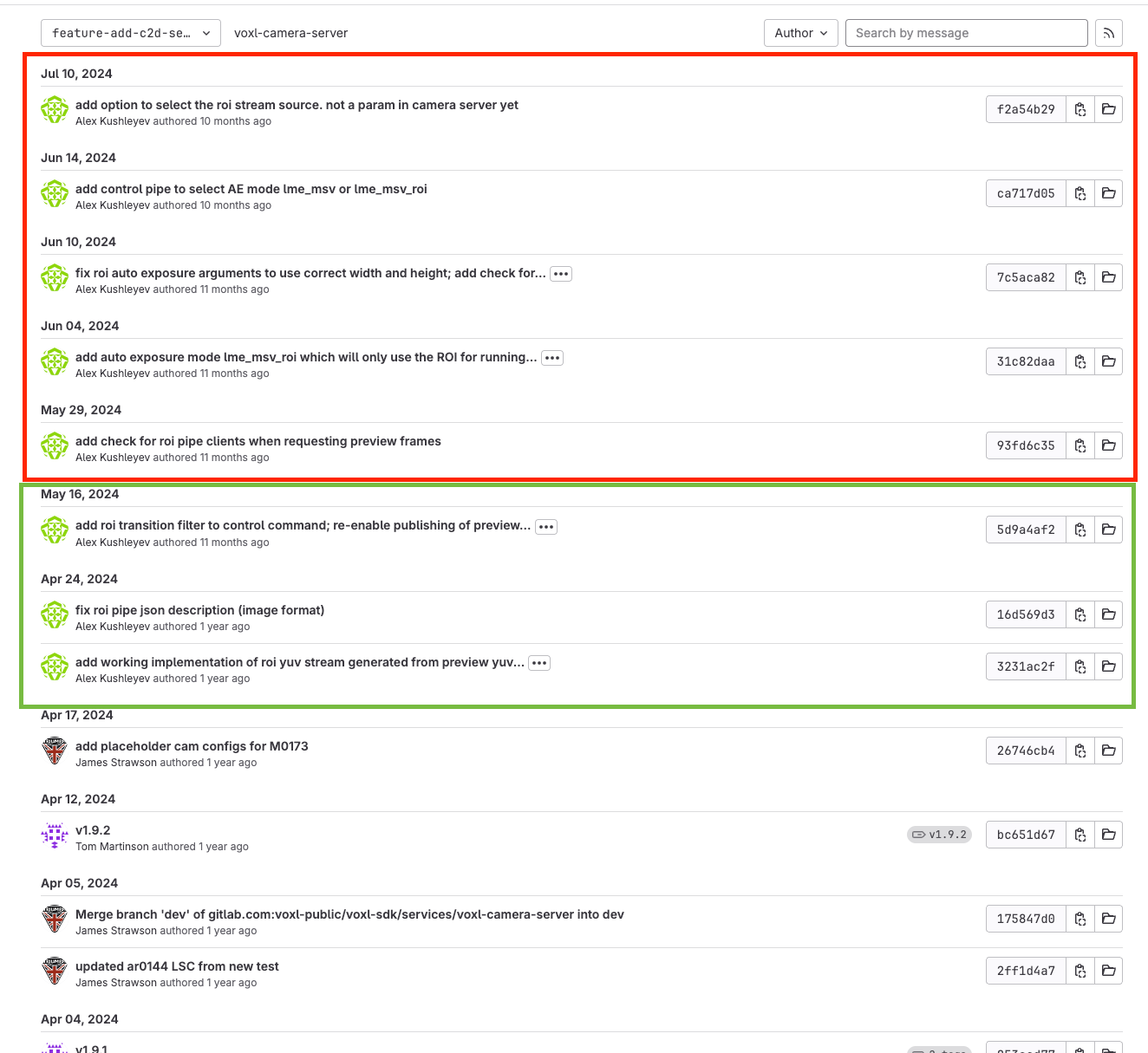
I note that in the commits we do not have you added the option to change the ROI pipe source:
    enum ROI_SOURCE_STREAM {
        ROI_SOURCE_PREVIEW,
        ROI_SOURCE_VIDEO_SMALL,
        ROI_SOURCE_VIDEO_LARGE
    };
and default it to
roi_source_stream = ROI_SOURCE_VIDEO_LARGE; //ROI_SOURCE_PREVIEW; //ROI_SOURCE_VIDEO_SMALL // ROI_SOURCE_VIDEO_LARGEPerhaps in the code you tried yesterday the ROI source is the large encoded stream, whereas with my version of the code the ROI source is the preview stream. I will try to port over those five most recent commits from your work on ROI that we do not have in our code base and hopefully get the ROI pipe to work well using the large encoded stream, and that will serve as a solution (or rather no longer have the need) to get the preview stream working alongside the large encoded stream. Thank you for your help!!
-
@Alex-Kushleyev Looking at that branch you sent, I might see why you are having better luck than us. We at Cleo only have the code up to and including add roi transition filter to control command; re-enable publishing of preview...
In green are the commits we have in our codebase, in red are the commits we do not have.
I note that in the commits we do not have you added the option to change the ROI pipe source:
    enum ROI_SOURCE_STREAM {
        ROI_SOURCE_PREVIEW,
        ROI_SOURCE_VIDEO_SMALL,
        ROI_SOURCE_VIDEO_LARGE
    };
and default it to
roi_source_stream = ROI_SOURCE_VIDEO_LARGE; //ROI_SOURCE_PREVIEW; //ROI_SOURCE_VIDEO_SMALL // ROI_SOURCE_VIDEO_LARGEPerhaps in the code you tried yesterday the ROI source is the large encoded stream, whereas with my version of the code the ROI source is the preview stream. I will try to port over those five most recent commits from your work on ROI that we do not have in our code base and hopefully get the ROI pipe to work well using the large encoded stream, and that will serve as a solution (or rather no longer have the need) to get the preview stream working alongside the large encoded stream. Thank you for your help!!
Hi @Rowan-Dempster , I actually tried this branch with both sources for roi (preview and large video stream). It seems to work fine.
I did notice that there is a bug where we were not setting the frame id, this needs to be added right here : https://gitlab.com/voxl-public/voxl-sdk/services/voxl-camera-server/-/blob/feature-add-c2d-select-roi-src/src/hal3_camera_mgr.cpp#L1341
roi_meta.frame_id = meta.frame_id;So, please try the code in the branch (with frame id fix) with different roi sources and let me know how it behaves. It should not matter whether the camera is IMX214 or IMX412, but i have not tried with IMX214. If this branch has the issue with IMX214 based on your testing, i can try it.
Also, if you have not already done so on your branch, please lock voxl-camera-server to use only upper 4 cores, as it significantly improves camera server performance when the load is high (the low level ISP interrupts happen on lower cores only, so this way camera server is not interfering). The reason why i mention this is that you are using an old branch of camera server, so just double checking.
Alex
-
Hi @Rowan-Dempster , I actually tried this branch with both sources for roi (preview and large video stream). It seems to work fine.
I did notice that there is a bug where we were not setting the frame id, this needs to be added right here : https://gitlab.com/voxl-public/voxl-sdk/services/voxl-camera-server/-/blob/feature-add-c2d-select-roi-src/src/hal3_camera_mgr.cpp#L1341
roi_meta.frame_id = meta.frame_id;So, please try the code in the branch (with frame id fix) with different roi sources and let me know how it behaves. It should not matter whether the camera is IMX214 or IMX412, but i have not tried with IMX214. If this branch has the issue with IMX214 based on your testing, i can try it.
Also, if you have not already done so on your branch, please lock voxl-camera-server to use only upper 4 cores, as it significantly improves camera server performance when the load is high (the low level ISP interrupts happen on lower cores only, so this way camera server is not interfering). The reason why i mention this is that you are using an old branch of camera server, so just double checking.
Alex
So, please try the code in the branch (with frame id fix) with different roi sources and let me know how it behaves. It should not matter whether the camera is IMX214 or IMX412, but i have not tried with IMX214. If this branch has the issue with IMX214 based on your testing, i can try it.
Is there any reason to use the preview source? I would prefer to leave that stream disabled since we do not need it for anything except (in the past) the ROI pipe (but now that ROI works on the large video source), and we are already using the large video pipe for recording videos.
Also, if you have not already done so on your branch, please lock voxl-camera-server to use only upper 4 cores, as it significantly improves camera server performance when the load is high (the low level ISP interrupts happen on lower cores only, so this way camera server is not interfering). The reason why i mention this is that you are using an old branch of camera server, so just double checking.
Yes we have the voxl-camera-server locked to 4-7:
[Unit] Description=voxl-camera-server SourcePath=/usr/bin/voxl-camera-server After=voxl-wait-for-fs.service Requires=voxl-wait-for-fs.service [Service] User=root Type=simple PIDFile=/run/voxl-camera-server.pid ExecStart=/usr/bin/taskset -c 4-7 /usr/bin/voxl-camera-server -
So, please try the code in the branch (with frame id fix) with different roi sources and let me know how it behaves. It should not matter whether the camera is IMX214 or IMX412, but i have not tried with IMX214. If this branch has the issue with IMX214 based on your testing, i can try it.
Is there any reason to use the preview source? I would prefer to leave that stream disabled since we do not need it for anything except (in the past) the ROI pipe (but now that ROI works on the large video source), and we are already using the large video pipe for recording videos.
Also, if you have not already done so on your branch, please lock voxl-camera-server to use only upper 4 cores, as it significantly improves camera server performance when the load is high (the low level ISP interrupts happen on lower cores only, so this way camera server is not interfering). The reason why i mention this is that you are using an old branch of camera server, so just double checking.
Yes we have the voxl-camera-server locked to 4-7:
[Unit] Description=voxl-camera-server SourcePath=/usr/bin/voxl-camera-server After=voxl-wait-for-fs.service Requires=voxl-wait-for-fs.service [Service] User=root Type=simple PIDFile=/run/voxl-camera-server.pid ExecStart=/usr/bin/taskset -c 4-7 /usr/bin/voxl-camera-server@Rowan-Dempster, one reason would be if your video recording resolution is lower than full camera resolution, but you may want the input for ROI to be the maximum resolution (so you get the best zoomed in quality). So in this case you would set your preview resolution to the max (and use preview as input to ROI) and then your video stream would record the downscaled full view.
If your video recording resolution is already at maximum, then there would be no benefit in using a preview stream for this use case.
Depending on the use case, you can choose what works better for you.
Alex
-
@Rowan-Dempster, one reason would be if your video recording resolution is lower than full camera resolution, but you may want the input for ROI to be the maximum resolution (so you get the best zoomed in quality). So in this case you would set your preview resolution to the max (and use preview as input to ROI) and then your video stream would record the downscaled full view.
If your video recording resolution is already at maximum, then there would be no benefit in using a preview stream for this use case.
Depending on the use case, you can choose what works better for you.
Alex
@Alex-Kushleyev Gotcha, thanks for the info Alex and your help resolving this issue!


Reading along? Create a free ModalAI Forum account to join in.
With an account you can reply, ask your own question, get an email when a ModalAI engineer answers, and mark the reply that solved it. Your place in each thread is saved between visits.
Questions about VOXL, Flight Core, ESCs and ModalAI drones are answered here by the engineers who build them.
Register Login