
[Starling2] The devices are recognized as /dev/video* but no assigned as the device available in the voxl system
-
Hi, I unblicked one of our Starling2, but I can not see any video in the app QGroundControl.
I found the problem with the debug tool described in the following log section.
However, I could not figure out how to fix it. Could you give me any help, please?
Thanks.
- What hardware are you using? If you have specific SKU or serial number, that is also helpful
family code: MRB-D0014 (starling-2) compute board: 4 (voxl2) hw version: 1 cam config: 27 modem config: 22 (M0141 w/ Alfa Networks WiFi Dongle AWUS036EACS) tx config: 7 (elrs_beta_fpv) extras config: 0 (none) SKU: MRB-D0014-4-V1-C27-T7-M22-X0- What version of software are you using? voxl-version is very helpful for determining software version.*
-------------------------------------------------------------------------------- system-image: 1.8.02-M0054-14.1a-perf kernel: #1 SMP PREEMPT Mon Nov 11 22:47:44 UTC 2024 4.19.125 -------------------------------------------------------------------------------- hw platform: M0054 mach.var: 1.0.1 -------------------------------------------------------------------------------- voxl-suite: 1.4.1 -------------------------------------------------------------------------------- current IP: wlan0: 192.168.8.1 --------------------------------------------------------------------------------- How have you configured the software? What is the output of voxl-inspect-services
Service Name | Enabled | Running | CPU Usage ------------------------------------------------------------------- docker-autorun | Disabled | Not Running | modallink-relink | Disabled | Not Running | voxl-auto-logger | Disabled | Not Running | voxl-camera-server | Enabled | Running | 31.9% voxl-cpu-monitor | Enabled | Running | 0.7% voxl-dfs-server | Disabled | Not Running | voxl-elrs-startup | Disabled | Not Running | voxl-feature-tracker | Disabled | Not Running | voxl-flow-server | Disabled | Not Running | voxl-imu-server | Enabled | Running | 4.3% voxl-io-server | Disabled | Not Running | voxl-lepton-server | Disabled | Not Running | voxl-lepton-tracker | Disabled | Not Running | voxl-logger | Disabled | Not Running | voxl-mavcam-manager | Enabled | Running | 0.0% voxl-mavlink-server | Enabled | Running | 4.0% voxl-modem | Disabled | Not Running | voxl-open-vins-server | Enabled | Not Running | voxl-osd | Disabled | Not Running | voxl-portal | Enabled | Running | 0.1% voxl-px4-imu-server | Disabled | Not Running | voxl-px4 | Enabled | Running | 42.9% voxl-qvio-server | Disabled | Not Running | voxl-rangefinder-server | Enabled | Running | 0.9% voxl-remote-id | Disabled | Not Running | voxl-softap | Enabled | Completed | voxl-state-estimator | Disabled | Not Running | voxl-static-ip | Disabled | Not Running | voxl-streamer | Enabled | Running | 0.0% voxl-tag-detector | Disabled | Not Running | voxl-tflite-server | Disabled | Not Running | voxl-time-sync | Disabled | Not Running | voxl-uvc-server | Disabled | Not Running | voxl-vision-hub | Enabled | Running | 9.3% voxl-vrx | Disabled | Not Running | voxl-vtx | Disabled | Not Running | voxl-wait-for-fs | Enabled | Completed |- Do you have any logs? Uploading PX4 logs to https://logs.px4.io can be very helpful. See details on PX4 logs here
With this command:
voxl-inspect-cam -aI got this:
Client is cleaning up pipes for the server
ERROR in pipe_client_open opening request pipe: No such device or address
closing and exitingver stopped without cleaning up
I also tried this:
voxl2:/$ ls /dev/video* /dev/video0 /dev/video1 /dev/video32 /dev/video33- Can you share pictures of your setup?
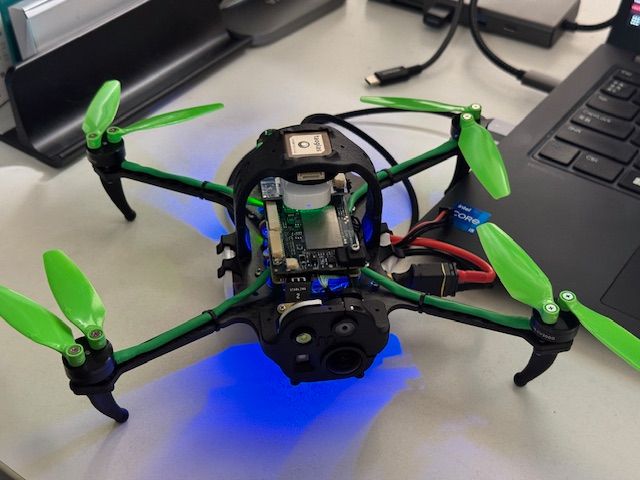
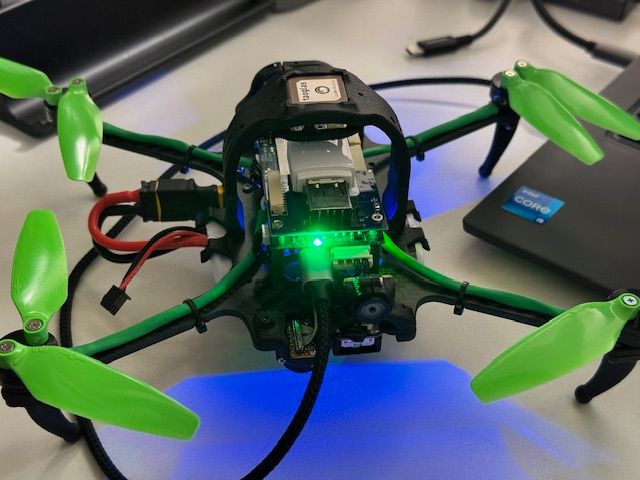
- Have you looked at the source code? If so, can you point to any potential issues?
No.
-
Hi, I unblicked one of our Starling2, but I can not see any video in the app QGroundControl.
I found the problem with the debug tool described in the following log section.
However, I could not figure out how to fix it. Could you give me any help, please?
Thanks.
- What hardware are you using? If you have specific SKU or serial number, that is also helpful
family code: MRB-D0014 (starling-2) compute board: 4 (voxl2) hw version: 1 cam config: 27 modem config: 22 (M0141 w/ Alfa Networks WiFi Dongle AWUS036EACS) tx config: 7 (elrs_beta_fpv) extras config: 0 (none) SKU: MRB-D0014-4-V1-C27-T7-M22-X0- What version of software are you using? voxl-version is very helpful for determining software version.*
-------------------------------------------------------------------------------- system-image: 1.8.02-M0054-14.1a-perf kernel: #1 SMP PREEMPT Mon Nov 11 22:47:44 UTC 2024 4.19.125 -------------------------------------------------------------------------------- hw platform: M0054 mach.var: 1.0.1 -------------------------------------------------------------------------------- voxl-suite: 1.4.1 -------------------------------------------------------------------------------- current IP: wlan0: 192.168.8.1 --------------------------------------------------------------------------------- How have you configured the software? What is the output of voxl-inspect-services
Service Name | Enabled | Running | CPU Usage ------------------------------------------------------------------- docker-autorun | Disabled | Not Running | modallink-relink | Disabled | Not Running | voxl-auto-logger | Disabled | Not Running | voxl-camera-server | Enabled | Running | 31.9% voxl-cpu-monitor | Enabled | Running | 0.7% voxl-dfs-server | Disabled | Not Running | voxl-elrs-startup | Disabled | Not Running | voxl-feature-tracker | Disabled | Not Running | voxl-flow-server | Disabled | Not Running | voxl-imu-server | Enabled | Running | 4.3% voxl-io-server | Disabled | Not Running | voxl-lepton-server | Disabled | Not Running | voxl-lepton-tracker | Disabled | Not Running | voxl-logger | Disabled | Not Running | voxl-mavcam-manager | Enabled | Running | 0.0% voxl-mavlink-server | Enabled | Running | 4.0% voxl-modem | Disabled | Not Running | voxl-open-vins-server | Enabled | Not Running | voxl-osd | Disabled | Not Running | voxl-portal | Enabled | Running | 0.1% voxl-px4-imu-server | Disabled | Not Running | voxl-px4 | Enabled | Running | 42.9% voxl-qvio-server | Disabled | Not Running | voxl-rangefinder-server | Enabled | Running | 0.9% voxl-remote-id | Disabled | Not Running | voxl-softap | Enabled | Completed | voxl-state-estimator | Disabled | Not Running | voxl-static-ip | Disabled | Not Running | voxl-streamer | Enabled | Running | 0.0% voxl-tag-detector | Disabled | Not Running | voxl-tflite-server | Disabled | Not Running | voxl-time-sync | Disabled | Not Running | voxl-uvc-server | Disabled | Not Running | voxl-vision-hub | Enabled | Running | 9.3% voxl-vrx | Disabled | Not Running | voxl-vtx | Disabled | Not Running | voxl-wait-for-fs | Enabled | Completed |- Do you have any logs? Uploading PX4 logs to https://logs.px4.io can be very helpful. See details on PX4 logs here
With this command:
voxl-inspect-cam -aI got this:
Client is cleaning up pipes for the server
ERROR in pipe_client_open opening request pipe: No such device or address
closing and exitingver stopped without cleaning up
I also tried this:
voxl2:/$ ls /dev/video* /dev/video0 /dev/video1 /dev/video32 /dev/video33- Can you share pictures of your setup?
- Have you looked at the source code? If so, can you point to any potential issues?
No.
Can you please stop
voxl-camera-serverservice and run the camera server in foreground to make sure that all cameras are started:systemctl stop voxl-camera server voxl-camera-serverIf there is a problem, you should see it in the terminal output. I am surprised that
voxl-inspect-cam -adoes not produce any output, which means none of the cameras are alive, so you should see something in the output fromvoxl-camera-serverprocess.Perhaps your board is not correctly configured for the cameras, so you may want to run
voxl-configure-camerasand select the correct option for your camera setup. Then re-startvoxl-camera-server.Alex
-
Can you please stop
voxl-camera-serverservice and run the camera server in foreground to make sure that all cameras are started:systemctl stop voxl-camera server voxl-camera-serverIf there is a problem, you should see it in the terminal output. I am surprised that
voxl-inspect-cam -adoes not produce any output, which means none of the cameras are alive, so you should see something in the output fromvoxl-camera-serverprocess.Perhaps your board is not correctly configured for the cameras, so you may want to run
voxl-configure-camerasand select the correct option for your camera setup. Then re-startvoxl-camera-server.Alex
I inspected with the command and got the output below:
voxl2:/$ voxl-inspect-sku

family code:   MRB-D0014 (starling-2)
compute board: 4 (voxl2)
hw version:    1
cam config:    27
modem config:  22 (M0141 w/ Alfa Networks WiFi Dongle AWUS036EACS)
tx config:     0 (none)
extras config: 0 (none)
SKU:           MRB-D0014-4-V1-C27-T0-M22-X0
This is the correct setting and this is also suggested by the automatic detection of the wizard.
I tested the 3 settings below by modifying /etc/modalai/voxl-camera-server.conf
- all camera
- w/o IMX412
- only IMX412
The details are below.
- all camera
Under this settings, as the drone's CPU load increases with such as viewing the image stream from VOXL portal, the likelihood that the process will fail increases. Sometimes, it dies during the starting up.
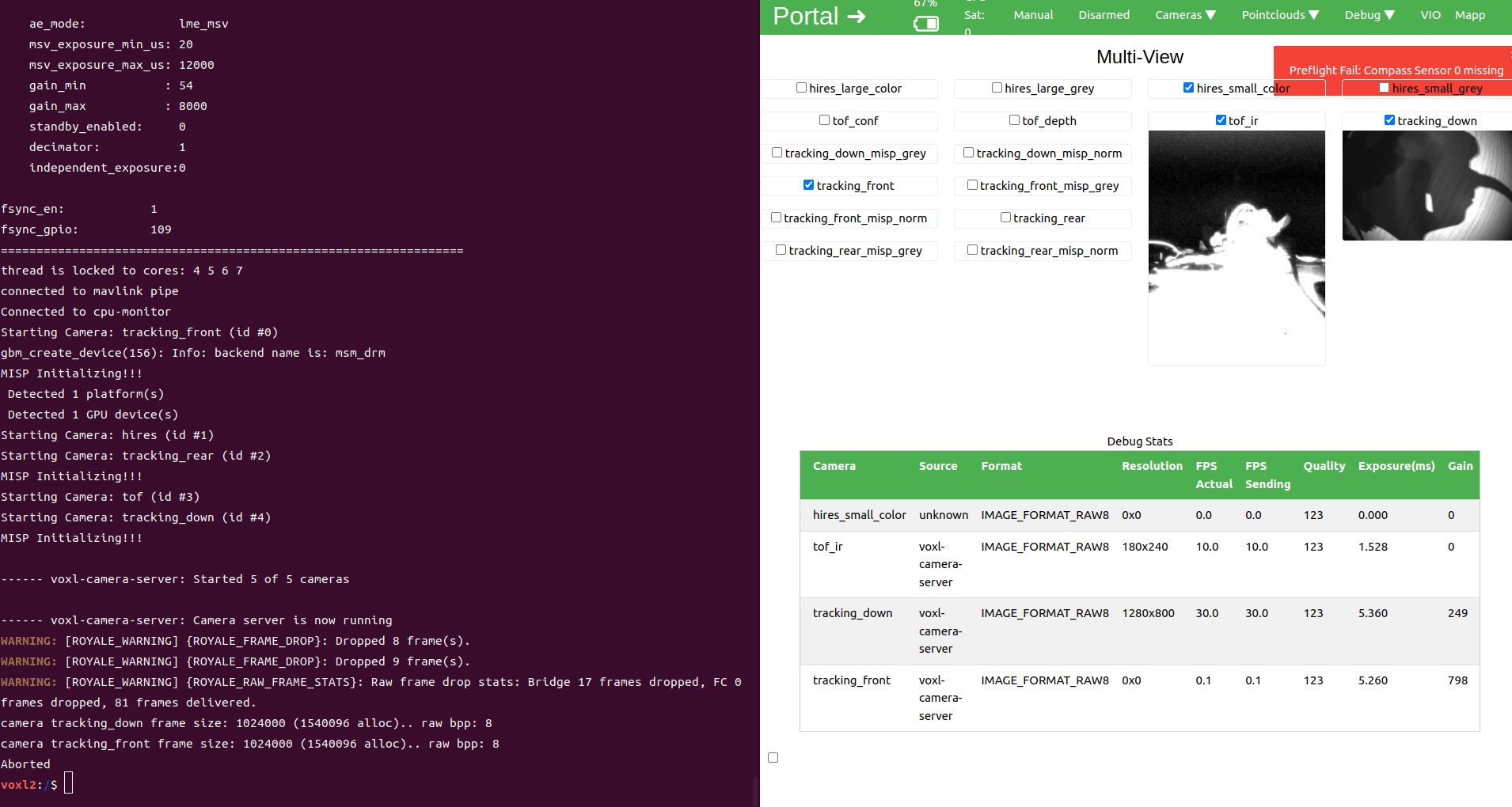
No output from voxl-inspect-cam -a
- w/o IMX412
This setting works fine. I can see the 4 image streams in VOXL portal.
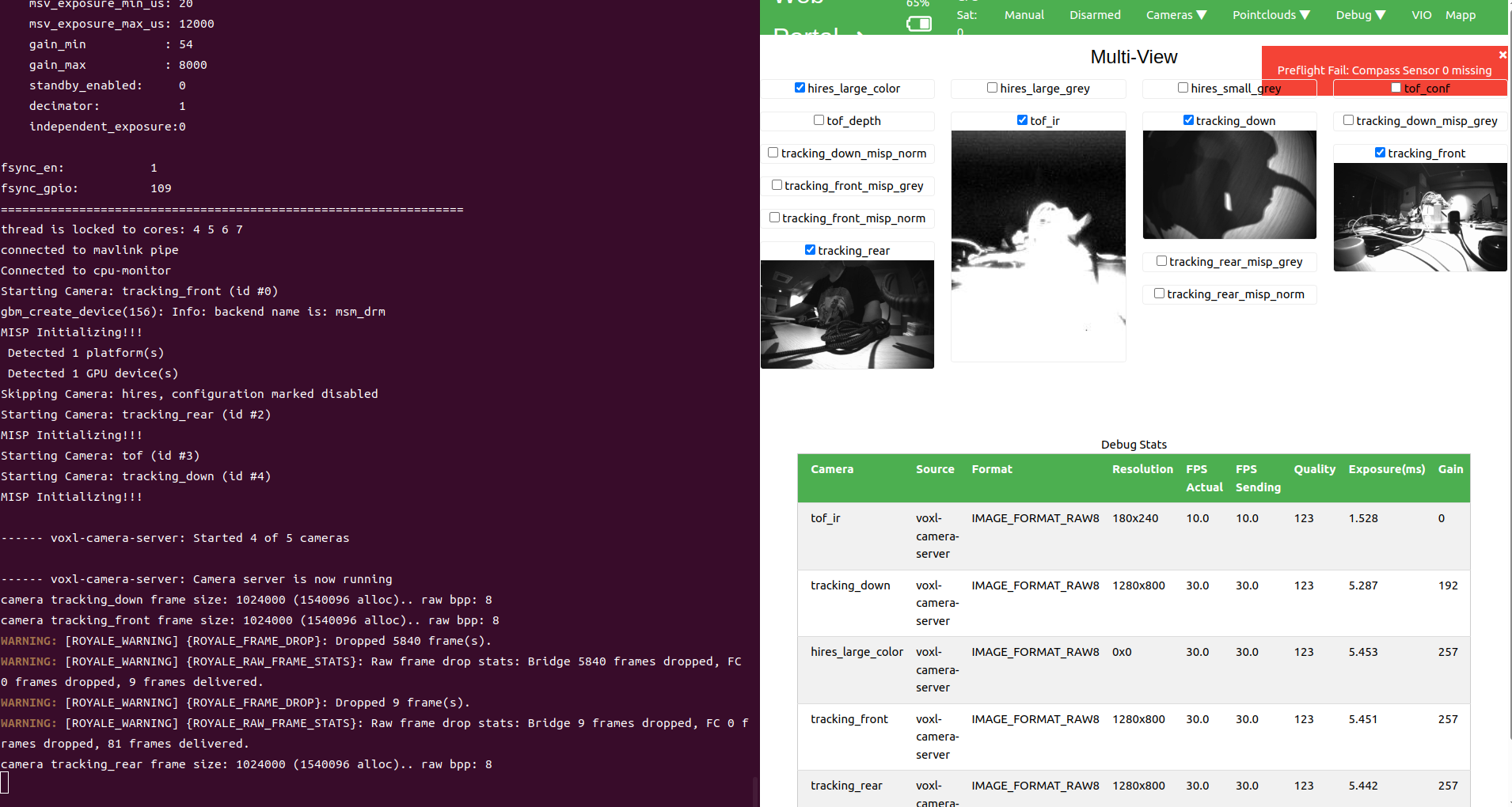
voxl-inspect-cam -a says:
| Pipe Name | bytes | wide | hgt |exp(ms)| gain | frame id |latency(ms)| fps | mbps t | tof_conf | 43200 | 180 | 240 | 1.53 | 0 | 3559 | 23.4 | 10.0 | 3.58 | tof_depth | 43200 | 180 | 240 | 1.53 | 0 | 3560 | 23.3 | 10.0 | 3.58 | tof_ir | 43200 | 180 | 240 | 1.53 | 0 | 3560 | 23.2 | 10.0 | 3.58 | tracking_down | 1024000 | 1280 | 800 | 5.29 | 192 | 7690 | 31.1 | 30.0 | 245.88 | tracking_down_bayer | 1024000 | 1280 | 800 | 5.29 | 192 | 7690 | 30.7 | 30.0 | 245.88 | tracking_down_misp_grey | 1024000 | 1280 | 800 | 5.29 | 192 | 7690 | 29.8 | 30.0 | 245.88 | tracking_down_misp_norm | 1024000 | 1280 | 800 | 5.29 | 192 | 7690 | 30.9 | 30.0 | 245.88 | tracking_front | 1024000 | 1280 | 800 | 5.45 | 257 | 7577 | 30.8 | 30.0 | 245.88 | tracking_front_bayer | 1024000 | 1280 | 800 | 5.45 | 257 | 7577 | 30.8 | 30.0 | 245.88 | tracking_front_misp_grey | 1024000 | 1280 | 800 | 5.45 | 257 | 7577 | 29.8 | 30.0 | 245.88 | tracking_front_misp_norm | 1024000 | 1280 | 800 | 5.45 | 257 | 7577 | 31.3 | 30.0 | 245.88 | tracking_rear | 1024000 | 1280 | 800 | 5.42 | 249 | 7341 | 31.0 | 30.0 | 245.88 | tracking_rear_bayer | 1024000 | 1280 | 800 | 5.42 | 249 | 7341 | 31.0 | 30.0 | 245.88 | tracking_rear_misp_grey | 1024000 | 1280 | 800 | 5.42 | 249 | 7341 | 29.8 | 30.0 | 245.88 | tracking_rear_misp_norm | 1024000 | 1280 | 800 | 5.42 | 249 | 7341 | 31.1 | 30.0 | 245.88- only IMX412
No image stream.
(
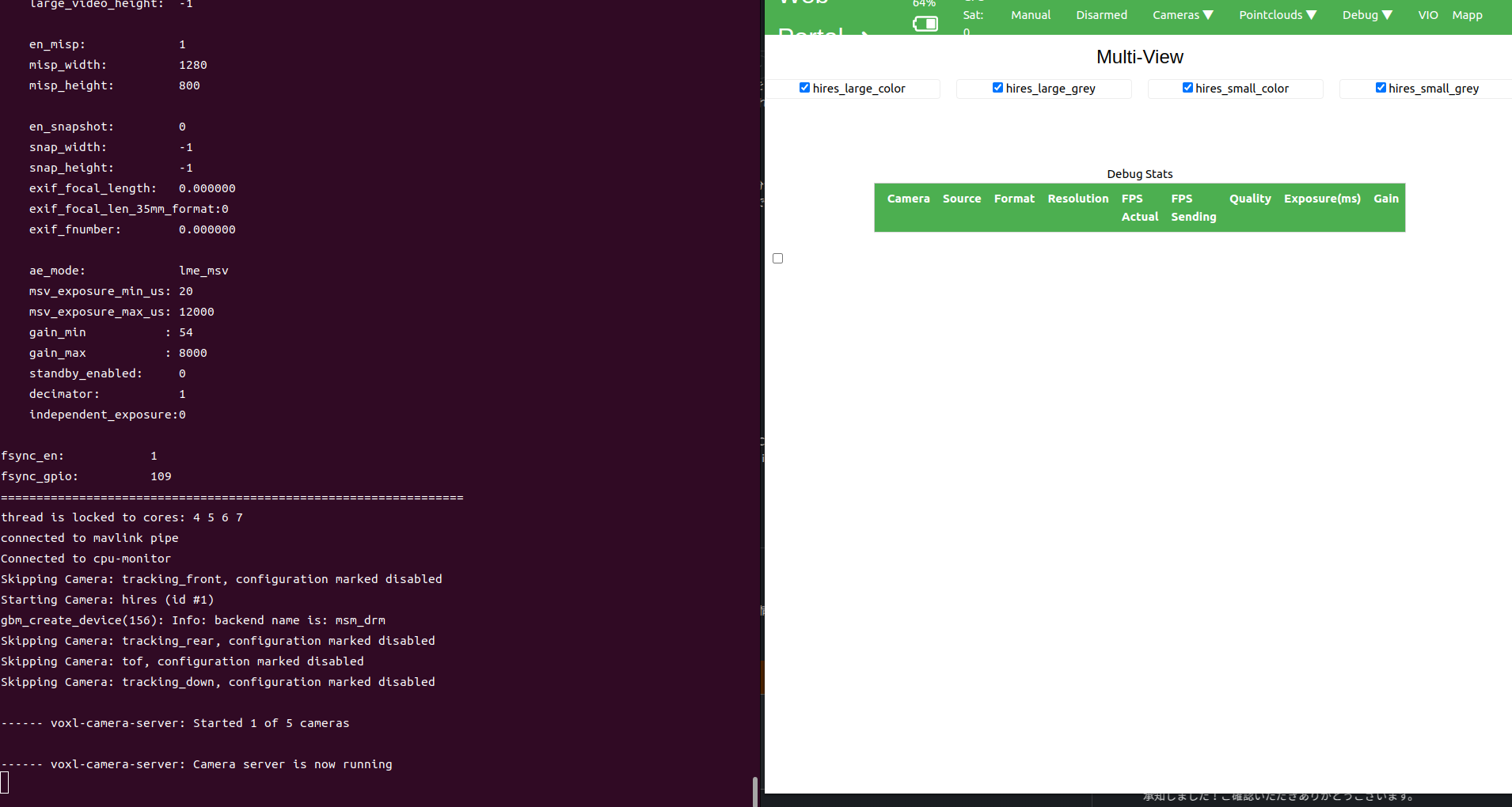
| Pipe Name | bytes | wide | hgt |exp(ms)| gain | frame id |latency(ms)| fps | mbps | fot | hires_large_color | | hires_large_encoded | | hires_large_grey | | hires_small_color | | hires_small_encoded | | hires_small_grey | | hires_snapshot | `` As the result, this one seems to have some hardware issue. I spent a lot of time for this but any resolutions do not work at all. We have three of starling 2 and compared with the working one. There is no diff. And, this one have not been healthy since the arrival, and we have unblicked it and reinstalled the SDK: https://docs.modalai.com/voxl2-unbricking/ https://docs.modalai.com/flash-system-image/ -
I inspected with the command and got the output below:
voxl2:/$ voxl-inspect-sku

family code:   MRB-D0014 (starling-2)
compute board: 4 (voxl2)
hw version:    1
cam config:    27
modem config:  22 (M0141 w/ Alfa Networks WiFi Dongle AWUS036EACS)
tx config:     0 (none)
extras config: 0 (none)
SKU:           MRB-D0014-4-V1-C27-T0-M22-X0
This is the correct setting and this is also suggested by the automatic detection of the wizard.
I tested the 3 settings below by modifying /etc/modalai/voxl-camera-server.conf
- all camera
- w/o IMX412
- only IMX412
The details are below.
- all camera
Under this settings, as the drone's CPU load increases with such as viewing the image stream from VOXL portal, the likelihood that the process will fail increases. Sometimes, it dies during the starting up.
No output from voxl-inspect-cam -a
- w/o IMX412
This setting works fine. I can see the 4 image streams in VOXL portal.
voxl-inspect-cam -a says:
| Pipe Name | bytes | wide | hgt |exp(ms)| gain | frame id |latency(ms)| fps | mbps t | tof_conf | 43200 | 180 | 240 | 1.53 | 0 | 3559 | 23.4 | 10.0 | 3.58 | tof_depth | 43200 | 180 | 240 | 1.53 | 0 | 3560 | 23.3 | 10.0 | 3.58 | tof_ir | 43200 | 180 | 240 | 1.53 | 0 | 3560 | 23.2 | 10.0 | 3.58 | tracking_down | 1024000 | 1280 | 800 | 5.29 | 192 | 7690 | 31.1 | 30.0 | 245.88 | tracking_down_bayer | 1024000 | 1280 | 800 | 5.29 | 192 | 7690 | 30.7 | 30.0 | 245.88 | tracking_down_misp_grey | 1024000 | 1280 | 800 | 5.29 | 192 | 7690 | 29.8 | 30.0 | 245.88 | tracking_down_misp_norm | 1024000 | 1280 | 800 | 5.29 | 192 | 7690 | 30.9 | 30.0 | 245.88 | tracking_front | 1024000 | 1280 | 800 | 5.45 | 257 | 7577 | 30.8 | 30.0 | 245.88 | tracking_front_bayer | 1024000 | 1280 | 800 | 5.45 | 257 | 7577 | 30.8 | 30.0 | 245.88 | tracking_front_misp_grey | 1024000 | 1280 | 800 | 5.45 | 257 | 7577 | 29.8 | 30.0 | 245.88 | tracking_front_misp_norm | 1024000 | 1280 | 800 | 5.45 | 257 | 7577 | 31.3 | 30.0 | 245.88 | tracking_rear | 1024000 | 1280 | 800 | 5.42 | 249 | 7341 | 31.0 | 30.0 | 245.88 | tracking_rear_bayer | 1024000 | 1280 | 800 | 5.42 | 249 | 7341 | 31.0 | 30.0 | 245.88 | tracking_rear_misp_grey | 1024000 | 1280 | 800 | 5.42 | 249 | 7341 | 29.8 | 30.0 | 245.88 | tracking_rear_misp_norm | 1024000 | 1280 | 800 | 5.42 | 249 | 7341 | 31.1 | 30.0 | 245.88- only IMX412
No image stream.
(
| Pipe Name | bytes | wide | hgt |exp(ms)| gain | frame id |latency(ms)| fps | mbps | fot | hires_large_color | | hires_large_encoded | | hires_large_grey | | hires_small_color | | hires_small_encoded | | hires_small_grey | | hires_snapshot | `` As the result, this one seems to have some hardware issue. I spent a lot of time for this but any resolutions do not work at all. We have three of starling 2 and compared with the working one. There is no diff. And, this one have not been healthy since the arrival, and we have unblicked it and reinstalled the SDK: https://docs.modalai.com/voxl2-unbricking/ https://docs.modalai.com/flash-system-image/@Yoshimaru-Tanaka , lets focus on the case when only IMX412 is enabled.
After you start the camera server and run
voxl-inspect-cam -a(and you see no frames), does camera server abort?Can you check what is the output of
dmesg, perhaps you can paste the output after the camera starts streaming, which would look similar to this (so you can see if there are any errors after this print):[ 1455.171322] CAM_INFO: CAM-SENSOR: cam_sensor_driver_cmd: 997 CAM_ACQUIRE_DEV Success, sensor_id:0x577,sensor_slave_addr:0x34 [ 1455.685718] msm_vidc: high: 00000001: ....e: Opening video instance: ffffffdc7a86c000, 0 [ 1455.897358] CAM_ERR: CAM-ISP: cam_ife_hw_mgr_print_acquire_info: 710 Successfully acquire single IFE[6 -1] with [0 pix] [0 pd] [1 rdi] ports for ctx:4 [ 1455.902246] CAM_INFO: CAM-CSIPHY: cam_csiphy_core_cfg: 1137 START_DEV: CSIPHY_IDX: 0, Device_slot: 0, Datarate: 2500000000, Settletime: 2200000000 [ 1455.910641] CAM_INFO: CAM-ISP: cam_vfe_bus_ver3_init_hw: 3659 Overriding clock gating at bus input [ 1455.910644] CAM_INFO: CAM-ISP: cam_vfe_top_ver3_init_hw: 246 Disable clock gating at IFE top [ 1455.910795] CAM_ERR: CAM-ISP: cam_ife_mgr_start_hw: 4510 ->Config HW, 000000008601d43d [ 1455.911552] CAM_INFO: CAM-SENSOR: cam_sensor_driver_cmd: 1089 CAM_START_DEV Success, sensor_id:0x577,sensor_slave_addr:0x20Also, is your drone set up with 3 tracking cameras, configuration C27 and the cameras are plugged into correct locations based on the diagram? https://docs.modalai.com/voxl2-coax-camera-bundles/
Alex
-
@Yoshimaru-Tanaka , lets focus on the case when only IMX412 is enabled.
After you start the camera server and run
voxl-inspect-cam -a(and you see no frames), does camera server abort?Can you check what is the output of
dmesg, perhaps you can paste the output after the camera starts streaming, which would look similar to this (so you can see if there are any errors after this print):[ 1455.171322] CAM_INFO: CAM-SENSOR: cam_sensor_driver_cmd: 997 CAM_ACQUIRE_DEV Success, sensor_id:0x577,sensor_slave_addr:0x34 [ 1455.685718] msm_vidc: high: 00000001: ....e: Opening video instance: ffffffdc7a86c000, 0 [ 1455.897358] CAM_ERR: CAM-ISP: cam_ife_hw_mgr_print_acquire_info: 710 Successfully acquire single IFE[6 -1] with [0 pix] [0 pd] [1 rdi] ports for ctx:4 [ 1455.902246] CAM_INFO: CAM-CSIPHY: cam_csiphy_core_cfg: 1137 START_DEV: CSIPHY_IDX: 0, Device_slot: 0, Datarate: 2500000000, Settletime: 2200000000 [ 1455.910641] CAM_INFO: CAM-ISP: cam_vfe_bus_ver3_init_hw: 3659 Overriding clock gating at bus input [ 1455.910644] CAM_INFO: CAM-ISP: cam_vfe_top_ver3_init_hw: 246 Disable clock gating at IFE top [ 1455.910795] CAM_ERR: CAM-ISP: cam_ife_mgr_start_hw: 4510 ->Config HW, 000000008601d43d [ 1455.911552] CAM_INFO: CAM-SENSOR: cam_sensor_driver_cmd: 1089 CAM_START_DEV Success, sensor_id:0x577,sensor_slave_addr:0x20Also, is your drone set up with 3 tracking cameras, configuration C27 and the cameras are plugged into correct locations based on the diagram? https://docs.modalai.com/voxl2-coax-camera-bundles/
Alex
I tried your advice, and I'm curious about the messages which looks like hardware related:
[    6.363892] qcom,camera ac4f000.qcom,cci:qcom,cam-sensor1: Dropping the link to regulator.79
[    6.413925] qcom,camera ac50000.qcom,cci:qcom,cam-sensor2: Linked as a consumer to regulator.79
[    7.591724] CAM_ERR: CAM-ISP: cam_ife_csid_cid_reserve: 1040 CSID:2 IPP resource not available
Should I check the physical connection between the camera and the board?
I also give you all I got below:
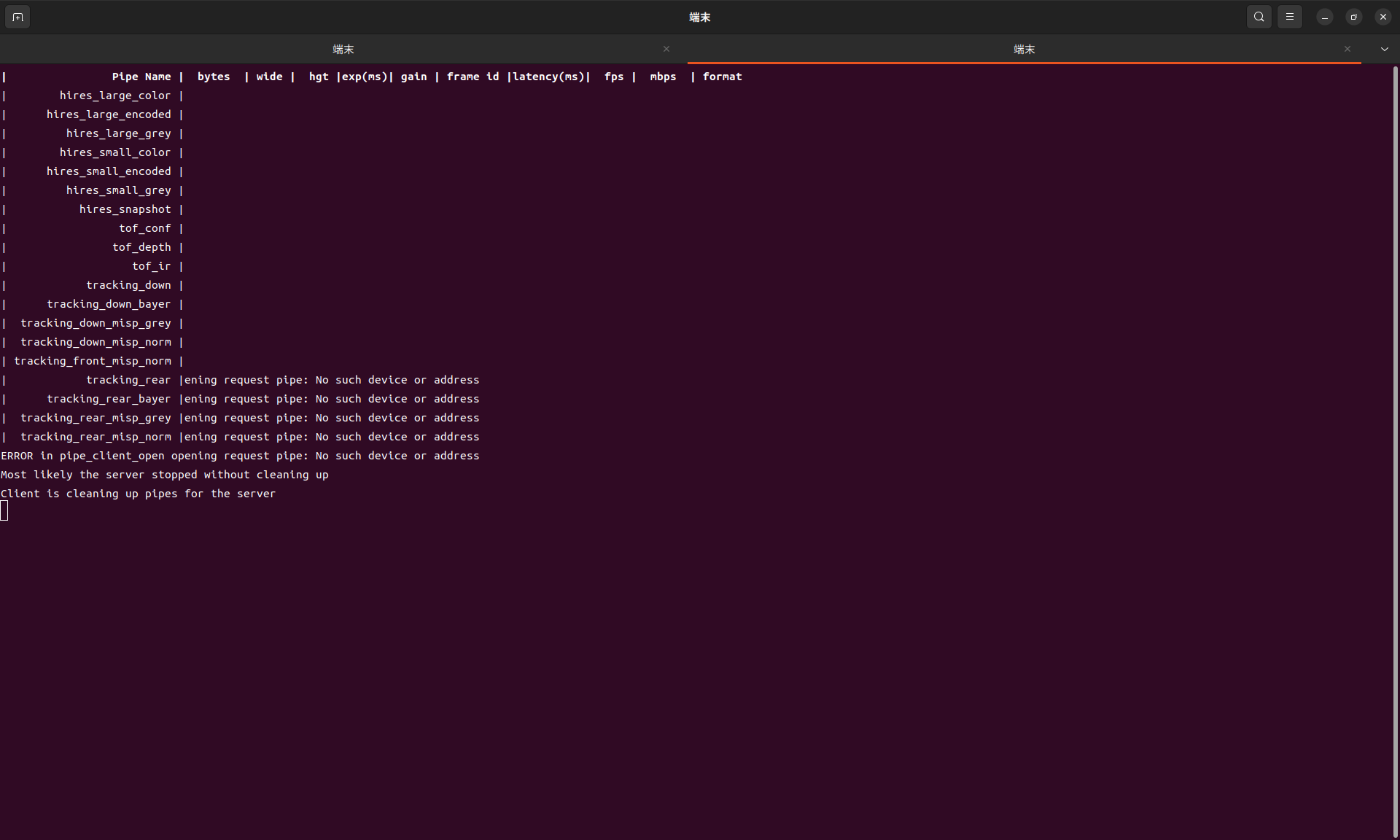
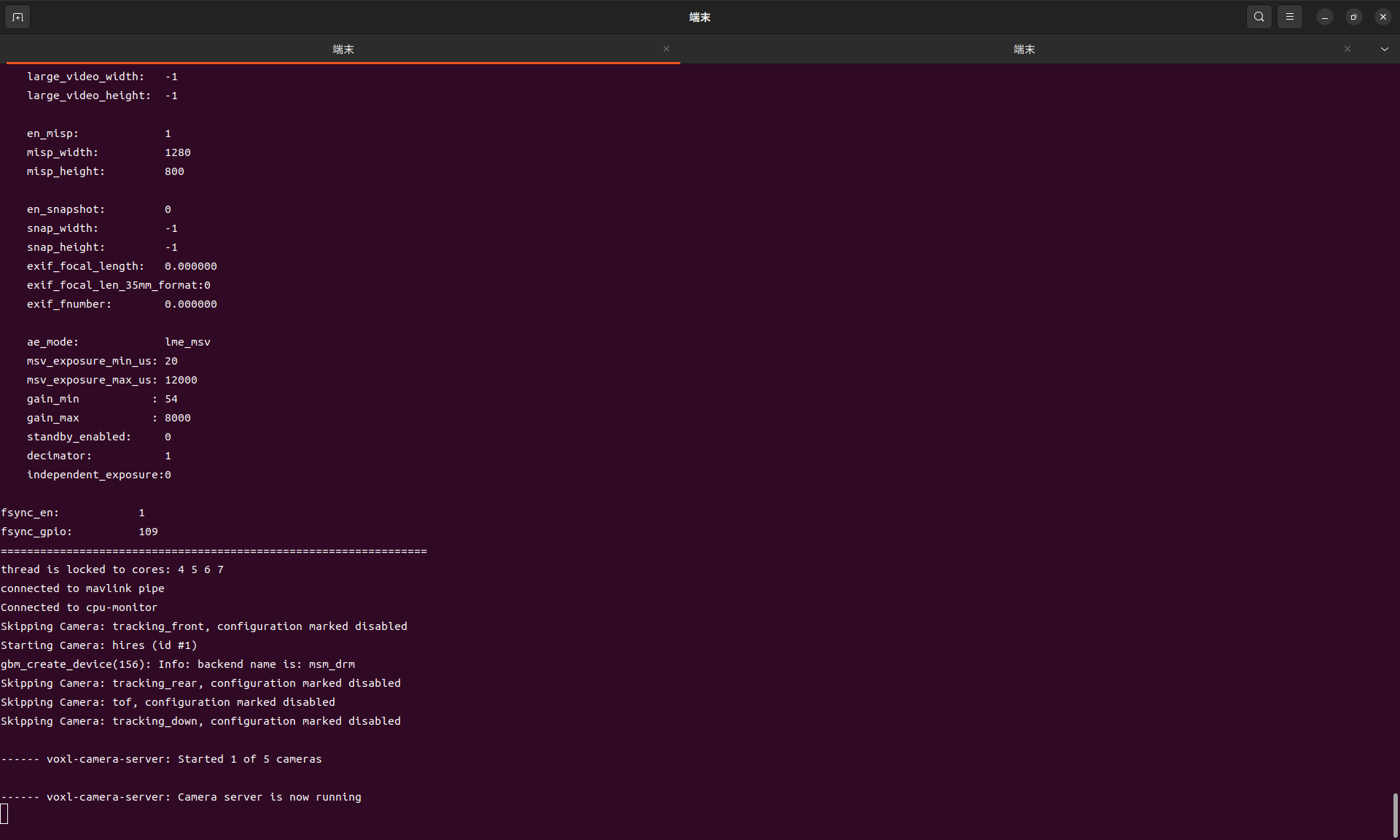
dmesg log
https://drive.google.com/file/d/1SR9mGPbrsWaXHDW1HW4sHUVJHjCLTbcf/view?usp=drive_link -
@Yoshimaru-Tanaka , lets focus on the case when only IMX412 is enabled.
After you start the camera server and run
voxl-inspect-cam -a(and you see no frames), does camera server abort?Can you check what is the output of
dmesg, perhaps you can paste the output after the camera starts streaming, which would look similar to this (so you can see if there are any errors after this print):[ 1455.171322] CAM_INFO: CAM-SENSOR: cam_sensor_driver_cmd: 997 CAM_ACQUIRE_DEV Success, sensor_id:0x577,sensor_slave_addr:0x34 [ 1455.685718] msm_vidc: high: 00000001: ....e: Opening video instance: ffffffdc7a86c000, 0 [ 1455.897358] CAM_ERR: CAM-ISP: cam_ife_hw_mgr_print_acquire_info: 710 Successfully acquire single IFE[6 -1] with [0 pix] [0 pd] [1 rdi] ports for ctx:4 [ 1455.902246] CAM_INFO: CAM-CSIPHY: cam_csiphy_core_cfg: 1137 START_DEV: CSIPHY_IDX: 0, Device_slot: 0, Datarate: 2500000000, Settletime: 2200000000 [ 1455.910641] CAM_INFO: CAM-ISP: cam_vfe_bus_ver3_init_hw: 3659 Overriding clock gating at bus input [ 1455.910644] CAM_INFO: CAM-ISP: cam_vfe_top_ver3_init_hw: 246 Disable clock gating at IFE top [ 1455.910795] CAM_ERR: CAM-ISP: cam_ife_mgr_start_hw: 4510 ->Config HW, 000000008601d43d [ 1455.911552] CAM_INFO: CAM-SENSOR: cam_sensor_driver_cmd: 1089 CAM_START_DEV Success, sensor_id:0x577,sensor_slave_addr:0x20Also, is your drone set up with 3 tracking cameras, configuration C27 and the cameras are plugged into correct locations based on the diagram? https://docs.modalai.com/voxl2-coax-camera-bundles/
Alex
@Alex-Kushleyev Could you please check my last post? I attached the full dmsg log.
-
@Alex-Kushleyev Could you please check my last post? I attached the full dmsg log.
@Yoshimaru-Tanaka , from the dmesg log i see the following, which looks like a hardware error in high speed data bus (MIPI). There is an error on MIPI Lane 0, which causes the camera data frame reception to fail. Do you have another IMX412 + cable you could try to figure out, perhaps it is a bad cable? Also, I know you already provided that information above, but please double check again that your
voxl-versionreportsmach.var: 1.0.1, which has some camera-related changes in the Kernel for the Starling 2.[ 507.022775] CAM_ERR: CAM-ISP: cam_ife_hw_mgr_print_acquire_info: 710 Successfully acquire single IFE[1 -1] with [12 pix] [0 pd] [1 rdi] ports for ctx:2 [ 507.028042] CAM_INFO: CAM-CSIPHY: cam_csiphy_core_cfg: 1137 START_DEV: CSIPHY_IDX: 1, Device_slot: 0, Datarate: 1500000000, Settletime: 2200000000 [ 507.038323] CAM_INFO: CAM-ISP: cam_vfe_bus_ver3_init_hw: 3659 Overriding clock gating at bus input [ 507.038328] CAM_INFO: CAM-ISP: cam_vfe_top_ver3_init_hw: 246 Disable clock gating at IFE top [ 507.038523] CAM_ERR: CAM-ISP: cam_ife_mgr_start_hw: 4510 ->Config HW, 000000002ded1537 [ 507.039341] CAM_INFO: CAM-SENSOR: cam_sensor_driver_cmd: 1089 CAM_START_DEV Success, sensor_id:0x577,sensor_slave_addr:0x34 [ 507.042553] CAM_ERR: CAM-ISP: cam_ife_csid_irq: 4848 CSID:1 lane 0 over flow [ 507.042560] CAM_INFO: CAM-ISP: cam_ife_csid_halt_csi2: 1931 CSID: 1 cnt: 2 Halt csi2 rx [ 507.042571] CAM_INFO: CAM-CSIPHY: cam_csiphy_subdev_handle_message: 22 subdev index : 0 CSIPHY index: 1 [ 507.042576] CAM_INFO: CAM-CSIPHY: cam_csiphy_subdev_handle_message: 22 subdev index : 1 CSIPHY index: 1 [ 507.042582] CAM_INFO: CAM-CSIPHY: cam_csiphy_status_dmp: 103 PHY base addr= pK-error offset=0x8b0 size=11 [ 507.042590] CAM_INFO: CAM-CSIPHY: cam_csiphy_status_dmp: 117 CSIPHY1_IRQ_STATUS_ADDR0 = 0x4 [ 507.042596] CAM_INFO: CAM-CSIPHY: cam_csiphy_status_dmp: 117 CSIPHY1_IRQ_STATUS_ADDR1 = 0x1 [ 507.042603] CAM_INFO: CAM-CSIPHY: cam_csiphy_status_dmp: 117 CSIPHY1_IRQ_STATUS_ADDR2 = 0x80 [ 507.042609] CAM_INFO: CAM-CSIPHY: cam_csiphy_status_dmp: 117 CSIPHY1_IRQ_STATUS_ADDR3 = 0x20 [ 507.042615] CAM_INFO: CAM-CSIPHY: cam_csiphy_status_dmp: 117 CSIPHY1_IRQ_STATUS_ADDR4 = 0x0 [ 507.042621] CAM_INFO: CAM-CSIPHY: cam_csiphy_status_dmp: 117 CSIPHY1_IRQ_STATUS_ADDR5 = 0x10 [ 507.042628] CAM_INFO: CAM-CSIPHY: cam_csiphy_status_dmp: 117 CSIPHY1_IRQ_STATUS_ADDR6 = 0x4 [ 507.042634] CAM_INFO: CAM-CSIPHY: cam_csiphy_status_dmp: 117 CSIPHY1_IRQ_STATUS_ADDR7 = 0x0 [ 507.042640] CAM_INFO: CAM-CSIPHY: cam_csiphy_status_dmp: 117 CSIPHY1_IRQ_STATUS_ADDR8 = 0x2 [ 507.042646] CAM_INFO: CAM-CSIPHY: cam_csiphy_status_dmp: 117 CSIPHY1_IRQ_STATUS_ADDR9 = 0x40 [ 507.042653] CAM_INFO: CAM-CSIPHY: cam_csiphy_status_dmp: 117 CSIPHY1_IRQ_STATUS_ADDR10 = 0x4 [ 507.042657] CAM_INFO: CAM-CSIPHY: cam_csiphy_subdev_handle_message: 22 subdev index : 2 CSIPHY index: 1 [ 507.042661] CAM_INFO: CAM-CSIPHY: cam_csiphy_subdev_handle_message: 22 subdev index : 3 CSIPHY index: 1 [ 507.042665] CAM_INFO: CAM-CSIPHY: cam_csiphy_subdev_handle_message: 22 subdev index : 4 CSIPHY index: 1 [ 507.042670] CAM_INFO: CAM-CSIPHY: cam_csiphy_subdev_handle_message: 22 subdev index : 5 CSIPHY index: 1 [ 507.042757] CAM_ERR: CAM-ISP: cam_csid_evt_bottom_half_handler: 4616 idx 1 err 5 phy 1 lane type:0 ln num:4 ln cfg:0x3210 cnt 2 [ 507.042762] cam_csid_evt_bottom_half_handler: 1 callbacks suppressed -
@Yoshimaru-Tanaka , from the dmesg log i see the following, which looks like a hardware error in high speed data bus (MIPI). There is an error on MIPI Lane 0, which causes the camera data frame reception to fail. Do you have another IMX412 + cable you could try to figure out, perhaps it is a bad cable? Also, I know you already provided that information above, but please double check again that your
voxl-versionreportsmach.var: 1.0.1, which has some camera-related changes in the Kernel for the Starling 2.[ 507.022775] CAM_ERR: CAM-ISP: cam_ife_hw_mgr_print_acquire_info: 710 Successfully acquire single IFE[1 -1] with [12 pix] [0 pd] [1 rdi] ports for ctx:2 [ 507.028042] CAM_INFO: CAM-CSIPHY: cam_csiphy_core_cfg: 1137 START_DEV: CSIPHY_IDX: 1, Device_slot: 0, Datarate: 1500000000, Settletime: 2200000000 [ 507.038323] CAM_INFO: CAM-ISP: cam_vfe_bus_ver3_init_hw: 3659 Overriding clock gating at bus input [ 507.038328] CAM_INFO: CAM-ISP: cam_vfe_top_ver3_init_hw: 246 Disable clock gating at IFE top [ 507.038523] CAM_ERR: CAM-ISP: cam_ife_mgr_start_hw: 4510 ->Config HW, 000000002ded1537 [ 507.039341] CAM_INFO: CAM-SENSOR: cam_sensor_driver_cmd: 1089 CAM_START_DEV Success, sensor_id:0x577,sensor_slave_addr:0x34 [ 507.042553] CAM_ERR: CAM-ISP: cam_ife_csid_irq: 4848 CSID:1 lane 0 over flow [ 507.042560] CAM_INFO: CAM-ISP: cam_ife_csid_halt_csi2: 1931 CSID: 1 cnt: 2 Halt csi2 rx [ 507.042571] CAM_INFO: CAM-CSIPHY: cam_csiphy_subdev_handle_message: 22 subdev index : 0 CSIPHY index: 1 [ 507.042576] CAM_INFO: CAM-CSIPHY: cam_csiphy_subdev_handle_message: 22 subdev index : 1 CSIPHY index: 1 [ 507.042582] CAM_INFO: CAM-CSIPHY: cam_csiphy_status_dmp: 103 PHY base addr= pK-error offset=0x8b0 size=11 [ 507.042590] CAM_INFO: CAM-CSIPHY: cam_csiphy_status_dmp: 117 CSIPHY1_IRQ_STATUS_ADDR0 = 0x4 [ 507.042596] CAM_INFO: CAM-CSIPHY: cam_csiphy_status_dmp: 117 CSIPHY1_IRQ_STATUS_ADDR1 = 0x1 [ 507.042603] CAM_INFO: CAM-CSIPHY: cam_csiphy_status_dmp: 117 CSIPHY1_IRQ_STATUS_ADDR2 = 0x80 [ 507.042609] CAM_INFO: CAM-CSIPHY: cam_csiphy_status_dmp: 117 CSIPHY1_IRQ_STATUS_ADDR3 = 0x20 [ 507.042615] CAM_INFO: CAM-CSIPHY: cam_csiphy_status_dmp: 117 CSIPHY1_IRQ_STATUS_ADDR4 = 0x0 [ 507.042621] CAM_INFO: CAM-CSIPHY: cam_csiphy_status_dmp: 117 CSIPHY1_IRQ_STATUS_ADDR5 = 0x10 [ 507.042628] CAM_INFO: CAM-CSIPHY: cam_csiphy_status_dmp: 117 CSIPHY1_IRQ_STATUS_ADDR6 = 0x4 [ 507.042634] CAM_INFO: CAM-CSIPHY: cam_csiphy_status_dmp: 117 CSIPHY1_IRQ_STATUS_ADDR7 = 0x0 [ 507.042640] CAM_INFO: CAM-CSIPHY: cam_csiphy_status_dmp: 117 CSIPHY1_IRQ_STATUS_ADDR8 = 0x2 [ 507.042646] CAM_INFO: CAM-CSIPHY: cam_csiphy_status_dmp: 117 CSIPHY1_IRQ_STATUS_ADDR9 = 0x40 [ 507.042653] CAM_INFO: CAM-CSIPHY: cam_csiphy_status_dmp: 117 CSIPHY1_IRQ_STATUS_ADDR10 = 0x4 [ 507.042657] CAM_INFO: CAM-CSIPHY: cam_csiphy_subdev_handle_message: 22 subdev index : 2 CSIPHY index: 1 [ 507.042661] CAM_INFO: CAM-CSIPHY: cam_csiphy_subdev_handle_message: 22 subdev index : 3 CSIPHY index: 1 [ 507.042665] CAM_INFO: CAM-CSIPHY: cam_csiphy_subdev_handle_message: 22 subdev index : 4 CSIPHY index: 1 [ 507.042670] CAM_INFO: CAM-CSIPHY: cam_csiphy_subdev_handle_message: 22 subdev index : 5 CSIPHY index: 1 [ 507.042757] CAM_ERR: CAM-ISP: cam_csid_evt_bottom_half_handler: 4616 idx 1 err 5 phy 1 lane type:0 ln num:4 ln cfg:0x3210 cnt 2 [ 507.042762] cam_csid_evt_bottom_half_handler: 1 callbacks suppressed@Alex-Kushleyev We replaced the camera and the cable, and the issue had been resolved. Thanks for your help.
However, it was difficult to figure out this problem, and we spent a lot of time. Therefore, the SDK should automatically detect its hardware failure from dmsg. Or, there should be a trouble shooting in the document.
I hope our awesome chatGPT to learn from my post and give us better resolution in earlier round next time XD
-
@Alex-Kushleyev We replaced the camera and the cable, and the issue had been resolved. Thanks for your help.
However, it was difficult to figure out this problem, and we spent a lot of time. Therefore, the SDK should automatically detect its hardware failure from dmsg. Or, there should be a trouble shooting in the document.
I hope our awesome chatGPT to learn from my post and give us better resolution in earlier round next time XD
@Yoshimaru-Tanaka , you are right, the information in the documentation is not sufficient to diagnose this issue.
There is a page already for camera debugging information, but it is very brief. We will add more details (from this thread and more) to this page.
https://docs.modalai.com/debugging-camera-issues/
Thank you
Alex


Reading along? Create a free ModalAI Forum account to join in.
With an account you can reply, ask your own question, get an email when a ModalAI engineer answers, and mark the reply that solved it. Your place in each thread is saved between visits.
Questions about VOXL, Flight Core, ESCs and ModalAI drones are answered here by the engineers who build them.
Register Login