Skip to content
  • Categories
  • Recent
  • Tags
  • Popular
  • Users
  • Groups
Collapse
Brand Logo

ModalAI Forum

  1. ModalAI Support Forum
  2. Software Development
  3. QUP0 i2c access on VOXL2 mini

QUP0 i2c access on VOXL2 mini

Scheduled Pinned Locked Moved Software Development
7 Posts 2 Posters 1.1k Views 1 Watching
  • Oldest to Newest
  • Newest to Oldest
  • Most Votes
Reply
  • Reply as topic
Log in to reply
This topic has been deleted. Only users with topic management privileges can see it.
  • J Offline
    J Offline
    jcai
    Contributor
    wrote on last edited by
    #1

    Sort of a 2-part question:

    On a VOXL2 mini, if I have both an M0155 and an M0181 on J6 and J7, is there any way to access i2c-0 on J7? I'm assuming if the coax adapter is on J7, there's no way to break out the i2c pins?

    If not, then my other option is to use QUP0 on J19. I'm not running px4. Is it possible to somehow use that i2c bus from the apps proc? I've looked at libqrb5165-io and there doesn't seem to be anything for that. There's functions for accessing slpi UARTs, but only one port at a time?

    Thanks

    Alex KushleyevA 1 Reply Last reply
    0
    • J jcai

      Sort of a 2-part question:

      On a VOXL2 mini, if I have both an M0155 and an M0181 on J6 and J7, is there any way to access i2c-0 on J7? I'm assuming if the coax adapter is on J7, there's no way to break out the i2c pins?

      If not, then my other option is to use QUP0 on J19. I'm not running px4. Is it possible to somehow use that i2c bus from the apps proc? I've looked at libqrb5165-io and there doesn't seem to be anything for that. There's functions for accessing slpi UARTs, but only one port at a time?

      Thanks

      Alex KushleyevA Offline
      Alex KushleyevA Offline
      Alex Kushleyev
      ModalAI Team
      wrote on last edited by
      #2

      @jcai , can you please let me know where you see i2c0 on J7 of voxl2 mini? Please keep in mind that CCI_I2C ports are reserved for camera use.

      Regarding accessing QUP0 on J19 from application processor, it not currently supported. It would require a bridge application to communicate the the DSP's I2C port. It's on our todo list to look at enabling this, but there is no timeline at this moment. The best bet right now would be writing a custom PX4 driver that will run on the DSP and talk to the device and then somehow pass that information to the application processor. There are a number of examples of i2c device drivers, such as barometer, compass drivers that are running on DSP.

      Alex

      J 1 Reply Last reply
      0
      • Alex KushleyevA Alex Kushleyev

        @jcai , can you please let me know where you see i2c0 on J7 of voxl2 mini? Please keep in mind that CCI_I2C ports are reserved for camera use.

        Regarding accessing QUP0 on J19 from application processor, it not currently supported. It would require a bridge application to communicate the the DSP's I2C port. It's on our todo list to look at enabling this, but there is no timeline at this moment. The best bet right now would be writing a custom PX4 driver that will run on the DSP and talk to the device and then somehow pass that information to the application processor. There are a number of examples of i2c device drivers, such as barometer, compass drivers that are running on DSP.

        Alex

        J Offline
        J Offline
        jcai
        Contributor
        wrote on last edited by
        #3

        @Alex-Kushleyev
        https://docs.modalai.com/voxl2-mini-linux-user-guide/
        https://docs.modalai.com/voxl2-mini-connectors/#j7---camera-group-1-specific-pinout
        The linux user guide says that i2c0 is on J7, but the connectors page only has i2c4 on pins 34/36. Could you confirm the correct bus and pin numbers here? I'm assuming i2c4 was on an older system image, in which case are the correct pins still 34/36?

        Also, turns out we're only using one camera so J7 will be free. As for QUP0, that makes sense, thanks

        Alex KushleyevA 1 Reply Last reply
        0
        • J jcai

          @Alex-Kushleyev
          https://docs.modalai.com/voxl2-mini-linux-user-guide/
          https://docs.modalai.com/voxl2-mini-connectors/#j7---camera-group-1-specific-pinout
          The linux user guide says that i2c0 is on J7, but the connectors page only has i2c4 on pins 34/36. Could you confirm the correct bus and pin numbers here? I'm assuming i2c4 was on an older system image, in which case are the correct pins still 34/36?

          Also, turns out we're only using one camera so J7 will be free. As for QUP0, that makes sense, thanks

          Alex KushleyevA Offline
          Alex KushleyevA Offline
          Alex Kushleyev
          ModalAI Team
          wrote on last edited by
          #4

          @jcai , good news. I checked the kernel Device Tree for VOXL2 Mini (M0104) and I believe that J7 has /dev/i2c-0 , which is using GPIO 4 and 5. The /dev/i2c-0 is present on on the file system.

          I have not tested the i2c port just now, but you should give it a go! Just watch the digital IO voltage levels, they are 1.8V coming off from the voxl2 / mini camera connectors. Not buffered, but ESD protected.

          I think we need to update the docs to reflect that this is /dev/i2c-0 and not /dev/i2c-4.

          Link Preview Image
          recipes-kernel/linux-msm/files/dts/m0104/m0104-modalai-qupv3.dtsi · qrb5165-ubun1.0-14.1a · voxl / System Image Build / meta-voxl2-bsp · GitLab

          GitLab.com

          favicon

          GitLab (gitlab.com)

          Link Preview Image
          recipes-kernel/linux-msm/files/dts/common/m0xxx-kona-pinctrl.dtsi · qrb5165-ubun1.0-14.1a · voxl / System Image Build / meta-voxl2-bsp · GitLab

          GitLab.com

          favicon

          GitLab (gitlab.com)

          Alex

          Alex KushleyevA 1 Reply Last reply
          0
          • Alex KushleyevA Alex Kushleyev

            @jcai , good news. I checked the kernel Device Tree for VOXL2 Mini (M0104) and I believe that J7 has /dev/i2c-0 , which is using GPIO 4 and 5. The /dev/i2c-0 is present on on the file system.

            I have not tested the i2c port just now, but you should give it a go! Just watch the digital IO voltage levels, they are 1.8V coming off from the voxl2 / mini camera connectors. Not buffered, but ESD protected.

            I think we need to update the docs to reflect that this is /dev/i2c-0 and not /dev/i2c-4.

            Link Preview Image
            recipes-kernel/linux-msm/files/dts/m0104/m0104-modalai-qupv3.dtsi · qrb5165-ubun1.0-14.1a · voxl / System Image Build / meta-voxl2-bsp · GitLab

            GitLab.com

            favicon

            GitLab (gitlab.com)

            Link Preview Image
            recipes-kernel/linux-msm/files/dts/common/m0xxx-kona-pinctrl.dtsi · qrb5165-ubun1.0-14.1a · voxl / System Image Build / meta-voxl2-bsp · GitLab

            GitLab.com

            favicon

            GitLab (gitlab.com)

            Alex

            Alex KushleyevA Offline
            Alex KushleyevA Offline
            Alex Kushleyev
            ModalAI Team
            wrote on last edited by
            #5

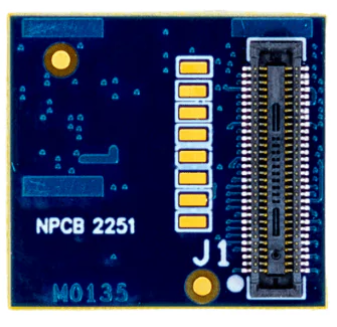
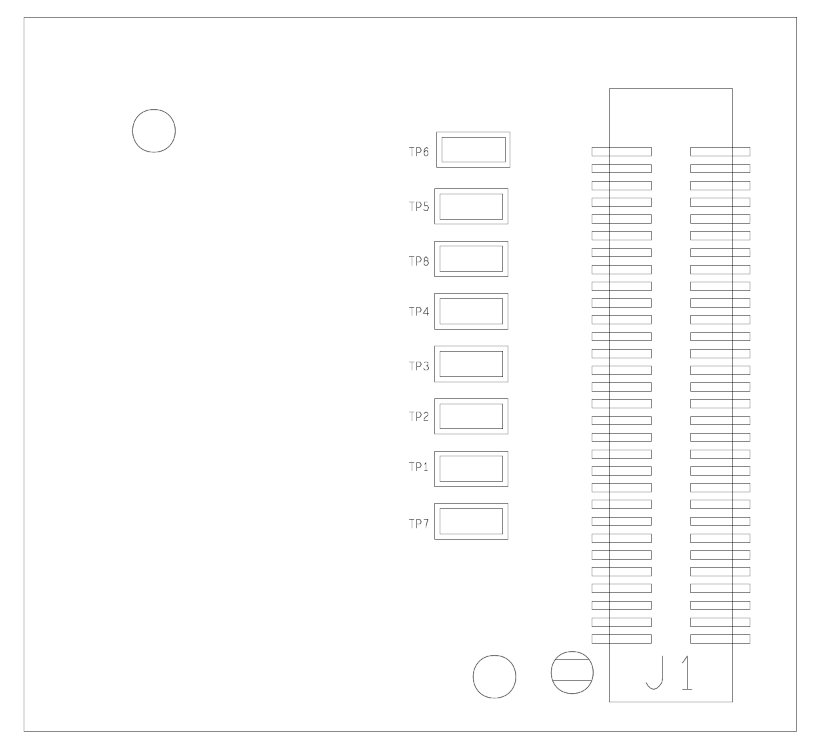
            BTW, you should be able to use M0076 single camera interposer or M0135 dual image interposer to access the I2C-0 pins if you need to:

            Link Preview Image
            M0076 VOXL 2 AXT Interposer

            ModalAI technical documentation for VOXL and VOXL 2 Companion Computers for PX4 and ArduPilot Obstacle Avoidance and GPS-denied navigation, assembled in the USA

            favicon

            ModalAI Technical Docs (docs.modalai.com)

            • TP 5 and 6 are GPIO 4 and 5

            Link Preview Image
            Page not found

            ModalAI technical documentation for VOXL and VOXL 2 Companion Computers for PX4 and ArduPilot Obstacle Avoidance and GPS-denied navigation, assembled in the USA

            favicon

            ModalAI Technical Docs (docs.modalai.com)

            • TP1 and TP2 are GPIO 4 and 5
              d7c6fd34-2829-4c7e-9182-48d4e5317811-image.png
              31fc2f3b-c48b-4e31-b3d8-64f8f1e5c961-image.png
            Alex KushleyevA 1 Reply Last reply
            0
            • Alex KushleyevA Alex Kushleyev

              BTW, you should be able to use M0076 single camera interposer or M0135 dual image interposer to access the I2C-0 pins if you need to:

              Link Preview Image
              M0076 VOXL 2 AXT Interposer

              ModalAI technical documentation for VOXL and VOXL 2 Companion Computers for PX4 and ArduPilot Obstacle Avoidance and GPS-denied navigation, assembled in the USA

              favicon

              ModalAI Technical Docs (docs.modalai.com)

              • TP 5 and 6 are GPIO 4 and 5

              Link Preview Image
              Page not found

              ModalAI technical documentation for VOXL and VOXL 2 Companion Computers for PX4 and ArduPilot Obstacle Avoidance and GPS-denied navigation, assembled in the USA

              favicon

              ModalAI Technical Docs (docs.modalai.com)

              • TP1 and TP2 are GPIO 4 and 5
                d7c6fd34-2829-4c7e-9182-48d4e5317811-image.png
                31fc2f3b-c48b-4e31-b3d8-64f8f1e5c961-image.png
              Alex KushleyevA Offline
              Alex KushleyevA Offline
              Alex Kushleyev
              ModalAI Team
              wrote on last edited by
              #6

              https://docs.modalai.com/voxl2-mini-connectors/#j7---camera-group-1-specific-pinout has been updated to i2c-0 and SDA / SCL pins are labeled

              J 1 Reply Last reply
              0
              • Alex KushleyevA Alex Kushleyev

                https://docs.modalai.com/voxl2-mini-connectors/#j7---camera-group-1-specific-pinout has been updated to i2c-0 and SDA / SCL pins are labeled

                J Offline
                J Offline
                jcai
                Contributor
                wrote on last edited by
                #7

                Awesome, thanks!

                1 Reply Last reply
                0

                Hello! It looks like you're interested in this conversation, but you don't have an account yet.

                Getting fed up of having to scroll through the same posts each visit? When you register for an account, you'll always come back to exactly where you were before, and choose to be notified of new replies (either via email, or push notification). You'll also be able to save bookmarks and upvote posts to show your appreciation to other community members.

                With your input, this post could be even better 💗

                Register Login
                Reply
                • Reply as topic
                Log in to reply
                • Oldest to Newest
                • Newest to Oldest
                • Most Votes


                ModalAI
                Categories Recent Tags ModalAI.com Docs
                © 2026 ModalAI® · Accelerating autonomy for smaller, smarter, safer drones · Powered by NodeBB
                • Login

                • Don't have an account? Register

                • Login or register to search.
                • First post
                  Last post
                0
                • Categories
                • Recent
                • Tags
                • Popular
                • Users
                • Groups