
How to use test SIM to connect to a 5G test network. VOXL2 drone platform
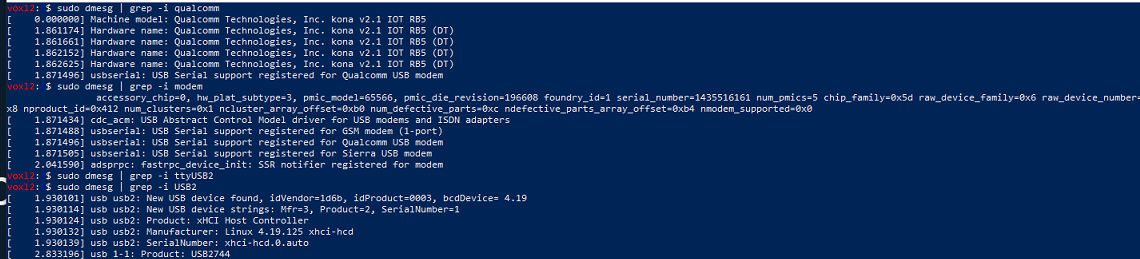
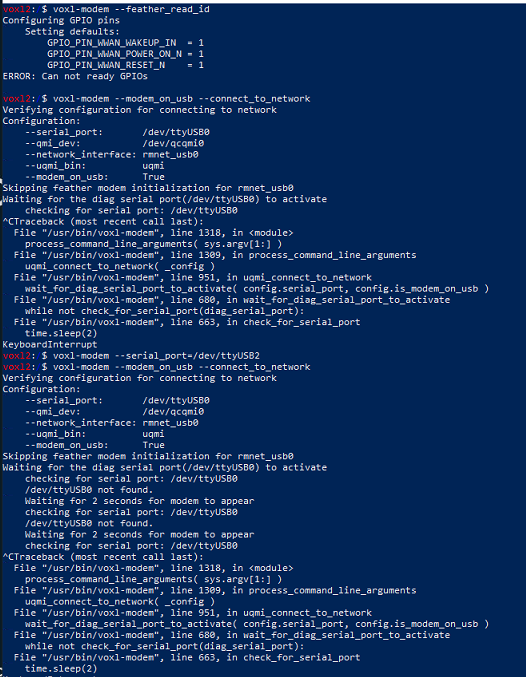
-
@RSAUser1 you may want to query the modem more directly with AT commands to confirm it can 1) see your BTS 2) is able to connect on that band (it should be available on all bands by default but doesnt hurt to check)
ModalAI hasnt seemed to implement AT commands w/ the EM9291 yet but I posted a way to do it here
https://forum.modalai.com/post/19131
There is a reference guide on AT commands on the Sierra Wireless website. "AT+COPS=?" would probably be a good starting point
-
@RSAUser1 you may want to query the modem more directly with AT commands to confirm it can 1) see your BTS 2) is able to connect on that band (it should be available on all bands by default but doesnt hurt to check)
ModalAI hasnt seemed to implement AT commands w/ the EM9291 yet but I posted a way to do it here
https://forum.modalai.com/post/19131
There is a reference guide on AT commands on the Sierra Wireless website. "AT+COPS=?" would probably be a good starting point
@groupo Thanks for the information.
When I follow your other post starting with lsusb I do not see a sierra wireless interface? Do I need to access through one of the debugging ports on the side, instead of the main USB-type C?
Here is what lsusb returned:
voxl2:/$ lsusb
Bus 002 Device 002: ID 0424:5744 Standard Microsystems Corp.
Bus 002 Device 001: ID 1d6b:0003 Linux Foundation 3.0 root hub
Bus 001 Device 004: ID 0424:2740 Standard Microsystems Corp.
Bus 001 Device 003: ID 0bda:0811 Realtek Semiconductor Corp.
Bus 001 Device 002: ID 0424:2744 Standard Microsystems Corp.
Bus 001 Device 001: ID 1d6b:0002 Linux Foundation 2.0 root hub -
@groupo Thanks for the information.
When I follow your other post starting with lsusb I do not see a sierra wireless interface? Do I need to access through one of the debugging ports on the side, instead of the main USB-type C?
Here is what lsusb returned:
voxl2:/$ lsusb
Bus 002 Device 002: ID 0424:5744 Standard Microsystems Corp.
Bus 002 Device 001: ID 1d6b:0003 Linux Foundation 3.0 root hub
Bus 001 Device 004: ID 0424:2740 Standard Microsystems Corp.
Bus 001 Device 003: ID 0bda:0811 Realtek Semiconductor Corp.
Bus 001 Device 002: ID 0424:2744 Standard Microsystems Corp.
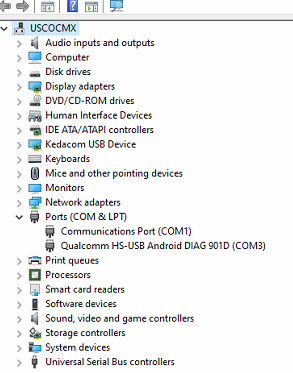
Bus 001 Device 001: ID 1d6b:0002 Linux Foundation 2.0 root hubSo one thing I forgot to mention is we installed the sierra wireless drivers SDX65 on their website but we still arent seeing a modem in device manager as noted in the EM9291 user guide (when connecting USB C there should be QC in ports and Sierra wireless in modems):
-
@groupo Thanks for the information.
When I follow your other post starting with lsusb I do not see a sierra wireless interface? Do I need to access through one of the debugging ports on the side, instead of the main USB-type C?
Here is what lsusb returned:
voxl2:/$ lsusb
Bus 002 Device 002: ID 0424:5744 Standard Microsystems Corp.
Bus 002 Device 001: ID 1d6b:0003 Linux Foundation 3.0 root hub
Bus 001 Device 004: ID 0424:2740 Standard Microsystems Corp.
Bus 001 Device 003: ID 0bda:0811 Realtek Semiconductor Corp.
Bus 001 Device 002: ID 0424:2744 Standard Microsystems Corp.
Bus 001 Device 001: ID 1d6b:0002 Linux Foundation 2.0 root hub@RSAUser1 That is interesting. No, I don't think so. Here is something that got me. You have to unscrew the modem board to put the SIM in on the underbelly. Did you screw it back on fully? I had not and it took embarrassingly long to realize (Tom told me). Make you you screw it back down so it connects properly. I don't see your WIFI dongle either (if you have one). That also would be knocked offline if the modem board wasnt connected properly (at least for me that was the case)
-
So one thing I forgot to mention is we installed the sierra wireless drivers SDX65 on their website but we still arent seeing a modem in device manager as noted in the EM9291 user guide (when connecting USB C there should be QC in ports and Sierra wireless in modems):
@RSAUser1 you should not need to download any drivers to do the steps I listed, in fact I almost advise against it unless you know what you're doing. I certainly didn't and still don't. I found my workaround much easier. The idea of outdated drivers is a theory I have, but modalAI never confirmed if that was the case. Probably @tom or Travis could speak more to that
-
@RSAUser1 That is interesting. No, I don't think so. Here is something that got me. You have to unscrew the modem board to put the SIM in on the underbelly. Did you screw it back on fully? I had not and it took embarrassingly long to realize (Tom told me). Make you you screw it back down so it connects properly. I don't see your WIFI dongle either (if you have one). That also would be knocked offline if the modem board wasnt connected properly (at least for me that was the case)
@groupo Wow, trying to save time since I need to remove the SIM after I validate this connecting. Thanks, I was thinking since we were talking to it all was good. Getting some errors when doing status voxl-modem but believe thats because we have a test SIM and it cant connect to a live network.
Mar 02 12:59:53 m0054 voxl-modem-start[1854]: Service: 'wds'Mar 02 12:59:53 m0054 voxl-modem-start[1854]: CID: '102' Mar 02 12:59:53 m0054 voxl-modem-start[1854]: Error detected! Retrying... Mar 02 12:59:54 m0054 voxl-modem-start[1854]: error: couldn't start network: QMI protocol error (14): 'CallFailed' Mar 02 12:59:54 m0054 voxl-modem-start[1854]: call end reason (3): generic-no-service Mar 02 12:59:54 m0054 voxl-modem-start[1854]: verbose call end reason (3,2001): [cm] no-service Mar 02 12:59:54 m0054 voxl-modem-start[1854]: [/dev/cdc-wdm0] Client ID not released: Mar 02 12:59:54 m0054 voxl-modem-start[1854]: Service: 'wds' Mar 02 12:59:54 m0054 voxl-modem-start[1854]: CID: '103' Mar 02 12:59:54 m0054 voxl-modem-start[1854]: Error detected! Retrying...Going to see if we setup our BS emulator
-
@groupo Wow, trying to save time since I need to remove the SIM after I validate this connecting. Thanks, I was thinking since we were talking to it all was good. Getting some errors when doing status voxl-modem but believe thats because we have a test SIM and it cant connect to a live network.
Mar 02 12:59:53 m0054 voxl-modem-start[1854]: Service: 'wds'Mar 02 12:59:53 m0054 voxl-modem-start[1854]: CID: '102' Mar 02 12:59:53 m0054 voxl-modem-start[1854]: Error detected! Retrying... Mar 02 12:59:54 m0054 voxl-modem-start[1854]: error: couldn't start network: QMI protocol error (14): 'CallFailed' Mar 02 12:59:54 m0054 voxl-modem-start[1854]: call end reason (3): generic-no-service Mar 02 12:59:54 m0054 voxl-modem-start[1854]: verbose call end reason (3,2001): [cm] no-service Mar 02 12:59:54 m0054 voxl-modem-start[1854]: [/dev/cdc-wdm0] Client ID not released: Mar 02 12:59:54 m0054 voxl-modem-start[1854]: Service: 'wds' Mar 02 12:59:54 m0054 voxl-modem-start[1854]: CID: '103' Mar 02 12:59:54 m0054 voxl-modem-start[1854]: Error detected! Retrying...Going to see if we setup our BS emulator
-
@RSAUser1 glad its working! You can use AT commands to confirm you can 'see' your network too
@groupo THanks for your help! One strange thing is that I still don't have the modem listed in my PCs device manager. Still waiting on my emulator to become available to test if we see the 5G broadcast.
Seems like some part of the modem is still not reachable, as I it still cant communicate QMI device which is part of modem @tom have you seen this issue before?
-
@groupo THanks for your help! One strange thing is that I still don't have the modem listed in my PCs device manager. Still waiting on my emulator to become available to test if we see the 5G broadcast.
Seems like some part of the modem is still not reachable, as I it still cant communicate QMI device which is part of modem @tom have you seen this issue before?
Could something still not be seated properly or maybe a cable has come lose,?
voxl2:/$ systemctl status voxl-modem
● voxl-modem.service - Modem Initialization
Loaded: loaded (/etc/systemd/system/voxl-modem.service; enabled; vendor preset: enabled)
Active: active (running) since Thu 2023-03-02 12:58:06 UTC; 31s ago
Process: 1263 ExecStartPre=/bin/sleep 2 (code=exited, status=0/SUCCESS)
Main PID: 1861 (voxl-modem-star)
Tasks: 7 (limit: 4915)
CGroup: /system.slice/voxl-modem.service
├─1861 /bin/bash /usr/bin/voxl-modem-start
├─2144 /usr/lib/libmbim/mbim-proxy******************└─2208 qmicli --device=/dev/cdc-wdm0 --device-open-proxy --wds-start-network=ip-type=4,apn=cmx500.rohde-schwaMar 02 12:58:14 m0054 voxl-modem-start[1861]: Waiting for wwan0 to come up...**
Mar 02 12:58:15 m0054 voxl-modem-start[1861]: Waiting for wwan0 to come up...
Mar 02 12:58:16 m0054 voxl-modem-start[1861]: Waiting for wwan0 to come up...
Mar 02 12:58:17 m0054 voxl-modem-start[1861]: Waiting for wwan0 to come up...
Mar 02 12:58:18 m0054 voxl-modem-start[1861]: Waiting for wwan0 to come up...
Mar 02 12:58:19 m0054 voxl-modem-start[1861]: wwan0 is up!
Mar 02 12:58:19 m0054 voxl-modem-start[1861]: Sierra detected!
Mar 02 12:58:20 m0054 voxl-modem-start[1861]: Starting qmi network...
Mar 02 12:58:35 m0054 voxl-modem-start[1861]: error: couldn't open the QmiDevice: Transaction timed out
Mar 02 12:58:35 m0054 voxl-modem-start[1861]: Error detected! Retrying...****************Then sometimes it will give 'error: couldn't create client for the 'wds' service: QMI protocol error (5)'
-
Could something still not be seated properly or maybe a cable has come lose,?
voxl2:/$ systemctl status voxl-modem
● voxl-modem.service - Modem Initialization
Loaded: loaded (/etc/systemd/system/voxl-modem.service; enabled; vendor preset: enabled)
Active: active (running) since Thu 2023-03-02 12:58:06 UTC; 31s ago
Process: 1263 ExecStartPre=/bin/sleep 2 (code=exited, status=0/SUCCESS)
Main PID: 1861 (voxl-modem-star)
Tasks: 7 (limit: 4915)
CGroup: /system.slice/voxl-modem.service
├─1861 /bin/bash /usr/bin/voxl-modem-start
├─2144 /usr/lib/libmbim/mbim-proxy******************└─2208 qmicli --device=/dev/cdc-wdm0 --device-open-proxy --wds-start-network=ip-type=4,apn=cmx500.rohde-schwaMar 02 12:58:14 m0054 voxl-modem-start[1861]: Waiting for wwan0 to come up...**
Mar 02 12:58:15 m0054 voxl-modem-start[1861]: Waiting for wwan0 to come up...
Mar 02 12:58:16 m0054 voxl-modem-start[1861]: Waiting for wwan0 to come up...
Mar 02 12:58:17 m0054 voxl-modem-start[1861]: Waiting for wwan0 to come up...
Mar 02 12:58:18 m0054 voxl-modem-start[1861]: Waiting for wwan0 to come up...
Mar 02 12:58:19 m0054 voxl-modem-start[1861]: wwan0 is up!
Mar 02 12:58:19 m0054 voxl-modem-start[1861]: Sierra detected!
Mar 02 12:58:20 m0054 voxl-modem-start[1861]: Starting qmi network...
Mar 02 12:58:35 m0054 voxl-modem-start[1861]: error: couldn't open the QmiDevice: Transaction timed out
Mar 02 12:58:35 m0054 voxl-modem-start[1861]: Error detected! Retrying...****************Then sometimes it will give 'error: couldn't create client for the 'wds' service: QMI protocol error (5)'

Reading along? Create a free ModalAI Forum account to join in.
With an account you can reply, ask your own question, get an email when a ModalAI engineer answers, and mark the reply that solved it. Your place in each thread is saved between visits.
Questions about VOXL, Flight Core, ESCs and ModalAI drones are answered here by the engineers who build them.
Register Login