
voxl2 to jetson uart
-
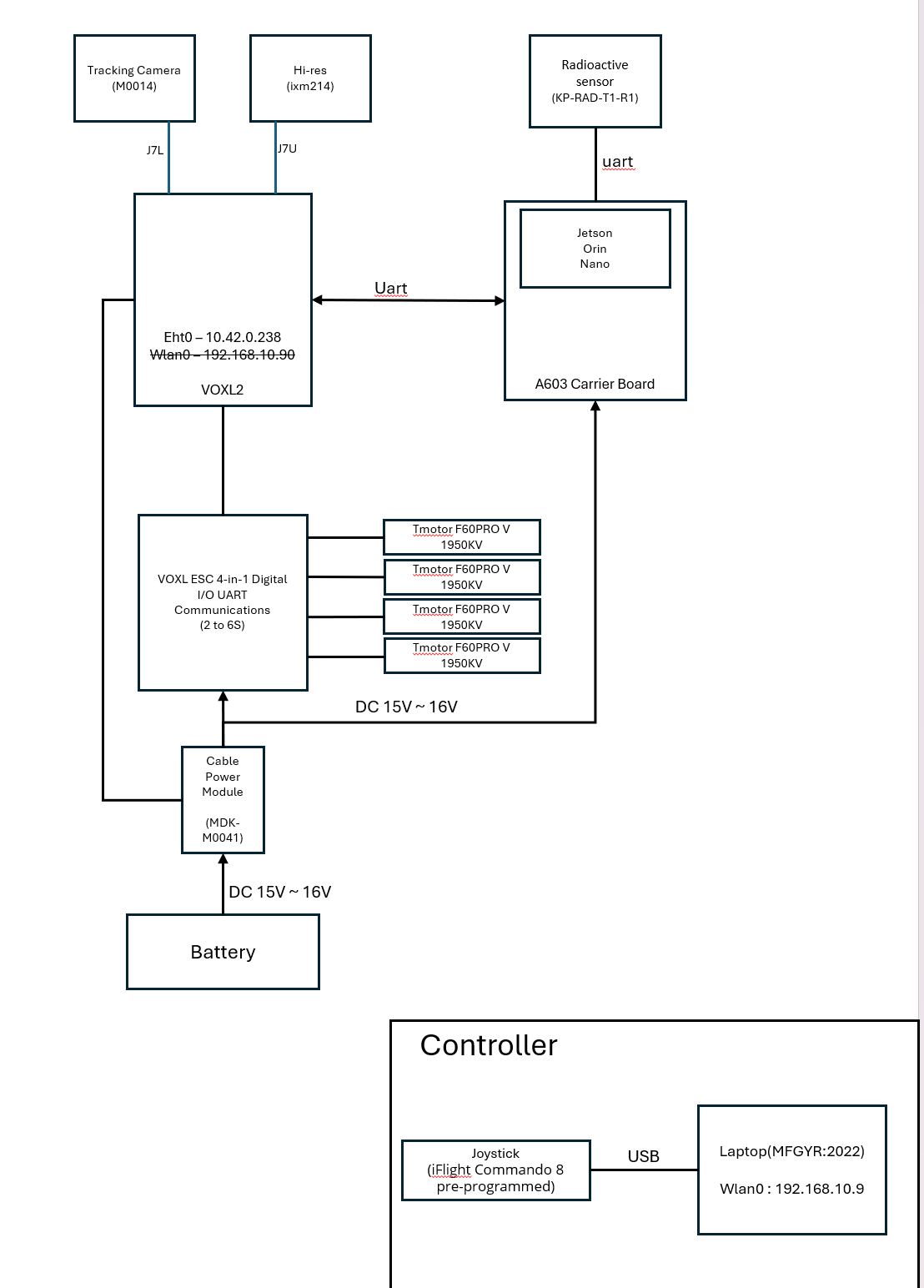
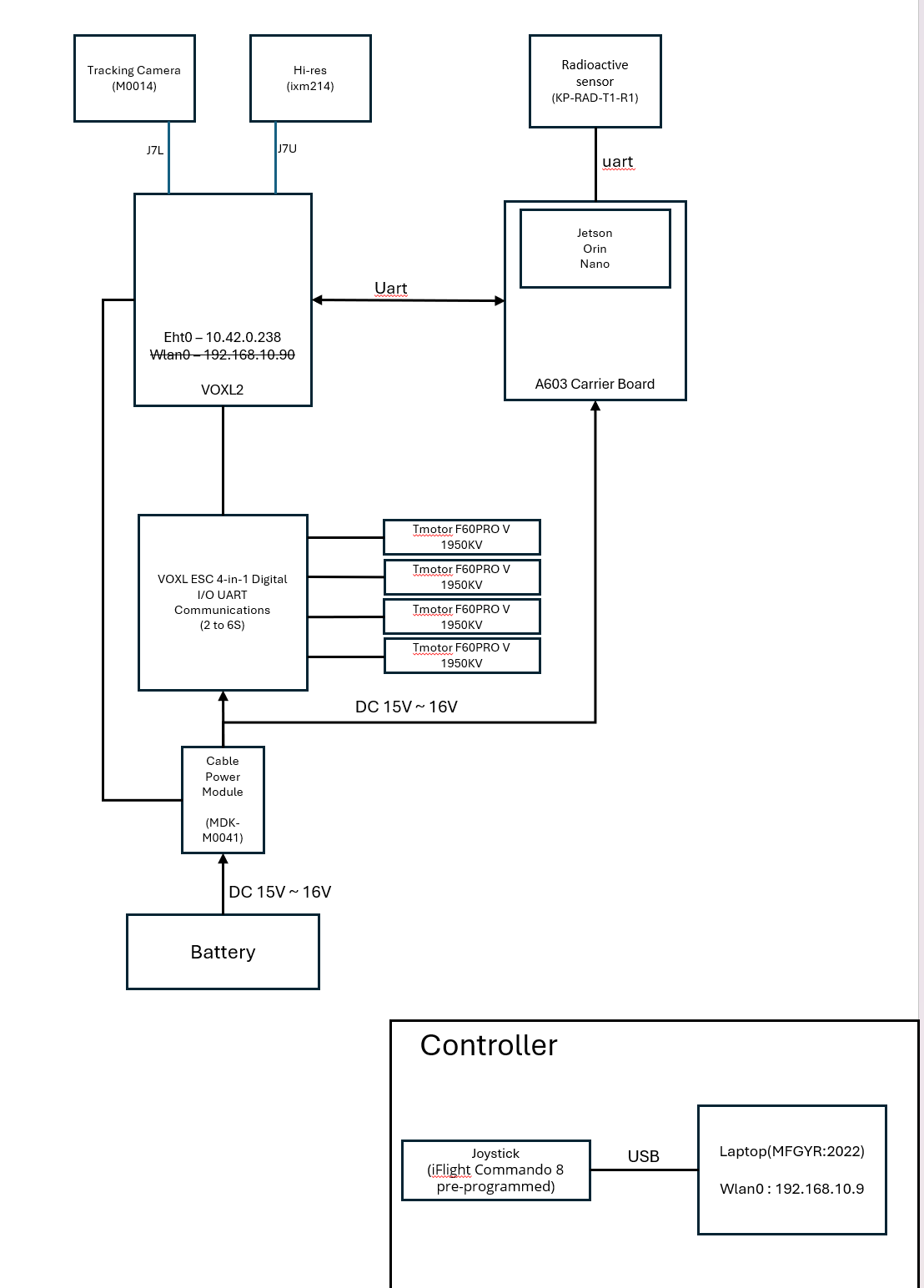
Hello, I'm using VOXL2 right now. And I'm using it by connecting jetson. By the way, I want to connect voxl and jetson with uart and use the Wi-Fi function on jetson to run QGC on another PC to get the data. I won't use the Internet for voxl. The image below is an overall block diagram. Is there a way to connect by referring to the block diagram?
-
Hello, I'm using VOXL2 right now. And I'm using it by connecting jetson. By the way, I want to connect voxl and jetson with uart and use the Wi-Fi function on jetson to run QGC on another PC to get the data. I won't use the Internet for voxl. The image below is an overall block diagram. Is there a way to connect by referring to the block diagram?
Hello, @tkddnjs825
You have a few options:
- Using an add-on board, either M0141 or M0151:
- https://docs.modalai.com/usb2-type-a-breakout-add-on/
- https://docs.modalai.com/voxl2-usb3-uart-add-on-datasheet/
- both boards expose connection to UART7 on the Application Processor, which is mapped to
/dev/ttyHS1and will behave as standard Linux UART high speed device (up to 2Mbit/s)
- Using one of the DSP (SLPI) UARTs, but this only works if PX4 is not running:
- VOLX2 conector J19 exposes DSP UARTs 6 and 7
- https://docs.modalai.com/voxl2-connectors/#j19---external-sensors-2x-uart-2x-i2c
- px4 must not be running and you can use libqrb5165-io library to talk to one UART concurrently
- my guess is that this is not an option for you because already have VOXL ESC connected, so PX4 is probably already running
- Using an ADB forward or reverse trick:
Host side setup
Set up reverse forwarding
adb reverse tcp:2222 tcp:3333
adb reverse --list   #just list the forwarded connections for confirmation
Create a python script for a simple tcp server to run on host
#! /usr/bin/python
# a simple tcp server
import socket,os
sock = socket.socket(socket.AF_INET, socket.SOCK_STREAM)
sock.bind(('127.0.0.1', 3333))
sock.listen(5)
while True:
    connection,address = sock.accept()
    buf = connection.recv(1024)
    print(buf)
    #connection.send(buf)
    connection.close()
Run on host
python3 tcp_server.pyRun a simple test on voxl2
#install requires internet connection
apt install netcat

echo "Hello World!" | netcat 127.0.0.1 2222
(The message should print out on the host side, which means you just tested a TCP connection between voxl2 and your host).
# output on the server side
> python3 tcp_server.py
b'Hello World!\n'
You can use this approach to create one or multiple TCP links between VOXL2 and another Linux board. You may be able to use PX4 directly and have PX4 on VOXL2 connect to a server on Jetson board or bridge the data to be forwarded to an external computer.
Alex
-
Hello, @tkddnjs825
You have a few options:
- Using an add-on board, either M0141 or M0151:
- https://docs.modalai.com/usb2-type-a-breakout-add-on/
- https://docs.modalai.com/voxl2-usb3-uart-add-on-datasheet/
- both boards expose connection to UART7 on the Application Processor, which is mapped to
/dev/ttyHS1and will behave as standard Linux UART high speed device (up to 2Mbit/s)
- Using one of the DSP (SLPI) UARTs, but this only works if PX4 is not running:
- VOLX2 conector J19 exposes DSP UARTs 6 and 7
- https://docs.modalai.com/voxl2-connectors/#j19---external-sensors-2x-uart-2x-i2c
- px4 must not be running and you can use libqrb5165-io library to talk to one UART concurrently
- my guess is that this is not an option for you because already have VOXL ESC connected, so PX4 is probably already running
- Using an ADB forward or reverse trick:
Host side setup
Set up reverse forwarding
adb reverse tcp:2222 tcp:3333
adb reverse --list   #just list the forwarded connections for confirmation
Create a python script for a simple tcp server to run on host
#! /usr/bin/python
# a simple tcp server
import socket,os
sock = socket.socket(socket.AF_INET, socket.SOCK_STREAM)
sock.bind(('127.0.0.1', 3333))
sock.listen(5)
while True:
    connection,address = sock.accept()
    buf = connection.recv(1024)
    print(buf)
    #connection.send(buf)
    connection.close()
Run on host
python3 tcp_server.pyRun a simple test on voxl2
#install requires internet connection
apt install netcat

echo "Hello World!" | netcat 127.0.0.1 2222
(The message should print out on the host side, which means you just tested a TCP connection between voxl2 and your host).
# output on the server side
> python3 tcp_server.py
b'Hello World!\n'
You can use this approach to create one or multiple TCP links between VOXL2 and another Linux board. You may be able to use PX4 directly and have PX4 on VOXL2 connect to a server on Jetson board or bridge the data to be forwarded to an external computer.
Alex
Hello, @Alex-Kushleyev
Thank you for your answer.
I am currently trying to use a Jetson device with MAVLink-router through a UART port.
In this case, is it possible to use PX4 with VOXL simultaneously?
My ultimate goal is to use VOXL while Jetson serves only as a router. I want to achieve this by using the UART port. -
Hello, @Alex-Kushleyev
Thank you for your answer.
I am currently trying to use a Jetson device with MAVLink-router through a UART port.
In this case, is it possible to use PX4 with VOXL simultaneously?
My ultimate goal is to use VOXL while Jetson serves only as a router. I want to achieve this by using the UART port.I believe option 1 should work for you, since you will get a standard uart (linux device
/dev/ttyHS1which is completely independent from PX4 running on VOXL). However you will need the additional adapter board (either M0141 or M0151 - either one will work). You will need to configurevoxl-mavlink-serverto use this UART port to stream the messages that you need (you may already know how to do it, i am not the expert in this part).By the way, if you use M0141 adapter board, you will also get USB 2.0 standard plug and if you use M0151 you will get USB 3.0 (make sure to get the version with cables). So you could plug in a wifi dongle or more advanced usb-to-wifi device (such as
alfa networks awus036achor similar) and not use Jetson if you do not need it.If you plug in the wifi adapter directly into VOXL2 (via M0141 or M0151) then you will not need the additional UART (but you will have it anyway)
If you do not wish to get any additional hardware, you should be able to use option 3 to set up the TCP bridge between VOXL2 and Jetson, but that requires more knowledge of networking.
Alex
-
I believe option 1 should work for you, since you will get a standard uart (linux device
/dev/ttyHS1which is completely independent from PX4 running on VOXL). However you will need the additional adapter board (either M0141 or M0151 - either one will work). You will need to configurevoxl-mavlink-serverto use this UART port to stream the messages that you need (you may already know how to do it, i am not the expert in this part).By the way, if you use M0141 adapter board, you will also get USB 2.0 standard plug and if you use M0151 you will get USB 3.0 (make sure to get the version with cables). So you could plug in a wifi dongle or more advanced usb-to-wifi device (such as
alfa networks awus036achor similar) and not use Jetson if you do not need it.If you plug in the wifi adapter directly into VOXL2 (via M0141 or M0151) then you will not need the additional UART (but you will have it anyway)
If you do not wish to get any additional hardware, you should be able to use option 3 to set up the TCP bridge between VOXL2 and Jetson, but that requires more knowledge of networking.
Alex
@Alex-Kushleyev ,
Thank you for your response.Currently, I am using the MDK-M0062-3-00 board. The reason for using this board is that I previously connected the VOXL and Jetson via Ethernet. However, since there is now only one Ethernet port on the Jetson, I need to use it for other purposes, and there are additional reasons as well. Therefore, I am trying to work using UART.
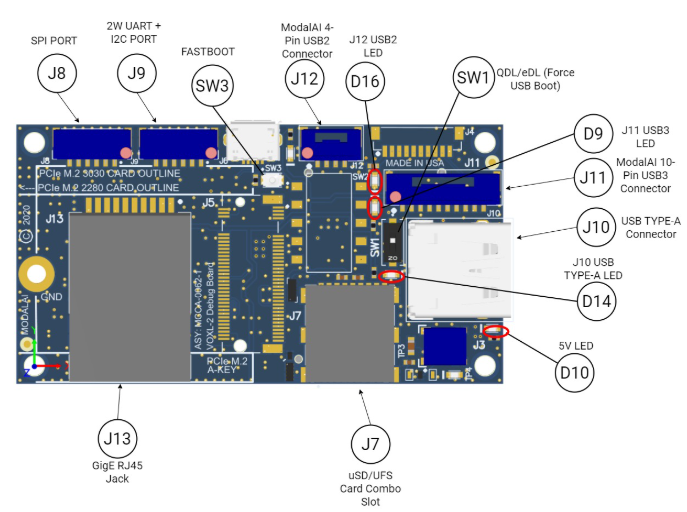
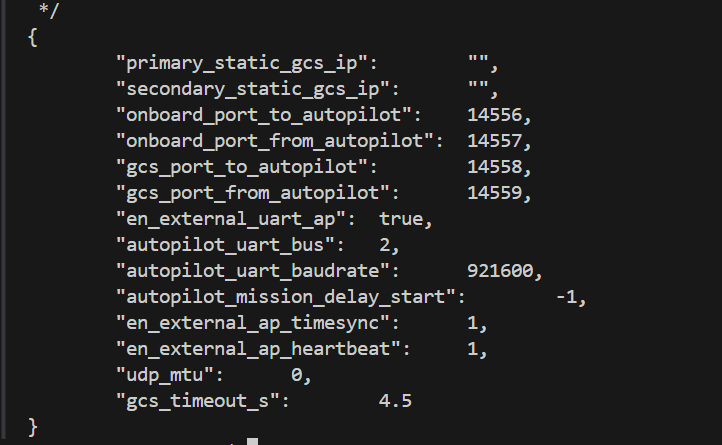
I have an additional question. Currently, I am using the MDK-M0062-3-00 board, and for the UART port, I am using J9. The UART port is recognized as /dev/ttyHS2, and I am working with it. The voxl-mavlink-server.conf is currently configured as shown in the image below. I would like to know if this setup is correct.
The current VOXL2 SDK is as shown in the image below.
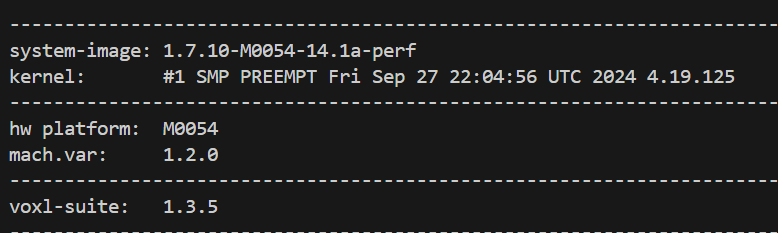
-
@Alex-Kushleyev ,
Thank you for your response.Currently, I am using the MDK-M0062-3-00 board. The reason for using this board is that I previously connected the VOXL and Jetson via Ethernet. However, since there is now only one Ethernet port on the Jetson, I need to use it for other purposes, and there are additional reasons as well. Therefore, I am trying to work using UART.
I have an additional question. Currently, I am using the MDK-M0062-3-00 board, and for the UART port, I am using J9. The UART port is recognized as /dev/ttyHS2, and I am working with it. The voxl-mavlink-server.conf is currently configured as shown in the image below. I would like to know if this setup is correct.
The current VOXL2 SDK is as shown in the image below.
@tkddnjs825 , since you already have M0062, you should be able to use it. As you already identified, J9 on M0062 has
/dev/ttyHS2Linux UART device.You can also find more information here : https://docs.modalai.com/voxl2-external-flight-controller/ regarding configuring mavlink server.
It looks like you are doing the right things here. However, the use case for "autopilot_uart_bus" maybe different from what you need - in your case your autopilot (px4) is actually on VOXL2 and the uart connection is for the path to GCS.
You may need to modify mavlink server depending on what you want to pass on this UART connection.. This goes beyond my knowledge of mavlink server - please try to see if you can get it to work, otherwise post a follow up question with details of what you would need to be sent using the UART connection.
Alex


Reading along? Create a free ModalAI Forum account to join in.
With an account you can reply, ask your own question, get an email when a ModalAI engineer answers, and mark the reply that solved it. Your place in each thread is saved between visits.
Questions about VOXL, Flight Core, ESCs and ModalAI drones are answered here by the engineers who build them.
Register Login