
OV64B Configuration
-
Please see the following images of the Hadron 640R adapters. Please note that the hardware is subject to change, but this is our current version.
M0159 : Plugs into the back of Hadron. it has two micro coax cable coming out and an optional USB plug for connecting to the "Boson" inside Hadron
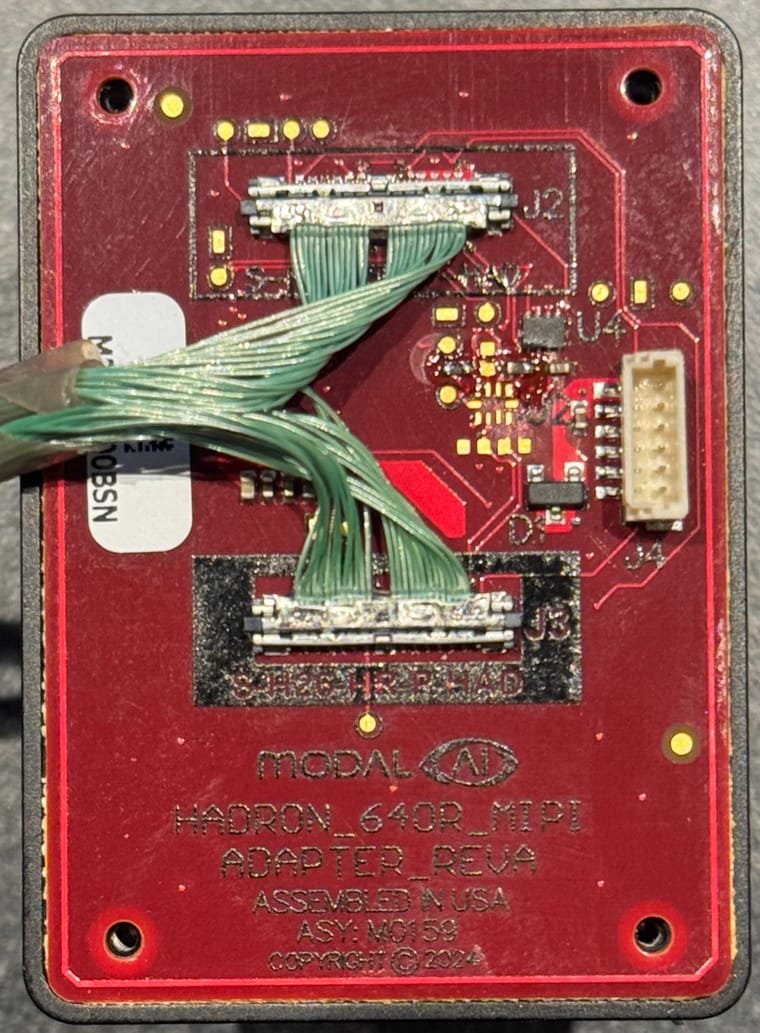
As I mentioned before, you can access the Boson camera via USB or MIPI.
M0181 is the adapter for connecting M0159 to VOXL2 / VOXL2 mini:
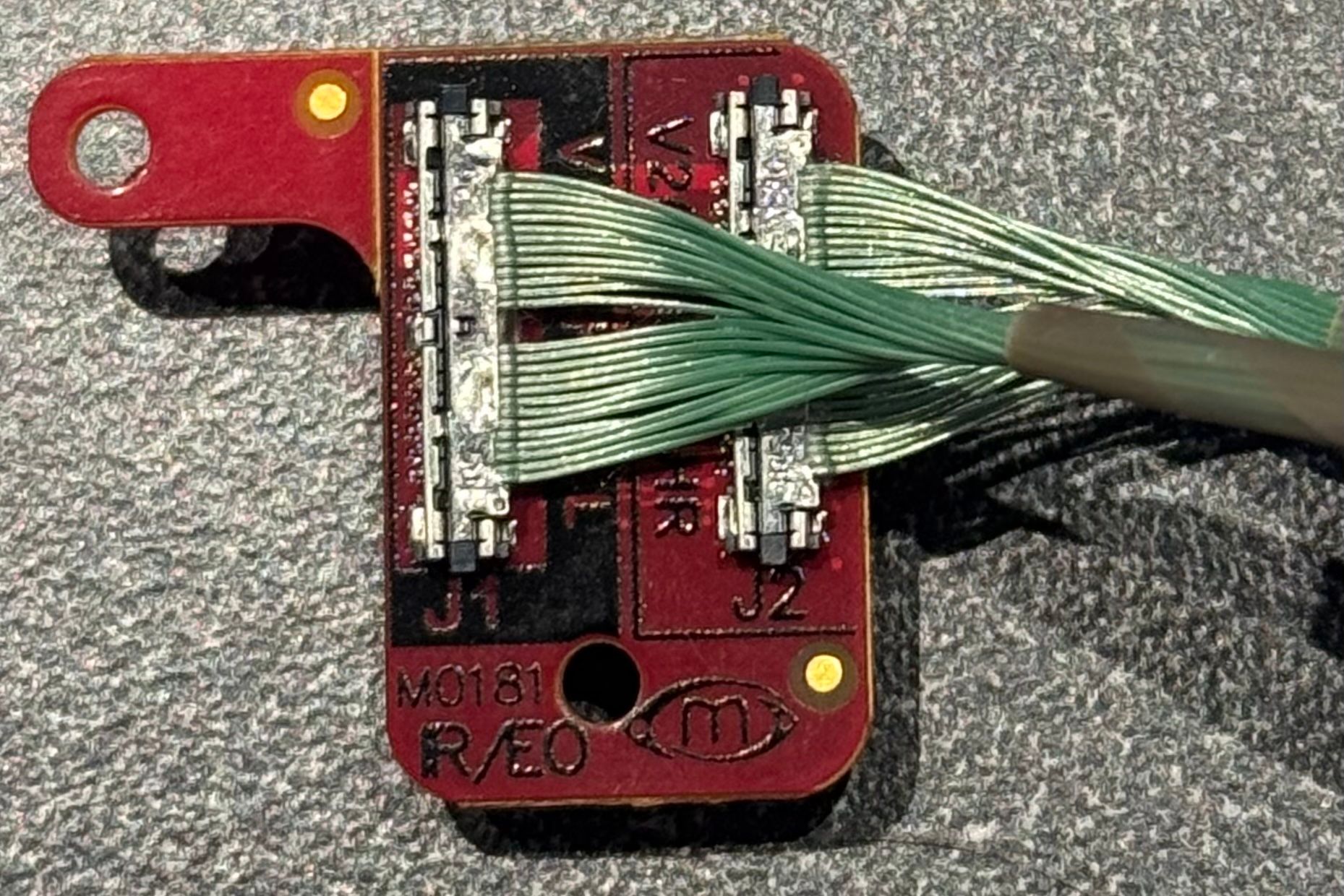
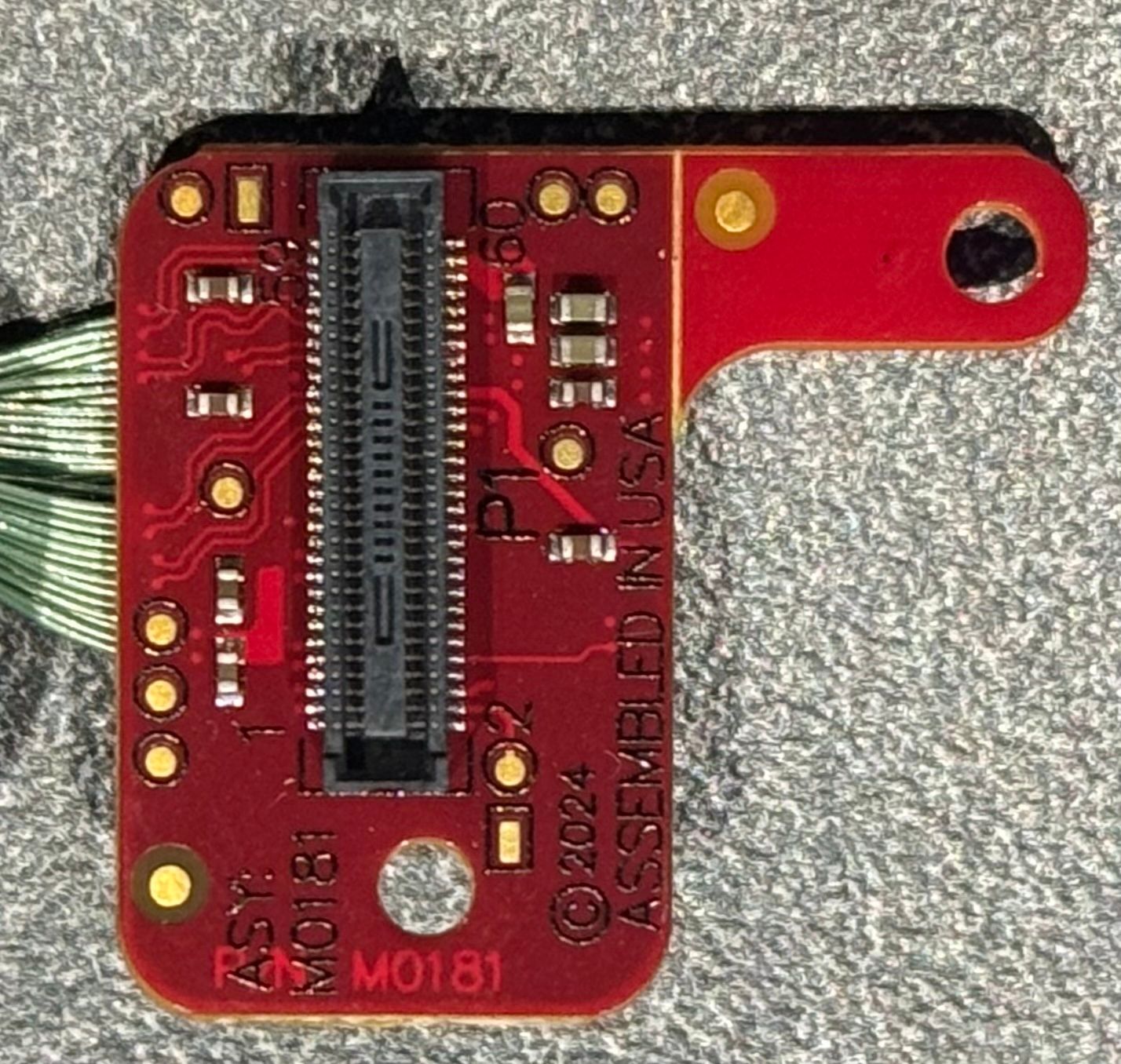
It is also possible to split up the two coaxes and instead of using a single M0181 for dual camera connection, M0155 for OV64B (https://www.modalai.com/products/m0155) and M0162 for Boson (or use USB for Boson).
@Alex-Kushleyev This looks pretty good, thanks!
If I'm understanding correctly, with one M0159, one M0181, and one M0155, I'd be able to connect all three sensors (OV64, boson, M0161) on a VOXL2/VOXL2 mini?
If that's the case, I'd be interested in experimenting with that setup. What would the process for getting these boards look like?
For the connection between the boards, what's the longest length coax I could get or use reliably?
-
@Alex-Kushleyev This looks pretty good, thanks!
If I'm understanding correctly, with one M0159, one M0181, and one M0155, I'd be able to connect all three sensors (OV64, boson, M0161) on a VOXL2/VOXL2 mini?
If that's the case, I'd be interested in experimenting with that setup. What would the process for getting these boards look like?
For the connection between the boards, what's the longest length coax I could get or use reliably?
@jcai, yes you are correct regarding the connections that will work on Voxl2 and Voxl2 mini.
Please reach out to https://modalai.com/contact and we will create a custom order for you. You should add a link to this thread. I will work with our team to get the right hardware for you.
You will need
- M0159
- M0181
- two specific coax cables between those teo boards (18cm length?).
- M0155 (assuming you already have M0161 with a coax, but is your M0161 connected to M0173 camera front end?
You should also get a tool for removing coax connectors - check at the bottom of this guide: https://docs.modalai.com/micro-coax-user-guide/ . I dont think we sell the tool, but it looks like the tool is out of stock (Mouser) - you will need it to disconnect your M0161 from M0173.. i will check if we can provide it.
Regarding length, it looks like the longest cable we sell is 18cm : https://www.modalai.com/products/mcbl-00084?variant=48956821733680 , and this is what i am using for testing Hadron.
Alex
-
@jcai, yes you are correct regarding the connections that will work on Voxl2 and Voxl2 mini.
Please reach out to https://modalai.com/contact and we will create a custom order for you. You should add a link to this thread. I will work with our team to get the right hardware for you.
You will need
- M0159
- M0181
- two specific coax cables between those teo boards (18cm length?).
- M0155 (assuming you already have M0161 with a coax, but is your M0161 connected to M0173 camera front end?
You should also get a tool for removing coax connectors - check at the bottom of this guide: https://docs.modalai.com/micro-coax-user-guide/ . I dont think we sell the tool, but it looks like the tool is out of stock (Mouser) - you will need it to disconnect your M0161 from M0173.. i will check if we can provide it.
Regarding length, it looks like the longest cable we sell is 18cm : https://www.modalai.com/products/mcbl-00084?variant=48956821733680 , and this is what i am using for testing Hadron.
Alex
@jcai , Here is a draft of instructions for using the Hadron adapter (M0159 + M0181) for beta testing. I will put these up on our docs page but just wanted to provide these to you so you can test the hardware. Please let me know if you have any questions.
WARNING:
- even though the coax cables are the same for both connections, the order cannot be swapped
- HR connector has to conect to HR and 5L to 5L
- M0159 J2 -> M0181 J1
- M0159 J3 -> M0181 J2
- shipped assemblies have been correctly connected and tested
Software Setup
- use voxl2 mini (VOXL2 also supported)
- install sdk 1.4.0 (tested) or later
- change apt source to dev :
/etc/apt/sources.list.d/modalai.listdeb [trusted=yes] http://voxl-packages.modalai.com/ ./dists/qrb5165/dev/binary-arm64/
apt update
apt install libmodal-pipe voxl-portal voxl-camera-server
Confirm sensormodule drivers exist
- in
chi-cdkdirectory where all the camera drivers are kept (but not used)
ls /usr/share/modalai/chi-cdk/ov64b40 : com.qti.sensormodule.ov64b40_0.bin ... 5.bin
ls /usr/share/modalai/chi-cdk/boson:    com.qti.sensormodule.boson_0.bin ... 5.bin
Confirm these exist (also part of camera sernsor drivers):
/usr/lib/camera/com.qti.sensor.ov64b40.so
/usr/lib/camera/com.qti.sensor.boson.so
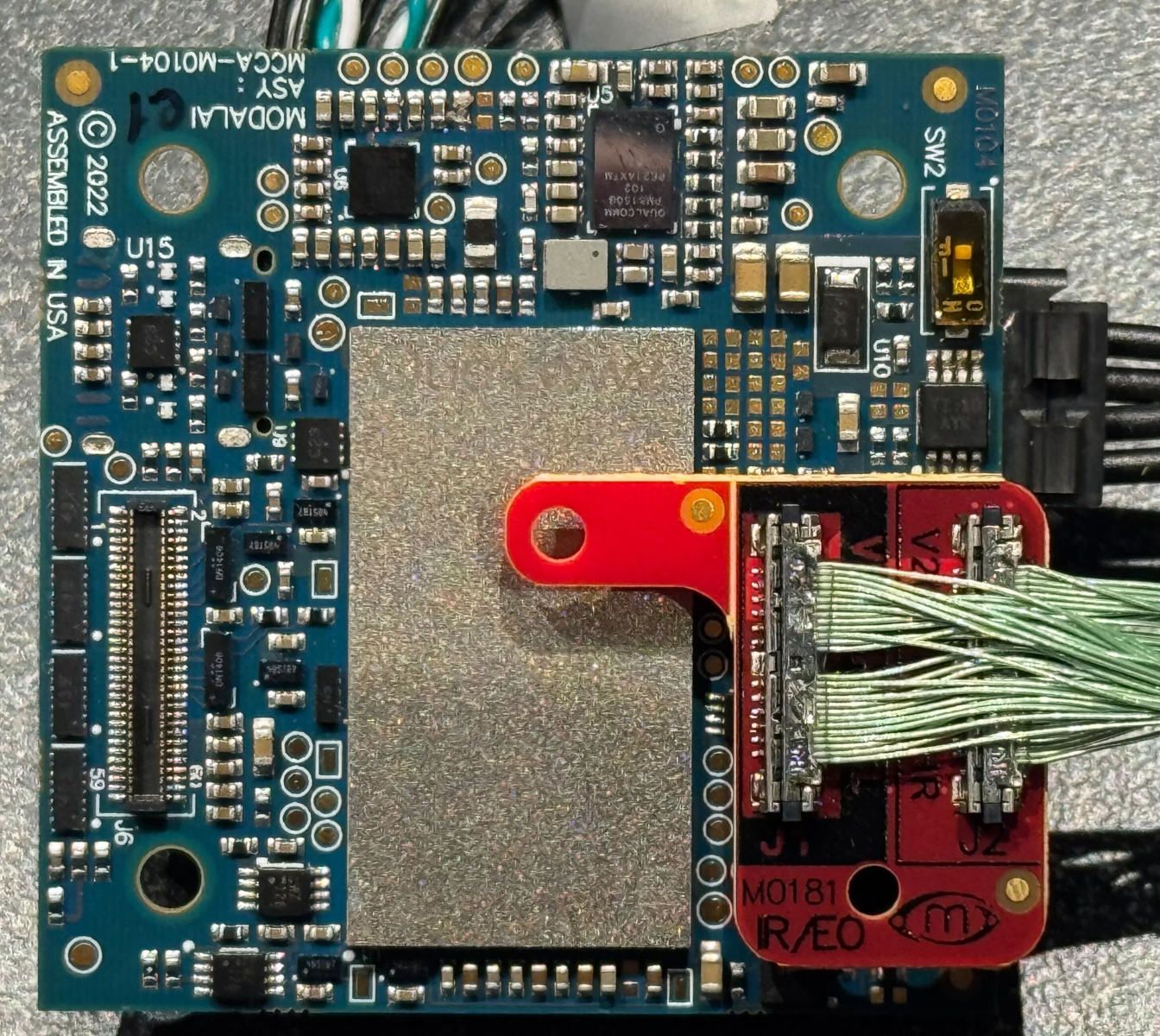
Connect M0181 to Voxl2 Mini J7
- make sure pin alignment on connectors is correct. the mounting holes should align and the tab of M0181 will hover above the main SoC
- see attached image
- the tab can be removed from M0181 if not needed
Copy correct sensormodule drivers
cp /usr/share/modalai/chi-cdk/boson/com.qti.sensormodule.boson_2.bin /usr/lib/camera/
cp /usr/share/modalai/chi-cdk/ov64b40/com.qti.sensormodule.ov64b40_3.bin /usr/lib/camera/
Configure CCI Mux on M0159 via GPIO
- Use gpio 6 on J7 of VOXL2 Mini to configure the i2c mux to connect J7U cci to Hadron's cam cci
- this needs to be done each time after reboot, before running camera server
voxl-gpio -m 6 out && voxl-gpio -w 6 1Detect cameras
voxl-camera-server -l
(should detect both cameras)
Supported resolutions / modes
- OV64B currently supports the following modes
- these are the RAW modes that camera can be configured to (by the camera pipeline)
- the camera pipeline picks the best mode based on the requested resolution and fps
- note that if you request
3840x2160 30FPS, the camera pipeline actually selects4624x3472because it matches the desired FPS (30) - actual selected mode can be checked using
logcat | grep -i selectedbefore starting camera server, the selected resolution will be printed for each camera.
# (Mbps per csi lane)
Mode0_9248x6944_10fps_2500.8Mbps
Mode1_4624x3472_30fps_PD_1136x860_1502Mbps
Mode4_3840x2160_60fps_2500.8Mbps
Mode5_1920x1080_240fps_2500.8Mbps
Mode6_1920x1080_30fps_800Mbps
Max resolution (works! about 9fps)
"preview_width": 9248, "preview_height": 6944,- Note that at this >8K resolution, the Qualcomm ISP runs in dual VFE mode, which means you cannot use any other non-RAW camera that uses the ISP.
- MISP approach does not use Qualcomm ISP and will support more cameras (documentation coming soon)
Minimum config
- paste into
/etc/modalai/voxl-camera-server.conf:
{
	"version":	0.1,
	"fsync_en":	false,
	"fsync_gpio":	109,
	"cameras":	[
		{
			"type":	"boson",
			"name":	"boson",
			"enabled":	true,
			"camera_id":	0,
			"fps":	30,
			"en_preview":	true,
			"en_misp":	false,
			"preview_width":	640,
			"preview_height":	512,
			"en_raw_preview":	true,
			"en_small_video":	false,
			"en_large_video":	false,
			"ae_mode":	"off"
		},
		{
			"type":				"ov64b",
			"name":				"hires",
			"enabled":			true,
			"camera_id":		1,
			"fps":				30,
			"en_preview":		true,
			"en_misp":			false,
			"preview_width":	1920,
			"preview_height":	1080,
			"en_raw_preview":	false,
			"en_small_video":	false,
			"en_large_video":	false,
			"en_snapshot":	false,
			"ae_mode":	"isp",
			"gain_min":	54,
			"gain_max":	32000
		}
		]
}
Start Camera Server
- run
voxl-camera-serverin foreground to make sure everything is going right and you can view streams usingvoxl-portal - note that very high resolution streams viewed as YUVs (which are transferred as MJPG by voxl-portal) will take a lot of CPU to encode to MJPG and also a lot of bandwidth to stream.
Image of M0181 Plugged into VOXL2 Mini J7
-
@jcai , Here is a draft of instructions for using the Hadron adapter (M0159 + M0181) for beta testing. I will put these up on our docs page but just wanted to provide these to you so you can test the hardware. Please let me know if you have any questions.
WARNING:
- even though the coax cables are the same for both connections, the order cannot be swapped
- HR connector has to conect to HR and 5L to 5L
- M0159 J2 -> M0181 J1
- M0159 J3 -> M0181 J2
- shipped assemblies have been correctly connected and tested
Software Setup
- use voxl2 mini (VOXL2 also supported)
- install sdk 1.4.0 (tested) or later
- change apt source to dev :
/etc/apt/sources.list.d/modalai.listdeb [trusted=yes] http://voxl-packages.modalai.com/ ./dists/qrb5165/dev/binary-arm64/
apt update
apt install libmodal-pipe voxl-portal voxl-camera-server
Confirm sensormodule drivers exist
- in
chi-cdkdirectory where all the camera drivers are kept (but not used)
ls /usr/share/modalai/chi-cdk/ov64b40 : com.qti.sensormodule.ov64b40_0.bin ... 5.bin
ls /usr/share/modalai/chi-cdk/boson:    com.qti.sensormodule.boson_0.bin ... 5.bin
Confirm these exist (also part of camera sernsor drivers):
/usr/lib/camera/com.qti.sensor.ov64b40.so
/usr/lib/camera/com.qti.sensor.boson.so
Connect M0181 to Voxl2 Mini J7
- make sure pin alignment on connectors is correct. the mounting holes should align and the tab of M0181 will hover above the main SoC
- see attached image
- the tab can be removed from M0181 if not needed
Copy correct sensormodule drivers
cp /usr/share/modalai/chi-cdk/boson/com.qti.sensormodule.boson_2.bin /usr/lib/camera/
cp /usr/share/modalai/chi-cdk/ov64b40/com.qti.sensormodule.ov64b40_3.bin /usr/lib/camera/
Configure CCI Mux on M0159 via GPIO
- Use gpio 6 on J7 of VOXL2 Mini to configure the i2c mux to connect J7U cci to Hadron's cam cci
- this needs to be done each time after reboot, before running camera server
voxl-gpio -m 6 out && voxl-gpio -w 6 1Detect cameras
voxl-camera-server -l
(should detect both cameras)
Supported resolutions / modes
- OV64B currently supports the following modes
- these are the RAW modes that camera can be configured to (by the camera pipeline)
- the camera pipeline picks the best mode based on the requested resolution and fps
- note that if you request
3840x2160 30FPS, the camera pipeline actually selects4624x3472because it matches the desired FPS (30) - actual selected mode can be checked using
logcat | grep -i selectedbefore starting camera server, the selected resolution will be printed for each camera.
# (Mbps per csi lane)
Mode0_9248x6944_10fps_2500.8Mbps
Mode1_4624x3472_30fps_PD_1136x860_1502Mbps
Mode4_3840x2160_60fps_2500.8Mbps
Mode5_1920x1080_240fps_2500.8Mbps
Mode6_1920x1080_30fps_800Mbps
Max resolution (works! about 9fps)
"preview_width": 9248, "preview_height": 6944,- Note that at this >8K resolution, the Qualcomm ISP runs in dual VFE mode, which means you cannot use any other non-RAW camera that uses the ISP.
- MISP approach does not use Qualcomm ISP and will support more cameras (documentation coming soon)
Minimum config
- paste into
/etc/modalai/voxl-camera-server.conf:
{
	"version":	0.1,
	"fsync_en":	false,
	"fsync_gpio":	109,
	"cameras":	[
		{
			"type":	"boson",
			"name":	"boson",
			"enabled":	true,
			"camera_id":	0,
			"fps":	30,
			"en_preview":	true,
			"en_misp":	false,
			"preview_width":	640,
			"preview_height":	512,
			"en_raw_preview":	true,
			"en_small_video":	false,
			"en_large_video":	false,
			"ae_mode":	"off"
		},
		{
			"type":				"ov64b",
			"name":				"hires",
			"enabled":			true,
			"camera_id":		1,
			"fps":				30,
			"en_preview":		true,
			"en_misp":			false,
			"preview_width":	1920,
			"preview_height":	1080,
			"en_raw_preview":	false,
			"en_small_video":	false,
			"en_large_video":	false,
			"en_snapshot":	false,
			"ae_mode":	"isp",
			"gain_min":	54,
			"gain_max":	32000
		}
		]
}
Start Camera Server
- run
voxl-camera-serverin foreground to make sure everything is going right and you can view streams usingvoxl-portal - note that very high resolution streams viewed as YUVs (which are transferred as MJPG by voxl-portal) will take a lot of CPU to encode to MJPG and also a lot of bandwidth to stream.
Image of M0181 Plugged into VOXL2 Mini J7
@Alex-Kushleyev Great, I'll be updating with how the tests go
-
@Alex-Kushleyev Great, I'll be updating with how the tests go
@jcai , updated doc posted here : https://docs.modalai.com/voxl2-hadron/ . Mostly the same information with some clarifications.
I will also add information about the USB connector on M0159 adapter.
Alex
-
Just stumbled across this topic and quickly wanted to ask if it is already known when those boards will be available in the shop?
Else, would it be possible to order through email?Thanks a lot for your feedback!
@smiley , we made a small adjustment to the M0159 board to make it fit into the Hadron better (board outline). That was a small board re-spin (same functionality). Checking on the status..
Alex
-
@smiley , we made a small adjustment to the M0159 board to make it fit into the Hadron better (board outline). That was a small board re-spin (same functionality). Checking on the status..
Alex
@Alex-Kushleyev
For M0181 on a VOXL2 Mini, the docs say that
Other connectors (J6, J8) may be used, but a Kernel change is required (not recommended)What changes are required to use J6, and how different would the software setup be compared to the docs?
-
@Alex-Kushleyev
For M0181 on a VOXL2 Mini, the docs say that
Other connectors (J6, J8) may be used, but a Kernel change is required (not recommended)What changes are required to use J6, and how different would the software setup be compared to the docs?
@jcai , just wanted to confirm... since Voxl2 mini does not have J8, are you asking about about connecting Hadron to Voxl2 Mini J6?
Since this is VOXL2 Mini, which is not set up by default for the stereo pairs, I believe there should not be any changes needed to the kernel. I will test it.
Alex
-
@jcai , just wanted to confirm... since Voxl2 mini does not have J8, are you asking about about connecting Hadron to Voxl2 Mini J6?
Since this is VOXL2 Mini, which is not set up by default for the stereo pairs, I believe there should not be any changes needed to the kernel. I will test it.
Alex
Yes, Hadron is working when plugged into J6 of VOXL2 Mini with default kernel.
You just need to have the following sensormodule files in
/usr/lib/camera/:com.qti.sensormodule.boson_0.bin com.qti.sensormodule.ov64b40_1.binAnd instead of gpio6, you need to use gpio30 to enable the CCI mux, so that communication with the EO camera is enabled:
voxl-gpio -m 30 out
voxl-gpio -w 30 1
I will update the Hadron documentation..
Alex

Reading along? Create a free ModalAI Forum account to join in.
With an account you can reply, ask your own question, get an email when a ModalAI engineer answers, and mark the reply that solved it. Your place in each thread is saved between visits.
Questions about VOXL, Flight Core, ESCs and ModalAI drones are answered here by the engineers who build them.
Register Login