
M0138 FPV ESC capabilities
-
Hello community,
I have been using VOXL2 with latest SDK. I want to use M0138 FPV ESC for closed loop control over my custom drone and here are my queries.-
The M0138 link say's it can power VOXL2 directly and also has battery voltage and current sensing capability. We would be using this ESC with VOXL2 Mini and want to eliminate need of using VOXL Power module. There is mention but I wanted to know if there is direct 4 pin JST similar to VOXL Power module to connect to VOXL2 Mini or we have to customize any cable? Also is the power monitoring packet delivery to PX4 on DSP happening on same UART as that used for motor control or seperate I2C channel (Similar to VOXL Power module) with M0138 ESC?
-
I also have requirement to control one PWM payload (Mostly trigger) with 3.3V signal voltage. I can see mention of AUX out from M0138 and toggle capability. Can someone please ellaborate on this feature weather this toggle capability is with PWM or just normal GPIO signals?
Thank you!
Hi @Aaky
Yes, this variant will come with the correct VOXL 2 Mini Power Cable soldered onto it (make sure you see the 3.8V output option):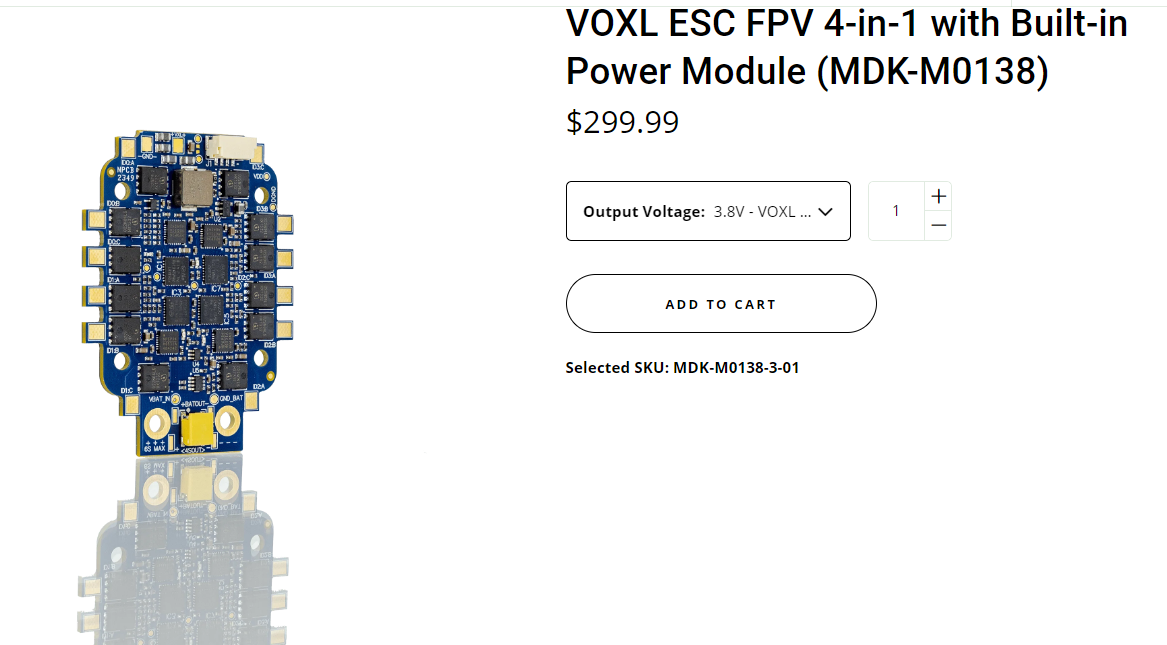
We provide the correct mating cables by default to ensure correct voltage variations of our ESC's and Power Modules cannot accidentally be plugged into the wrong VOXL host.
I will let @Alex-Kushleyev comment on the GPIO output features

Thanks!
-
-
Hi @Aaky
Yes, this variant will come with the correct VOXL 2 Mini Power Cable soldered onto it (make sure you see the 3.8V output option):We provide the correct mating cables by default to ensure correct voltage variations of our ESC's and Power Modules cannot accidentally be plugged into the wrong VOXL host.
I will let @Alex-Kushleyev comment on the GPIO output features
Thanks!
-
@Vinny Thanks Vinny for your inputs.
@Alex-Kushleyev Looking forward to your response over AUX control capabilities of this ESC along with battery/voltage monitoring integration for PX4. Thanks.@Aaky ,
The voltage and total current monitoring (via M0138 ESC) is already integrated into voxl-esc px4 driver. The way it works, one of the ESC channels on the 4-in-1 ESC is sampling total current and it sends back a custom feedback message via UART (battery status), which is decoded by voxl_esc px4 module and sent out as px4 battery status. This has been integrated several months ago, specifically here is the code that parses the new message and sends out battery status (link). Just make sure the param VOXL_ESC_PUB_BST is set to 1 (which is 1 by default), so that the driver actually publishes the message. Sometimes, if you are also using the APM, and both are publishing the message, there may be conflicting messages, so you want to choose one or the other in that case.
For supporting PWM output, we have beta testing pwm output functionality on some of the ESCs. M0138 has two pwm outputs which we plan to enable (shown as AUX IO in the diagram on the right https://docs.modalai.com/voxl-fpv-esc-datasheet/#hardware-overview)
I should be able to provide the beta ESC firmware for testing later this week for M0138 ESC.
Alex
-
@Aaky ,
The voltage and total current monitoring (via M0138 ESC) is already integrated into voxl-esc px4 driver. The way it works, one of the ESC channels on the 4-in-1 ESC is sampling total current and it sends back a custom feedback message via UART (battery status), which is decoded by voxl_esc px4 module and sent out as px4 battery status. This has been integrated several months ago, specifically here is the code that parses the new message and sends out battery status (link). Just make sure the param VOXL_ESC_PUB_BST is set to 1 (which is 1 by default), so that the driver actually publishes the message. Sometimes, if you are also using the APM, and both are publishing the message, there may be conflicting messages, so you want to choose one or the other in that case.
For supporting PWM output, we have beta testing pwm output functionality on some of the ESCs. M0138 has two pwm outputs which we plan to enable (shown as AUX IO in the diagram on the right https://docs.modalai.com/voxl-fpv-esc-datasheet/#hardware-overview)
I should be able to provide the beta ESC firmware for testing later this week for M0138 ESC.
Alex
@Alex-Kushleyev Perfect. Thanks for detailed explanation Alex. Regarding the beta firmware for PWM over AUX OUT, I will look forward to your firmware release later this week. Also how can we configuonfigure PWM output of these AUX OUT's? Via QGC Actuator tab? Or this would be inside firmware?
-
@Alex-Kushleyev Perfect. Thanks for detailed explanation Alex. Regarding the beta firmware for PWM over AUX OUT, I will look forward to your firmware release later this week. Also how can we configuonfigure PWM output of these AUX OUT's? Via QGC Actuator tab? Or this would be inside firmware?
@Aaky , I just posted test firmware for all ESCs which enables PWM output functionality. Firmware version V39.18.
https://gitlab.com/voxl-public/voxl-sdk/utilities/voxl-esc/-/tree/enable-pwm-outputs/
Currently, the following gpio/pwm is supported:
- M0049, M0117, M0129, M0134 (all variants) : 4 aux IO are in PWM input mode after boot (can be used to spin using regular pwm input), when PWM command is received via UART, the ports switch to PWM out. Only one pin per ESC ID (PA2)
- supports 3 frequency modes (50hz, 200hz, 400hz) and enabled/disabled timeout (0.5s). 0-2200us, 0.05us resolution.
- can be used as simple gpio by setting desired pulse either to 0us (low) or 2201us (high) (special value)
- M0138 : ID0 and ID3 have two PWM outputs (labeled 0P and 3P at the AUX IO test point location). PWM inputs are disabled (since only two ESCs have the pins exposed). Additional GPIO for Aux regulator is on ID0 PF0 (no pwm)
Test scripts:
- pwm : https://gitlab.com/voxl-public/voxl-sdk/utilities/voxl-esc/-/blob/enable-pwm-outputs/voxl-esc-tools/voxl-esc-pwm.py
- gpio : https://gitlab.com/voxl-public/voxl-sdk/utilities/voxl-esc/-/blob/enable-pwm-outputs/voxl-esc-tools/voxl-esc-gpio.py (only works on M0138 now on pin PF0 which controls the aux regulator on/off function)
PX4 integration is ongoing.. You could test the functionality using the python scripts for now. How would you normally expect to use the additional pwm outputs? just have voxl-esc driver provide more than 4 actuators (4 for motor rpm output and additional actuators just regular pwm?)
Alex
- M0049, M0117, M0129, M0134 (all variants) : 4 aux IO are in PWM input mode after boot (can be used to spin using regular pwm input), when PWM command is received via UART, the ports switch to PWM out. Only one pin per ESC ID (PA2)
-
@Aaky , I just posted test firmware for all ESCs which enables PWM output functionality. Firmware version V39.18.
https://gitlab.com/voxl-public/voxl-sdk/utilities/voxl-esc/-/tree/enable-pwm-outputs/
Currently, the following gpio/pwm is supported:
- M0049, M0117, M0129, M0134 (all variants) : 4 aux IO are in PWM input mode after boot (can be used to spin using regular pwm input), when PWM command is received via UART, the ports switch to PWM out. Only one pin per ESC ID (PA2)
- supports 3 frequency modes (50hz, 200hz, 400hz) and enabled/disabled timeout (0.5s). 0-2200us, 0.05us resolution.
- can be used as simple gpio by setting desired pulse either to 0us (low) or 2201us (high) (special value)
- M0138 : ID0 and ID3 have two PWM outputs (labeled 0P and 3P at the AUX IO test point location). PWM inputs are disabled (since only two ESCs have the pins exposed). Additional GPIO for Aux regulator is on ID0 PF0 (no pwm)
Test scripts:
- pwm : https://gitlab.com/voxl-public/voxl-sdk/utilities/voxl-esc/-/blob/enable-pwm-outputs/voxl-esc-tools/voxl-esc-pwm.py
- gpio : https://gitlab.com/voxl-public/voxl-sdk/utilities/voxl-esc/-/blob/enable-pwm-outputs/voxl-esc-tools/voxl-esc-gpio.py (only works on M0138 now on pin PF0 which controls the aux regulator on/off function)
PX4 integration is ongoing.. You could test the functionality using the python scripts for now. How would you normally expect to use the additional pwm outputs? just have voxl-esc driver provide more than 4 actuators (4 for motor rpm output and additional actuators just regular pwm?)
Alex
@Alex-Kushleyev Thanks for the update.
PX4 integration is ongoing.. You could test the functionality using the python scripts for now. How would you normally expect to use the additional pwm outputs? just have voxl-esc driver provide more than 4 actuators (4 for motor rpm output and additional actuators just regular pwm?)On this one, I would like to have AUX configurable as we do for VOXL2 IO, for example I was previously using VOXL2 IO for controlling gripper so I just configured particular Channel to Gripper functionality and then I was able to use all gripper related options in Manual and Autonomous modes in PX4. So making PWM AUX OUT available as configurable channel on QGC Actuator Tab and assigning particular functionality over there can be beneficial similar to VOXL2 IO.
- M0049, M0117, M0129, M0134 (all variants) : 4 aux IO are in PWM input mode after boot (can be used to spin using regular pwm input), when PWM command is received via UART, the ports switch to PWM out. Only one pin per ESC ID (PA2)
-
@Alex-Kushleyev Thanks for the update.
PX4 integration is ongoing.. You could test the functionality using the python scripts for now. How would you normally expect to use the additional pwm outputs? just have voxl-esc driver provide more than 4 actuators (4 for motor rpm output and additional actuators just regular pwm?)On this one, I would like to have AUX configurable as we do for VOXL2 IO, for example I was previously using VOXL2 IO for controlling gripper so I just configured particular Channel to Gripper functionality and then I was able to use all gripper related options in Manual and Autonomous modes in PX4. So making PWM AUX OUT available as configurable channel on QGC Actuator Tab and assigning particular functionality over there can be beneficial similar to VOXL2 IO.
@Aaky , sounds good, let me see what i can do. I think i should be able to extend the
voxl_escdriver to have more outputs (pwm only, not rpm)Meanwhile, just a bit more detail how you can use the
voxl-esc-pwm.pytest script (some examples):- output a constant pwm signal on pwm channel 0 (connected to esc id 0) at 200hz without timeout, pwm pulse width 1500us:
./voxl-esc-pwm.py --id 0 --val 1500 --freq 200 --timeout 0- Command pwm channel 3 (connected to ESC id 3) to sweep pwm between 1000us and 2000us using steps of 10us with a delay of 10ms between steps. The actual pwm frequency will be 50Hz. Timeout enabled (pwm signal will stop after 0.5s of no pwm commands)
./voxl-esc-pwm.py --id 3 --val 1000 --freq 50 --timeout 1 --sweep-count 100 --sweep-step 10 --sweep-delay 0.01 -
@Aaky , sounds good, let me see what i can do. I think i should be able to extend the
voxl_escdriver to have more outputs (pwm only, not rpm)Meanwhile, just a bit more detail how you can use the
voxl-esc-pwm.pytest script (some examples):- output a constant pwm signal on pwm channel 0 (connected to esc id 0) at 200hz without timeout, pwm pulse width 1500us:
./voxl-esc-pwm.py --id 0 --val 1500 --freq 200 --timeout 0- Command pwm channel 3 (connected to ESC id 3) to sweep pwm between 1000us and 2000us using steps of 10us with a delay of 10ms between steps. The actual pwm frequency will be 50Hz. Timeout enabled (pwm signal will stop after 0.5s of no pwm commands)
./voxl-esc-pwm.py --id 3 --val 1000 --freq 50 --timeout 1 --sweep-count 100 --sweep-step 10 --sweep-delay 0.01 -
@Aaky , sounds good, let me see what i can do. I think i should be able to extend the
voxl_escdriver to have more outputs (pwm only, not rpm)Meanwhile, just a bit more detail how you can use the
voxl-esc-pwm.pytest script (some examples):- output a constant pwm signal on pwm channel 0 (connected to esc id 0) at 200hz without timeout, pwm pulse width 1500us:
./voxl-esc-pwm.py --id 0 --val 1500 --freq 200 --timeout 0- Command pwm channel 3 (connected to ESC id 3) to sweep pwm between 1000us and 2000us using steps of 10us with a delay of 10ms between steps. The actual pwm frequency will be 50Hz. Timeout enabled (pwm signal will stop after 0.5s of no pwm commands)
./voxl-esc-pwm.py --id 3 --val 1000 --freq 50 --timeout 1 --sweep-count 100 --sweep-step 10 --sweep-delay 0.01@Alex-Kushleyev Hi Alex, would these commands work with the M0134 Variant as well?
-
@Alex-Kushleyev Hi Alex, would these commands work with the M0134 Variant as well?
@tonygurney , yes.
Please see the comment about pin availability and pin numbers here : https://gitlab.com/voxl-public/voxl-sdk/utilities/voxl-esc/-/blob/master/voxl-esc-tools/voxl-esc-pwm.py?ref_type=heads#L17
Please note that running
voxl-esc-pwm.pyscript will use the serial port and cannot be done concurrently with PX4. This is a standalone tool, unlikevoxl-send-esc-pwm-cmdtool, which sends a message tovoxl-px4and the pwm control message is then forwarded to the ESC by thevoxl_escpx4 driver.Alex


Reading along? Create a free ModalAI Forum account to join in.
With an account you can reply, ask your own question, get an email when a ModalAI engineer answers, and mark the reply that solved it. Your place in each thread is saved between visits.
Questions about VOXL, Flight Core, ESCs and ModalAI drones are answered here by the engineers who build them.
Register Login