
Regarding building the mavsdk-python Docker image.
-
When I was preparing to follow the mavsdk-python tutorial , I encountered an issue with the command :
voxl-configure-docker-support.sh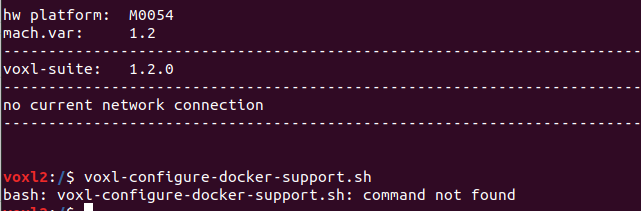
As a workaround, I tried using the command:
./build-image.shto execute this repo, but then I faced this problem:
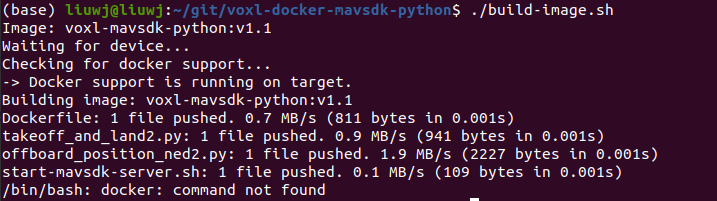
What should I do? My development board is VOXL2. Please help me, thank you!
-
When I was preparing to follow the mavsdk-python tutorial , I encountered an issue with the command :
voxl-configure-docker-support.shAs a workaround, I tried using the command:
./build-image.shto execute this repo, but then I faced this problem:
What should I do? My development board is VOXL2. Please help me, thank you!
@cy208183395 Have you installed Docker on target? It doesn't come preinstalled. The documentation is here: https://docs.modalai.com/docker-on-voxl/#configuration
-
When I was preparing to follow the mavsdk-python tutorial , I encountered an issue with the command :
voxl-configure-docker-support.shAs a workaround, I tried using the command:
./build-image.shto execute this repo, but then I faced this problem:
What should I do? My development board is VOXL2. Please help me, thank you!
@cy208183395 The voxl-configure-docker-support script is only used on VOXL. For VOXL 2 you need to install Docker and not run that script.
-
@cy208183395 The voxl-configure-docker-support script is only used on VOXL. For VOXL 2 you need to install Docker and not run that script.
@Eric-Katzfey said in Regarding building the mavsdk-python Docker image.:
@cy208183395 The voxl-configure-docker-support script is only used on VOXL. For VOXL 2 you need to install Docker and not run that script.
Thank you very much for your reply -
@cy208183395 The voxl-configure-docker-support script is only used on VOXL. For VOXL 2 you need to install Docker and not run that script.
I encountered a new problem. After I installed Docker as you suggested this website .I successfully started and ran it:

&&
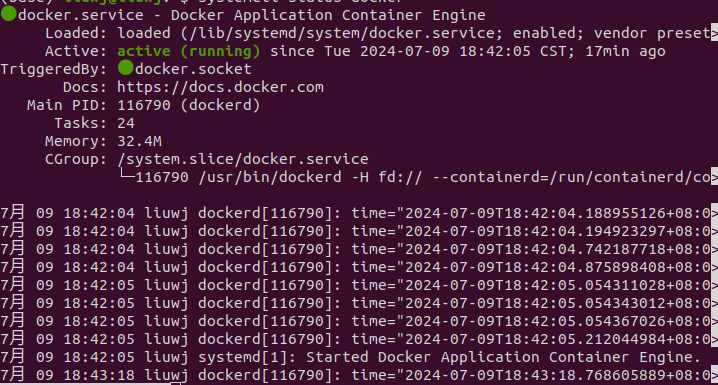
But when I followed the tutorial to download the repository and executed the command
./build-image.shit showed "command not found":

I tried setting the environment variable, but it still didn't work.
Then I continued to watch the tutorial video, entered the voxl2 shell, navigated to the folder /data/docker/mavsdk, and executed the command ./run-docker.sh. It still showed that the docker command was not found:
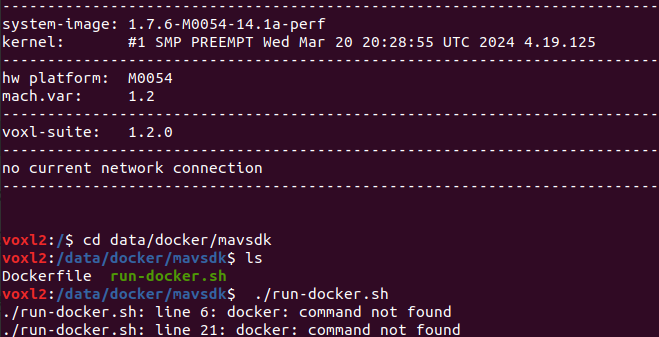
This means that whether I am in the voxl2 shell environment or not, the docker command is not found.
Can you help me? I followed your requirements, but I am stuck here. Please help me, thank you!
-
I encountered a new problem. After I installed Docker as you suggested this website .I successfully started and ran it:
&&
But when I followed the tutorial to download the repository and executed the command
./build-image.shit showed "command not found":
I tried setting the environment variable, but it still didn't work.
Then I continued to watch the tutorial video, entered the voxl2 shell, navigated to the folder /data/docker/mavsdk, and executed the command ./run-docker.sh. It still showed that the docker command was not found:
This means that whether I am in the voxl2 shell environment or not, the docker command is not found.
Can you help me? I followed your requirements, but I am stuck here. Please help me, thank you!
@cy208183395 Did you install Docker on your host machine or on VOXL 2? It needs to be installed on VOXL 2.
-
@cy208183395 Did you install Docker on your host machine or on VOXL 2? It needs to be installed on VOXL 2.
@Eric-Katzfey Yes, I currently have Docker installed on my host machine, but it is not installed on the voxl2.
-
@Eric-Katzfey Yes, I currently have Docker installed on my host machine, but it is not installed on the voxl2.
@cy208183395 Yes, well then that is your problem. When you try to run it on VOXL 2 and you don't have Docker installed on VOXL 2 then you will see an error like
docker: command not found. You have to install Docker on VOXL 2.

Reading along? Create a free ModalAI Forum account to join in.
With an account you can reply, ask your own question, get an email when a ModalAI engineer answers, and mark the reply that solved it. Your place in each thread is saved between visits.
Questions about VOXL, Flight Core, ESCs and ModalAI drones are answered here by the engineers who build them.
Register Login