Skip to content
  • Categories
  • Recent
  • Tags
  • Popular
  • Users
  • Groups
Collapse
Brand Logo

ModalAI Forum

  1. ModalAI Support Forum
  2. VOXL Dev Kits
  3. VOXL-CAM
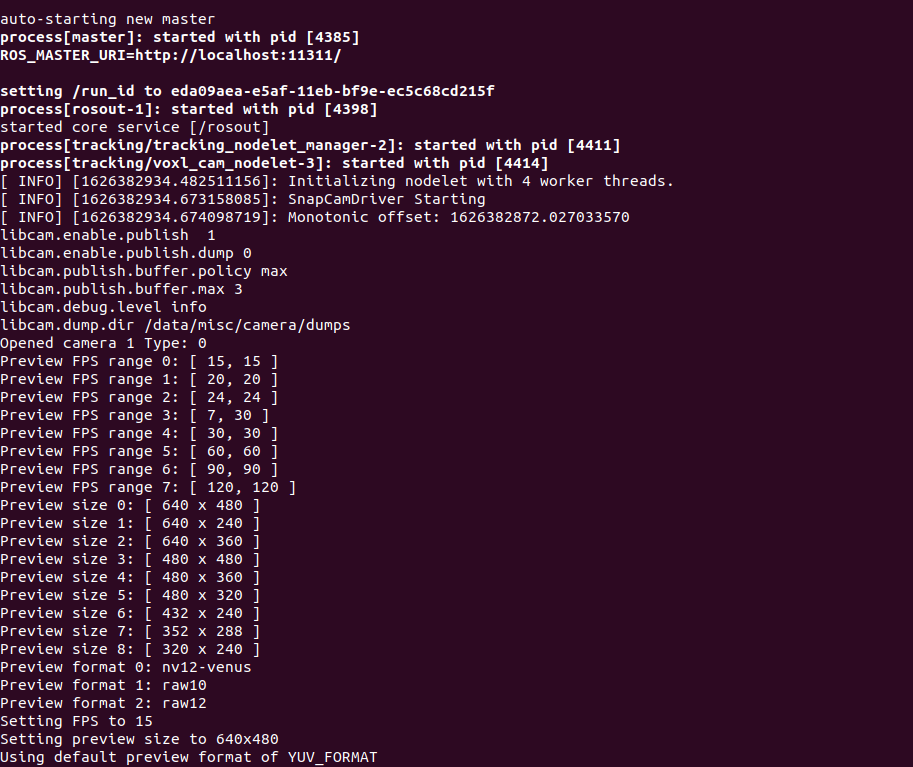
  4. voxl_cam_ros cannot read image from tracking camera

voxl_cam_ros cannot read image from tracking camera

Scheduled Pinned Locked Moved VOXL-CAM
17 Posts 2 Posters 2.8k Views 2 Watching
  • Oldest to Newest
  • Newest to Oldest
  • Most Votes
Reply
  • Reply as topic
Log in to reply
This topic has been deleted. Only users with topic management privileges can see it.
  • Alex KushleyevA Offline
    Alex KushleyevA Offline
    Alex Kushleyev
    ModalAI Team
    wrote on last edited by
    #8

    You are correct, neither of the two cameras in the stereo pair is detected. Can you please double check that you have the cameras plugged in correctly? See https://www.modalai.com/collections/accessories/products/stereo-camera-pair-and-flex-cable-kit-mkit-00009 and Stereo is only supported in J3 camera connector (next to J2, where your hi-res camera is probably connected). https://docs.modalai.com/voxl-flight-datasheet-connectors/#voxl-flight-board-top , the stereo flex needs to plug into J3 so that the cameras are going out forward from VOXL, not towards the board.

    1 Reply Last reply
    0
    • L Offline
      L Offline
      llgmrl
      Contributor
      wrote on last edited by
      #9

      Yes the stereo camera goes into the J3 port with the stereo flex goes out from the voxl board

      1 Reply Last reply
      0
      • Alex KushleyevA Offline
        Alex KushleyevA Offline
        Alex Kushleyev
        ModalAI Team
        wrote on last edited by
        #10

        Can you try to plug in hires camera into J3 instead of J2 (disconnect stereo completely). Hires camera should work either in J2 or J3. You can check if hires camera has been detected using ‘dmesg | grep imx214’. This would confirm at least the J3 port is functional. Then plug hires camera back into J2, which is default configuration.

        1 Reply Last reply
        0
        • L Offline
          L Offline
          llgmrl
          Contributor
          wrote on last edited by
          #11

          I connect the hires to the J3 and here is the output message, it seems fine:

          e5bce98d-0ef0-4846-8c19-55786f43c5ef-image.png

          I also tried connect the hires camera back to the J2 and run the same command "dmesg | grep imx214" and it has the same message output. Then I checked the hires camera on voxl_cam_ros and it output the image fine.

          So I guess the J3 port works fine?

          Best
          Rui

          1 Reply Last reply
          0
          • Alex KushleyevA Offline
            Alex KushleyevA Offline
            Alex Kushleyev
            ModalAI Team
            wrote on last edited by
            #12

            Yes, it seems J3 is fine. First the board tried to find imx214 on J2 (which fails in this case), then successfully on J3.

            Has this stereo module worked before? Please inspect the stereo flex cable and connector on it for any damage. If you dont mind please post a good close-up picture of the flex cable with two cameras plugged in, with connector (which goes into voxl) facing up, so that contacts can be seen.

            1 Reply Last reply
            0
            • L Offline
              L Offline
              llgmrl
              Contributor
              wrote on last edited by
              #13
              This post is deleted!
              1 Reply Last reply
              0
              • L Offline
                L Offline
                llgmrl
                Contributor
                wrote on last edited by
                #14

                HI Alex,

                Sorry for the late reply again. I was busy yesterday. Here are the pins' photos:
                J3 Port
                Stereo Flex J1
                Stereo Flex J2
                Stereo Flex J3
                Stereo Left Camera
                Stereo Right Camera

                It seems to me that the pins are fine.
                One interesting thing to report is that one camera in the stereo actually can be detected by the command "dmesg | grep ov 7251" after we reconnect all the cables again. However, the other one still cannot be detectd. The message is shown as following:
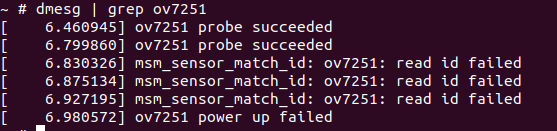
                4ac83272-6b06-435d-a9ea-0513a425186c-image.png

                1 Reply Last reply
                0
                • Alex KushleyevA Offline
                  Alex KushleyevA Offline
                  Alex Kushleyev
                  ModalAI Team
                  wrote on last edited by
                  #15

                  Interesting. The flex cables look good. I wonder if the multiple creases in the camera cables caused a break in the camera cable (not the Y splitter flex). If you switch left and right cameras, does the undetected camera switch places? From earlier post, it seems that previously neither of the two stereo cameras were detected.. inconsistent behavior may be a sign of a mechanical issue, like a cable break which changes with flexing of the cable itself.

                  1 Reply Last reply
                  0
                  • L Offline
                    L Offline
                    llgmrl
                    Contributor
                    wrote on last edited by llgmrl
                    #16

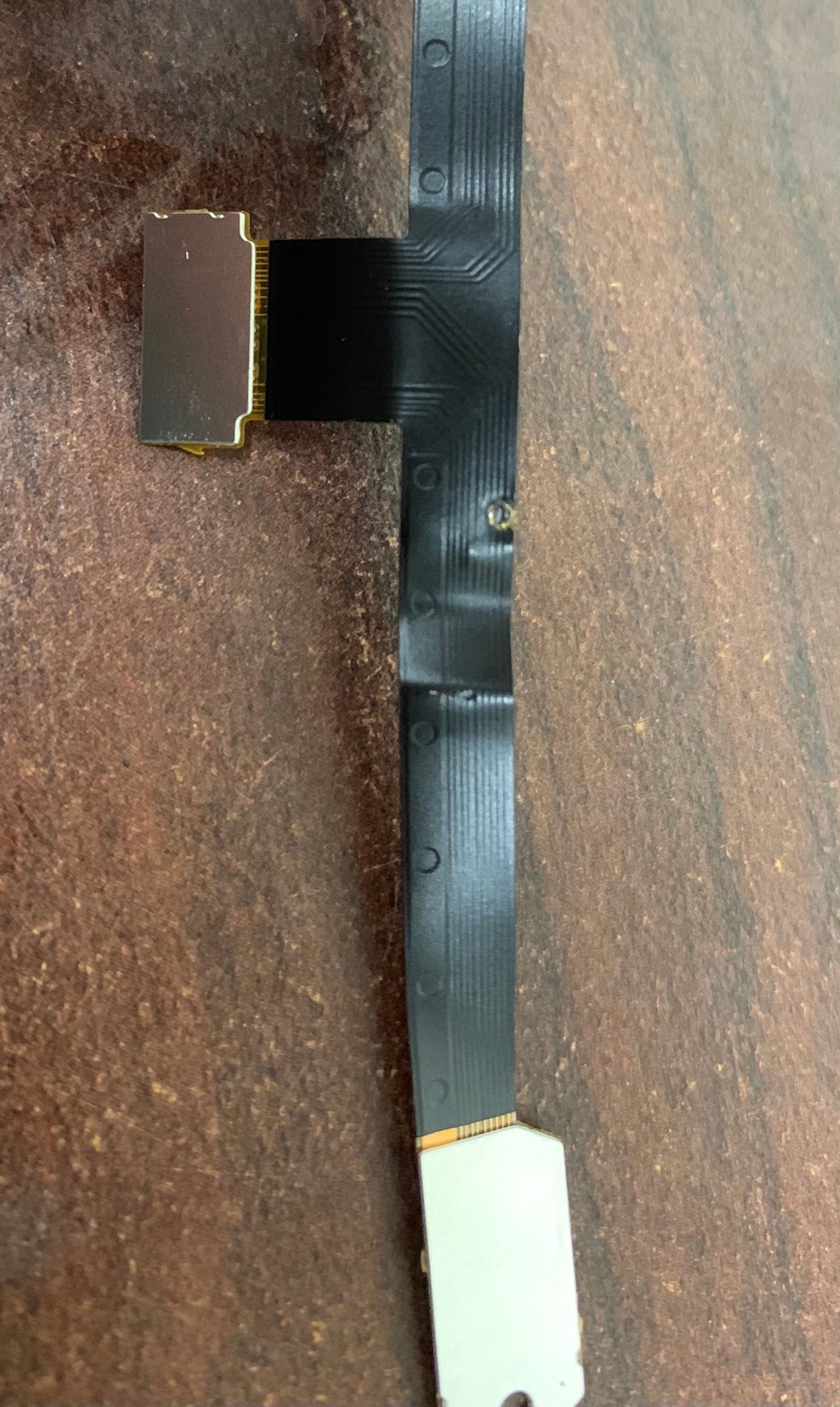
                    I think I found the issue. If I connect the cameras to the left of flex, they can be detected by the board. However, it doesn't work for the right side of flex. I notice a small circle on the flex cable which probably damage the connection inside as shown in the following image. Is it possible to get a new flex cable from your team?

                    Best,
                    Rui
                    IMG-2571.jpg

                    1 Reply Last reply
                    0
                    • Alex KushleyevA Offline
                      Alex KushleyevA Offline
                      Alex Kushleyev
                      ModalAI Team
                      wrote on last edited by
                      #17

                      Oh yes, this would absolutely cause a problem. Glad you found it.

                      You can find just the stereo flex cables here : https://www.modalai.com/collections/accessories/products/voxl-replacement-stereo-flex-cable

                      1 Reply Last reply
                      0

                      Hello! It looks like you're interested in this conversation, but you don't have an account yet.

                      Getting fed up of having to scroll through the same posts each visit? When you register for an account, you'll always come back to exactly where you were before, and choose to be notified of new replies (either via email, or push notification). You'll also be able to save bookmarks and upvote posts to show your appreciation to other community members.

                      With your input, this post could be even better 💗

                      Register Login
                      Reply
                      • Reply as topic
                      Log in to reply
                      • Oldest to Newest
                      • Newest to Oldest
                      • Most Votes


                      ModalAI
                      Categories Recent Tags ModalAI.com Docs
                      © 2026 ModalAI® · Accelerating autonomy for smaller, smarter, safer drones · Powered by NodeBB
                      • Login

                      • Login or register to search.
                      • First post
                        Last post
                      0
                      • Categories
                      • Recent
                      • Tags
                      • Popular
                      • Users
                      • Groups